Most email marketing software comparisons will hand you a checklist and call it a day, but choosing the right software isn't about finding the tool with the longest feature list.
Two platforms can both claim "automation" while delivering wildly different experiences. One might offer simple drip sequences while another orchestrates multi-step behavioral journeys across email, SMS, and web. Feature labels say nothing about depth, so they rarely tell you which platform is actually the best fit for your business.
Instead, you should be searching for the best email marketing software based on three things:
- Feature depth: What the platform can actually do beyond basic campaign sending, and how that meets your team’s email marketing objectives.
- How the platform stands out: Where it excels against the competition, what it’s actually designed for, and where limitations appear.
- Pricing and long-term value: How costs scale as your contact database and marketing needs grow.
To make that decision easier, this guide compares eight leading email marketing platforms based on how they actually work in practice, along with key differentiators, independent review data, and pricing breakdowns that examine real value over time. We’ve also evaluated how each platform approaches a real marketing workflow, so you can see whether each suits your day-to-day marketing operations.
Here's a quick look at how these email marketing platforms stack up against each other:
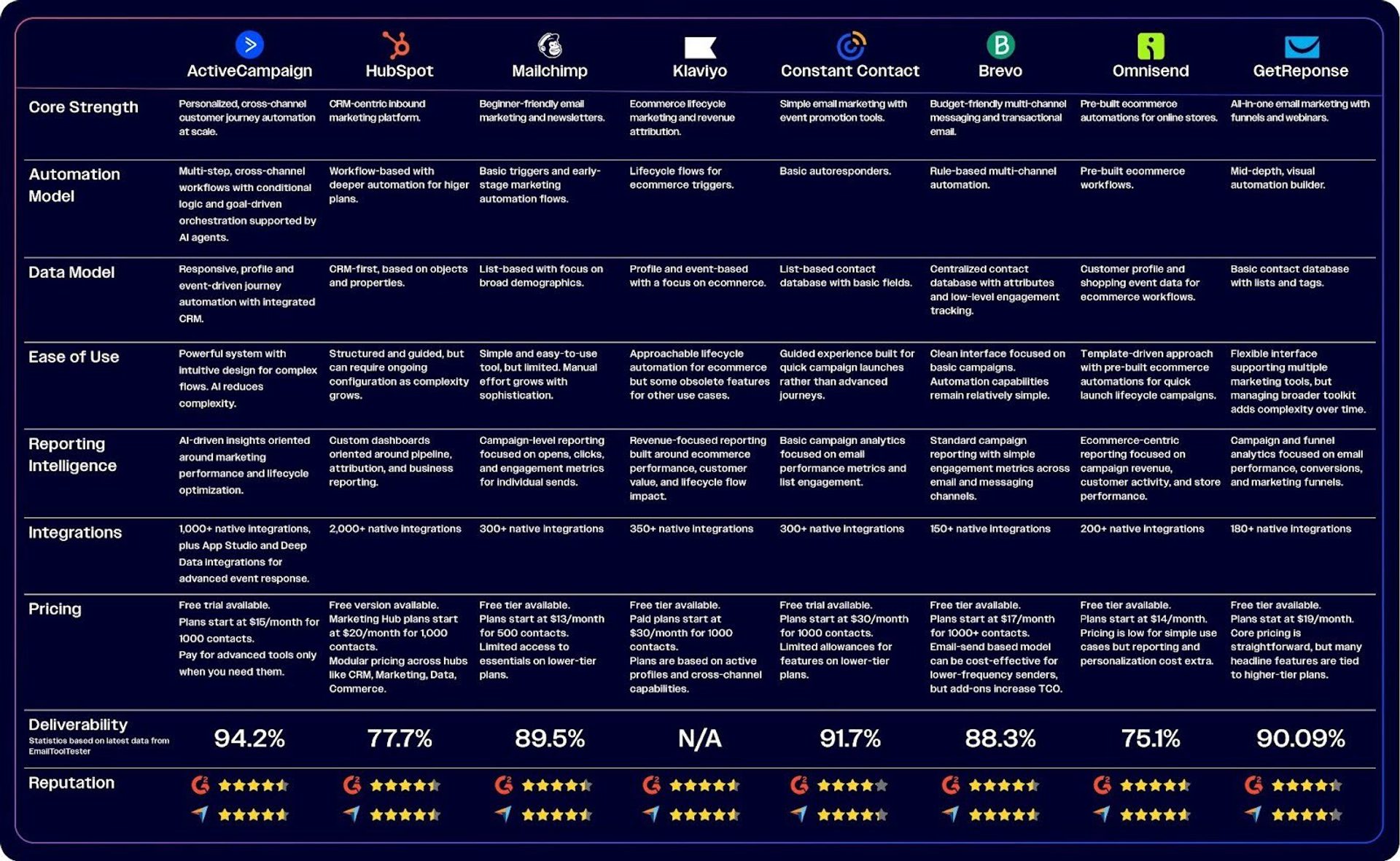
Prices and features accurate as of March 2026.
Now let’s have a look at how each platform performs in practice.
ActiveCampaign
ActiveCampaign is an AI-driven, autonomous marketing platform offering email marketing software with a first-in-class deliverability rate. It unifies CRM and cross-channel messaging in one system. Rather than forcing you to choose between simple tools that limit growth or enterprise platforms that require dedicated admins, ActiveCampaign delivers enterprise-grade automation with a learning curve softened by AI assistance.
The platform processes billions of customer interactions weekly to feed machine learning models that power everything from send-time optimization to campaign generation. The autonomous marketing platform doesn’t require constant manual adjustment, but instead is designed to get smarter as you use it.
ActiveCampaign's email marketing features at a glance
ActiveCampaign packs a wide feature set into a single platform to cover the full marketing lifecycle, from initial contact capture through closed deals:
- Active Intelligence for AI-powered campaigns, reporting, and optimization: A full suite of AI tools and agents reduce workload across the entire marketing workflow, from building complete journeys and automations to analyzing and intelligently optimizing performance.
- Visual campaign builders: A drag-and-drop email designer with hundreds of AI-powered templates, plus an AI Brand Kit that automatically imports your brand assets from your website.
- Cross-channel automation: Build workflows with advanced logic that span email, SMS, WhatsApp, and site messaging, all from one visual automation builder.
- Built-in sales CRM: Kanban-style deal pipelines, behavior-based lead scoring, and automated deal creation keep marketing and sales aligned without a separate tool.
- Deep segmentation and personalization: Behavioral tracking across site visits, email engagement, and app events feeds dynamic content, predictive sending, and AI-suggested segments.
- Transactional email: Send receipts, shipping confirmations, and password resets through a dedicated transactional email infrastructure.
- 1,000+ integrations: Connect ecommerce platforms, SaaS tools, CRMs, and business apps for bi-directional data and event sync without custom development.
- Strong deliverability infrastructure: Tools built to keep your sending reputation secure, including native domain verification tools, dedicated IP options, bounce management, automated list cleanup, and a deliverability consultation service.
Explore more features and see how they work for yourself in ActiveCampaign’s self-guided product tours.
How does ActiveCampaign stand out from other tools?
ActiveCampaign's core advantage is its automation-first architecture powered by AI. Where many platforms bolt automation on top of a newsletter tool, ActiveCampaign was built from the ground up to orchestrate complex customer journeys without requiring a dedicated ops team.
EmailToolTester’s latest email deliverability tests scored ActiveCampaign with a 94.2% deliverability rate, in 1st place out of 15 tools tested.
Let’s take a deeper dive into how the autonomous design of ActiveCampaign’s email marketing software plays out against other platforms.
It solves the "time drain" challenge. Small teams lose hours every week on repetitive campaign setup. ActiveCampaign's AI agents generate complete, on-brand campaigns in minutes, with drag-and-drop workflows and deep customization capabilities that don’t require technical expertise.
6.3 billion weekly automated experiences powered by ActiveCampaign.
The platform's 900+ automation recipes let you deploy proven workflows, including welcome sequences, abandoned carts, re-engagement series, with just a few clicks, and then customize from there. This automation is far more advanced than platforms like Mailchimp, Constant Contact, or Brevo, but easier and more marketing-focused than HubSpot's enterprise-level workflows.
Active Intelligence surfaces the insights. I just need to apply the learning and keep the cycle going. I’m steering strategy. I’m not pulling reports. I’m not guessing what to test next. The system does the heavy lifting.
Marketing teams using ActiveCampaign save an average of 10 hours weekly across tasks like campaign building, content creation, and lead follow-up.
It handles personalization complexity. Behavioral tracking across site visits, email clicks, and app events feeds conditional journeys and dynamic content blocks automatically. Predictive sending analyzes engagement data to find the best send time not just at list level, but for every individual contact.
Don Purdy, Director of the University at Albany's Executive MBA Program, started with basic marketing theory and expanded essential, foundational personalization concepts with ActiveCampaign. With AI-support baked in, he was able to take proven methods to scale, serving tens of thousands of students with personalized content.
I realized that my system was the problem. I didn’t need more people. I didn’t need a smaller list. I needed to go back to Marketing 101. Segment by behavior, send relevant messages, track what works, but execute it with infrastructure that could actually scale. That’s when I switched to ActiveCampaign. I use close to 400 tags. And all the segments, all the tags feed into automations.
Watch the webinar to learn more.
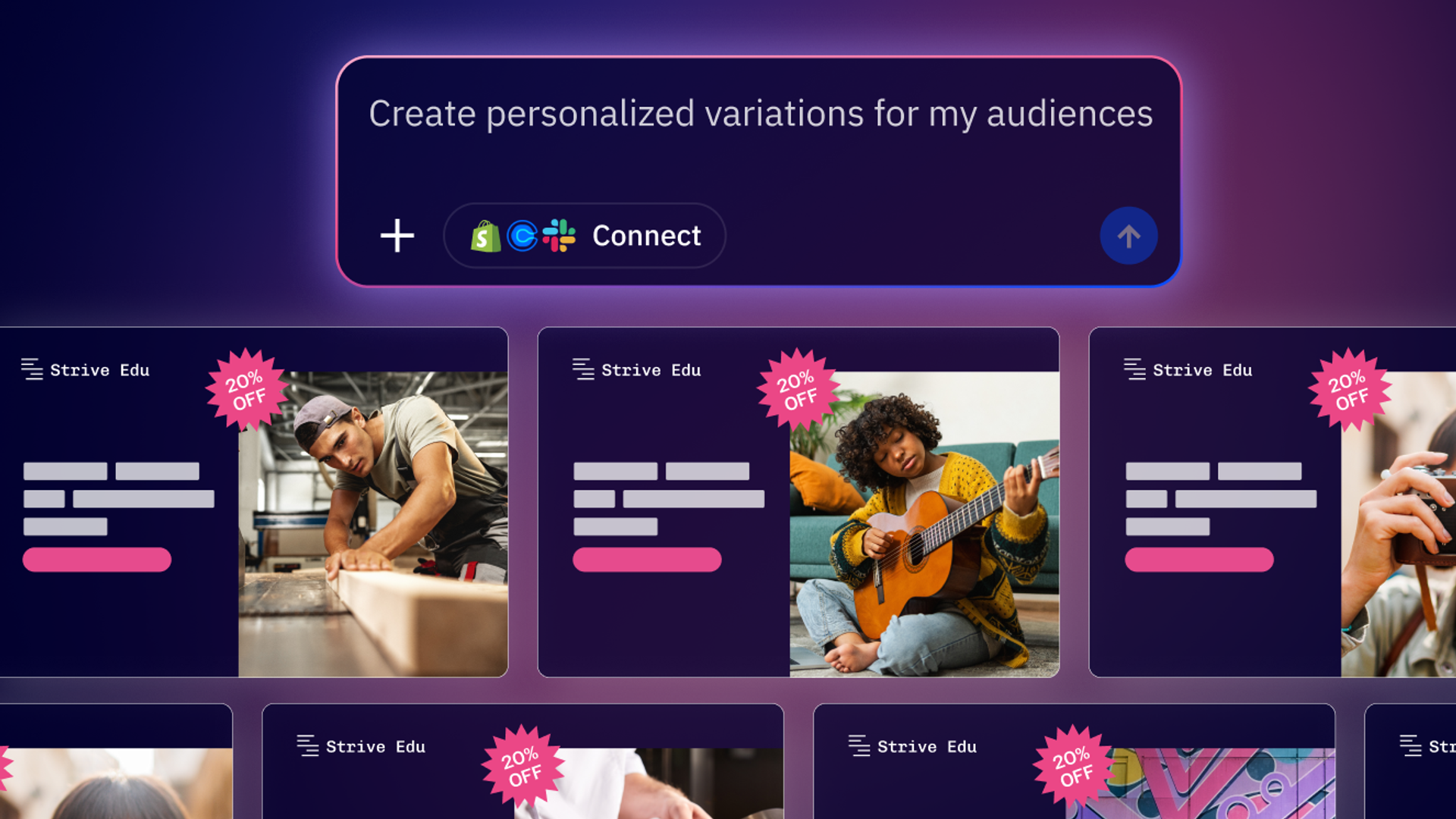
AI-suggested segments create smart audiences from behavior and preferences in seconds with no manual filtering required. Targeting is far more advanced than broadcast segmentation tools and rivals Klaviyo in personalization depth, while supporting more diverse business models beyond ecommerce.
It unifies cross-channel marketing. ActiveCampaign orchestrates email, SMS, WhatsApp, and site messaging from a single workflow. Unified reporting ties marketing activity to revenue, so you can see what drives results across every channel.
The integration library connects to 1,000+ tools spanning ecommerce, SaaS, B2B, and service businesses. This provides broader lifecycle orchestration than Constant Contact, GetResponse, or Brevo, with comparable channel depth to Omnisend but far more automation flexibility.
The built-in CRM aligns marketing and sales. Automated lead scoring and deal creation eliminate the need for separate CRM software for most teams. Chrome and Outlook extensions bring CRM context into your inbox, and Slack notifications can alert your team when contacts take key actions.
This is more integrated than Klaviyo, Mailchimp, or Omnisend. It's also far more accessible and cost-effective than HubSpot's full CRM suite.
Revenue and lifecycle reporting goes beyond "what happened" to “what’s next”. AI-powered insights recommend next steps: what to adjust, when to send, and which segments to prioritize. The Business Goals agent maps plain-language goals to proven strategies and tracks progress with real-time performance metrics.
So what are the limitations?
ActiveCampaign's feature depth can look overwhelming initially. The platform offers significantly more capabilities than basic send-only tools, which may make it look like there's more to learn. However, extensive resources including AI agents, user-friendly documentation, pre-built recipes and templates, and free migration assistance help teams navigate complexity with confidence.
ActiveCampaign offers significantly more power with much less friction.
Teams with very simple newsletter-only needs might not use the full platform's capabilities. If you're only sending monthly updates with no automation, segmentation, or CRM requirements you can do so easily. Simpler tools might feel like a better fit, but keep in mind that you'll hit their limits quickly if your needs evolve.
ActiveCampaign's pricing and value over time
ActiveCampaign’s pricing structure is based on providing a complete marketing and sales platform from the start. Pricing is based mostly on contact numbers, with plans starting at $15/month for 1,000 contacts, and deep automation capabilities, CRM functionality, and AI features available earlier in tiers than many competitors.
Unlike platforms that gate essential features behind expensive tiers, ActiveCampaign delivers meaningful automation capabilities at accessible price points. You can also add specialist features to any tier when you’re ready to justify the ROI, so there are no all-or-nothing upgrades.
As your contact list and complexity grow, ActiveCampaign's pricing scales with the value you're extracting. Teams consistently report that the time saved through automation and the revenue generated through better personalization justify choosing the platform over basic ESPs.
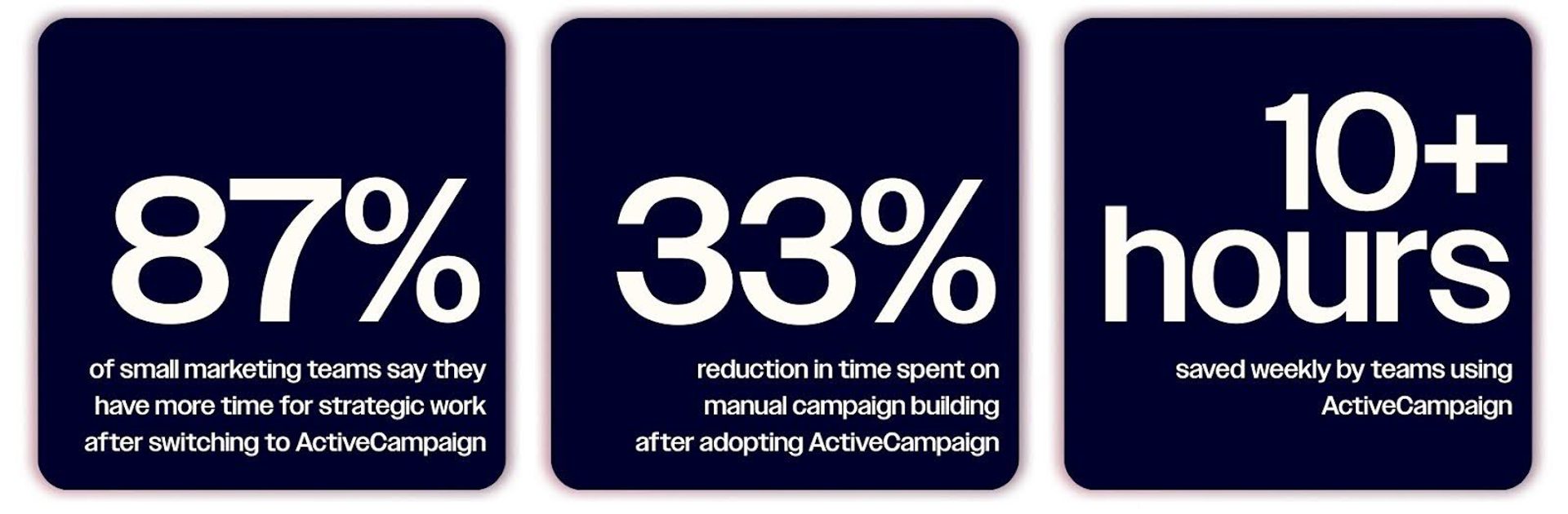
ActiveCampaign users report significant and measurable productivity gains.
What users have to say about ActiveCampaign
ActiveCampaign users frequently call out the platform as a superior Mailchimp alternative and HubSpot alternative for growing teams that need automation without enterprise complexity.
ActiveCampaign operates as a high-precision orchestration layer, moving far beyond traditional email broadcasting into the realm of “Active Intelligence.” Its visual automation builder is a technical benchmark, allowing for complex, branching logic that responds to granular behavioral triggers in real-time. With a consistently elite deliverability rate of 94%, it ensures that sophisticated segmentation strategies translate into measurable inbox presence and superior engagement metrics.
We’ve discovered that ActiveCampaign strikes the best combination between use and power. It’s a useful tool with a manageable learning curve. It is now a key component of our approach to relationship management and customer acquisition.
A lot of marketing tools either lean too heavy into complexity or they oversimplify and limit what I can actually build. But ActiveCampaign hits a sweet spot. It balances power with usability.
ActiveCampaign is the best email marketing software for teams that need automation-driven growth, cross-channel orchestration, and a built-in CRM without the cost or complexity of enterprise platforms. It's versatile across industries: ecommerce, SaaS, B2B, agencies, and service businesses alike.
HubSpot
HubSpot's email marketing lives inside a much larger ecosystem. It sits inside the Marketing Hub, which is one component of a full suite of inbound marketing products—all connected by HubSpot's Smart CRM. For organizations already running their go-to-market motion in HubSpot, email is a natural extension.
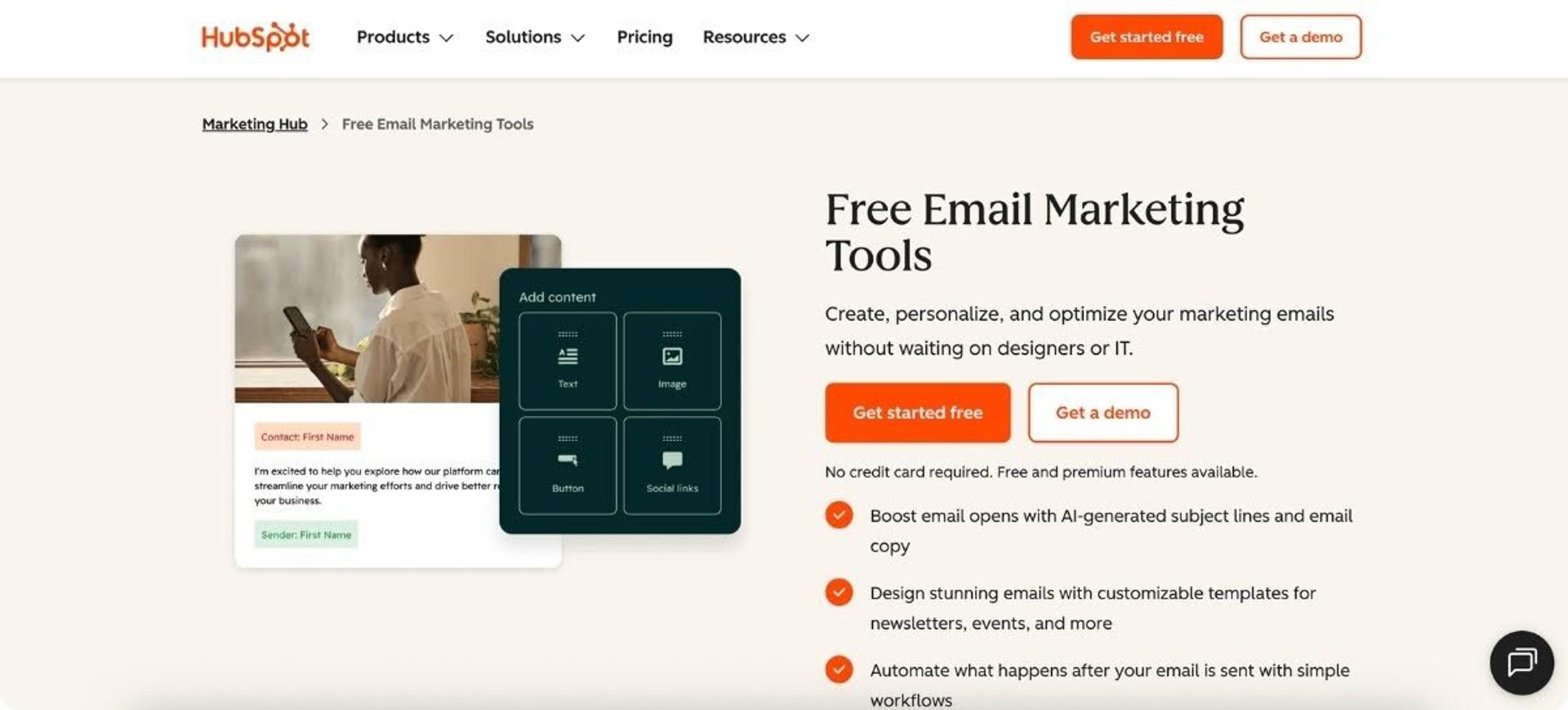
HubSpot's email marketing features at a glance
HubSpot approaches email as a CRM-first activity. Standout capabilities include:
- CRM-driven personalization: Email content draws directly from CRM properties, lifecycle stages, and custom objects to personalize messages based on where contacts sit in your pipeline.
- Marketing automation workflows: Triggered based on CRM data, form submissions, and behavioral events.
- Drag-and-drop email builder for easy design of professional layouts.
- Forms, landing pages, and traffic tools: Built-in lead capture and website tools feed contacts directly into nurture workflows.
- Nurture sequences and workflows: Drag-and-drop workflow builder supports conditional logic, delays, and multi-branch paths (available on Professional and above).
- Reporting and attribution: Connect email performance to pipeline movement and revenue.
- AI features: Content generation, send-time optimization, and messaging insights via the Breeze tool.
Email creation integrates with HubSpot's broader content tools. You can reuse images and videos across emails, landing pages, and social posts without re-uploading assets, while the Campaign feature ties multiple touchpoints together for unified tracking.
How does HubSpot stand out from other tools?
EmailToolTester’s latest email deliverability tests scored HubSpot with a 77.7% deliverability rate, in 12th place out of 15 tools tested.
HubSpot's primary strength is unification. The entire go-to-market function—marketing, sales, and service—can live in one platform if you invest in the full suite.
It unifies the entire GTM motion. HubSpot works best when your full go-to-market engine runs inside the platform. Marketing emails, forms, landing pages, lead handoff, pipeline management, and customer service activity all tie back to the same CRM record, giving teams a shared view of the customer across every stage of the funnel.
It creates strong cross-team visibility. HubSpot’s permissions, team structures, custom objects, and reporting layers make it well suited to organizations that need governance across larger teams. It is built for coordinating multiple teams around the same customer record and reporting framework.
It benefits from a mature partner and integration ecosystem. HubSpot has a large number of app integrations that support adoption and expansion. For businesses that want broad internal alignment around a single platform, that ecosystem can be an advantage.
So what are the limitations?
HubSpot’s email automation can be less flexible than platforms designed specifically for lifecycle marketing. Many teams find workflow automation powerful for cross-team processes but more rigid for highly customized behavioral email journeys.
It can also introduce high platform overhead and costs. Because HubSpot is designed as a full CRM and business platform, teams may end up managing more structure, configuration, and pricing complexity than they actually need for email marketing. That may be less appealing for teams that mainly want advanced email automation without the cost and weight of a broader suite.
HubSpot’s pricing and value over time
HubSpot’s Marketing Hub tiers are based on feature availability, HubSpot branding removal, and automation depth. Contact limits and number of seats affect pricing significantly, with a free tier available and paid subscriptions starting at $9/seat/month for HubSpot Marketing Hub Starter. Each tier offers a set number of marketing contacts and once your marketing list hits these limits, there are (significant) additional monthly fees based on volume.
Because the platform is modular, with dedicated hubs for CRM, marketing, sales, and service, you’re likely to be paying for multiple systems to ensure your data is fully integrated.
Common pricing complaints center on the gap between Starter and Professional. Starter looks affordable but lacks workflows—the feature most teams need for real automation. Professional unlocks capabilities like stronger automation and AI functionality, but requires annual commitment and substantial upfront investment.
It’s also worth noting that there is a compulsory one-time fee for onboarding to Professional and Enterprise plans. This ranges from $3,000 for smaller businesses to $7,000+ for larger enterprises.
What users have to say about HubSpot
Users consistently praise the intuitive interface and the all-in-one nature for reducing tool sprawl. Criticisms focus on cost and complexity, noting that the spread of the platform can sometimes be confusing.
HubSpot Marketing Hub stands out for its intuitive interface, powerful automation tools, and seamless integration of email marketing, CRM, and analytics in one platform.
What I like most about HubSpot Marketing Hub is that it lets me centralize all the campaigns we run for customers in one place. It’s relatively easy to use, and there are countless things you can do with it, which makes it a really flexible tool for managing our work. With so many possibilities available, it can be hard to fully understand everything the product can do. I get the sense that there are plenty of options I’m not taking advantage of simply because I don’t know about them yet.
HubSpot is a good choice for organizations that value tight marketing-sales alignment and can justify the investment in a comprehensive ecosystem.
Read our full comparison of ActiveCampaign and HubSpot for a deeper dive into both platforms.
Weighing the cost difference? Find out what teams get when they switch from HubSpot to ActiveCampaign, including what migration looks like and where teams find the most immediate value.
Mailchimp
Mailchimp’s email marketing software is one of the most recognized products in the game and most people who've ever sent a marketing email have at least considered it. But recent pricing and feature changes have shifted its value proposition significantly. What was once the default choice for small businesses has become a more expensive option with automation depth that caps out faster than competitors.
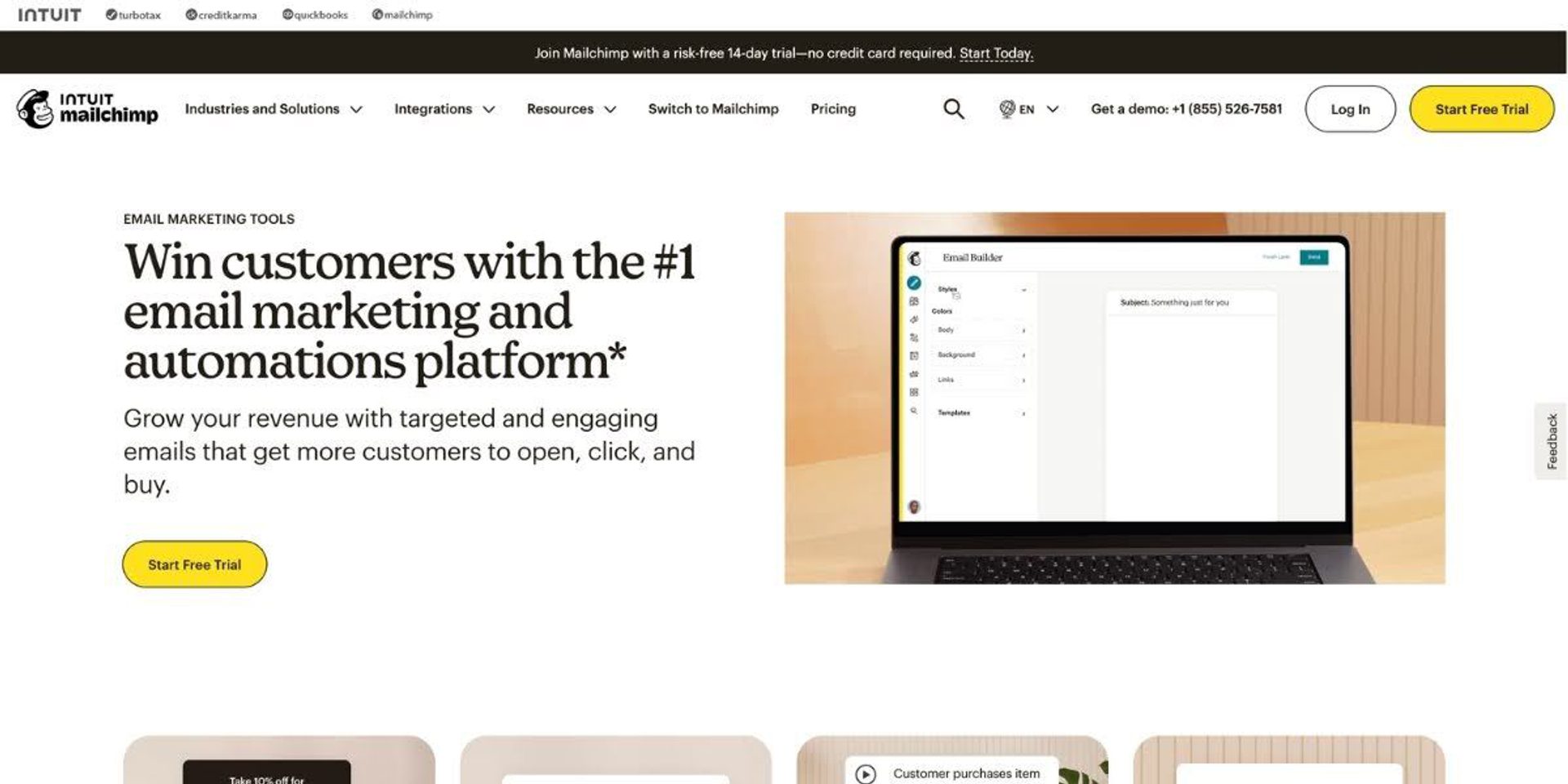
Mailchimp's email marketing features at a glance
Mailchimp's core features center on email creation and basic audience management:
- Intuitive email builder: Use drag-and-drop editing and 100+ templates.
- Customer journeys: Create basic, automated email sequences.
- Audience segmentation: Based on tags, groups, and basic behavioral data.
- Integrations: Including major ecommerce platforms, social media, and business tools.
- AI writing and design: Via Intuit Assist (beta) for content generation and predictive insights.
- Lead capture: Landing pages and forms.
- Basic reporting: Opens, clicks, and engagement metrics.
The platform once offered stronger AI email design through its Creative Assistant feature. But after consolidating AI tools under the Intuit Assist umbrella, many of those design capabilities appear to have been reduced or quietly retired.
How does Mailchimp stand out from other tools?
EmailToolTester’s latest email deliverability tests scored Mailchimp with an 89.5% deliverability rate, in 7th place out of 15 tools tested.
Mailchimp's approachable UX makes it one of the fastest platforms for getting your first campaign out the door.
It is very approachable for absolute beginners. The interface prioritizes simplicity over sophistication. You can create and send your first campaign quickly without technical knowledge or extensive training.
It has strong brand-familiarity. Because of this, abundant third-party content, tutorials, and community resources are also available. For someone who's never used email marketing software, Mailchimp might feel less intimidating than platforms with deeper feature sets.
It has a strong template library and design tools. Mailchimp offers professionally designed templates across various use cases. The email builder includes a Canva integration for creating graphics directly within campaigns. For teams without dedicated designers, these resources provide a reasonable starting point.
So what are the limitations?
Automation depth caps out for complex lifecycle journeys. Mailchimp's Marketing Automation Flows handle basic sequences like welcome series and abandoned cart reminders. But teams needing sophisticated conditional branching, goal tracking, or multi-step behavioral workflows will find the platform restrictive compared to ActiveCampaign or Klaviyo.
The audience and list-based data model creates friction as businesses grow. Mailchimp counts contacts across all lists. The same person in multiple audiences counts multiple times toward your limit—a policy that can inflate costs and frustrate teams.
Mailchimp's pricing and value over time
Mailchimp paid plans start at $26.50/month for 1,000 contacts and pricing scales significantly based on list size. The platform's contact counting methodology, such as charging for duplicates across audiences, creates unexpected cost increases that other platforms avoid.
Recent changes have made the free plan futile for most organizations. The contact limit has dropped from 2,000 to 500 to just 250 contacts now. Monthly sends are capped at 500 with a 250-email daily limit and automation features are no longer available to free users.
The feature offering at each tier hasn't expanded proportionally to frequent price increases over recent years, plus a number of deprecations (including the dropping contact limits on the free plan and the retirement of their Classic Automation Builder) have pushed many users into higher tier plans.
The common perception among Mailchimp reviewers and analysts is that value drops at scale. Many find better value with more powerful tools such as ActiveCampaign or GetResponse. Mailchimp delivers the most value when you just want a low-cost entry point for a small list.
What users have to say about Mailchimp
Users consistently praise ease of use for basic campaigns, noting the intuitive drag-and-drop editor and templates that make it easy to stay on-brand. Common criticisms focus on cost and feature limitations, noting that advanced functionalities are often locked behind higher pricing tiers. The general consensus is that Mailchimp feels adequate, but outdated compared to newer platforms.
Mailchimp is a solid email marketing tool with an intuitive interface and a wide range of templates that make it easy to get started quickly. The segmentation and automation features cover the basics well. However, compared to more advanced tools like Klaviyo or Braze, it reaches its limits fairly quickly – especially when it comes to complex automation flows, deep CRM integration, and sophisticated personalization at scale.
One thing I dislike about Intuit Mailchimp Email Marketing is that advanced features and automation are locked behind higher-priced plans, which can be limiting for small businesses or beginners. The pricing can increase quickly as contact lists grow, and some customization options feel restricted unless you have more technical experience.
Mailchimp is a good choice for solopreneurs or very small teams with simple, infrequent sending needs, including basic newsletters and promotional emails.
Read our full comparison of ActiveCampaign and Mailchimp for a deeper dive into both platforms.
Ready to make the move? See what's included when you switch from Mailchimp to ActiveCampaign, from free data migration to hands-on onboarding.
Klaviyo
Klaviyo is a data-driven email and SMS platform built primarily for ecommerce brands. Its email marketing software is deeply integrated into the Shopify ecosystem and treats every contact interaction as a potential data point for smarter targeting.

Klaviyo's email marketing features at a glance
Klaviyo organizes its features around ecommerce data models:
- Ecommerce-first segmentation: Build segments based on purchase behavior, browse history, and predicted customer lifetime value.
- Strong lifecycle flows: Pre-built automations for cart recovery, browse abandonment, post-purchase follow-up, and winback campaigns.
- Email and SMS integration: Both channels are tightly integrated, with SMS credits included in combined plans.
- Predictive purchasing analytics: AI-powered predictions focused on revenue outcomes including next order date, churn risk, and spending potential.
- Deep integration ecosystem: Native for Shopify, WooCommerce, Magento, and BigCommerce sync product, order, and customer data in real time.
- Revenue attribution: Track email and SMS performance directly in relation to sales and ROI.
Klaviyo helps drive sales and convert leads directly via email and SMS, with strong automation and segmentation tools that track marketing performance all the way to a sale.
How does Klaviyo stand out from other tools?
There is currently no data available for Klaviyo’s overall customer deliverability score compared to other providers.
Klaviyo is focused on ecommerce-first architecture. While many email marketing platforms are built to support a wide range of industries, Klaviyo is designed specifically for direct-to-consumer brands.
It excels at ecommerce lifecycle marketing. Klaviyo’s data model is built around ecommerce behavior, including purchases, product views, carts, and browsing activity. This makes it easy for marketing teams to create lifecycle campaigns that drive repeat purchases, upsells, and retention.
It launches ecommerce automations quickly. Because Klaviyo is tightly integrated with ecommerce platforms like Shopify and WooCommerce, common revenue-driving workflows work out of the box. Abandoned cart reminders, browse abandonment campaigns, and post-purchase follow-ups can be deployed quickly with minimal configuration.
It prioritizes product-driven personalization. Klaviyo’s segmentation and messaging revolve around ecommerce signals like order history and browsing behavior. For online stores that rely heavily on personalized recommendations and targeted promotions, this depth of product-level data can be extremely powerful.
So what are the limitations?
Because it is highly specialized for ecommerce, Klaviyo assumes data structures and workflows common to online retail, which can make it feel less natural for B2B companies, service businesses, agencies, or content creators. Teams outside ecommerce often find that many of the platform’s features aren’t relevant to their marketing workflows.
CRM capabilities are limited compared to some other platforms, so businesses that require deeper CRM functionality often pair it with a separate sales platform.
Klaviyo’s pricing and value over time
Klaviyo pricing is driven by active profiles more than features. Paid email plans start at $30/month for 1,000 contacts and pricing increases significantly as profile counts rise. For example, pricing increases from $790 per month at 50,000 profiles to $1,380 per month at 100,000, making it one of the more expensive options as ecommerce databases scale. The perceived cost jump as profiles scale is a frequent theme in user reviews.
All features are available on every paid tier, so you only pay more only as your list grows, but email sends are limited to 10x the number of contacts on your plan and you’ll have to choose add-ons to integrate WhatsApp, SMS, data and analytics,
Brands spending over $10,000/month are automatically enrolled in Klaviyo One. This adds a 20% fee to the base plan.
What users have to say about Klaviyo
Users praise segmentation depth, support, and ecommerce-specific flows. Criticisms frequently note the high growth price compared to alternatives, and some users struggle with complex navigation and setup.
Pricing is the biggest pain point. Costs scale quickly as lists grow and it can feel disproportionate during high growth phases where you’re paying a lot more without a step up in features. It’s hard to justify that cost to stakeholders when the costs increase. That said it earns back in results — but pricing could be more flexible.
While new features are great, I don’t love how something like the UI changes quite often. It disrupts my work flow, leaving me spending more time looking for buttons or links I usually could find with my eyes closed. Also, for some of my colleagues who don’t use Klaviyo as frequently as me, the changes often seem big, because more time passes between uses. I also don’t particularly love how some seemingly obvious features are not available, and when I try to dig into why, the answer is often ‘just because.’
Klaviyo is a good choice for ecommerce businesses whose revenue model revolves around repeat purchases and customer lifetime value.
Read our full comparison of ActiveCampaign and Klaviyo for a deeper dive into both platforms.
Constant Contact
Constant Contact’s email marketing software has been around since the late 1990s, and simplicity remains its calling card. It's a dependable choice for organizations that need to send clean, professional emails without a steep learning curve, but it hasn't evolved at the pace of automation-focused platforms.

Constant Contact’s email marketing features at a glance
Constant Contact focuses on accessible essentials:
- Email builder and templates: A straightforward drag-and-drop editor with a solid template library and basic list management tools.
- Event marketing tools: Built-in invitation and registration management — a unique feature among email platforms that makes it popular with nonprofits and community organizations.
- Social posting and small-business utilities: Schedule social posts, manage basic ads, and access small-business marketing tools alongside email.
- List management: Basic segmentation organizes contacts by demographics and engagement
- Basic automation: Supports simple workflows like welcome emails and triggered messages.
- High-touch support: Phone support is available on all paid plans.
The platform's event marketing integration distinguishes it from pure email tools and makes it popular with organizations running workshops, fundraisers, and community events.
How does Constant Contact stand out from other tools?
EmailToolTester’s latest email deliverability tests scored Constant Contact with a 91.7% deliverability rate, in 2nd place out of 15 tools tested.
Constant Contact’s core advantage is its practical, guided approach to email marketing. Rather than trying to be the most advanced automation platform, it focuses on helping small organizations get campaigns out the door quickly and confidently.
It packages events and email into one workflow. Constant Contact is one of the few email marketing platforms that makes event promotion a built-in part of the product experience. Invitations, registrations, reminders, and follow-up emails all live in the same system, which is especially useful for nonprofits or community groups that rely on workshops, fundraisers, classes, or webinars to drive engagement.
It prioritizes ease of use for small teams. Constant Contact is designed for teams with limited marketing resources or technical expertise. The platform enables straightforward campaign creation without the complexity of advanced automation systems. A large library of pre-built templates and a simple editor allows users to quickly create newsletters, announcements, and promotional emails.
It offers high-touch support for SMB users. One of Constant Contact’s biggest differentiators is its phone-based customer support, which has become rare among small-business email platforms that rely primarily on chat or ticket systems. This support model makes the platform feel more service-oriented than many competitors in the category.
So what are the limitations?
Constant Contact is not built for deep automation, segmentation, or analytics. It works well for straightforward campaigns, but lacks advanced workflow and reporting capabilities. It is not the right platform for teams that need complex, multi-branch lifecycle journeys, behavioral segmentation, or lifecycle attribution.
While the high-touch support can be beneficial to smaller companies, it can complicate matters for enterprises who have larger, fast-moving teams. With account management handled largely over the phone, teams who need to make quick changes to their subscriptions may find the lack of online support frustrating.
Constant Contact's pricing and value over time
Constant Contact has also now removed its free plan entirely, and prices are higher than you might expect for a simple tool. Paid plans start at $30/month for 1,000 contacts. The lack of advanced features makes it probably the most expensive option relative to feature depth.
As lists scale, real-world costs may surprise users when they factor in email volume limits or add-ons like CRM and SMS. Businesses often find they pay more for contact storage without unlocking substantially deeper platform capabilities.
Payment friction is another factor. Constant Contact doesn’t offer a simple self-serve cancellation in account settings. Prepaid plans auto-renew, and users must contact support to stop future charges. Complaint logs and reviews show a notable number of billing and cancellation disputes, often tied to renewals and unclear timing expectations.
What users have to say about Constant Contact
Users appreciate the simplicity, event marketing tools, and phone support availability. Complaints often focus on the limited reporting flexibility, with users complaining about being forced to use screenshots or copy and paste to share reports.
The biggest strength of Constant Contact is also its biggest weakness for more advanced email marketers. Although it is easy to use, it lacks many features more robust email marketing tools have. I wouldn’t recommend Contact Contact for ecommerce. There are other email marketing tools with more advanced features for ecommerce automation and segmentation.
Limited automation features compared to some other platforms. Pricing can get a bit high as your contact list grows. I accidentally signed up for Mail View on desktop, and there was no clear way to cancel it myself from the dashboard. I had to reach out to customer support, but unfortunately, I’m still waiting for a resolution. The platform itself has good tools, but the lack of control over account settings and slow support response on the account part.
Constant Contact is a good choice for small organizations that want easy campaign execution with integrated event promotion, rather than teams building sophisticated automation programs.
Read our full comparison of ActiveCampaign and Constant Contact for a deeper dive into both platforms.
Brevo
Brevo (formerly Sendinblue) is a multi-channel platform focused on making SMS and email marketing accessible and affordable, especially for small and mid-sized businesses. Its send-based pricing model is a genuine differentiator for businesses with large contact lists but moderate sending frequency.
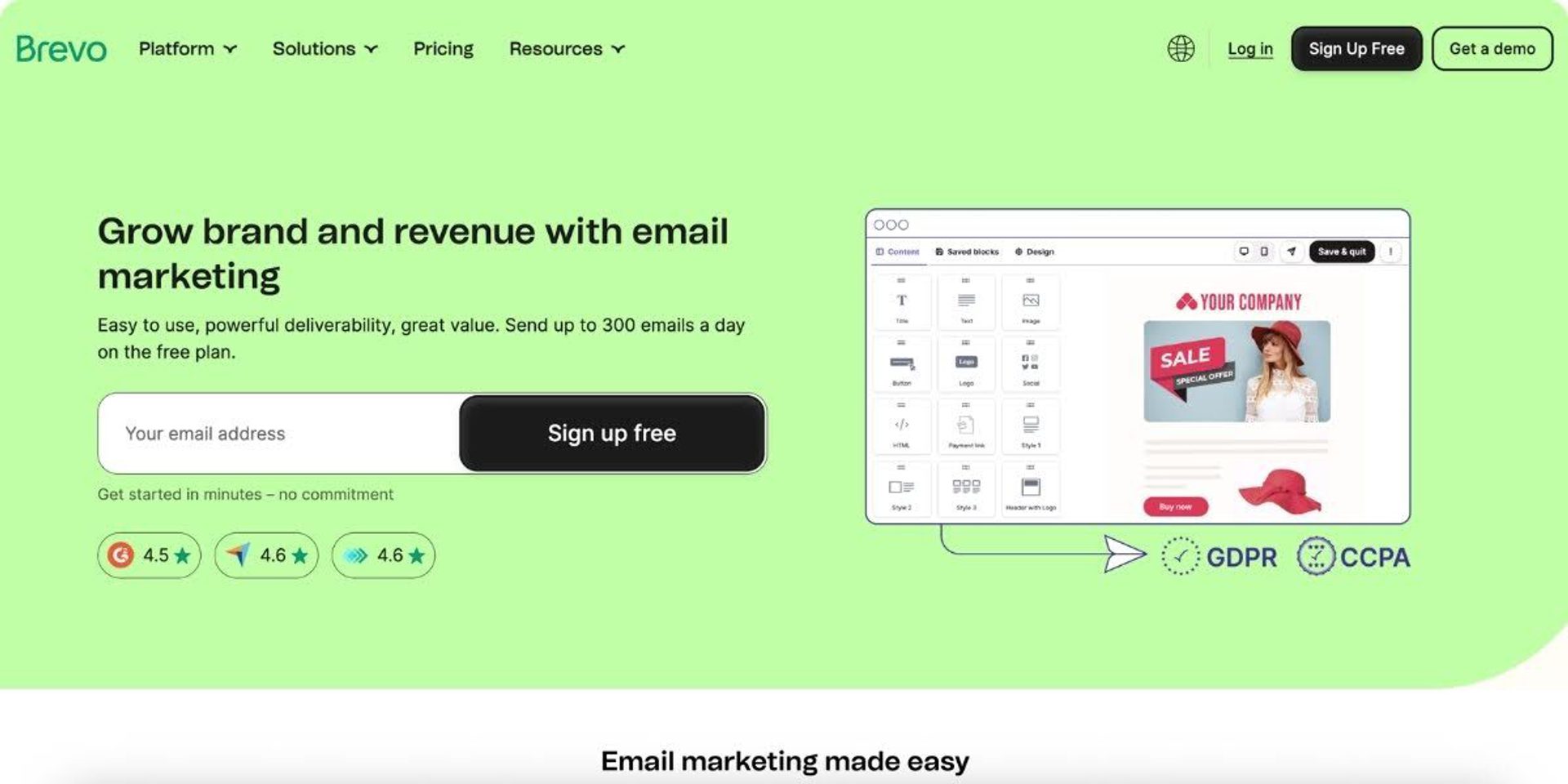
Brevo’s email marketing features at a glance
Brevo's feature set is focused on connecting email to multiple communication channels:
- Cross-channel messaging: Email, SMS, and WhatsApp campaigns from one dashboard, plus transactional email through a dedicated API.
- Transactional email: SMTP relay for order confirmations, password resets, and notifications.
- Send-based pricing: A unique pricing model based on email volume rather than contact list size.
- Basic CRM: Built-in contact management, deal pipelines, and sales tracking — functional but not as deep as dedicated CRM platforms.
- Built-in chat: Live chat and chatbot functionality directly within the platform.
- Marketing automation: Visual workflow builder and pre-built templates for cross-channel workflows.
Brevo’s feature set offers email, transactional messaging, and basic cross-channel marketing in one place without the need to adopt a more complex automation platform.
How does Brevo stand out from other tools?
EmailToolTester’s latest email deliverability tests scored Brevo with an 88.3% deliverability rate, in 8th place out of 15 tools tested.
Brevo’s main differentiator is its send-based pricing model. While most email marketing platforms charge primarily based on the number of contacts in your database, Brevo prices plans according to how many emails you send.
It flips the traditional pricing model. Brevo allows unlimited contacts on most plans and instead charges based on monthly email volume. This structure benefits businesses with large databases who send infrequently or segment heavily. Instead of paying for every stored contact, teams pay mainly for actual sending activity.
It handles transactional email alongside marketing campaigns. Like ActiveCampaign, Brevo is also one of the stronger options for businesses that need to manage both promotional emails and operational messaging from the same platform. Through its SMTP relay and API infrastructure, companies can send order confirmations, password resets, shipping notifications, and other transactional messages alongside marketing campaigns.
It supports simple cross-channel messaging. Brevo bundles email with SMS, WhatsApp messaging, and live chat tools inside one interface. While these capabilities are lighter than dedicated automation platforms, they allow small teams to manage several communication channels without adopting multiple tools.
So what are the limitations?
Brevo’s automation capabilities are relatively basic. The workflow builder is less sophisticated than the automation systems found in platforms like ActiveCampaign that are built specifically for lifecycle marketing. Teams looking to build multi-branch customer journeys or behavioral automation may find the platform limiting as their marketing programs mature.
Reporting can also be limited on lower tiers. Campaign-level metrics and basic analytics are available, but deeper insights into lifecycle performance are more limited compared with higher-end marketing automation tools.
Brevo has the most modest integration offering on this list, with just 150 native connections available. Teams wanting to connect their marketing with a broader system of tools may find it limiting.
Brevo’s pricing and value over time
Brevo’s send-based model means costs depend on volume rather than list size, which can be a major cost advantage for certain sending patterns. A business with 50,000 contacts sending only twice monthly will likely pay less than if they choose a contact-based platform. On the other hand, high-frequency senders may find costs escalate quickly.
A free plan is available and paid plans start at $9/month for 5,000 emails. Add-ons are required for branding removal, dedicated IP addresses, and advanced features.
What users have to say about Brevo
Reviews for Brevo often express mixed opinions, with some users praising its accessibility and others calling out complicated navigation. Multi-channel capabilities and generous free plan limits are often praised, but reviewers note that the subscription plans sometimes require a bit more consideration during growth.
What I like most about Brevo is how easy and intuitive it is to use — even if you don’t have a technical background. Setting up email campaigns, segmenting contacts, and scheduling messages feels straightforward and doesn’t take forever to learn. The drag-and-drop editor is smooth and actually enjoyable to work with, which isn’t something I can say about every platform. Some of the more advanced automation and segmentation capabilities can feel a bit basic compared to higher-end tools. If you’re trying to build highly complex multistep flows or deeply dynamic segments, it can sometimes feel restrictive.
At times, I find that the reporting interface would benefit from a bit more granularity, allowing for a deeper exploration of specific conversion metrics without the need to export data. Furthermore, as our contact volume increases, navigating the various pricing tiers demands thoughtful consideration to ensure we select the most suitable option. Despite this, the service continues to offer competitive value.
Some advanced features and settings can take time to fully understand, especially for users who are new to email marketing or automation. A bit more in-app guidance for complex workflows and reporting would make the learning curve even smoother. That said, once you get familiar with the platform, it becomes very efficient and reliable.
Brevo is a good choice for businesses that send large volumes of transactional emails while keeping marketing campaigns relatively infrequent, allowing them to benefit from lower per-send costs with large contact databases.
Read our full comparison of ActiveCampaign and Brevo for a deeper dive into both platforms.
Omnisend
Omnisend’s email marketing software is built specifically for ecommerce stores that want to get multi-channel marketing running fast, without spending weeks on configuration.
Omnisend's email marketing features at a glance
Omnisend centers its features around online store workflows:
- Pre-built ecommerce workflow: Ready-to-deploy automations for cart recovery, browse abandonment, and post-purchase sequences across email, SMS, and push.
- Drag-and-drop editor: Includes 250+ customizable templates organized by goal and theme.
- Multi-channel automation: Email, SMS, and push notifications are combined in unified workflows.
- Product recommendation engine: Dynamic content insertion for online browsers.
- Segmentation: List management based on shopping behavior, purchase history, and customer lifecycle.
- Shopify and WooCommerce integrations: Quick setup with major ecommerce platforms that syncs product, order, and customer data.
- Ecommerce-focused reporting: Revenue attribution and conversion tracking flow automatically from your store integration, displaying total store revenue versus Omnisend-attributed sales.
These features make Omnisend particularly well suited to teams that want ready-to-run ecommerce lifecycle workflows without needing to build complex automation systems from scratch.
How does Omnisend stand out from other tools?
EmailToolTester’s latest email deliverability tests scored Omnisend with a 75.1% deliverability rate, in 13th place out of 15 tools tested.
Omnisend’s core advantage is its ready-to-run ecommerce automation framework. The platform focuses on helping online stores activate proven revenue-driving workflows quickly.
It launches ecommerce automations quickly. Omnisend maps customer journeys around common retail scenarios like abandoned carts, browse recovery, post-purchase follow-ups, and customer re-engagement. These workflows are built specifically for ecommerce behavior, making them easy to activate without complex setup.
It bundles ecommerce messaging channels together. Omnisend combines email, SMS, and push notifications within the same automation workflows, allowing retailers to coordinate messaging across multiple channels without managing separate tools. This helps stores reach customers at different moments in the buying journey.
It delivers fast time-to-value for online stores. Omnisend’s onboarding process is built around connecting your store and activating proven marketing workflows immediately. The simplified setup can help generate results faster than platforms that require deeper configuration.
So what are the limitations?
Omnisend is, of course, designed primarily for ecommerce businesses. While it supports behavior-based targeting and AI-assisted segments, its segmentation depth is lighter than platforms designed for broader lifecycle marketing across multiple industries. As a result, B2B companies, service businesses, and content creators are unlikely to find all of the tools they need for sophisticated engagement programs.
Compared with platforms that serve a wider range of use cases, Omnisend offers fewer third-party integrations, which may limit flexibility for businesses with more complex technology stacks.
Omnisend's pricing and value over time
Omnisend provides a free plan with many features available, including automation templates, segmentation tools, and multi-channel messaging capabilities. However, this is limited to just 250 contacts and 500 email sends per month. Paid plans start at $14/month for 1,000 contacts when you commit to 3 months upfront.
SMS is included in paid plans rather than charged separately, making multi-channel costs more predictable than platforms adding SMS as a premium add-on.
Pricing scales with contact count and channel usage. The inclusion of SMS, push notifications, and ecommerce features at lower tiers provides better value than some platforms. However, the gating of personalization features in particular may well be frustrating to teams that want to build more engaging campaigns.
What users have to say about Omnisend
User reviews highlight fast setup and ecommerce-specific automations, but also frequently describe the customization options as restrictive. Many reviewers also cite deliverability concerns, noting that more supportive deliverability features would be beneficial.
What I like best about Omnisend is how it turns complex marketing automation into something surprisingly simple. I can quickly build email and SMS campaigns that actually feel smart, not robotic, and it saves me a lot of time while still driving real engagement. I find Omnisend frustrating sometimes because its templates can be a bit rigid, and customizing beyond the basics isn’t as smooth as I’d like.
The only things I’d like to see improved are the reporting options and email design flexibility. The analytics are clear but could go a bit deeper for tracking campaign comparisons or custom KPIs. Also, while the email templates look good, it would be nice to have a few more creative layout options. Lastly, SMS pricing can add up if you’re sending high volumes, so it’s something to watch.
Omnisend is a good choice for small ecommerce stores that want quick automation setup with combined email and SMS.
Read our full comparison of ActiveCampaign and Omnisend for a deeper dive into both platforms.
GetResponse
GetResponse’s email marketing software bundles standard campaigns alongside landing pages, webinars, and conversion funnels. It's carved out a niche with creators, coaches, and educators who want launch-style marketing tools.
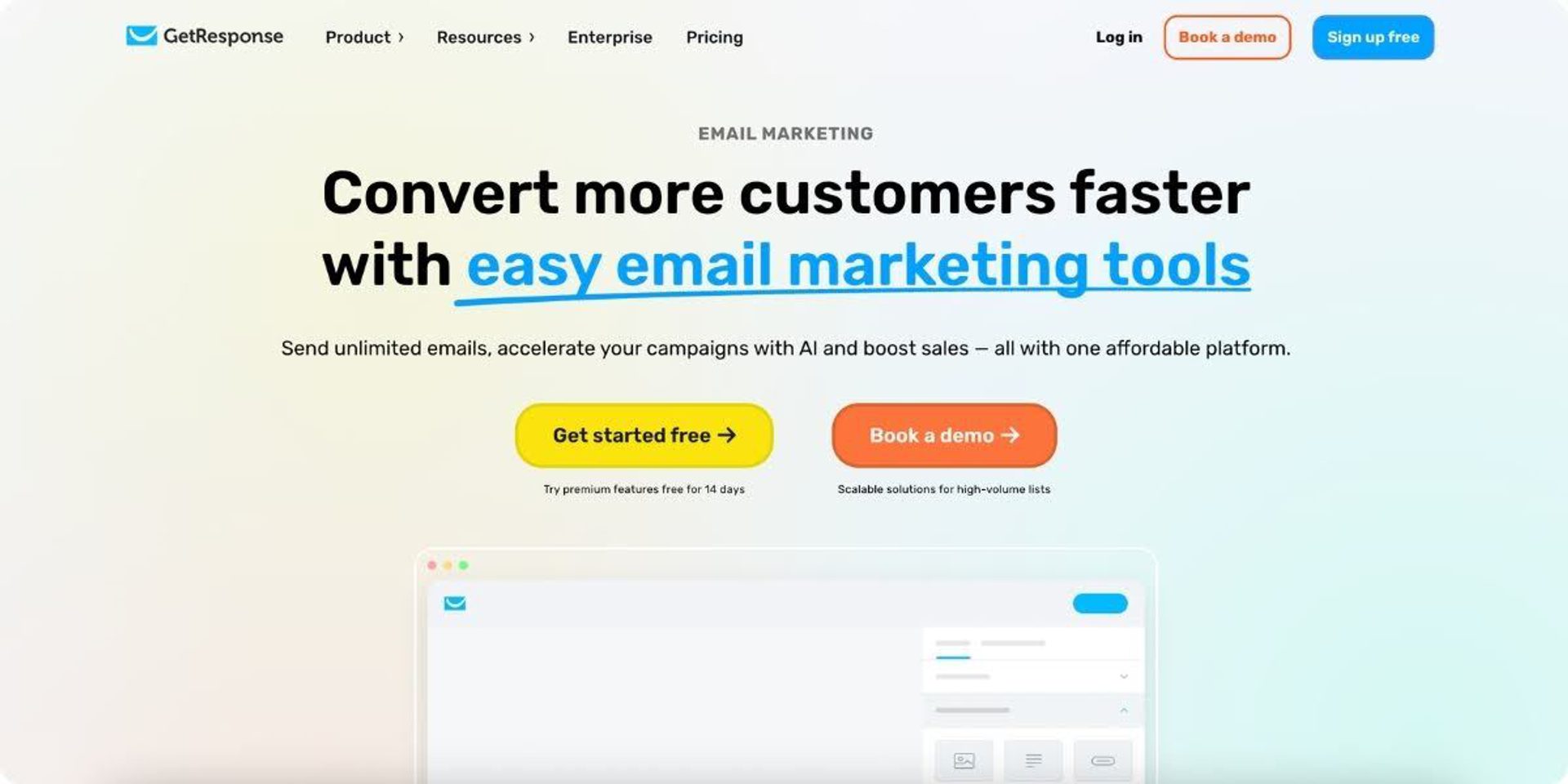
GetResponse's email marketing features at a glance
GetResponse distinguishes itself with a range of creator-focused tools most email platforms don't offer:
- Landing pages and conversion funnel builder: Build sales funnels with opt-in pages, thank-you pages, and automated follow-ups — no third-party tool required.
- Webinar hosting: A built-in webinar platform that integrates with email sequences for pre/post-event communication — a rare feature in the email marketing space.
- AI email generator: Create email drafts using AI, with optimization suggestions for subject lines and content.
- Visual automation builder: Drag-and-drop workflow builder with conditional logic, though less deep than dedicated automation platforms.
- Creator monetization and course tools: Higher-tier plans include course creation and monetization features for educators and coaches.
How does GetResponse stand out from other tools?
EmailToolTester’s latest email deliverability tests scored GetResponse with an 90.9 % deliverability rate, in 3rd place out of 15 tools tested.
While most email marketing platforms focus primarily on campaigns and automation, GetResponse bundles multiple marketing tools into a system specifically designed to support lead generation and content-first product launches.
It includes built-in webinar hosting. Unlike most email platforms that require integrations, GetResponse allows businesses to host webinars directly within the platform. Registration pages and attendee tracking are also connected automatically. For educators and course creators, this built-in functionality can remove significant operational friction.
It supports launch-driven marketing workflows. GetResponse is particularly well suited for businesses running structured marketing sequences built around product launches, educational webinars, or time-limited offers. Email sequences, registration funnels, and follow-up campaigns can all be managed in one place.
So what are the limitations?
Automation capabilities are more limited than dedicated platforms. While GetResponse includes a visual automation builder, its workflow depth and conditional logic are lighter than platforms designed specifically for lifecycle marketing. More advanced features such as branching logic and scoring are only available on higher-tier plans.
Individual features are also less polished than specialized tools. While GetResponse combines a diverse range of products, specialist components tend to be less advanced than purpose-built alternatives in those categories.
GetResponse's pricing and value over time
GetResponse structures pricing across multiple product lines, which can create confusion. The Starter plan is priced at $19/month for 1,000 contacts, but it excludes headline features like webinars and has very limited automation. Upgrading adds better workflow functionality, but if you need webinars that will require jumping to a premium plan or purchasing separately.
This tiered structure means the advertised entry price rarely reflects what you'll actually pay to access the features that attracted you to GetResponse in the first place.
Unlike some platforms that offer volume discounts or flexible contact bands, GetResponse pricing increases predictably with list size. This provides budget certainty but can become expensive compared to alternatives at higher volumes.
What users have to say about GetResponse
Users consistently praise the platform's ease of use and the convenience of having landing pages, email, and webinars in one place. Common criticisms focus on a steeper learning curve, as well as limited feature depth and pricing on the higher end.
A few areas could be better: Some advanced automation features are less flexible compared to other tools. The reporting dashboard could be more intuitive and visually clear. Certain template designs look a bit outdated. Integrations with some third-party tools can also be slow or limited. Customer support can sometimes take longer to reply during busy periods.
GetResponse is a great email tool, but I feel there are times when the reports feel less in-depth. Also, I felt that many times, customisation options in the templates were limited. The pricing is on the high end, as the email list increases.
GetResponse is a good choice for creators and coaches that need email marketing and webinars in one platform.
Workflow test: how each platform handles a real email marketing journey
Feature lists don't reveal how a platform actually performs in day-to-day work. A tool might check every box on paper, then frustrate you with a clunky builder, missing QA tools, or automation that hits limits at step three.
To test this, we walked each platform through a typical email marketing campaign workflow:
| Tool | Creation | Delivery | Analytics | Optimization |
| ActiveCampaign | ActiveCampaign supports the full creation process with AI tooling, from generating strategy and content to design and automation. Built-in QA tools like spam checks, inbox previews, and link validation let your team intervene when it matters most. | ActiveCampaign combines strong deliverability tooling with automation-led delivery, letting teams send behavior-triggered cross-channel messages. | ActiveCampaign offers journey-level reporting and revenue attribution, with AI-powered business goals that assess performance and surface next steps. | ActiveCampaign is one of the most efficient platforms for campaign optimization, with intelligent, AI-led insights, goal-based branching, contact-level predictive sending, and fast iteration through duplicated workflows and content variants. |
| HubSpot | HubSpot’s creation flow is structured and CRM-driven, with personalization in the editor, and AI assistance on higher tiers. | HubSpot pairs strong sending infrastructure with workflow-based delivery, though more advanced automated delivery depends on higher-tier plans and a heavier CRM setup. | HubSpot’s reporting is strongest in CRM and revenue contexts, with campaign reporting on lower tiers and broader attribution on higher ones. | HubSpot can support strong workflow optimization, but most advanced automation requires Professional or Enterprise plans and more setup than email-first tools. |
| Mailchimp | Mailchimp makes creation easy with a polished drag-and-drop editor, solid templates, a beta AI tool for content generation, and basic preview and testing tools. | Mailchimp delivers standard campaigns reliably and supports simple automated sends, but delivery remains more campaign-centric than lifecycle-orchestrated. | Mailchimp focuses on campaign-level metrics like opens, clicks, and engagement. | Mailchimp supports basic A/B testing and send-time optimization, but optimization options become more limited as workflows get more complex. |
| Klaviyo | Klaviyo is built for ecommerce creation, with catalog-driven product blocks, manual campaign setup, light AI assistance, and standard preview and testing tools. | Klaviyo combines strong managed delivery with event-triggered ecommerce automation, making it especially effective for online shopping flows. | Klaviyo’s analytics are a strength, with flow-level revenue attribution and ecommerce-specific performance reporting. | Klaviyo is strong at optimizing ecommerce workflows through behavioral triggers, A/B testing, and predictive models, though it is narrower than broader automation platforms. |
| Constant Contact | Constant Contact keeps creation simple with an easy editor, accessible templates, and basic preview and test-send tools. | Constant Contact delivers newsletters and simple automated emails reliably, but automation plays a limited role in delivery beyond basic triggered messages. | Constant Contact focuses on simple campaign metrics such as opens and clicks. | Constant Contact offers light optimization, with basic autoresponders, limited testing, and more manual iteration than workflow-based platforms. |
| Brevo | Brevo’s creation process is mostly manual, with a drag-and-drop editor, basic content blocks, stock images, and AI content help on some tiers. | Brevo supports both marketing and transactional email delivery, with automation that triggers operational messages and simple cross-channel flows, though deliverability feedback is more mixed than with top-tier email platforms. | Brevo offers campaign-level reporting, but analytics are more limited on lower tiers. | Brevo supports rule-based automation and standard A/B testing, but optimization is more manual and less sophisticated than on dedicated automation platforms. |
| Omnisend | Omnisend speeds up creation with pre-built ecommerce templates, product blocks, and simple preview and test-send tools. | Omnisend ties delivery closely to ecommerce automation, making it strong for triggered sends across email, SMS, and push tied to store activity and customer behavior. | Omnisend focuses on revenue attribution for ecommerce campaigns. | Omnisend is built for quick ecommerce optimization, with ready-to-run workflows, A/B testing, and simple ways to improve performance over time. |
| GetResponse | GetResponse combines email design with creator funnel tools, using AI-generated drafts, a visual builder, and standard QA tools like previews, test sends, and spam scoring. | GetResponse offers solid delivery for both campaigns and automated funnel sequences, with automation playing its biggest role in webinar follow-up and timed promotional sends. | GetResponse provides visual dashboards and segmentation-based reporting across campaigns and funnels. | GetResponse supports A/B testing, visual automation, and some AI suggestions, though deeper optimization depends on higher-tier plans. |
ActiveCampaign stands out in particular for end-to-end AI assistance that drives autonomous marketing from generating the campaign to optimizing after delivery. The combination of intelligent AI agents means fewer manual steps between "idea" and "results." Most other platforms handle the basics well but force some level of repetitive manual work at every optimization stage.
How to find the best email marketing software for your business
A tool that feels perfect today can become a bottleneck in 12 months if it can't grow with you, so it’s important to take your growth plans into account from the start. Switching email marketing platforms isn't easy either; you pay in time, lost data, rebuilt workflows, and even compulsory migration fees for some platforms.
Here's a fit-based framework to match your situation to the right platform:
| Business Case | Best Fit |
| Simple campaigns and newsletters | Mailchimp or Constant Contact |
| Ecommerce lifecycle focus | Klaviyo or Omnisend |
| Automation-driven growth across business models | ActiveCampaign |
| Enterprise inbound with existing HubSpot investment | HubSpot |
| High-volume transactional sending on a budget | Brevo |
| Creators wanting email and webinars + landing pages | GetResponse |
ActiveCampaign is built for teams ready to move beyond basic sends into automation-driven, personalized customer journeys, without the complexity or cost of enterprise suites. It's where growth-focused marketers go when they've outgrown simple tools but aren't ready to hire an ops team to manage a bloated platform.
67% of ActiveCampaign customers see ROI within 6 months, and 42% within 90 days, while 93% of customers say ActiveCampaign’s deliverability is superior to competitors.
Plus, if you’re thinking about switching to ActiveCampaign we make it easy. Multiple support paths, self-serve resources, free onboarding, and free data migration are available.
Start a free 14-day trial or take a look at our migration guide to see how easily you can get started with the best email marketing software for teams who want to do more with less manual work.
FAQs
What's the best email marketing software for small businesses in 2026?
For small businesses just starting out, Mailchimp and Constant Contact may offer the simplest path to sending your first campaigns. But if you plan to grow beyond basic newsletters into automated workflows and personalization, ActiveCampaign's Starter plan provides deeper capabilities from day one, at a comparable price, so you won't need to migrate later. ActiveCampaign also offers significant self-serve resources and AI-powered tools to support end-to-end campaign creation that is accessible, even to beginners.
What's the best email marketing software for growing businesses in 2026?
ActiveCampaign is the strongest email marketing software choice for growing businesses. Its AI-powered automation, built-in CRM, and cross-channel orchestration help small teams scale campaigns without adding headcount. The modular add-on structure means you only pay for capabilities as you need them.
What's the best email marketing software for enterprise businesses in 2026?
Many large organizations already invested in the HubSpot ecosystem choose HubSpot Enterprise as their email marketing software. However, ActiveCampaign offers comparable automation depth with extensive integrations, HIPAA compliance, dedicated support, AI-powered optimization, and simpler structure across tools—often at a fraction of HubSpot's total cost.
What makes ActiveCampaign's email marketing software different from other platforms?
ActiveCampaign combines fully AI-native marketing, goal-driven automation, a built-in CRM, and cross-channel orchestration in one platform. Unlike simpler tools, it supports complex branching logic and predictive personalization. Unlike enterprise suites, it remains accessible and modular, so you get depth without paying for features you don't use.
How do I migrate to a new email marketing platform without losing data?
Most platforms offer migration support for contacts, tags, and automations. ActiveCampaign includes free onboarding sessions and complimentary migration of lists, custom fields, forms, and key automations. You can export your data, map fields to the new platform, and rebuild critical automations before deactivating your old tool.