Marketing analytics with Monday’s report already done
Build the dashboards you check, ask your data a question in plain words, and see which emails drove store sales. Active Intelligence pulls the numbers. You decide the next move.
Build the dashboards you check, ask your data a question in plain words, and see which emails drove store sales. Active Intelligence pulls the numbers. You decide the next move.
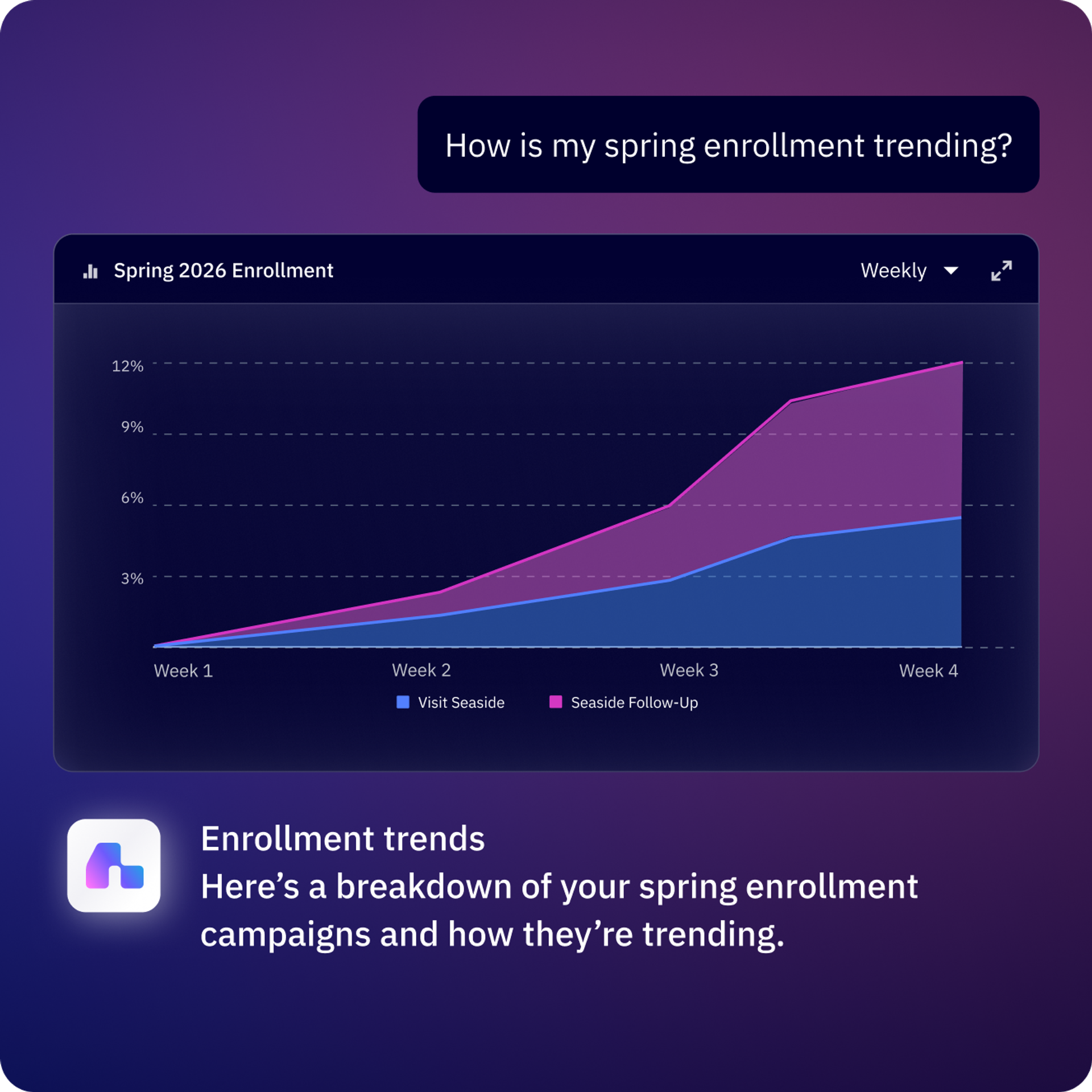
The report you used to stitch together by hand now arrives with the numbers, the trend and a next move.
Set a scheduled task once, and Active Intelligence sends last week's numbers and a drafted next step before the week starts.
Ready for Monday.

Type "Which campaign drove the most clicks last month?" and get a summary and a chart from your own account data.
Actionable insights by Tuesday.

Add, remove and rearrange widgets, filter any date range, and export the view to share with your team or clients.
All tracked by Midweek.

Revenue attribution credits ecommerce purchases made within 7 days of an email. Pro and Enterprise plans.
Proven before Friday's meeting.

Get campaign reports for every email, SMS and WhatsApp send, step-by-step automation reports and custom dashboards you can arrange, filter and export.
Report on the fields and questions that matter to your business, not just the defaults.
Compare your opens and clicks with your industry, and with the 39.26% average open rate across ActiveCampaign customers.

Ask Active Intelligence how last month's campaigns compare with your industry, or which automation earned the most clicks. You get a summary, a chart and the figures behind it.
Every answer comes from your own campaigns, automations and contacts, with the figures shown.
Ask which emails were followed by a store purchase within 7 days.
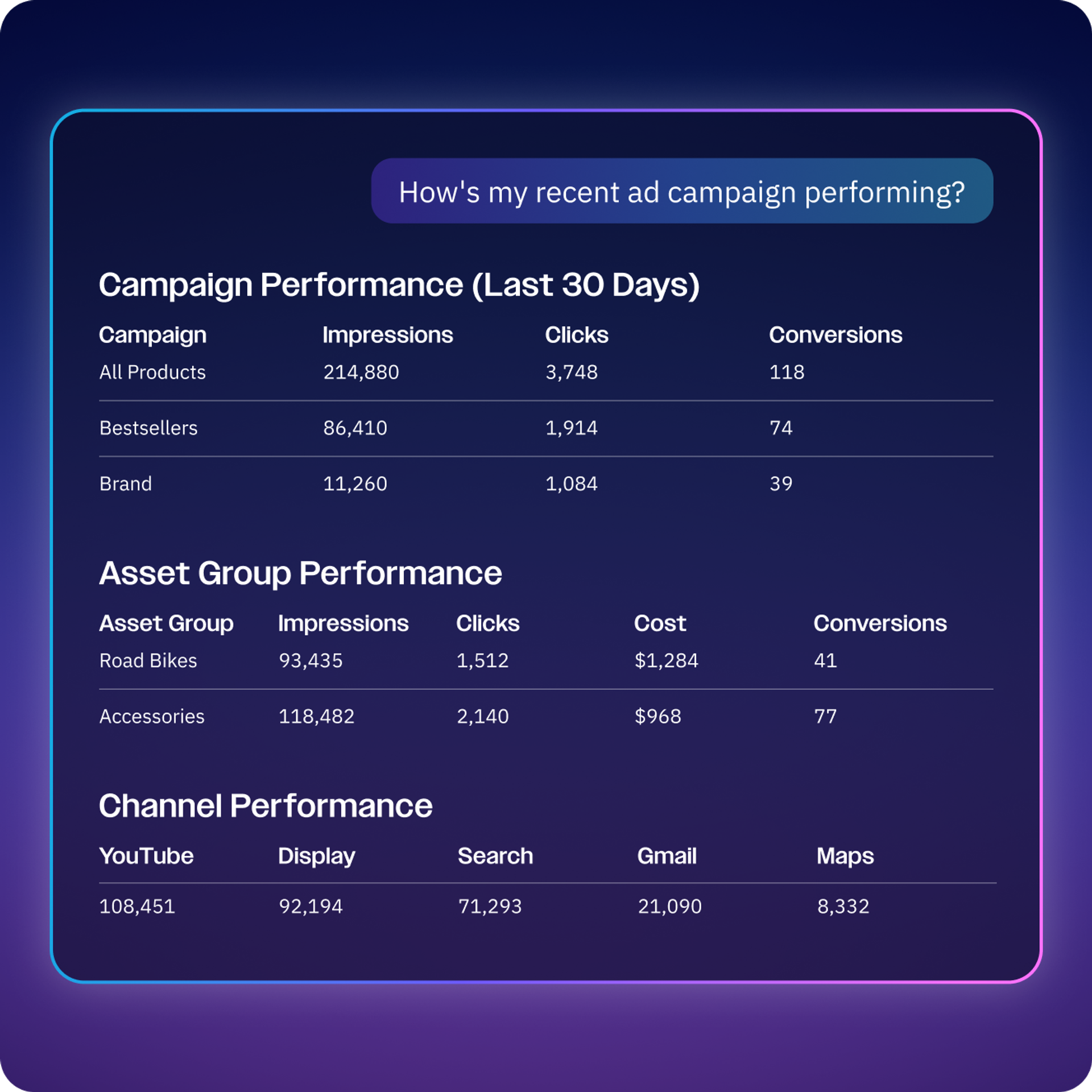
Revenue attribution credits ecommerce purchases made within 7 days of an email, so your reports show what each send sold.
Purchases from your connected store sit next to your opens and clicks.
Attribution counts store purchases only, so deals, offline sales and other channels aren't credited.

You get the numbers pulled, the trends explained and the next move drafted. That's the output of a whole team, with you in charge, so you can show leadership which sends earned store revenue.
Feraud O. said in a G2 review: "The big draw was the custom dashboard you can create for each client."
Parrish Law saves 10+ hours a month on reporting by using Active Intelligence for it.
Your Therapy Source: "When I look at the marketing revenue in the Ecommerce Dashboard, I'm always in shock."
Active Intelligence knows your business from your own campaigns, contacts and store data. It pulls the numbers and drafts a next move. Nothing runs until you approve it.

Build the segment a report points to, so every contact gets a message that fits.
Market moves, broken journeys and drafts ahead of your dates.
Dive into every feature, grouped by what you want to do.

Our open rates used to be around 17 to 19 percent. Now we’re consistently above 35 to 40 percent because of AI reporting and testing in ActiveCampaign.
Marketing analytics and reporting measures how your campaigns, automations and channels perform, and ties results like clicks, conversions and revenue back to the marketing behind them. In ActiveCampaign, reports and dashboards tie to individual contacts, and you can ask Active Intelligence about your data in plain words.
Google Analytics tracks website traffic, but it doesn’t tie those visits to individual contacts. ActiveCampaign does: opens, clicks, site visits, form submissions, purchases and custom events all sit on each contact, so you can follow one person from an email click to a landing page, a purchase and the follow-up automation.
Yes. Build a custom report that tracks one campaign, or a dashboard that shows every form and landing page together. Report on campaign engagement, website activity, sales pipelines, conversions, deals won, split test results and more, and give each client or team its own dashboard.
Revenue attribution credits an ecommerce purchase to an email when the contact buys within 7 days of it. Purchase data comes from your connected store, and attributed revenue shows in your reports. It covers ecommerce purchases only, not deals or offline sales, and is included on the Pro and Enterprise plans.
Yes. Export most reports and dashboards to share with your team or clients. Set a scheduled task in Active Intelligence, and a performance summary arrives on your schedule. ActiveCampaign connects with 1,000+ apps, and the API lets you pull contact, campaign or deal data into your own database.
Revenue attribution is included on the Pro and Enterprise plans, and every plan is priced by contact count. The pricing page lists the reports on each plan, and the free trial gives you Pro-tier features for up to 100 contacts and 100 emails, no credit card required. See pricing.
Customer results come from published ActiveCampaign customer stories and G2 reviews, in each customer’s own words and numbers. Survey figures come from ActiveCampaign’s ROI Report, a UserEvidence survey of ActiveCampaign customers, so they describe those customers, not all customers. The G2 rankings are third-party.
83% of surveyed customers see ROI within the first year.