Automate your conversations effortlessly on WhatsApp
Optimize customer interactions on WhatsApp with easy-to-use flows to profile customers, onboard them, or whatever you'd like to automate.
Optimize customer interactions on WhatsApp with easy-to-use flows to profile customers, onboard them, or whatever you'd like to automate.
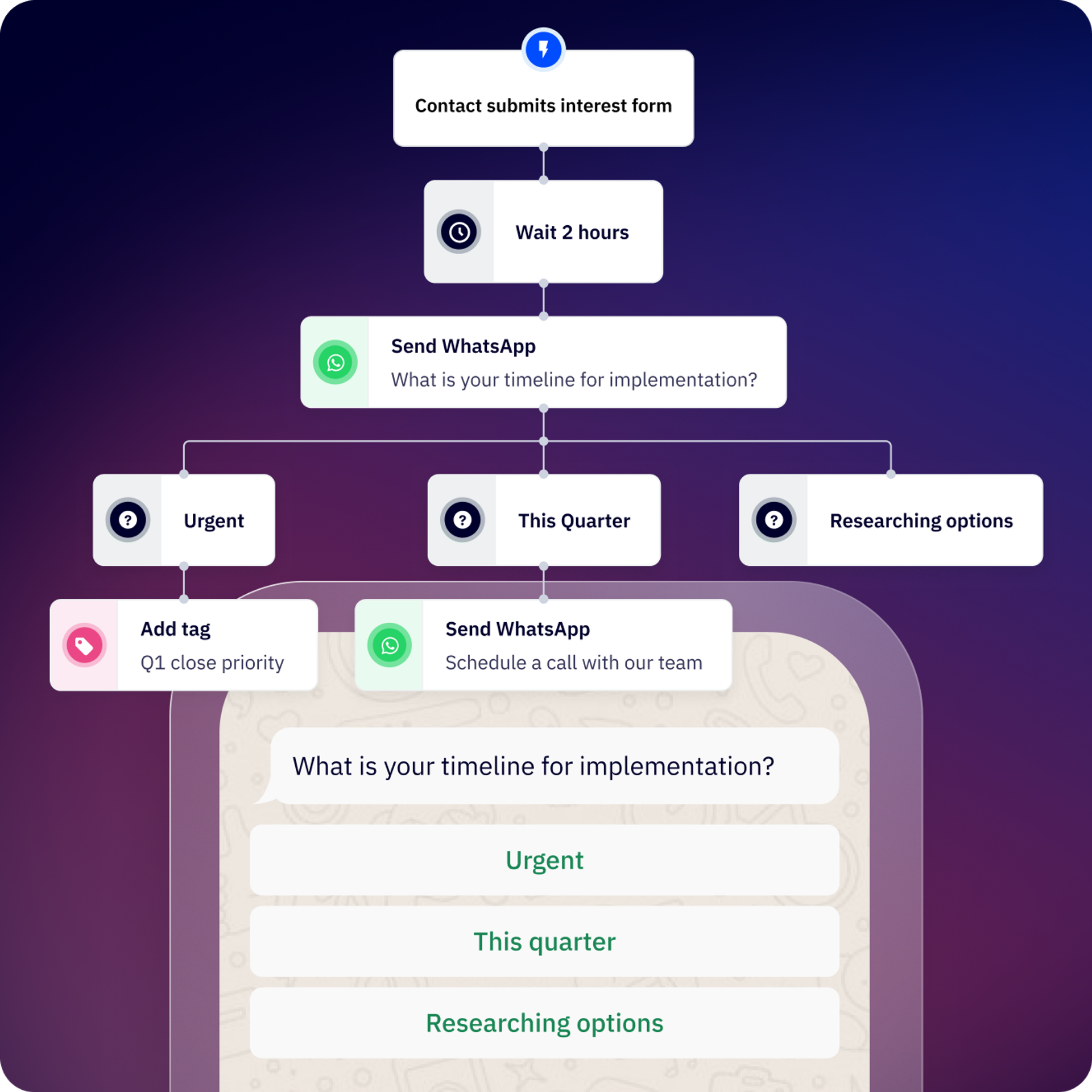
Flows is how you can automate conversations on WhatsApp Messaging and how you can quickly automate the workflow around your conversations.
Whether it's marketing, sales, or operations, you can create the workflows that make sense for your company and your needs.
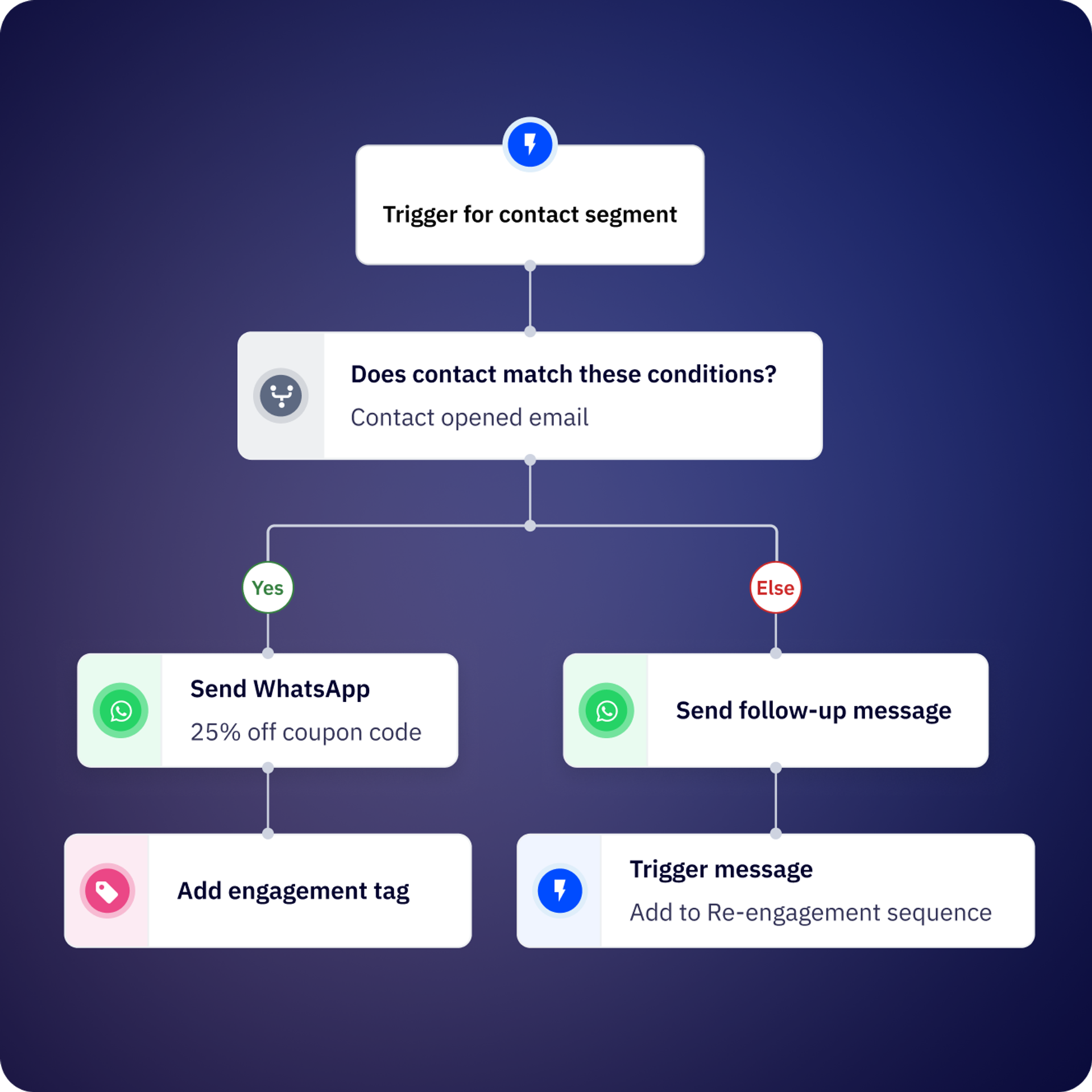
Start a flow by sending a message to your users, or if the message sent to you by a customer matches a word or pattern. You can trigger Flows directly from the shared Inbox.
Create teams to assign your conversations, contact ownership, or assign to a specific user based on your customer's needs.
Integrate your favorite tools and tech stack.
Schedule reminders via WhatsApp by creating simple flows.
Define when you want to create or update your customers' data in your CRM.
Leave behind heavy manual tasks; build follow-ups and repetitive tasks in your Flows.
Identify the precise moment when you need to contact your customers to automatically send a WhatsApp that helps you reactivate their account.
Is your main flow so big that it's hard to follow? Break it down into smaller, reusable flows and activate them anytime!
Use the Conversion API step to inform Meta which conversations/leads are qualified.
Use the API Step in our flow builder to connect to your systems.
Create forms so your customers don’t have to leave the WhatsApp conversation to share important data.
Add artificial intelligence to streamline your workflows. Connect your OpenAI account to ActiveCampaign WhatsApp Messaging.
Kredi created a chatbot, Andrea, which automatically profiles and assigns conversations. The result? A 99% delivery rate for authentication messaging and 30% faster resolution of customer inquiries.
Contalink improved coordination and passing leads between teams, which boosted–and sustained–retention.
Flows are automated conversation workflows on WhatsApp that let you create chatbots and automation sequences without code. You can use them to profile leads, qualify customers, automate responses, send follow-ups, integrate with your CRM, and handle common customer interactions—all through ActiveCampaign.
Inbound flows trigger automatically when a contact sends a message that matches specific keywords or conditions. Outbound flows are initiated by you—e.g., through ActiveCampaign, via API, or by uploading a contact list. Inbound flows are ideal for instant responses to customer inquiries, while outbound flows work for campaigns, reminders, and proactive outreach.
You can create your first functional Flow in approximately 10 minutes using the visual canvas editor. More complex flows with multiple branches, API connections, and CRM integrations may take longer depending on your use case.
Flows can automate lead qualification and profiling, customer support responses, order tracking updates, appointment reminders, payment follow-ups, CSAT surveys, contact assignment to team members, CRM data synchronization, re-engagement campaigns, and custom workflows using API connections to external systems.
Yes. Conditional steps let you branch your flow based on contact variables, flow variables (answers from previous steps), global variables (date, time, business hours), or execution variables.
Getting tactical: All conditions use AND logic, meaning all conditions must be met to follow the “THEN” branch; otherwise, the flow follows the “OTHERWISE” branch.
Yes. You can create reusable sub-flows and trigger them from larger Flows at any time. This helps keep complex automations manageable and allows you to maintain commonly used sequences (like contact qualification or CRM sync) in one place.
Flows include message steps (send text, media, templates), question steps (collect open-ended responses), menu steps (present button options), conditional steps (branch based on logic), action steps (update contact properties), delay steps (wait before continuing), API connection steps (integrate external systems), assignment steps (route to team members), and end steps (complete the flow).
While Flows can send messages in any language supported by WhatsApp, you’ll need to create separate branches or flows for different languages. You can use conditional logic to route contacts based on their language preference or location data stored in their contact profile.
Automating WhatsApp conversations through Flows delivers measurable ROI by reducing manual workload, accelerating response times, and improving conversion rates throughout the customer journey. Businesses using WhatsApp automation typically see significant efficiency gains and revenue improvements compared to manual conversation handling.
Key ROI drivers from WhatsApp Messaging include:
Real-world impact:
To understand the potential impact for your business, explore our WhatsApp Messaging ROI Report for benchmarks on automation efficiency, conversion improvements, and cost savings that WhatsApp Messaging customers experience (based on a customer survey). You can also calculate your potential returns using our WhatsApp ROI Calculator, which estimates revenue impact based on your conversation volume, response times, and automation opportunities.
Try it free for 14 days.


