Automatize as conversas sem esforço no WhatsApp
Otimize as interações com clientes no WhatsApp com fluxos fáceis de usar para criar perfis de clientes, integrá-los ou fazer a automação que você quiser.
Otimize as interações com clientes no WhatsApp com fluxos fáceis de usar para criar perfis de clientes, integrá-los ou fazer a automação que você quiser.
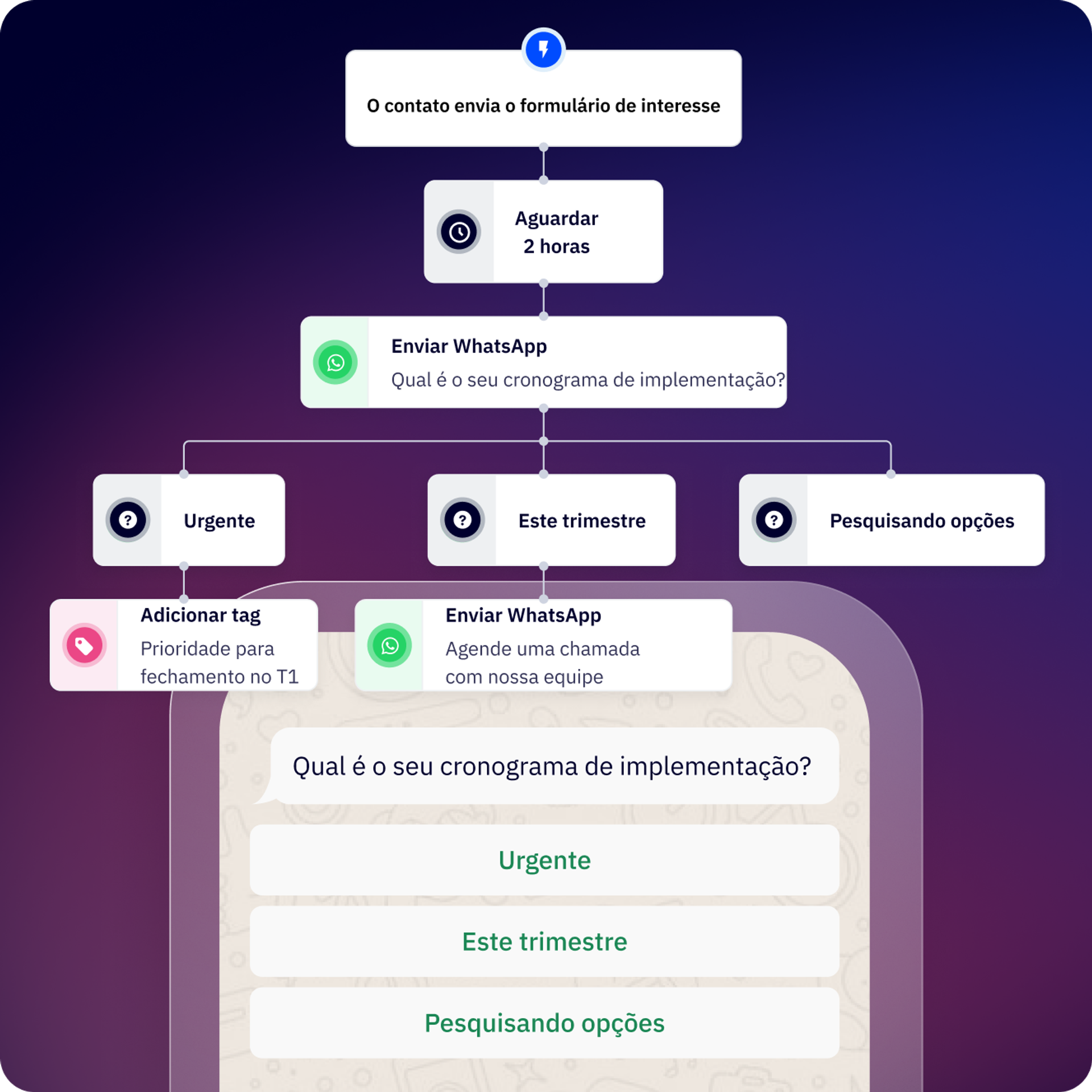
O Flows permite automatizar conversas no WhatsApp Messaging bem como todo o fluxo de trabalho em torno das conversas.
Seja no setor de marketing, vendas ou operações, você pode criar os fluxos de trabalho que atendam às necessidades da empresa e às suas.
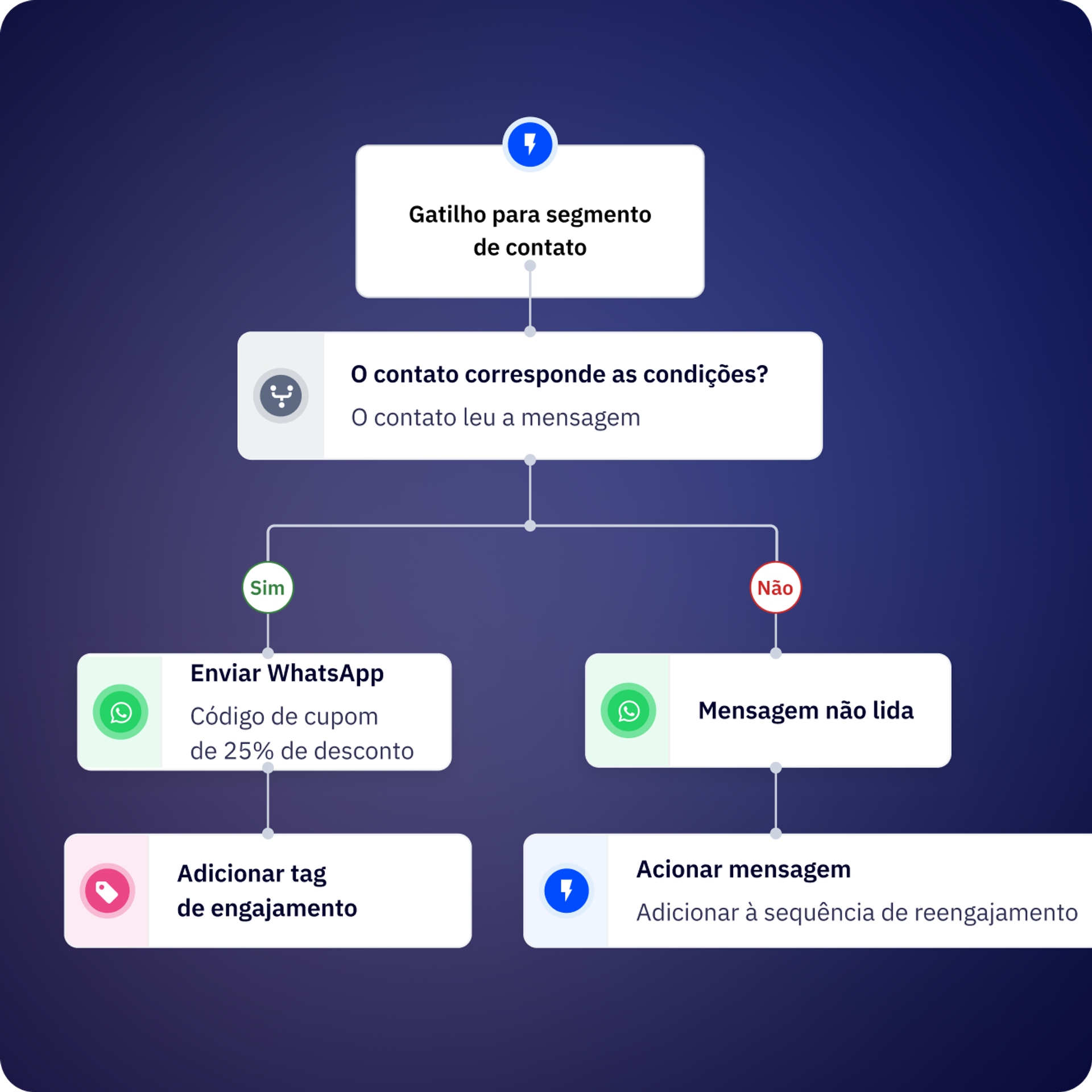
Um fluxo é iniciado quando você envia uma mensagem a um usuário ou quando a mensagem recebida de um cliente corresponde a uma palavra ou padrão. Você pode acionar fluxos diretamente da caixa de entrada compartilhada.
Crie equipes para atribuir conversas, a responsabilidade pelos contatos ou para designar pessoas específicas com base nas necessidades de clientes.
Integre as ferramentas e tecnologias favoritas.
Agende lembretes via WhatsApp desenvolvendo fluxos simples.
Defina quando gostaria de criar ou atualizar os dados de clientes no CRM.
Deixe de lado as tarefas manuais pesadas; crie follow-ups e tarefas repetitivas no Flows.
Identifique o momento exato em que você precisa contatar clientes para enviar automaticamente uma mensagem pelo WhatsApp que os ajude a reativar as contas.
O fluxo principal é tão extenso que fica difícil de acompanhar? Faça uma divisão em fluxos menores e reaproveitáveis que podem ser ativados quando você quiser!
Use a etapa da API de Conversões para informar à Meta quais conversas/leads são qualificados.
Use a etapa de API em nosso construtor de fluxos para conectar-se aos sistemas.
Crie formulários para que os clientes não precisem sair da conversa no WhatsApp para compartilhar dados importantes.
Adicione a inteligência artificial para otimizar os fluxos de trabalho. Conecte sua conta OpenAI ao WhatsApp Messaging da ActiveCampaign.
A Kredi criou um chatbot, Andrea, que cria automaticamente perfis e atribui conversas. O resultado foi uma taxa de entrega de 99% para mensagens de autenticação e uma resolução 30% mais rápida das dúvidas dos clientes.
A Contalink melhorou a coordenação e o compartilhamento de informações entre as equipes, o que impulsionou e ajudou a retenção de talentos.
Flows são fluxos de conversa automatizados do WhatsApp que possibilitam a criação de chatbots e sequências de automação sem precisar de códigos. Você pode usá-los para criar perfis de leads, qualificar clientes, automatizar respostas, enviar follow-ups, integrar ao seu CRM e lidar com interações comuns de clientes — tudo isso por meio da ActiveCampaign.
Os fluxos de entrada são acionados automaticamente quando um contato envia uma mensagem que corresponde a palavras-chave ou condições específicas. Os fluxos de saída são iniciados por você — por exemplo, por meio da ActiveCampaign, via API ou fazendo upload de uma lista de contatos. Os fluxos de entrada são ideais para respostas instantâneas a consultas de clientes, enquanto os fluxos de saída funcionam para campanhas, lembretes e contato proativo.
Você pode criar seu primeiro fluxo funcional em aproximadamente 10 minutos usando o editor visual de tela. Fluxos mais complexos, com múltiplas ramificações, conexões de API e integrações de CRM, podem levar mais tempo, dependendo do seu caso de uso.
O Flows pode automatizar a qualificação e o perfil de leads, as respostas de suporte ao cliente, as atualizações de rastreamento de pedidos, follow-ups de agendamento, o acompanhamento de pagamentos, as pesquisas de satisfação do cliente, a atribuição de contatos a membros da equipe, a sincronização de dados de CRM, as campanhas de reengajamento e os fluxos de trabalho personalizados usando conexões de API com sistemas externos.
Sim. As etapas condicionais permitem ramificar o fluxo com base em variáveis de contato, variáveis de fluxo (respostas das etapas anteriores), variáveis globais (data, hora, horário comercial) ou variáveis de execução.
Para entender a situação: todas as condições usam a lógica E, o que significa que todas as condições devem ser atendidas para seguir a ramificação “ENTÃO”; caso contrário, o fluxo seguirá a ramificação “SENÃO”.
Sim. Você pode criar subfluxos reaproveitáveis e os acionar a partir de fluxos maiores a qualquer momento. Isso ajuda a manter automações complexas gerenciáveis e permite que você mantenha sequências usadas com frequência (como qualificação de contatos ou sincronização com o CRM) em um só lugar.
Os fluxos podem incluir etapas de mensagens (enviar texto, mídia e modelos), etapas de perguntas (coletar respostas abertas), etapas de menu (apresentar opções de botão), etapas condicionais (ramificação com base na lógica), etapas de ação (atualização de propriedades do contato), etapas de atraso (aguardar antes de continuar), etapas de conexão de API (integração de sistemas externos), etapas de atribuição (encaminhar para membros da equipe) e etapas finais (concluir o fluxo).
Embora seja possível enviar mensagens pelo Flows em qualquer idioma compatível com o WhatsApp, você precisará criar ramificações ou fluxos separados para cada idioma. Você pode usar a lógica condicional para direcionar contatos com base na preferência de idioma ou nos dados de localização armazenados no perfil dos contatos.
Automatizar conversas do WhatsApp por meio do Flows proporciona um ROI mensurável, reduzindo a carga de trabalho manual, acelerando os tempos de resposta e melhorando as taxas de conversão ao longo da jornada do cliente. Empresas que usam a automação do WhatsApp geralmente observam ganhos significativos de eficiência e melhorias na receita em comparação com o gerenciamento manual de conversas.
Os principais fatores de ROI do WhatsApp Messaging incluem:
Impacto no mundo real:
Para compreender o possível impacto para o seu negócio, conheça nosso Relatório de ROI no WhatsApp Messaging para obter benchmarks sobre a eficiência da automação, melhorias na conversão e redução de custos que os clientes do WhatsApp Messaging experimentam (com base em uma pesquisa com clientes). Você também pode calcular as possibilidades de os retornos usando nosso Calculador de ROI do WhatsApp, que dá uma estimativa do impacto na receita com base no volume de conversas, tempos de resposta e oportunidades de automação.
Experimente grátis por 14 dias.


