Automatisez facilement vos conversations sur WhatsApp
Optimisez vos interactions clients sur WhatsApp grâce à des flux faciles à utiliser pour établir le profil de vos clients, les intégrer ou automatiser tout ce que vous souhaitez.
Optimisez vos interactions clients sur WhatsApp grâce à des flux faciles à utiliser pour établir le profil de vos clients, les intégrer ou automatiser tout ce que vous souhaitez.
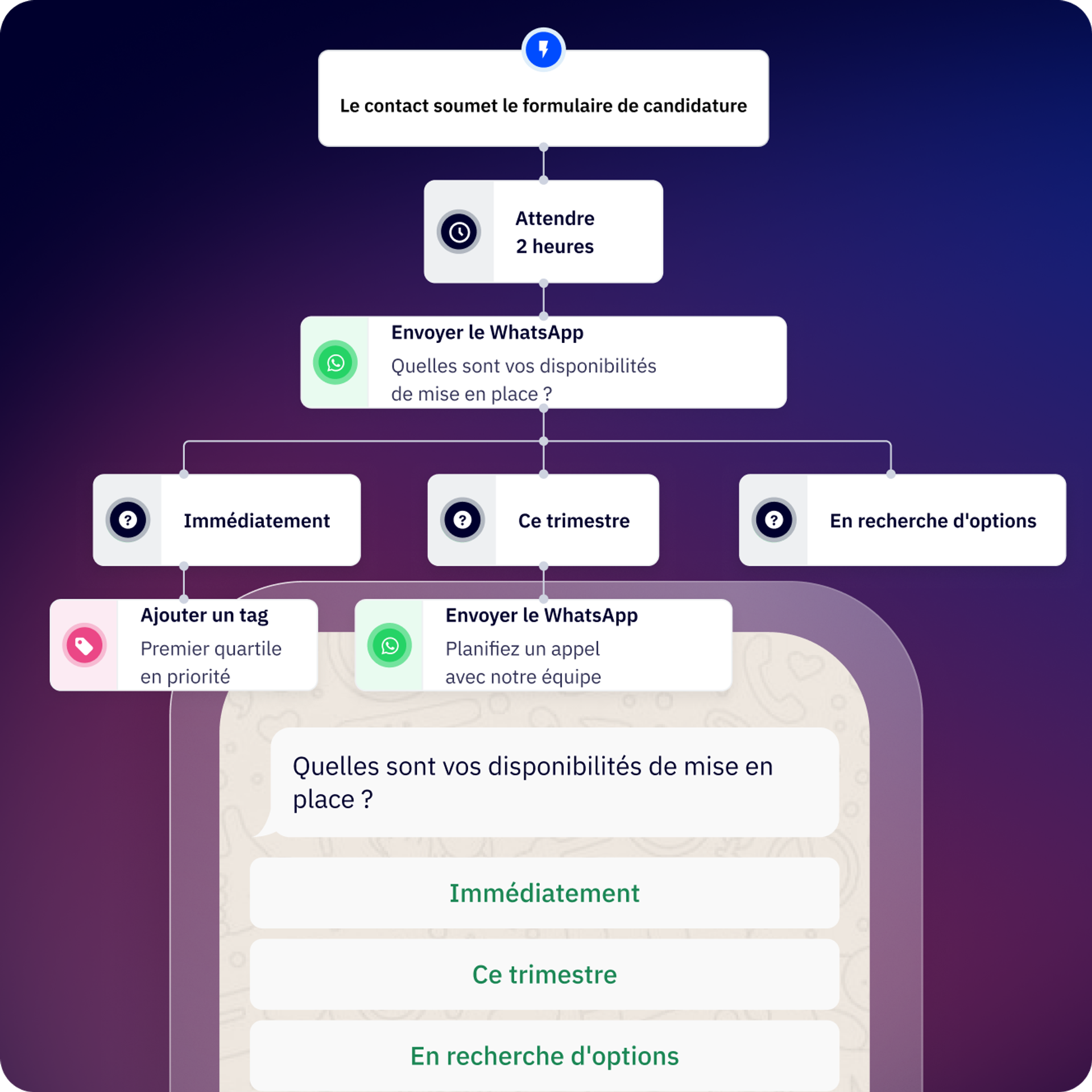
Flux vous permet d’automatiser les conversations sur la messagerie WhatsApp et le flux de travail de vos conversations.
Que ce soit pour le marketing, les ventes ou les opérations, vous pouvez créer des flux de travail adaptés à votre entreprise et à vos besoins.
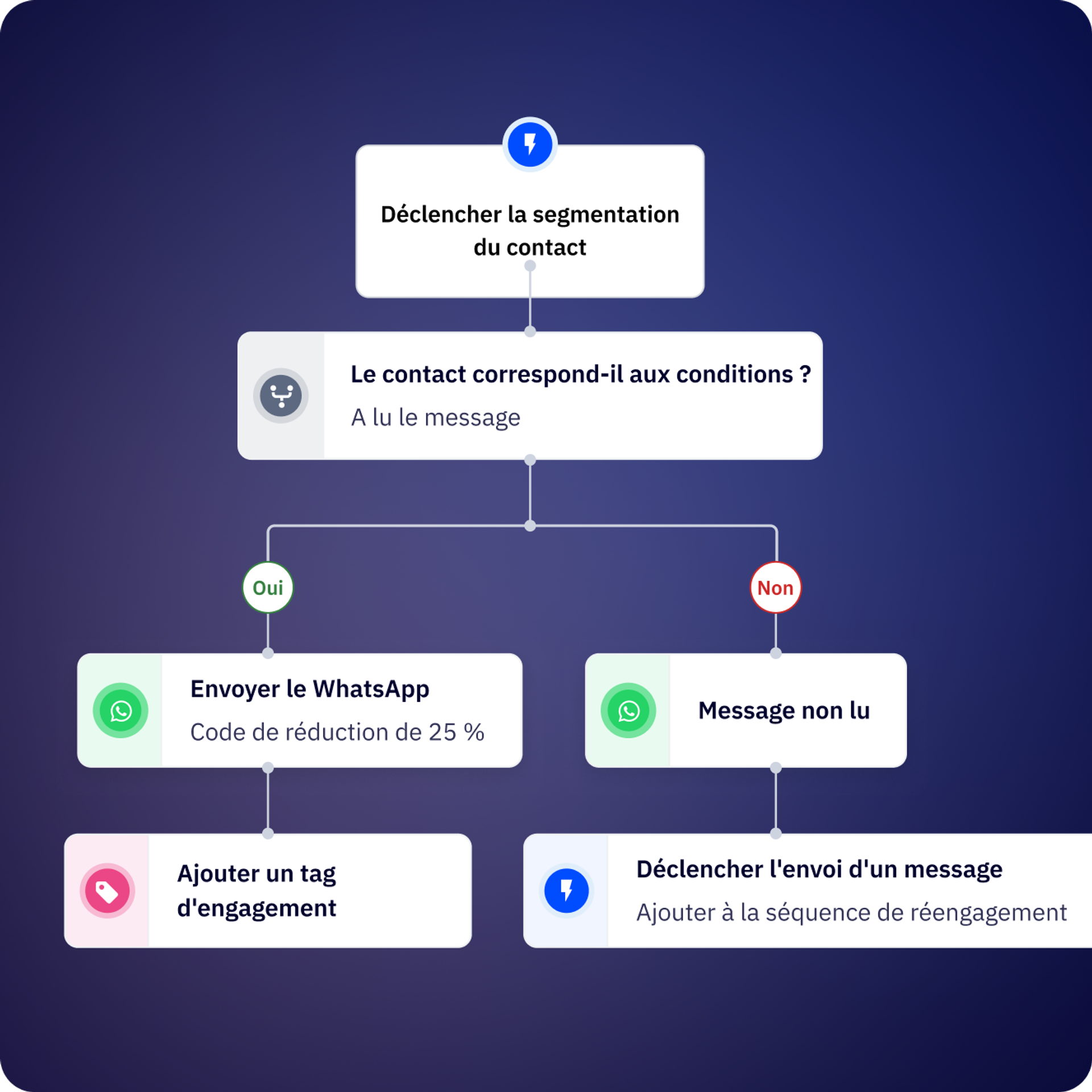
Démarrez un flux en envoyant un message à vos utilisateurs ou si le message d’un client correspond à un mot ou un modèle. Vous pouvez déclencher des flux directement depuis la boîte de réception partagée.
Créez des équipes pour attribuer les conversations, la propriété des contacts ou les attribuer à un utilisateur spécifique en fonction des besoins du client.
Intégrez vos outils et technologies préférés.
Planifiez des rappels via WhatsApp en créant des flux simples.
Définissez un créneau de création ou mise à jour des données de vos clients dans votre CRM.
Laissez tomber les tâches manuelles fastidieuses et intégrez les suivis et tâches répétitives à Flux.
Repérez le moment précis de contact des clients pour leur envoyer automatiquement un message WhatsApp qui vous permettra de réactiver leur compte.
Votre flux principal est-il complexe au point d’en être difficile à suivre ? Décomposez-le en flux plus petits et réutilisables que vous pouvez activer à tout moment !
Utilisez l’étape API de conversion pour indiquer à Meta les conversations ou prospects qualifiés.
Utilisez l’étape API de notre générateur de flux pour connecter vos systèmes.
Créez des formulaires pour que vos clients puissent partager des données importantes sans quitter la conversation WhatsApp.
Optimisez vos flux de travail grâce à l’intelligence artificielle. Connectez votre compte OpenAI à la messagerie WhatsApp d’ActiveCampaign.
Kredi a créé un chatbot, nommé Andrea, qui établit des profils et attribue automatiquement les conversations. Résultat ? Un taux de délivrabilité de 99 % pour les messages d’authentification et une résolution des demandes clients 30 % plus rapide.
Contalink a amélioré la coordination et la transmission des informations entre les équipes, ce qui a stimulé et maintenu la fidélisation.
Ce sont des flux de conversation automatisés sur WhatsApp qui vous permettent de créer des chatbots et des séquences d’automatisation sans codage. Vous pouvez les utiliser pour établir les profils de vos prospects, qualifier vos clients, automatiser vos réponses, envoyer des relances, intégrer votre CRM et gérer les interactions clients courantes, le tout via ActiveCampaign.
Les flux entrants se déclenchent automatiquement lorsqu’un contact envoie un message avec des mots-clés ou remplissant des conditions spécifiques. Les flux sortants désignent les conversations que vous initiez, par exemple via ActiveCampaign, une API ou en important une liste de contacts. Ils sont parfaits pour répondre instantanément aux demandes des clients, tandis que les flux sortants conviennent aux campagnes, aux rappels et aux prises de contact proactives.
Vous pouvez créer votre premier flux fonctionnel en une dizaine de minutes grâce à l’éditeur visuel. Les flux plus complexes, comportant plusieurs branches, des connexions API et des intégrations CRM, peuvent prendre plus de temps selon votre cas d’utilisation.
Avec Flux, vous automatisez la qualification et le profilage des prospects, les réponses aux demandes d’assistance client, les mises à jour du suivi des commandes, les rappels de rendez-vous, les suivis de paiement, les enquêtes de satisfaction client, l’attribution des contacts aux membres de l’équipe, la synchronisation des données CRM, les campagnes de réengagement et les flux de travail personnalisés utilisant des connexions API à des systèmes externes.
Oui. Les étapes conditionnelles vous permettent de diviser votre flux en fonction de variables de contact, de variables de flux (réponses des étapes précédentes), de variables globales (date, heure, heures d’ouverture) ou de variables d’exécution.
Adoptez une approche tactique : toutes les conditions utilisent la logique « ET », ce qui signifie que toutes les conditions doivent être remplies pour suivre la branche « ALORS » ; sinon, le flux suit la branche « SINON ».
Oui. Vous pouvez créer des sous-flux réutilisables et les déclencher à tout moment à partir de flux plus importants. Cela permet de simplifier la gestion des automatisations complexes et de centraliser les séquences fréquemment utilisées (comme la qualification des contacts ou la synchronisation CRM).
Flux comprend des étapes de message (envoi de texte, de médias, de modèles), des étapes de question (collecte de réponses ouvertes), des étapes de menu (présentation des options de bouton), des étapes conditionnelles (branchement basé sur la logique), des étapes d’action (mise à jour des propriétés du contact), des étapes de délai (attente avant de continuer), des étapes de connexion API (intégration de systèmes externes), des étapes d’attribution (acheminement vers les membres de l’équipe) et des étapes de fin (achèvement du flux).
Bien que Flux puisse envoyer des messages dans toutes les langues prises en charge par WhatsApp, vous devrez créer des branches ou des flux distincts pour chaque langue. Vous pouvez utiliser une logique conditionnelle pour acheminer les contacts en fonction de leur langue préférée ou des données de localisation enregistrées dans leur profil.
Le fait d’automatiser les conversations WhatsApp avec Flux offre un ROI mesurable : charge de travail manuelle réduite, délais de réponse raccourcis et taux de conversion améliorés tout au long du parcours client. Les entreprises qui utilisent l’automatisation WhatsApp gagnent généralement en efficacité et augmentent significativement leurs revenus par rapport à une gestion manuelle des conversations.
Principaux facteurs de ROI avec la messagerie WhatsApp :
Impact concret :
Pour comprendre les retombées potentielles sur votre entreprise, consultez notre Rapport sur le ROI de la messagerie WhatsApp (en anglais) pour obtenir des points de référence sur l’efficacité de l’automatisation, l’amélioration des conversions et les économies réalisées par les clients de la messagerie WhatsApp (d’après une enquête client). Vous pouvez également calculer votre ROI potentiel grâce à notre calculateur de ROI WhatsApp (en anglais), qui fournit une estimation de l’impact sur le chiffre d’affaires en fonction du volume de vos conversations, des temps de réponse et des opportunités d’automatisation.
Profitez de 14 jours d'essai gratuit.


