Automatizza le tue conversazioni su WhatsApp senza sforzo
Ottimizza le interazioni con i clienti su WhatsApp con flussi facili da usare, per profilare i clienti, effettuarne l'onboarding o automatizzare qualsiasi altro processo.
Ottimizza le interazioni con i clienti su WhatsApp con flussi facili da usare, per profilare i clienti, effettuarne l'onboarding o automatizzare qualsiasi altro processo.
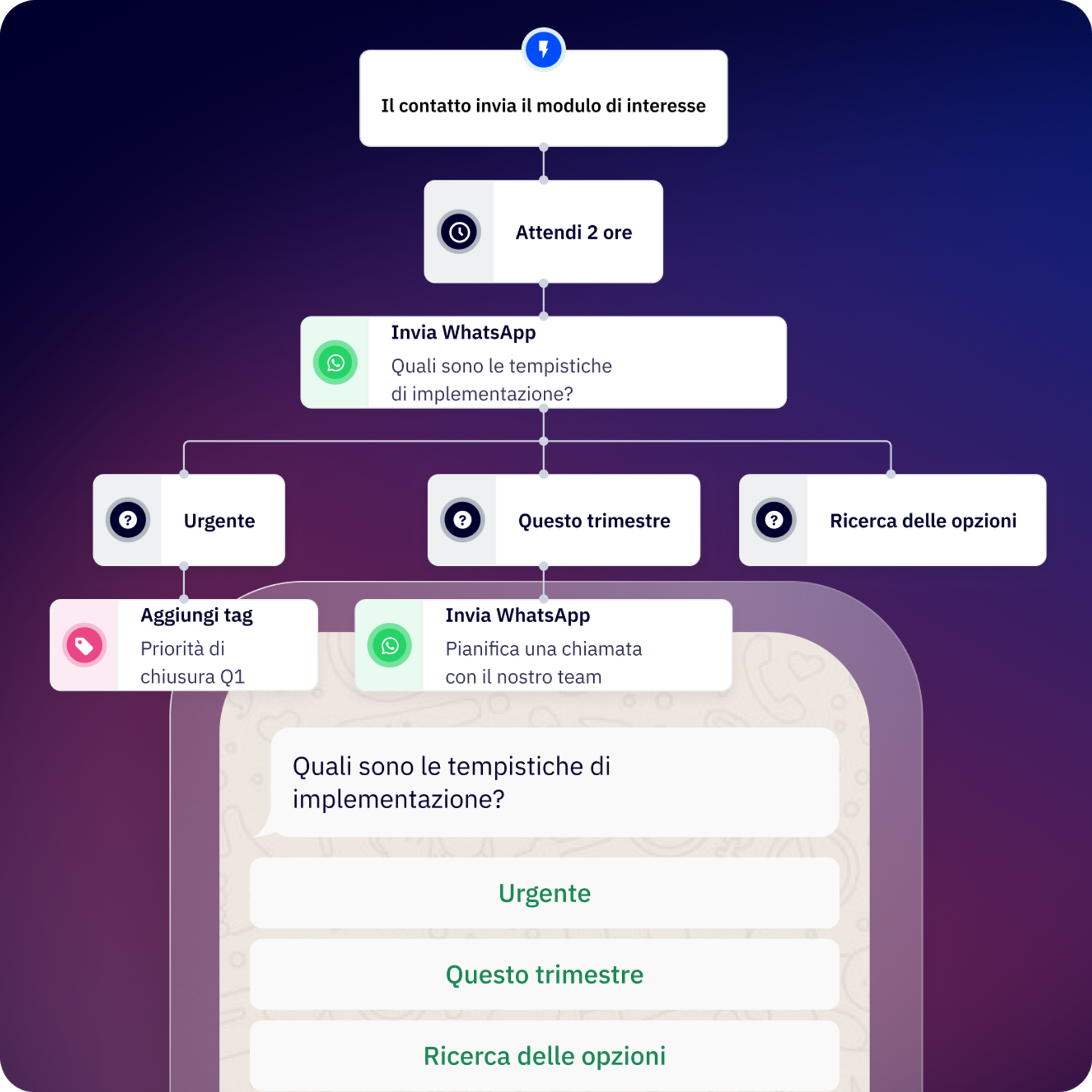
Con Flows puoi automatizzare le conversazioni su Messaggistica WhatsApp e velocizzare i flussi di lavoro in base alle conversazioni.
Che si tratti di marketing, vendite oppure operazioni, puoi creare flussi di lavoro più adatti alla tua azienda e alle tue esigenze.
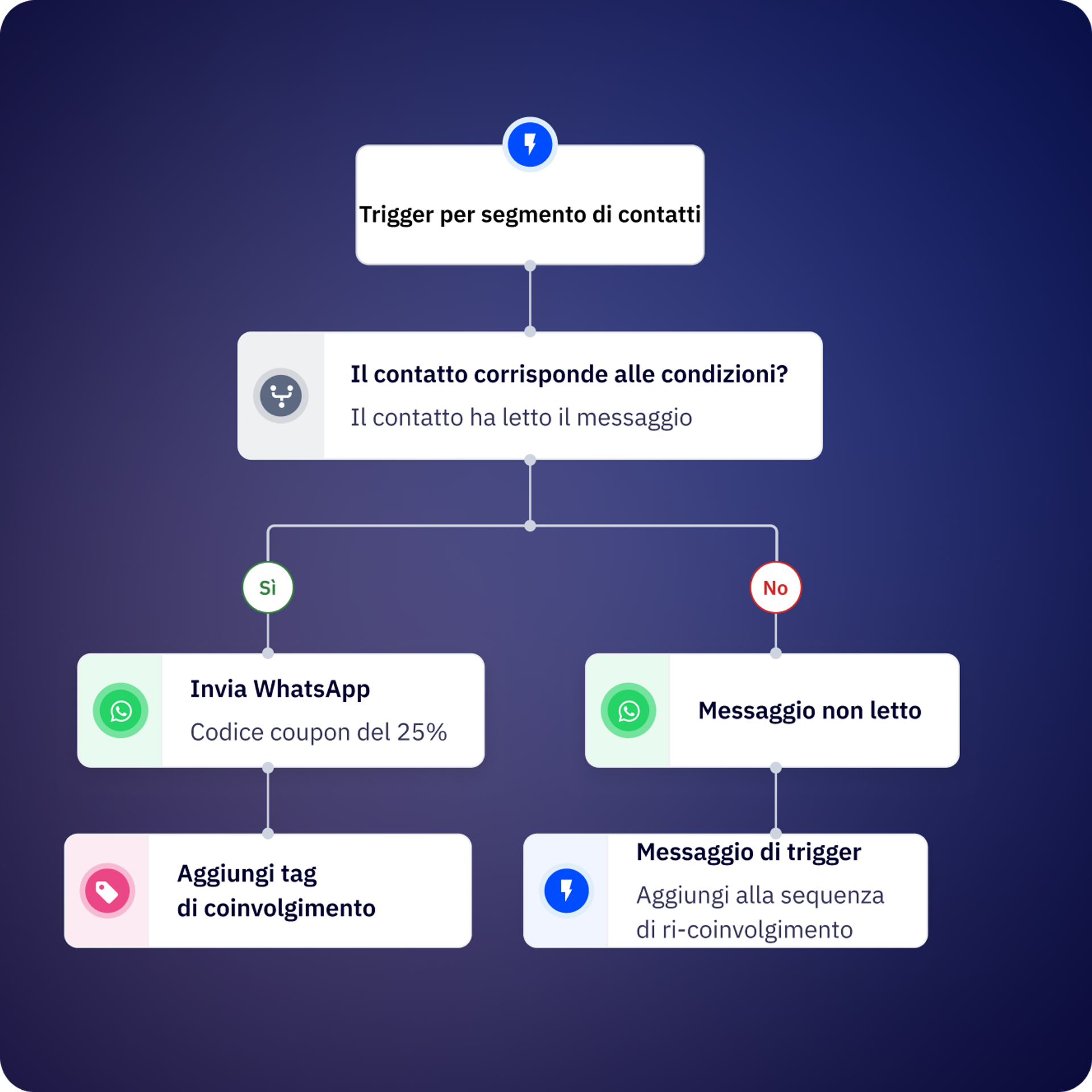
Avvia un flusso inviando un messaggio ai tuoi utenti o se un messaggio ricevuto da un tuo cliente contiene una certa parola o pattern. Puoi attivare Flows direttamente dalla posta in arrivo condivisa.
Crea team a cui assegnare le conversazioni, la proprietà dei contatti o un utente specifico in base alle necessità del tuo cliente.
Integra i tuoi strumenti e stack tecnologici preferiti.
Programma promemoria via WhatsApp creando flussi semplici.
Stabilisci quando vuoi creare o aggiornare i dati dei clienti nel tuo CRM.
Abbandona i task manuali impegnativi; crea follow-up e task ripetitivi su Flows.
Identifica il momento preciso in cui contattare i tuoi clienti per inviare automaticamente un messaggio WhatsApp che aiuterà a riattivare il loro account.
Il tuo flusso principale è così esteso che non riesci a seguirlo? Dividilo in flussi più piccoli e riutilizzabili e riattivali in qualsiasi momento!
Usa l'API Conversions per comunicare a Meta quali conversazioni o lead sono qualificati.
Usa l'API nel nostro generatore di flussi per connetterti ai tuoi sistemi.
Crea moduli, così che i clienti non debbano abbandonare le conversazioni WhatsApp per condividere dati importanti.
Aggiungi l'intelligenza artificiale per semplificare i tuoi flussi di lavoro. Collega il tuo account OpenAI alla Messaggistica WhatsApp di ActiveCampaign.
Kredi ha creato un chatbot, Andrea, che profila e assegna le conversazioni automaticamente. Il risultato? Un tasso di consegna del 99% per i messaggi di autenticazione e una risoluzione delle richieste dei clienti il 30% più rapida.
Contalink ha migliorato la coordinazione e il passaggio di lead tra team, aumentando e sostenendo la fidelizzazione.
I flussi sono flussi di lavoro di conversazioni automatizzati su WhatsApp, che ti permettono di creare chatbot e sequenze di automazione senza codici. Puoi usarli per profilare i lead, qualificare clienti, automatizzare le risposte, inviare follow-up, integrarli con il tuo CRM e occuparsi di interazioni con i clienti comuni, tutto tramite ActiveCampaign.
I flussi in entrata si attivano automaticamente quando un contatto invia un messaggio con parole chiave o condizioni specifiche. I flussi in uscita sono avviati da te, attraverso ActiveCampaign, API o caricando una lista contatti. I flussi in entrata sono l’ideale per risposte istantanee alle domande dei clienti, mentre i flussi in uscita servono per campagne, promemoria e sensibilizzazione attiva.
Puoi creare il tuo primo flusso funzionale in circa 10 minuti, usando l’editor visivo. Per flussi più complessi, con molteplici diramazioni, connessioni API e integrazioni CRM potrebbe volerci più tempo, a seconda del caso d’uso.
Flows può automatizzare la qualificazione e la profilazione dei lead, risposte dell’assistenza clienti, gli aggiornamenti sul tracciamento degli ordini, i promemoria di appuntamenti, i follow-up per i pagamenti, i sondaggi CSAT, le assegnazioni dei contatti ai membri del team, la sincronizzazione dei dati del CRM, le campagne di ri-coinvolgimento e i flussi di lavoro personalizzati usando connessioni API a sistemi esterni.
Sì, i passaggi condizionali permettono di diramare il flusso in base alle variabili dei contatti, dei flussi (risposte da passaggi precedenti), variabili globali (data, ora, orario di lavoro) o variabili esecutive.
In pratica: tutte le condizioni usano la logica E, dunque tutte quelle da soddisfare seguiranno il ramo «ALLORA»; diversamente, seguiranno il ramo «ALTRIMENTI».
Sì, puoi creare sotto flussi riutilizzabili e attivarli da flussi più estesi quando vuoi. Questo permette di gestire facilmente automazioni complesse e di conservare sequenze di uso comune (come qualificazione dei contatti o la sincronizzazione del CRM) in un unico posto.
Flows include passaggi per messaggi (inviare testi, materiali multimediali, modelli), domande (raccogliere risposte aperte), menu (offrire opzioni per i pulsanti), passaggi condizionali (rami in base alla logica), di azione (aggiornare le proprietà dei contatti), proroga (attendere prima di continuare), connessione API (integrare sistemi esterni), assegnazione (inviare ai membri del team) e fine (completare il flusso).
Flows può inviare messaggi in tutte le lingue supportate da WhatsApp, ma dovrai creare dei rami o dei flussi separati per lingue diverse. Puoi usare la logica condizionale per dirigere i contatti in base alle loro preferenze linguistiche o i dati sulla posizione memorizzati sul profilo.
Automatizzare le conversazioni WhatsApp con Flows genera un ROI misurabile, tramite la riduzione del lavoro manuale, la velocizzazione dei tempi di risposta e il miglioramento dei tassi di conversione lungo l’intero percorso del cliente. Le aziende che usano l’automazione di WhatsApp registrano generalmente notevoli miglioramenti in termini di efficienza e di entrate rispetto alla gestione manuale delle conversazioni.
Le principali fonti di ROI della Messaggistica WhatsApp sono:
Impatto nel mondo reale:
Per comprendere appieno l’impatto potenziale per la tua azienda, leggi il nostro Report sul ROI della Messaggistica WhatsApp (in inglese) per conoscere i benchmark sull’efficienza dell’automazione, i miglioramenti delle conversioni e i risparmi sui costi, ottenuti dai clienti che usano la Messaggistica WhatsApp (in base a un sondaggio clienti). Puoi anche calcolare i tuoi ritorni potenziali usando il Calcolatore del ROI di WhatsApp (in inglese), che stima l’impatto sulle entrate, in base al tuo volume di conversazioni, ai tempi di risposta e alle opportunità di automazione.
Provalo gratis per 14 giorni.


