Automatisiere mühelos deine Gespräche auf WhatsApp
Optimiere die Kundeninteraktionen auf WhatsApp mit benutzerfreundlichen Flows, um Kundenprofile zu erstellen, sie einzubinden oder was auch immer du automatisieren möchtest.
Optimiere die Kundeninteraktionen auf WhatsApp mit benutzerfreundlichen Flows, um Kundenprofile zu erstellen, sie einzubinden oder was auch immer du automatisieren möchtest.
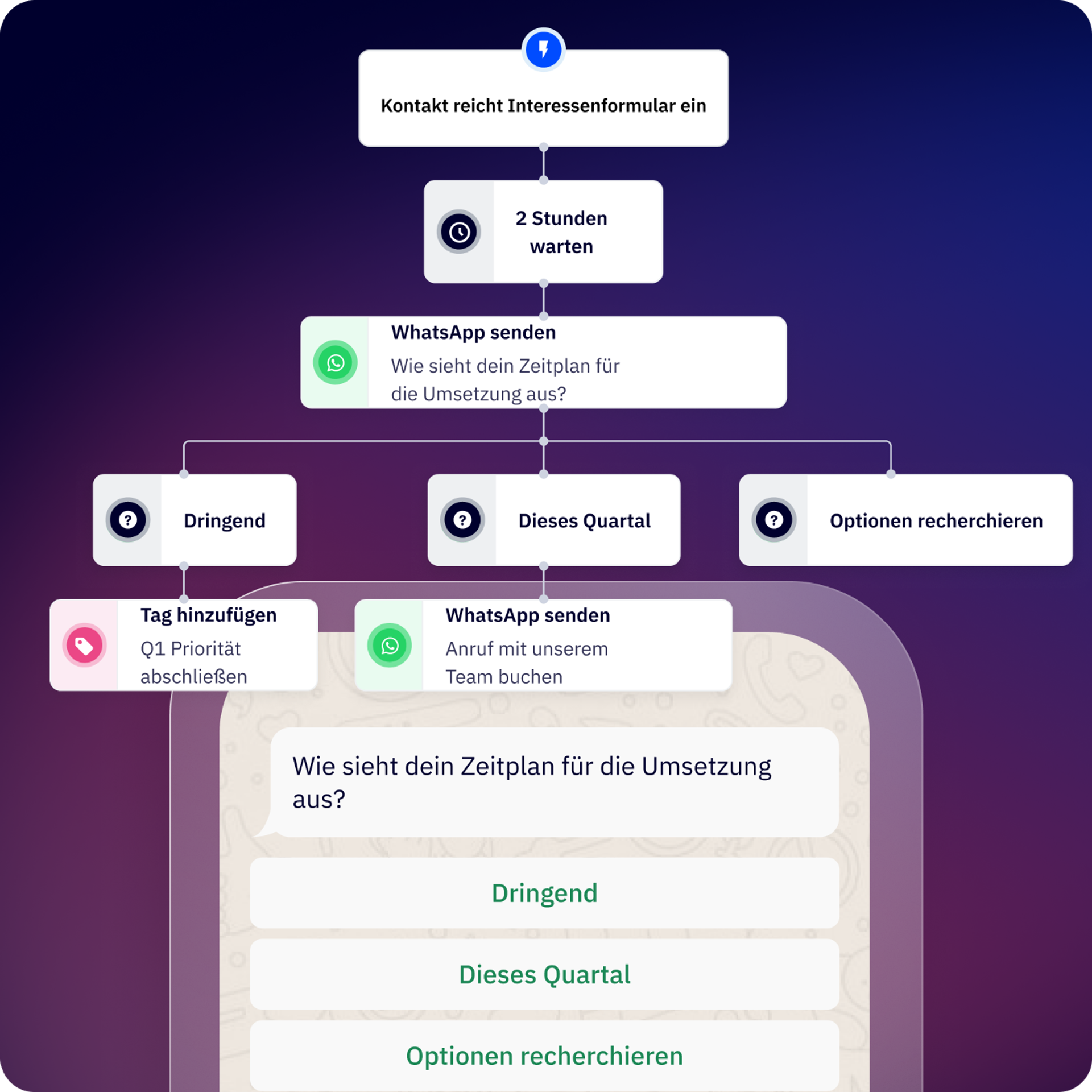
Flows ermöglicht die Automation von Gesprächen auf WhatsApp Nachrichten und die schnelle Automation des Workflows rund um deine Gespräche.
Ob Marketing, Vertrieb oder operative Abläufe – du kannst die Workflows erstellen, die für dein Unternehmen und deine Bedürfnisse sinnvoll sind.
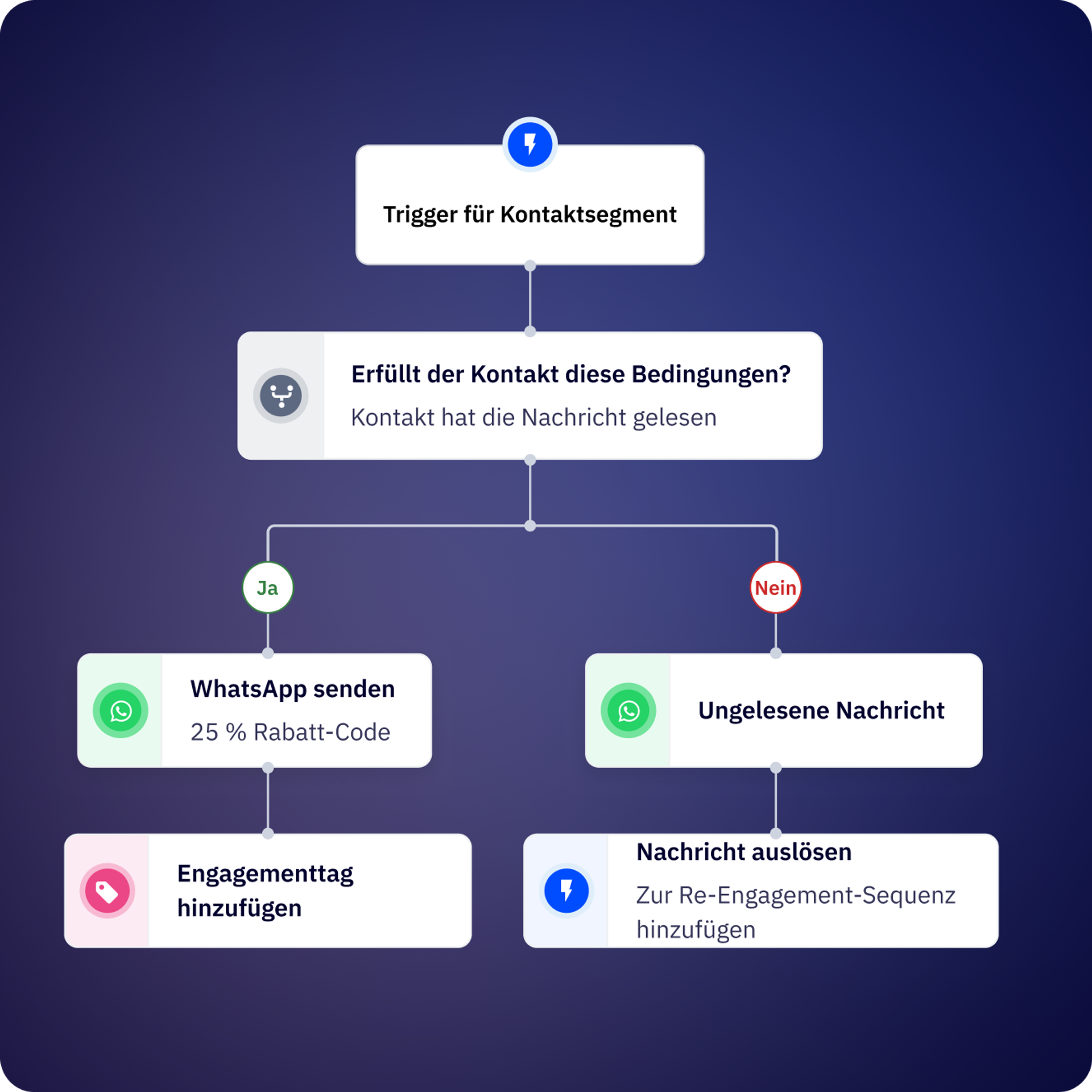
Starte einen Flow, indem du eine Nachricht an deine Benutzer sendest oder wenn die von einem Kunden an dich gesendete Nachricht einem Wort oder Muster entspricht. Du kannst Flows direkt über den gemeinsamen Posteingang auslösen.
Erstelle Teams, um deine Gespräche zuzuweisen, die Zuständigkeit für Kontakte festzulegen oder sie einem bestimmten Benutzer zuzuordnen, je nach den Bedürfnissen deiner Kunden.
Verknüpfe deine bevorzugten Tools und Tech-Stacks.
Plane Erinnerungen über WhatsApp, indem du einfache Flows erstellst.
Lege fest, wann du die Daten deiner Kunden in deinem CRM erstellen oder aktualisieren möchtest.
Lasse schwere manuelle Aufgaben hinter dir; baue Follow-ups und sich wiederholende Aufgaben in deine Flows ein.
Ermittle den genauen Zeitpunkt, zu dem du deine Kunden kontaktieren musst, um automatisch eine WhatsApp-Nachricht zu senden, die dir dabei hilft, ihre Konten zu reaktivieren.
Ist dein Haupt-Flow so groß, dass er schwer zu verfolgen ist? Teile ihn in kleinere, wiederverwendbare Flows auf und aktiviere sie jederzeit!
Verwende den Konversions-API-Schritt, um Meta mitzuteilen, welche Gespräche/Leads qualifiziert sind.
Verwende den API-Schritt in unserem Flow-Builder, um eine Verbindung zu deinen Systemen herzustellen.
Erstelle Formulare, damit deine Kunden das WhatsApp-Gespräch nicht verlassen müssen, um wichtige Daten zu teilen.
Füge KI hinzu, um deine Workflows zu optimieren. Verbinde dein OpenAI-Konto mit ActiveCampaign WhatsApp Nachrichten.
Kredi entwickelte den Chatbot Andrea, der automatisch Profile erstellt und Gespräche zuweist. Das Ergebnis? Eine Zustellungsrate von 99 % bei Authentifizierungsnachrichten und eine 30 % schnellere Bearbeitung von Kundenanfragen.
Contalink verbesserte die Koordination und die Weitergabe von Leads zwischen den Teams, was die Bindung an das Unternehmen förderte, und zwar nachhaltig.
Flows sind automatisierte Gesprächs-Workflows auf WhatsApp, mit denen du Chatbots und Automationssequenzen ohne Code erstellen kannst. Du kannst sie verwenden, um Leads zu profilieren, Kunden zu qualifizieren, Antworten zu automatisieren, Follow-ups zu senden, mit deinem CRM zu verknüpfen und allgemeine Kundeninteraktionen zu bearbeiten – alles über ActiveCampaign.
Inbound-Flows werden automatisch ausgelöst, wenn ein Kontakt eine Nachricht sendet, die bestimmten Schlüsselwörtern oder Bedingungen entspricht. Outbound-Flows werden von dir initiiert, z. B. über ActiveCampaign, über API oder durch Hochladen einer Kontaktliste. Inbound-Flows sind ideal für die sofortige Beantwortung von Kundenanfragen, während Outbound-Flows für Kampagnen, Erinnerungen und eine proaktive Kontaktaufnahme geeignet sind.
Mit dem visuellen Canvas-Editor kannst du deinen ersten funktionalen Flow innerhalb von etwa 10 Minuten erstellen. Komplexere Flows mit mehreren Verzweigungen, API-Verbindungen und CRM-Verknüpfungen können je nach Anwendungsfall länger dauern.
Flows können die Lead-Qualifizierung und ‑Profilerstellung, Kundensupportantworten, Auftragstracking-Updates, Terminerinnerungen, Zahlungs-Follow-ups, CSAT-Umfragen, Kontaktzuweisung an Teammitglieder, CRM-Datensynchronisierung, Re-Engagement-Kampagnen und benutzerdefinierte Workflows über API-Verbindungen zu externen Systemen automatisieren.
Ja. Mit bedingten Schritten kannst du deinen Flow auf der Grundlage von Kontaktvariablen, Flow-Variablen (Antworten aus vorherigen Schritten), globalen Variablen (Datum, Uhrzeit, Geschäftszeiten) oder Ausführungsvariablen verzweigen.
Taktisch vorgehen: Alle Bedingungen verwenden die UND-Logik, d. h. alle Bedingungen müssen erfüllt sein, um dem „DANN“-Zweig zu folgen; andernfalls folgt der Flow dem „ANDERNFALLS“-Zweig.
Ja. Du kannst wiederverwendbare Subflows erstellen und diese jederzeit von größeren Flows aus auslösen. Auf diese Weise bleiben komplexe Automationen überschaubar und du kannst häufig verwendete Sequenzen (wie Kontaktqualifizierung oder CRM-Synchronisierung) an einem Ort verwalten.
Flows umfassen Nachrichtenschritte (Senden von Text, Medien, Vorlagen), Frageschritte (Erfassen offener Antworten), Menüschritte (Präsentation von Schaltflächenoptionen), bedingte Schritte (Verzweigung auf der Grundlage von Logik), Aktionsschritte (Aktualisierung von Kontakteigenschaften), Verzögerungsschritte (Warten vor dem Fortfahren), API-Verbindungsschritte (Verknüpfung externer Systeme), Zuweisungsschritte (Weiterleitung an Teammitglieder) und Endschritte (Abschluss des Flows).
Flows können zwar Nachrichten in allen von WhatsApp unterstützten Sprachen versenden, du musst jedoch separate Zweige oder Flows für verschiedene Sprachen erstellen. Mithilfe bedingter Logik kannst du Kontakte basierend auf ihrer Sprachpräferenz oder den in ihrem Kontaktprofil gespeicherten Standortdaten weiterleiten.
Die Automation von WhatsApp-Gesprächen durch Flows liefert einen messbaren ROI, indem sie den manuellen Arbeitsaufwand reduziert, die Reaktionszeiten beschleunigt und die Konversionsraten während der gesamten Customer Journey verbessert. Unternehmen, die die WhatsApp-Automation nutzen, verzeichnen in der Regel erhebliche Effizienzgewinne und Umsatzsteigerungen im Vergleich zur manuellen Bearbeitung von Gesprächen.
Zu den wichtigsten ROI-Treibern von WhatsApp Nachrichten gehören:
Auswirkungen in der Praxis:
Um die potenziellen Auswirkungen auf dein Unternehmen zu verstehen, lies unseren WhatsApp Nachrichten-ROI-Bericht (in englischer Sprache) für Benchmarks zur Automationseffizienz, Konversionsverbesserungen und Kosteneinsparungen, die WhatsApp Nachrichten erfahren (basierend auf einer Kundenumfrage). Du kannst deine potenzielle Rendite auch mit unserem WhatsApp-ROI-Rechner (in englischer Sprache) berechnen, der die Auswirkungen auf den Umsatz auf der Grundlage deines Konversationsvolumens, der Antwortzeiten und der Automationsmöglichkeiten schätzt.
Testen Sie es 14 Tage lang kostenlos.


