A good Thanksgiving email is short, thanks the reader in specific terms, and goes to the right segment. The six best practices and 16 subject lines below show you how to write one that gets opened.
Most businesses plan November around Black Friday, and the numbers explain why. The National Retail Federation's annual holiday forecast projects U.S. retail sales above $1 trillion for November and December, and Black Friday opens the biggest shopping surge of the year.
Thanksgiving gives you a chance to thank your audience before the Black Friday rush starts. Customers who hear from you early have a reason to open the Black Friday emails that follow.
Plan the rest of the season with our guides to Cyber Monday emails and Christmas marketing campaign ideas. Our e-commerce holiday calendar helps you schedule each send ahead of time.
Why does a Thanksgiving email need to stand out?
Holiday inboxes fill fast, so a Thanksgiving email needs a clear reason to be opened. A typical inbox also holds product launches, company updates, sale announcements, discounts, blog posts, and newsletters from every brand a customer follows.
Many businesses send Thanksgiving emails at the same time as you. Send the right message to the right people, and make each email relevant, personal, and worth reading. Automation makes that possible, and the last section of this article shows how.
Should a Thanksgiving email be a thank-you or a promotion?
Send a gratitude email when the goal is the relationship, and a promotional email when the goal is a sale on a specific date. A gratitude email thanks the reader and asks for little or nothing. A promotional email leads with an offer and a deadline.
Choose a gratitude email when:
- Your offer doesn't fit the holiday, as with B2B companies, nonprofits, and service businesses
- Your sale starts on Black Friday, so a second sales email would crowd the first
- You're writing to new or lapsed contacts, who need a reason to stay before they need an offer
Choose a promotional email when:
- Your sale starts in Thanksgiving week, and customers expect the offer
- You have a real deadline, such as limited stock or a one-day offer
- You're rewarding loyal customers, with early access or a VIP code
A hybrid also works. Open with two sentences of thanks, then add one offer and one button, so the email still reads as a thank-you.
What are the 6 best practices for a Thanksgiving email?
Six practices raise Thanksgiving email engagement: know your audience, keep it short and easy to read on a phone, add a clear call to action, be genuine, reward loyal customers, and give back.
Know your audience
Start with who you're talking to. A customer of five years and a subscriber who joined last week need different emails, so split your list before you write a word.
Build these segments for a Thanksgiving send:
- Loyal customers: repeat buyers get a personal thank-you and early access to your sale.
- New subscribers: recent sign-ups get a warm welcome and a light introduction to your brand.
- Lapsed customers: contacts who haven't opened or bought in months get a short, friendly note. Our guide to re-engagement emails shows how.
- Donors and volunteers: nonprofits thank them by name and share what their support made possible, with no ask in the same email.
Speaking directly to each group's needs makes the email resonate on a personal level. If you only have time to build one extra segment, start with loyal customers.
Keep your Thanksgiving email template short and easy to read on a phone
People don't have time for long, wordy emails during the holiday season. A short Thanksgiving email respects your audience's time and gets read. A simple "Happy Thanksgiving," a heartfelt note of appreciation, and one clear call to action go a long way.
Use these design basics so the email reads well on a phone:
- One column: a single-column layout keeps text and images in reading order.
- A large button: make it big enough to tap with a thumb.
- Readable text: set body copy at 14 to 16 pixels or larger.
- Alt text on images: the message still makes sense when images are blocked.
- A preheader: use it to finish the thought your subject line starts.
Send a test to your own phone before every send. Our guide to email design covers layout in more detail.
Instead of a long paragraph about your latest products, try something like this:
Sample email: a short thank-you
Happy Thanksgiving from [Your Brand]
We're so grateful for your support this year. As a small token of our appreciation, we're giving you a sneak peek at what we've got planned for next year. Click here for your exclusive look plus a special gift.
That's the whole email: clean, simple, and easy to scan. People engage more with content that's easy to digest, especially in a packed inbox, so focus on clear messaging and let the visuals carry some of the weight.
Browse our free holiday email templates to start from a ready-made design.
Include a clear call to action
Thanksgiving is about gratitude, but your email still needs a next step. Make sure it has a clear, easy-to-find call to action (CTA). Whether it's "Shop Now," "Claim Your Offer," or "Check Out Our Thanksgiving Sale," your CTA should stand out visually and guide your audience toward taking action.
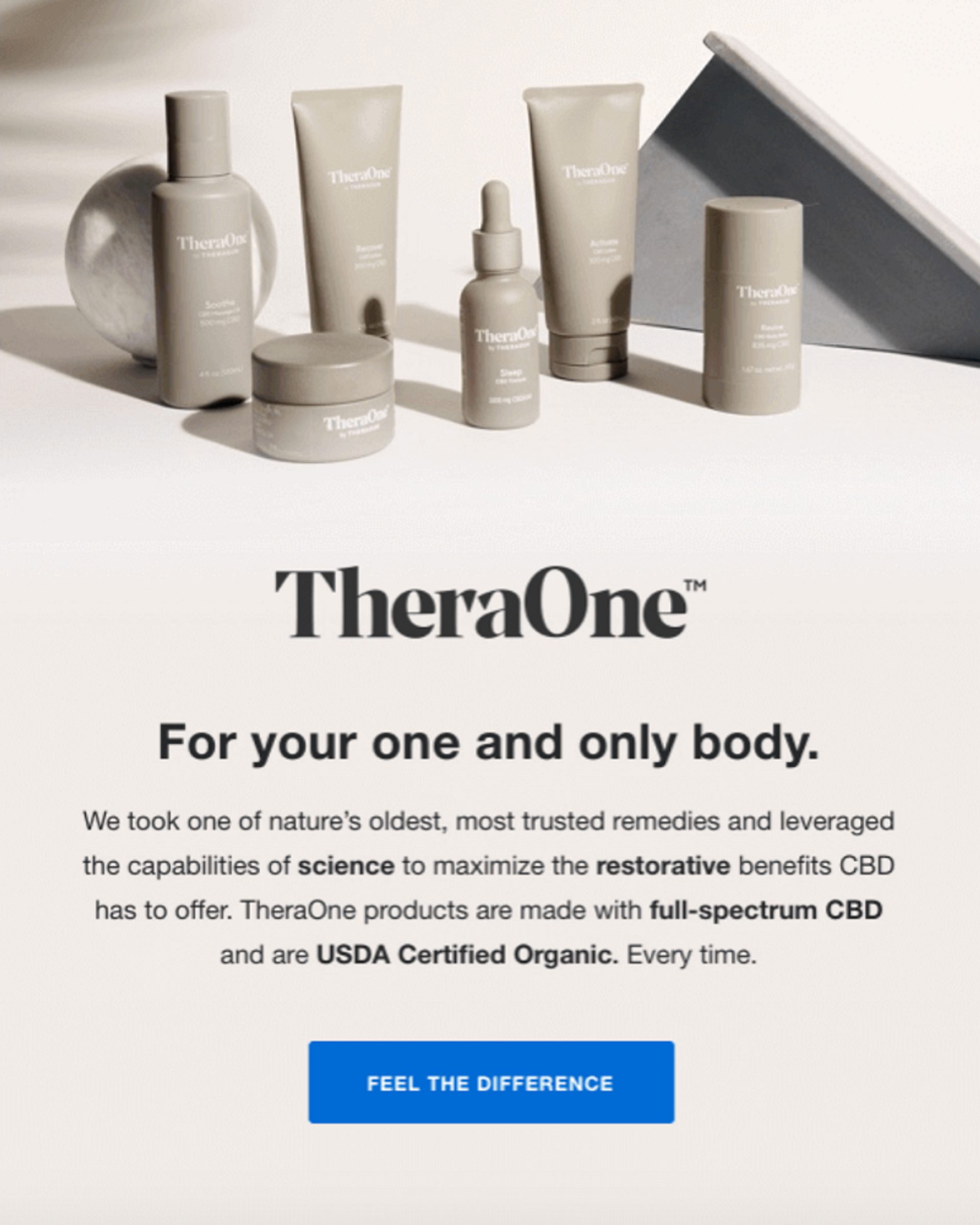
A button in a bold color that contrasts with the rest of your email design makes the call to action pop. Urgency or exclusivity helps too. "Get 20% Off Today Only" and "Early Access to Black Friday Deals" give people an extra push to click. Without a strong CTA, even the best email can fall flat.
Make it genuine and heartfelt
A heartfelt message that thanks your customers for their support can set your email apart from the promotions around it. It doesn't have to be sentimental, and a simple "thank you" goes a long way.
Share a personal story, talk about milestones your business hit because of their loyalty, or highlight how their support has made an impact. That emotional connection can turn a basic email into something memorable.
Reward your most loyal customers
Reward the customers who've supported you throughout the year. Exclusive offers, early access to sales, and special VIP deals show you care about their loyalty and make them feel valued.
You could send a personalized email like this:
Sample email: early access for loyal customers
Thank You, [Customer Name] ❤️
As one of our top customers, we wanted to give you early access to our Thanksgiving sale. Use the code VIPTHANKS for 25% off before the sale even begins. We appreciate you sticking with us.
This kind of offer boosts engagement and shows your most loyal customers you value them as people.
Give back (and encourage your audience to pay it forward)
Thanksgiving is about giving, so reflect that spirit by showing how your brand gives back. Donating a portion of your sales to a charity or supporting a cause your business cares about creates a stronger emotional connection. Even better, invite your customers to get involved too.
Your email could say:
Sample email: giving back
This Thanksgiving, we're donating 10% of all sales to [Charity Name] to help feed families in need. Join us in giving back. Every purchase helps make a difference. Let's spread the love this holiday season. ❤️
This builds your brand's reputation and makes your customers feel part of something bigger. Inviting them to pay it forward, through your business or in their own lives, can leave a lasting impression.
How do you write a good Thanksgiving email subject line?
A good Thanksgiving email subject line balances warmth, creativity, and a clear call to action in a few words. Our guide to email subject lines that improve clicks covers the basics.
Follow these five tips when Thanksgiving inboxes are full of similar offers:
- Make it short: aim for about 40 characters so phones show the whole line.
- Make it relevant: name the reason this group is getting the email.
- Make it personal: add a first name or reference a past purchase.
- Make it curious: hint at what's inside.
- Make it urgent: state a real deadline.
Four patterns cover most Thanksgiving subject lines: gratitude, emojis, urgency, and discounts. Match the pattern to the send. Gratitude fits a thank-you email, and urgency and discounts fit a promotional one. Use our email subject line generator to get started.
Which Thanksgiving subject line pattern fits which send?
| Pattern | Best for | Example |
|---|---|---|
| Gratitude | Thank-you emails to loyal, new, and lapsed contacts | Thank You for an Amazing Year: A Look Back |
| Emoji | Casual brands that want to stand out in a crowded inbox | A Feast of Savings Awaits 🦃 |
| Urgency | Sale reminders with a real end time | Last Chance for Thanksgiving Savings |
| Discount | Promotional emails to customers likely to buy | Enjoy 25% Off This Thanksgiving: Shop Now |
Thanksgiving subject lines that show gratitude
Thanking each recipient for their loyalty or acknowledging their support builds trust and strengthens your relationship with customers.
Try these gratitude subject lines:
- We’re Thankful for You: Here’s a Special Treat
- Thank You for an Amazing Year: A Look Back
- Grateful for Your Support: Enjoy This Exclusive Offer
- You Make Us Thankful Every Day: Happy Thanksgiving
Thanksgiving subject lines with emojis
Emojis add personality to your subject lines and grab attention in crowded inboxes. Use them sparingly and pick ones that match your message and the season. Think 🦃, 🍂, or 🎁 for Thanksgiving emails: festive without going over the top.
Try these emoji subject lines:
- 🍂 Grateful for You: Claim Your Thanksgiving Deal
- A Feast of Savings Awaits 🦃
- 🍁 Thanks for Sticking With Us: Here’s 20% Off
- Feeling Grateful? We Are Too 🎉
Thanksgiving subject lines with a sense of urgency
A little urgency drives clicks. Subject lines that emphasize limited-time offers or deals that expire soon create a sense of FOMO (fear of missing out), which pushes readers to act quickly. Use this tactic sparingly, or it loses its impact.
Try these urgency subject lines:
- Don’t Miss Out: Thanksgiving Sale Ends Soon
- Last Chance for Thanksgiving Savings
- Just Five More Hours to Save Big This Thanksgiving
- Grab Your Thanksgiving Deal Before It’s Gone
Thanksgiving subject lines with a discount
A clear discount in your subject line sets expectations and increases your chances of an open. Be upfront about the value, whether it's a percentage off or a special holiday bonus.
Try these discount subject lines:
- Enjoy 25% Off This Thanksgiving: Shop Now
- Thanksgiving Treat: Save 20% on Your Next Order
- Get 15% Off: Our Way of Saying Thanks
- Exclusive Thanksgiving Discount Included Inside
Stay authentic to your brand voice
Whatever technique you use, write your subject line in your existing brand voice. Don't try to be something you're not to fit the holiday spirit. If your brand voice is quirky and fun, don't switch to overly formal language. If you're known for being casual and friendly, keep that tone in a holiday message. Customers should recognize your voice, even amid the seasonal chaos.
Test two subject lines before the full send
Send two versions of a subject line to a small slice of one segment, then send the winner to everyone else in that segment. Our guide to A/B testing email subject lines walks through the setup.
What does a Thanksgiving week email calendar look like?
A Thanksgiving week email calendar gives each send one job and one audience. Thanksgiving falls on the fourth Thursday of November, Black Friday follows the next day, and Cyber Monday lands on the Monday after. Treat the Thanksgiving email as the first send in that run.
A sample Thanksgiving to Cyber Monday send calendar
| When | Audience | |
|---|---|---|
| Week before Thanksgiving | Thank-you note, or early access to your sale | Loyal customers and engaged subscribers |
| Day before Thanksgiving | Heads-up that your Black Friday offer is coming | Subscribers who opened recently |
| Thanksgiving Day | A short thank-you with no offer, or no send | Your full engaged list |
| Black Friday | Main offer, then a reminder later in the day | Everyone engaged, then openers who haven't bought |
| Weekend | Soft reminder with the products they viewed | Contacts who clicked but didn't buy |
| Cyber Monday | Online offer and a last-chance reminder | Everyone except Black Friday buyers |
| Day after Cyber Monday | Thank-you and order follow-up | Buyers |
Follow these rules so the sends work together:
- Keep the thank-you separate from the sale. Save the full offer for your Black Friday email, so each message has a clear purpose.
- Hold back on Thanksgiving Day itself. Many readers are away from their inboxes, so send a short thank-you or nothing at all.
- Change the audience, not only the copy. Send Cyber Monday emails to people who didn't buy on Black Friday.
- Plan the days after the sale. Thank buyers and follow up on their orders before you start your December sends.
Our guides to Black Friday emails and Cyber Monday emails cover the sale sends in detail, and our holiday campaign ideas help you plan what comes next.
How do you avoid inbox fatigue during Thanksgiving week?
You avoid inbox fatigue by capping how often each contact hears from you and removing people from sends that no longer apply to them. Thanksgiving week stacks several emails into a few days, so each one needs a reason to reach each person.
Use these controls to keep your list engaged through the holiday:
- Set a daily and weekly cap for each contact, and count automated emails in the total.
- Suppress buyers from later promotional emails for the same offer.
- Exclude unengaged contacts who haven't opened or clicked in recent months, because sending to them can hurt your email deliverability.
- Offer a lighter option, such as a link to receive fewer holiday emails, so contacts don't reach for unsubscribe or spam.
- Clean your list before the rush with our email list cleaning playbook.
How do you measure a Thanksgiving email?
Measure a Thanksgiving email by clicks, conversions, and unsubscribes, and compare each result with the same segment last year. Open rate still helps you compare subject lines, but Apple Mail Privacy Protection can inflate open counts, so confirm a winner with clicks.
Track these metrics for every Thanksgiving send:
- Click rate: shows whether your call to action earned attention.
- Conversions or revenue per send: shows whether the email drove a sale or a donation.
- Unsubscribe rate: signals a frequency problem. Our guide to unsubscribe rate explains what to watch.
- Spam complaints: give an early warning that a segment is wrong.
- Results by segment: show which group responded to which message.
Compare your numbers with ActiveCampaign email benchmarks and your own history. After the season, record which subject line pattern and segment won, so next year's calendar starts from your own data. Our guide to marketing campaign KPIs helps you choose what else to track.
How does ActiveCampaign help you automate Thanksgiving emails?
ActiveCampaign is an AI platform for marketers, with Active Intelligence built into every plan. Active Intelligence drafts, recommends, and flags, and you approve what goes out, so every holiday send you planned actually ships.
Customers who use Active Intelligence see 75% higher engagement than customers who don't, across 32,948 accounts.
Segment your audience in ActiveCampaign to personalize each email
Sending each person a tailored email by hand is impossible when you have hundreds or thousands of customers. With email automation, you can segment your audience by purchasing behavior, browsing history, or how often people open your emails.
A flat open rate often means one message is reaching several different audiences. Split the list first, then adjust the subject line for each group.
For example, you can build different email flows for VIP customers, new subscribers, and shoppers who abandoned their carts. VIPs might get an early bird deal, while new subscribers get a friendly welcome message and a smaller discount to encourage a first purchase. Segmentation keeps your messaging relevant to each customer, which boosts engagement and conversions.
Send the right Thanksgiving message at the right time with ActiveCampaign
ActiveCampaign automations send each message in response to what a contact does. You can set up workflows based on customer actions, or inaction. If someone adds items to their cart but doesn't check out, an automated email can follow up with a gentle reminder, or a discount to sweeten the deal.
Build a Thanksgiving week automation in these steps:
- Create segments for loyal customers, new subscribers, and lapsed contacts, or approve the ones Active Intelligence suggests.
- Start an automation for each segment that sends the thank-you on the day you choose.
- Add an if/else condition that checks who clicked, and send those contacts your early-access offer.
- Tag buyers so they drop out of the remaining promotional emails.
- Review click rate and conversions by segment in your reports.
Predictive Sending (Plus plans and above) goes one step further and picks the send time for each contact from their own open history. Once it is on, your Thanksgiving email reaches each contact around the time that person usually reads email.
Use ActiveCampaign site tracking to identify purchase-ready customers
Site tracking shows you which visitors are close to buying. Say a customer has visited your Black Friday deals page several times or keeps coming back to the same product. Site tracking records that activity, and you can set up an automated email that gives them the final push, like a "limited stock" message or a personalized offer.
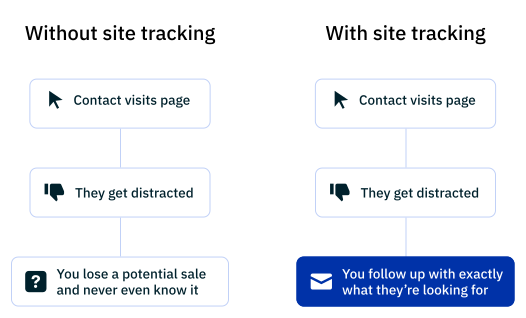
Following up on these behaviors lets you send highly relevant emails at the right moment and nudges hesitant shoppers toward a purchase without pressure.
Send the Thanksgiving email you planned to send
Thanksgiving email FAQ
When should you send a Thanksgiving email?
Send it in the week before Thanksgiving, so it arrives while customers plan their holiday. Keep sale offers for your Black Friday emails.
Should a Thanksgiving email include a promotion?
It can, and a short thank-you also works on its own. Offer a deal to your most loyal customers and send a simple note of thanks to everyone else.
How long should a Thanksgiving email be?
Keep it to a greeting, a note of thanks, and one clear call to action. A reader should finish it in a few seconds.
How can ActiveCampaign help you send Thanksgiving emails?
ActiveCampaign helps you segment your list, personalize each email, and automate sends for VIPs, new subscribers, and abandoned carts. Active Intelligence suggests segments and you approve them. Predictive Sending (Plus plans and above) picks the send time for each contact.