
Few things are more frustrating for marketers than sending a campaign that never reaches the inbox. You’ve done everything right—crafted the perfect message, segmented your audience, and hit send—only to find that open rates have suddenly plummeted.
Often, the culprit is an email blacklist.
An email blacklist is a database used by mailbox providers and spam filters to block messages from known or suspected spammers.
Getting blacklisted doesn’t just mean your emails bounce. It can quietly erode your entire marketing performance. Blacklisted domains or IPs result in lost leads, lower engagement, and long-term damage to your sender reputation, making it harder for future campaigns to reach subscribers who actually want to hear from you.
The good news is that you can diagnose, resolve, and prevent blacklisting before it hurts your brand. In this guide, we’ll show you how to check if you’re blacklisted, how to get delisted fast, and the proven best practices that ensure your campaigns consistently land where they belong: the inbox.
An email blacklist is a database used by mailbox providers and spam filters to block messages from known or suspected spammers.
How mailbox providers decide to block senders
Before an email ever reaches the inbox, mailbox providers like Gmail, Outlook, and Yahoo run it through a complex series of reputation checks. These systems don’t just look at what’s inside your message—they evaluate your entire sending history, using data from millions of users to decide whether your email deserves to be trusted or filtered out.
At the core of that decision is your sender reputation. Sender reputation is a score built from ongoing signals such as:
- Spam complaints: How often recipients or mailboxes mark your emails as spam.
- Bounce rates: How many of your messages are sent to invalid or inactive addresses.
- Unknown users: How frequently you send to nonexistent accounts or old lists.
- Engagement patterns: How often your recipients open, read, and click your messages.
A poor sender reputation increases the likelihood of landing on an email blacklist, especially if multiple warning signs appear at once.
Some missteps that can damage your reputation include:
- Using outdated or purchased contact lists, leading to high bounce and complaint rates.
- Sharing an IP address with other senders who have poor practices.
- Sudden spikes in sending volume that trigger suspicion of spam activity.
- Ignoring unsubscribe requests or using misleading subject lines.
- Stuffing messages with spam words that trigger filters.
- Sending unverified messages without proper SPF, DKIM, or DMARC alignment.
Modern deliverability standards
Mailbox providers are tightening standards to prioritize authentic, user-friendly senders. Modern filtering systems now also rely heavily on engagement-based filtering. Brands whose audiences consistently open and interact with their emails are rewarded with stronger sender reputation scores.
At the same time, authentication frameworks like DMARC (Domain-based Message Authentication, Reporting, and Conformance) and BIMI (Brand Indicators for Message Identification) are becoming essential. Providers increasingly enforce these standards and domains that fail authentication can face reduced deliverability or outright blocking.
Types of email blacklists
When poor sending behavior or failed authentication persists, mailbox providers and spam filter operators may add your IP or domain to an email blacklist. These act as shared warning systems for the email ecosystem, helping servers automatically reject messages from suspicious sources.
There are two main types of blacklists:
- Public RBLs or Real-time Blackhole Lists (like Spamhaus, SpamCop, BarracudaCentral, and UCEPROTECT) are accessible to anyone and widely used by Internet Service Providers (ISPs) and corporate mail servers.
- Private or proprietary lists, such as Proofpoint, Gmail’s internal filters, or Microsoft SNDS, are maintained internally by major providers. Their listings are harder to view or appeal and often rely on behavioral data unique to each network.
Some lists update every few hours and automatically remove clean senders, while others require formal delisting requests or long periods of improved reputation.
Mailbox providers’ goal is simple: protect users from unwanted or fraudulent mail. For legitimate businesses, understanding the risks, and monitoring your domain reputation continuously, is the key to staying off blacklists.
5 quick checks to tell you if you’re on an email blacklist
When your open or delivery rates suddenly dip, don’t panic. Start with a quick triage. These five checks will help you confirm whether your emails are being blocked and where the issue lies. Most can be done in minutes.
1. Run reputation scans on your sending domain and IP
Your first step is to see what the rest of the internet thinks of you. Use free online tools like MXToolbox or Google Postmaster Tools to scan your domain and IP address for blacklisting or reputation issues.
If any listings appear, note which blacklist has flagged you. Some are easier to remove from than others.
2. Inspect bounce codes and spam report logs
Your bounce logs are often the first clue that something’s wrong. Look for SMTP error codes such as:
- 550 5.7.1: Message rejected or blocked.
- 554 5.7.1: IP or domain appears on a blacklist.
- 421 4.7.0: Temporary deferral due to reputation concerns.
ActiveCampaign lets you easily review detailed bounce reports in your dashboard so you can see if mailbox providers are rejecting your messages or flagging spam complaints.
3. Compare open rate trends by mailbox provider
Sometimes only one provider, like Gmail or Outlook, shows a sharp decline in open rates. That’s a strong indicator that your domain or IP has been throttled or blacklisted on that network.
To confirm, review performance per mailbox provider. Create segments in ActiveCampaign that are based on your subscribers’ email addresses (for example, those ending in @gmail.com, @outlook.com, or @yahoo.com). Then, examine the bounce rates for each mailbox.
This can help you pinpoint where reputation damage is happening so you can focus on remediation.
4. Validate SPF, DKIM, and DMARC alignment
Misconfigured authentication records are one of the most common—and preventable—causes of deliverability issues. Three main protocols work together to prove that your emails are legitimate and authorized to be sent from your domain:
- SPF (Sender Policy Framework) verifies that your sending server is allowed to send email on behalf of your domain.
- DKIM (DomainKeys Identified Mail) adds a digital signature that confirms your message hasn’t been tampered with in transit.
- DMARC (Domain-based Message Authentication, Reporting, and Conformance) builds on both SPF and DKIM, telling mailbox providers how to handle messages that fail authentication—and gives you visibility into potential spoofing or abuse.
When any of these records are missing or misaligned, mailbox providers are far more likely to flag or block your messages, especially under new DMARC enforcement policies from Google and Yahoo.
Start with ActiveCampaign’s free Verification Tools for an instant health check. It will highlight configuration errors and provide actionable recommendations to strengthen your domain’s authentication and protect against blacklisting.
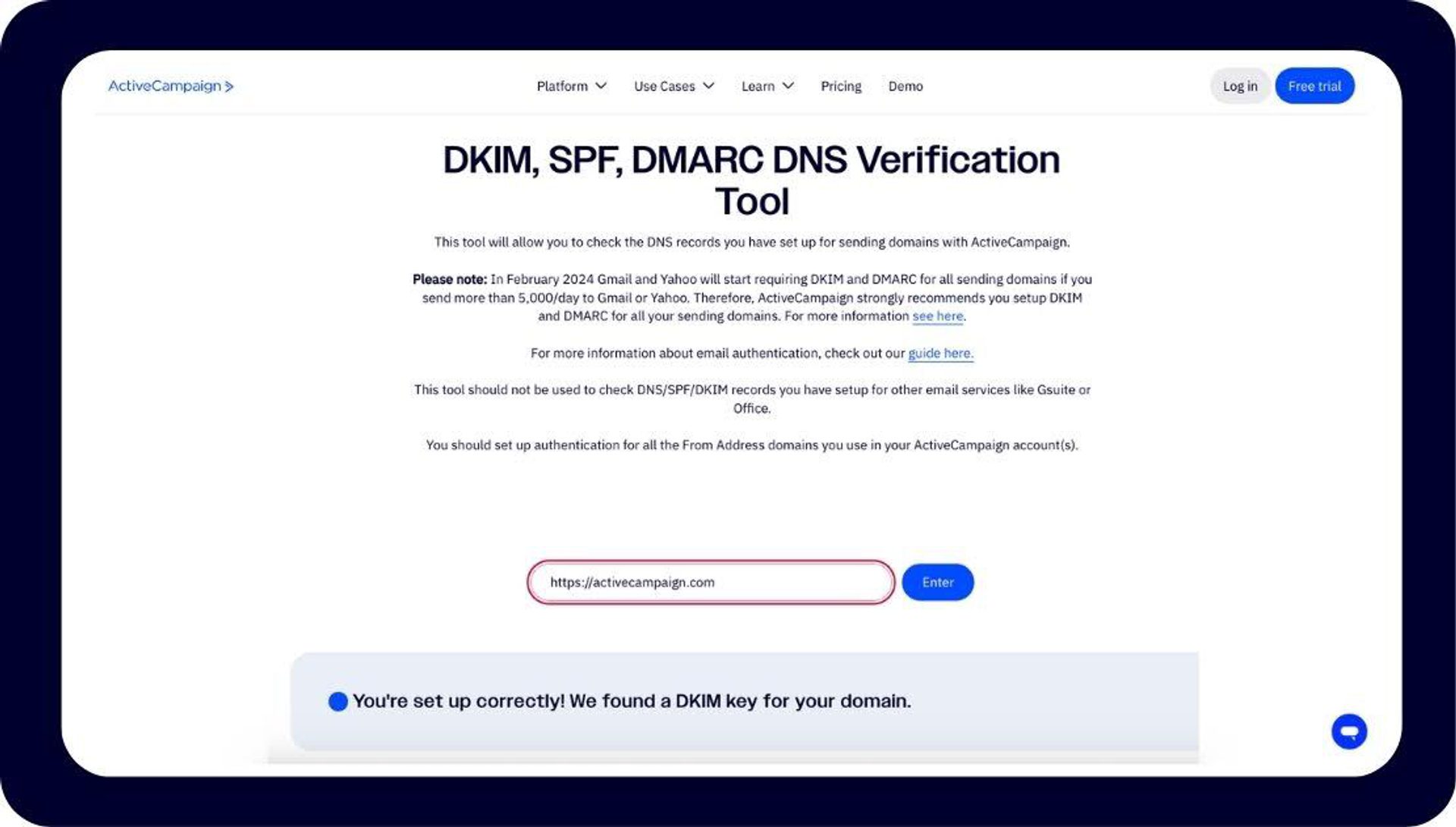
ActiveCampaign’s free public Verification tool.
5. Check public RBL databases manually
Finally, search the most widely referenced real-time block lists (RBLs) to see if your domain or IP appears:
If you find a match, document the listing. Record the:
- Date
- RBL name
- IP or domain listed
- Any details provided in the listing notice (such as the reason for blacklisting, evidence of spam activity, or removal instructions).
Keep this information in a shared log or tracking sheet—for example, in your team’s incident response documentation or email deliverability monitoring log. This will help you to spot any recurring patterns and respond faster in the event of another blacklisting.
Next, investigate why the listing occurred. Check recent outbound email patterns, marketing campaigns, and server logs for unusual spikes, compromised accounts, or spam-like behavior. This helps determine whether the issue is a one-time event or part of a broader deliverability problem.
Once you understand the cause, you can tackle the delisting process.
How to get delisted fast
If you’ve confirmed that your IP or domain is blacklisted, the key is to act quickly and methodically. Getting delisted is partly about fixing the root cause and partly about showing mailbox providers you’ve taken corrective action. The sooner you can demonstrate both, the faster you’ll restore your sender reputation.
Before you contact any blacklist operator or mailbox provider, make sure you can prove that your sending environment is clean and compliant. This will save you days of back-and-forth.
- Review and follow sending guidelines.
Each provider has its own rules. Start by reviewing Google’s Bulk Sender Guidelines and Microsoft’s Sender Best Practices. A few to keep top of mind are:- Make sure you’re honoring unsubscribe requests. Continuing to email people who’ve opted out can lead to spam complaints, damage your sender reputation, and violate email regulations like CAN-SPAM and GDPR
- Use consistent sending domains. Suppose your organization normally sends newsletters from news@yourcompany.com, but a new campaign goes out from marketing@yourcompanymail.com, or even from a third-party platform using mailer@somevendor.net. To recipients (and to spam filters), those different “From” domains look unrelated, even if they’re all controlled by your company. This inconsistency can trigger spam or phishing flags
- Maintain reasonable daily volumes. There’s no hard number for this, but new senders could start with under 500–1,000 emails per day, per domain. Then, gradually increase sending volume by 10% daily.
- Confirm your IP and domain are spam-free.
Stop all nonessential sends until the issue is resolved. Run your recent messages through a spam content analyzer and ensure your lists are clean of bounces or inactive addresses. It’s best practice to remove or suppress addresses that have been inactive (no opens, clicks, or responses) for at least 6–12 months. - Check and update authentication records.
Verify your SPF, DKIM, and DMARC configurations and update them if necessary. - Gather supporting evidence.Collect the following proof that shows you’re a legitimate sender:
- Sending logs or campaign history
- Any recent configuration or IP changes
- Proof of user opt-in (forms, timestamps, or confirmation emails)
Bounce and complaint reports from your ESP or monitoring tools
Your opt-in records, engagement history, and deliverability reports are centralized in ActiveCampaign, so it’s easy to compile verified evidence and demonstrate sender legitimacy quickly.
Submit a concise delisting request.
Keep your message professional and factual. Here’s a simple template you can adapt:
Subject: Request for Removal from [Blacklist Name]
Hello [Team/Support],
We’ve identified that our domain/IP ([example.com] / [IP address]) has been listed on your blacklist.
We take deliverability and compliance seriously and have taken the following actions:
- [Example: Cleaned inactive contacts and removed invalid addresses]
- [Example: Implemented DMARC and updated authentication records]
- [Example: Reviewed sending patterns to align with your guidelines]
We respectfully request removal from your list.
Please let us know if any additional information is needed.
Thank you for your time and consideration,
[Your Name]
[Your Company]
It’s important to avoid “paid removal” or “guaranteed delisting” services.
Many of these are scams or may get you relisted later. Always go through official channels published by the blacklist operator or your email service provider.
What if the provider never replies?
Sometimes, even after you’ve fixed everything, a provider doesn’t respond—or keeps your domain on a private blocklist. In those cases:
- Throttle your sending volume. Reduce campaign frequency to minimize further complaints or bounce activity while your reputation recovers.
- Switch to a clean or backup IP (if available). ActiveCampaign customers using dedicated IPs can work with our support team to warm up a new one while investigating the root cause.
- Notify stakeholders. Keep your marketing and IT teams in the loop so they can adjust expectations and track ongoing deliverability metrics.
- Lean on your ESP for help. ActiveCampaign can assist by reviewing your technical setup, monitoring reputation signals, and guiding your delisting or escalation requests.
Blacklist recovery is rarely instant, but with the right preparation, transparent communication, and a reputation-focused plan, most legitimate senders see improvement within days.
6 ways ActiveCampaign keeps your emails landing in the inbox
Preventing blacklisting isn’t just about fixing problems after they happen—it’s about building a deliverability foundation that keeps your sender reputation strong from day one. ActiveCampaign combines authentication tools, automation, and expert support to help you maintain inbox placement, even as filtering rules and authentication standards evolve.
Here are six ways ActiveCampaign helps you stay off email blacklists and ensure your campaigns consistently reach the right audience.
1. Email authentication and domain alignment
Built-in SPF, DKIM, and DMARC Verification Tools check your DNS records before you send a single email. The Configure Domain feature guides you through setup or automatically connects with your DNS provider to ensure proper domain alignment.
When your From domain, return-path, and DKIM signatures all match, mailbox providers recognize your messages as authentic. This prevents spoofing, reduces authentication errors, and keeps your emails out of spam filters.
2. Dedicated IPs, pre-warming, and custom sending domains
You can choose a dedicated IP address, isolating your reputation from other senders and giving you complete control over deliverability.
ActiveCampaign also supports both Custom and Mailserver domains, letting you replace shared domains with your own branded identity and giving you 100% control over your sender reputation.
During onboarding, ActiveCampaign provides warm-up guidance to gradually increase your sending volume and build trust with ISPs. This protects you from sudden spikes that can trigger blacklist flags.
3. Automated list hygiene and engagement management
Good list hygiene is one of the strongest defenses against blacklisting. ActiveCampaign’s Engagement Management tool automatically identifies unengaged contacts so you can suppress sends before they hurt your reputation.
You can also automate list hygiene workflows to tag inactive users, trigger re-engagement campaigns, or sunset dormant contacts. Integrations with tools like NeverBounce add another layer of validation, keeping your lists fresh and bounce rates low.
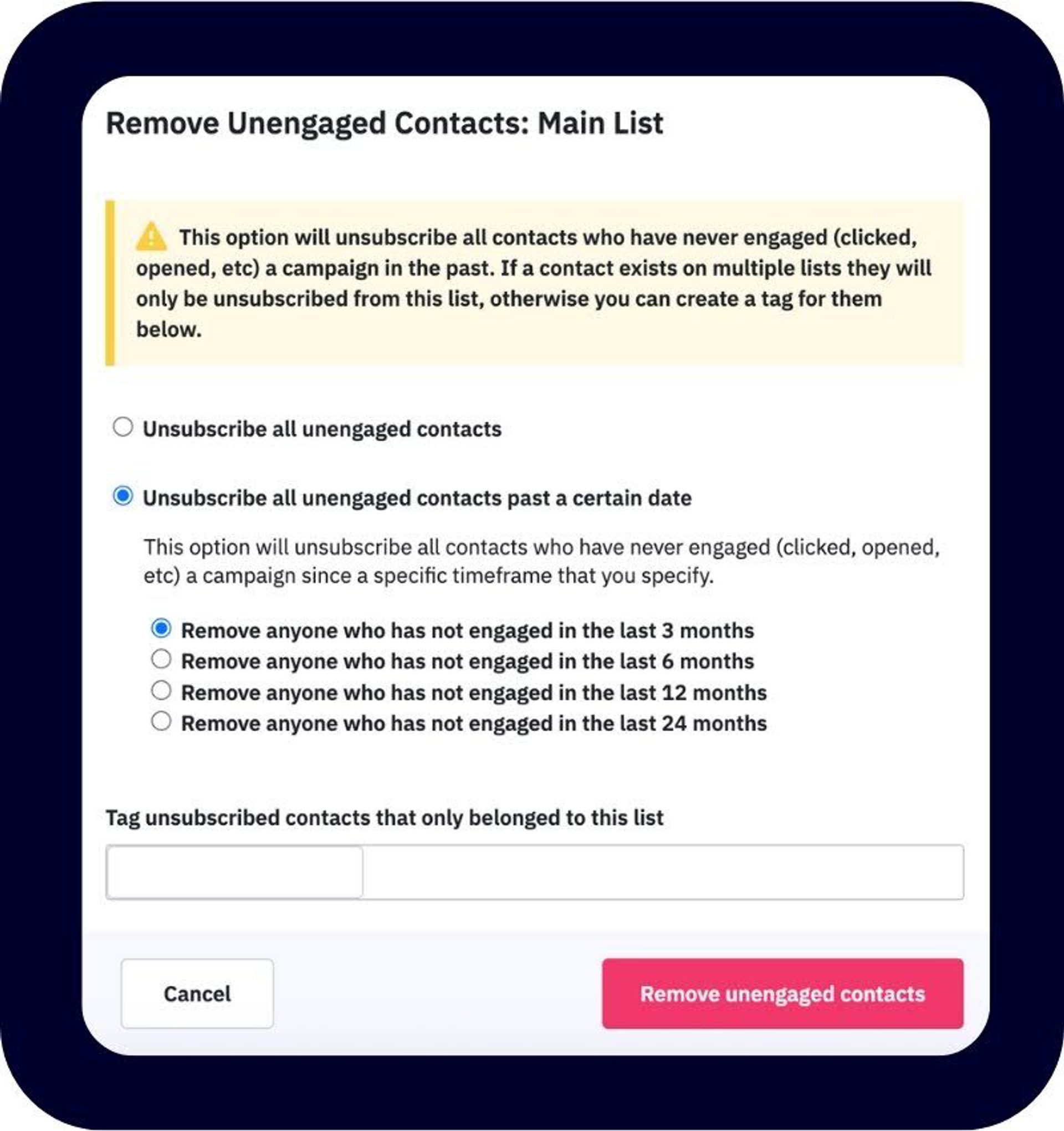
Remove unengaged contacts quickly with ActiveCampaign’s Engagement Management tool.
4. Deliverability coaching and onboarding support
Every account comes with free 1:1 onboarding and setup assistance to ensure your technical configuration (SPF, DKIM, DMARC, and custom domains) is correct from the start.
For advanced users, additional deliverability consultations provide tailored guidance on optimization and blacklist remediation. Extensive educational resources cover everything from deliverability in your first 30 days to Gmail’s bulk sender guidelines, so you can avoid deliverability pitfalls during setup or migration.
5. Feedback loops and ISP complaint management
ActiveCampaign connects to ISP feedback loops wherever available, automatically flagging and removing contacts who mark your messages as spam.
By suppressing these contacts immediately, you prevent further complaint activity that could damage your IP or domain reputation. Proactive complaint management helps maintain trust with mailbox providers and keeps your campaigns performing at peak deliverability.
6. Content templates and Spam Check
In addition, AI-powered writing assistance and compliance-optimized email templates help you craft engaging, on-brand messages that align with ISP standards and accessibility best practices. These built-in tools guide you toward clearer, more authentic messaging, even for email blasts. This reduces the risk of spam filtering and improves audience engagement.
Deliverability tips address subject line length, unsubscribe visibility, and link structure—ensuring every campaign follows best practices for inbox placement.
The Spam Check tool then scans the content of your message before sending to identify risky words or formatting.
Together, these features give marketers everything they need to protect their sender reputation, maintain high deliverability, and stay clear of email blacklists.
Stay out of spam folders and ahead of the curve with ActiveCampaign
Email blacklists aren’t a threat when deliverability is built in.
ActiveCampaign has been independently ranked as the #1 provider for email deliverability. We give you everything you need to stay ahead of changing ISP rules and emerging authentication standards, so your messages reach customers instead of spam folders.
With AI-driven engagement standards and automation that keeps your lists clean, you’re not just reacting to deliverability problems—you’re preventing them before they start. Add pre-warmed IPs and authenticated sending domains, and you’ve got a full system built for staying compliant, trusted, and consistently visible in the inbox.
With ActiveCampaign, you’re protected against blacklist risk from day one and equipped to recover fast if you ever land on one.
Email blacklists FAQs
How quickly can I get off an email blacklist?
How quickly you can get off an email blacklist depends on the type of blacklist and the cause. Some removals happen within hours once you resolve the underlying issue. Others may take several days and require a formal appeal. The fastest path is to fix authentication errors, clean your lists, and submit a detailed delisting request with proof of remediation. ActiveCampaign’s deliverability experts can help pinpoint the cause and guide you through the process.
Does using a shared IP increase the risk of blacklisting?
It can. When multiple senders share an IP, one sender’s poor practices (like sending to invalid or purchased lists) can affect everyone’s reputation. ActiveCampaign’s shared IP pools are actively monitored to maintain high reputation standards, but businesses that send large volumes or want full control can upgrade to a dedicated IP, isolating their reputation from others.
How often should I clean my email list?
A good rule of thumb is to clean your list every three to six months, or sooner if you notice rising bounce rates or falling engagement. ActiveCampaign automations can identify and suppress inactive or invalid contacts automatically, helping you maintain list hygiene without manual effort.
Will adding a BIMI logo improve deliverability?
BIMI (Brand Indicators for Message Identification) doesn’t directly improve deliverability, but it signals trust once you’ve already met strict authentication requirements like SPF, DKIM, and DMARC. In other words, BIMI is a reward for a strong reputation, not a shortcut to it. ActiveCampaign helps ensure those authentication protocols are correctly configured, so you can qualify for BIMI and reinforce your brand’s credibility in the inbox.