Your email list is your business’s revenue lifeline, yet it’s quietly falling apart every year, whether you realize it or not.
More than a quarter of your list could already be outdated. If you’ve experienced unexpected bounces or are left wondering why your subscribers have seemingly gone dark, your contact list hygiene practices might be to blame.
Fortunately, the powerful automated integration between ActiveCampaign and ZeroBounce provides a robust solution to combat list decay. And, this playbook will show you how to turn things around.
Learn how to automate your list hygiene, create clean lists with active contacts, and keep your campaigns in the inbox and out of the spam folder. Plus, we’ll explore tools and strategies to use that data for re-engagement and setting up the ideal automated hygiene and engagement funnel.
The impact of email list decay on marketing performance
To build strong engagement campaigns, the first thing you need is a healthy, valid email list.
Here’s the problem: According to ZeroBounce’s analysis of more than 10 billion email addresses, 28% of your current database could be invalid or outdated.
Out of every email address ZeroBounce validated through list upload or via real-time email verification on website forms in 2024, 28% of those were invalid (nonexistent mailboxes) or high-risk (spam traps, disposable domains, abuse emails, etc.).
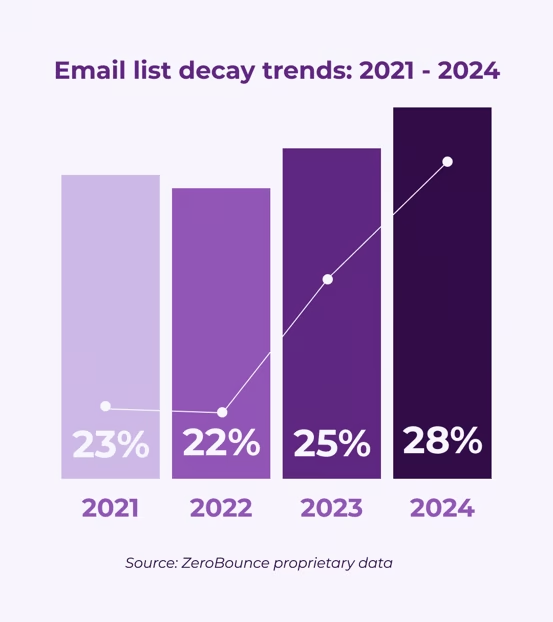
List decay describes the natural and gradual degradation of an email or contact list over time. This can happen to any list for a variety of reasons, including when someone:
- Makes a typo while entering their email address
- Changes emails for any reason (company change, layoff, promotion, etc.)
- Uses a disposable email address that expires
- Uses a fake email address when signing up for an account or newsletter
As these occurrences go unchecked by email validation, your email list decays, which affects your email marketing performance in these ways:
- Your email bounce rate increases.
- Missed communications cause your leads to go cold.
- High bounce rates and lower engagement negatively affect your sender reputation.
- Your sender reputation decreases, and your email deliverability plummets.
- Recipients start to reject your emails or send them to the spam folder.
You can’t build relationships through email if you don’t have a valid mailbox to reach. Furthermore, internet and email service providers hold bulk senders to certain guidelines, including maintaining a bounce rate of 5% or lower (though 2% or lower is ideal). Failing to meet this guideline hurts your email deliverability, reducing the percentage of emails that reach the inbox, where most of your audience’s eyes will be. An ActiveCampaign partner shares her thoughts on the strict nature of mailbox providers.
"Mailbox providers want to see consistent sending and engagement. Even during warming, they’re looking for signals of trust—and they absolutely hold a grudge if you mess it up."
— Sydney Lynch, Director of Customer Experience, Prospect2
How to automate list cleaning using the ZeroBounce integration with ActiveCampaign
Fortunately, automated email list cleaning is one of the easiest ways to improve your deliverability. All you need is an email validation tool that consistently yields accurate results while protecting your uploaded data.
Automating your list cleaning benefits you by:
- Verifying new email addresses as they’re added to your ActiveCampaign lists
- Sparing you the time and effort of importing and exporting your lists between platforms
- Combating list decay by detecting invalid, high-risk emails (e.g., spam traps, catch-all addresses, or repeat spam complainers) swiftly
- Minimizing email bounces to ensure successful communication. In particular, eliminating hard bounces (invalid email addresses) significantly lowers your bounce rate, which is a critical factor for maintaining a healthy sender score.
- Improved sender reputation. Regularly removing invalid or unengaged addresses tells mailbox providers you're a responsible sender, leading to better inbox placement and avoiding the spam folder.
ZeroBounce’s email validation system integrates directly with ActiveCampaign, making the process of scrubbing your data seamless. To do this, you’ll need an active account with both ActiveCampaign and ZeroBounce.
Here’s how to set up the ZeroBounce ActiveCampaign integration:
1. Log in to your ActiveCampaign account.
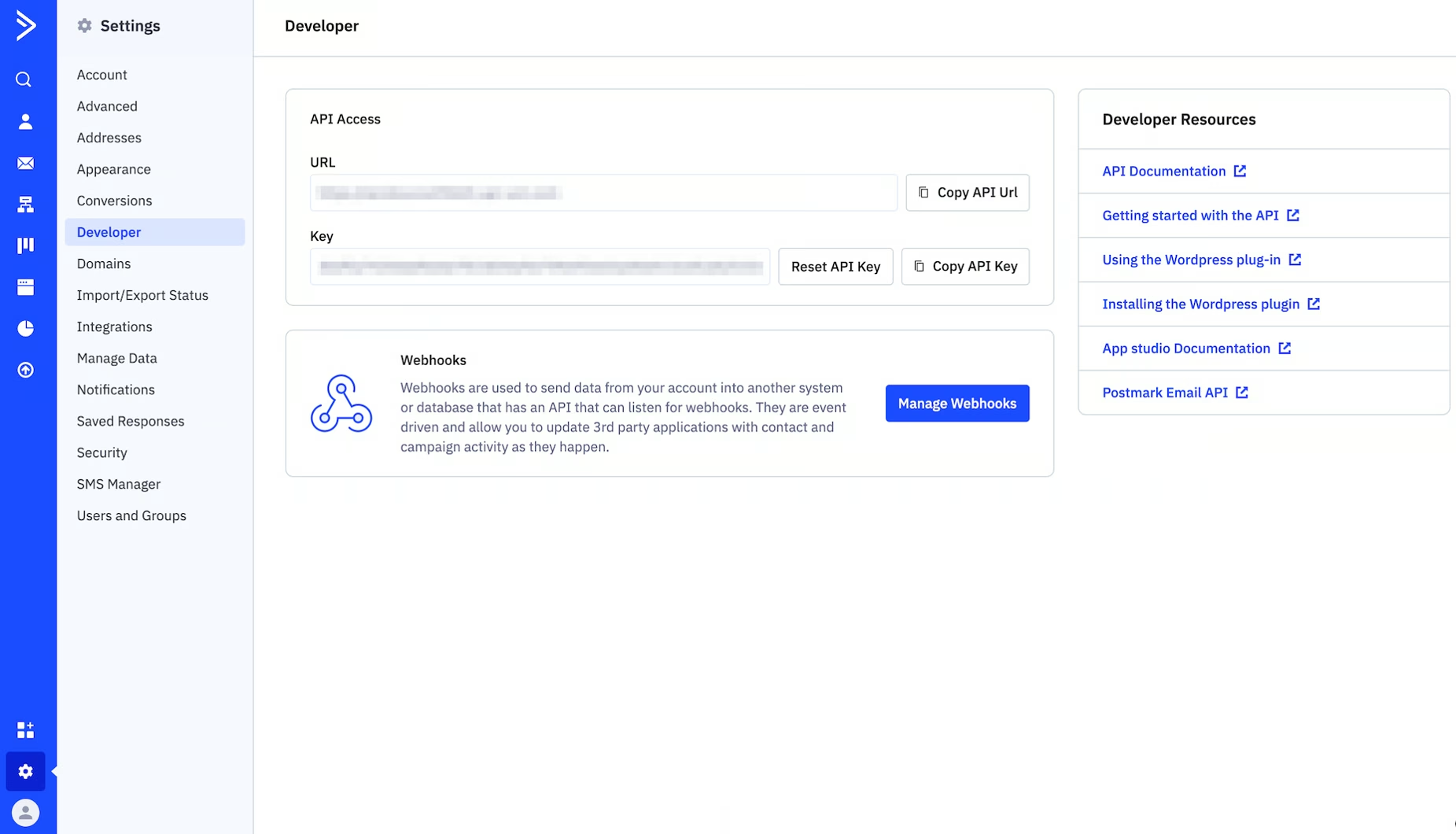
2. Retrieve your API key and API URL. You can find this by navigating to Settings > Developer.
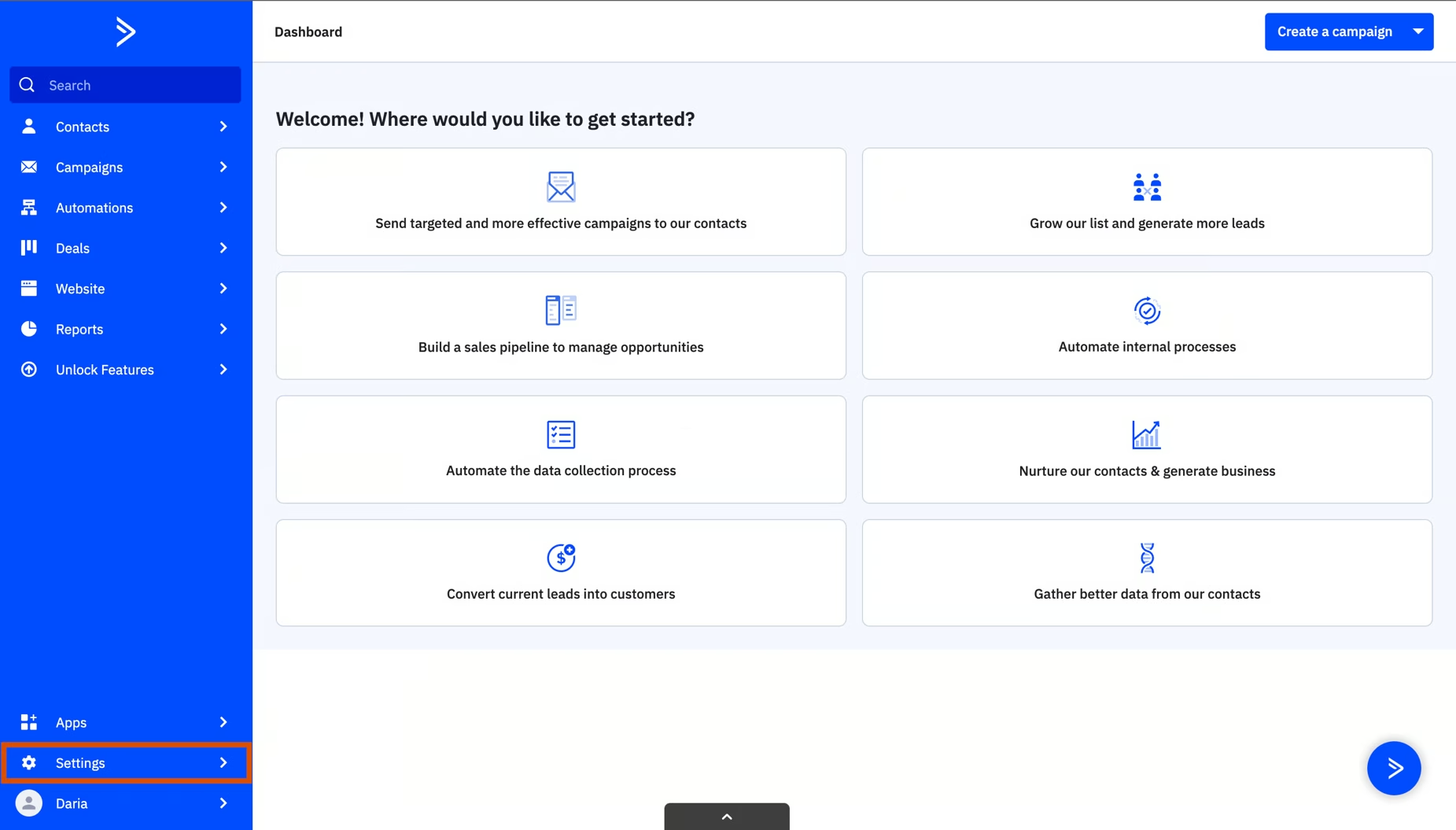
3. Copy both your API URL and key.
4. Log in to ZeroBounce and navigate to the Integrations tab.
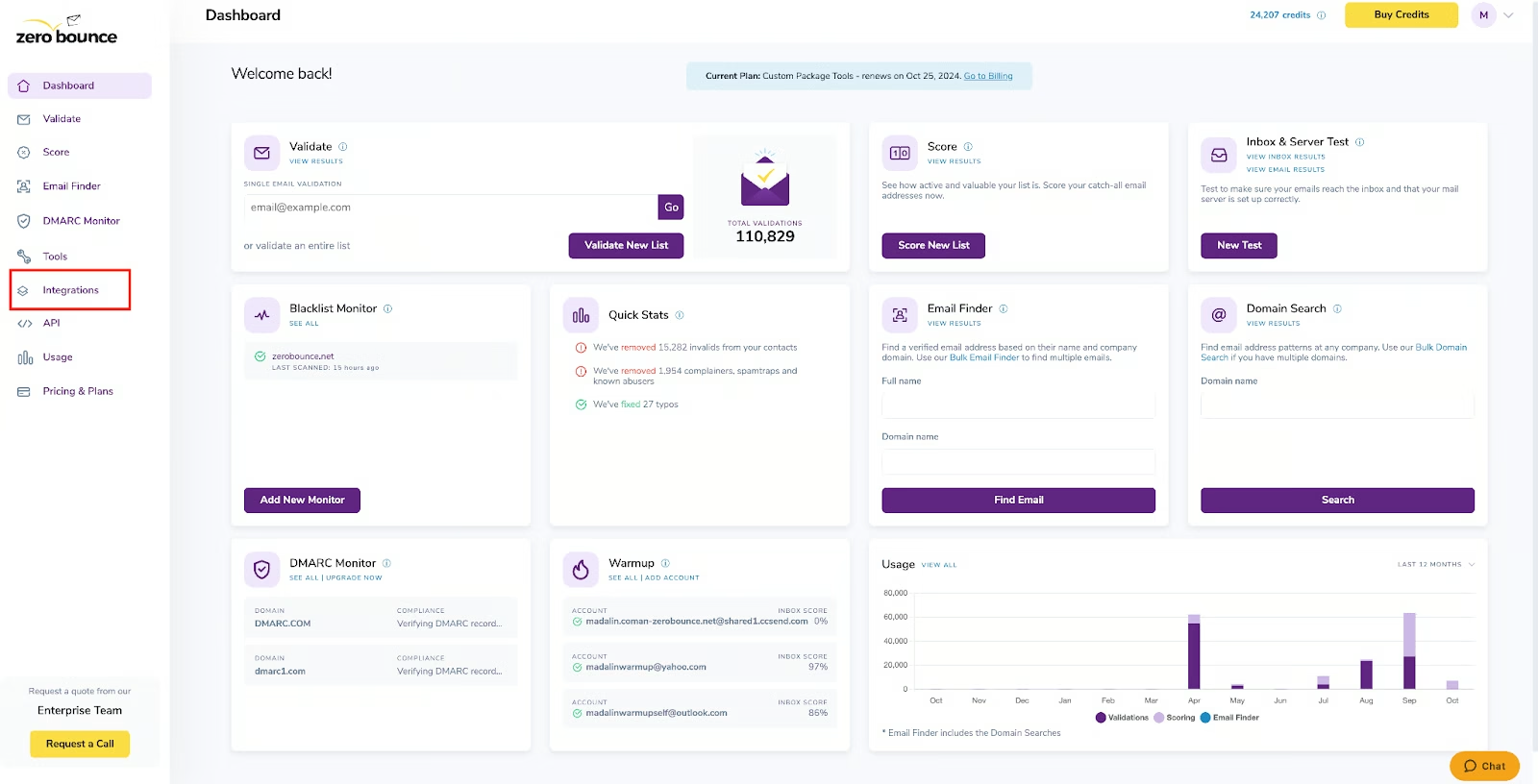
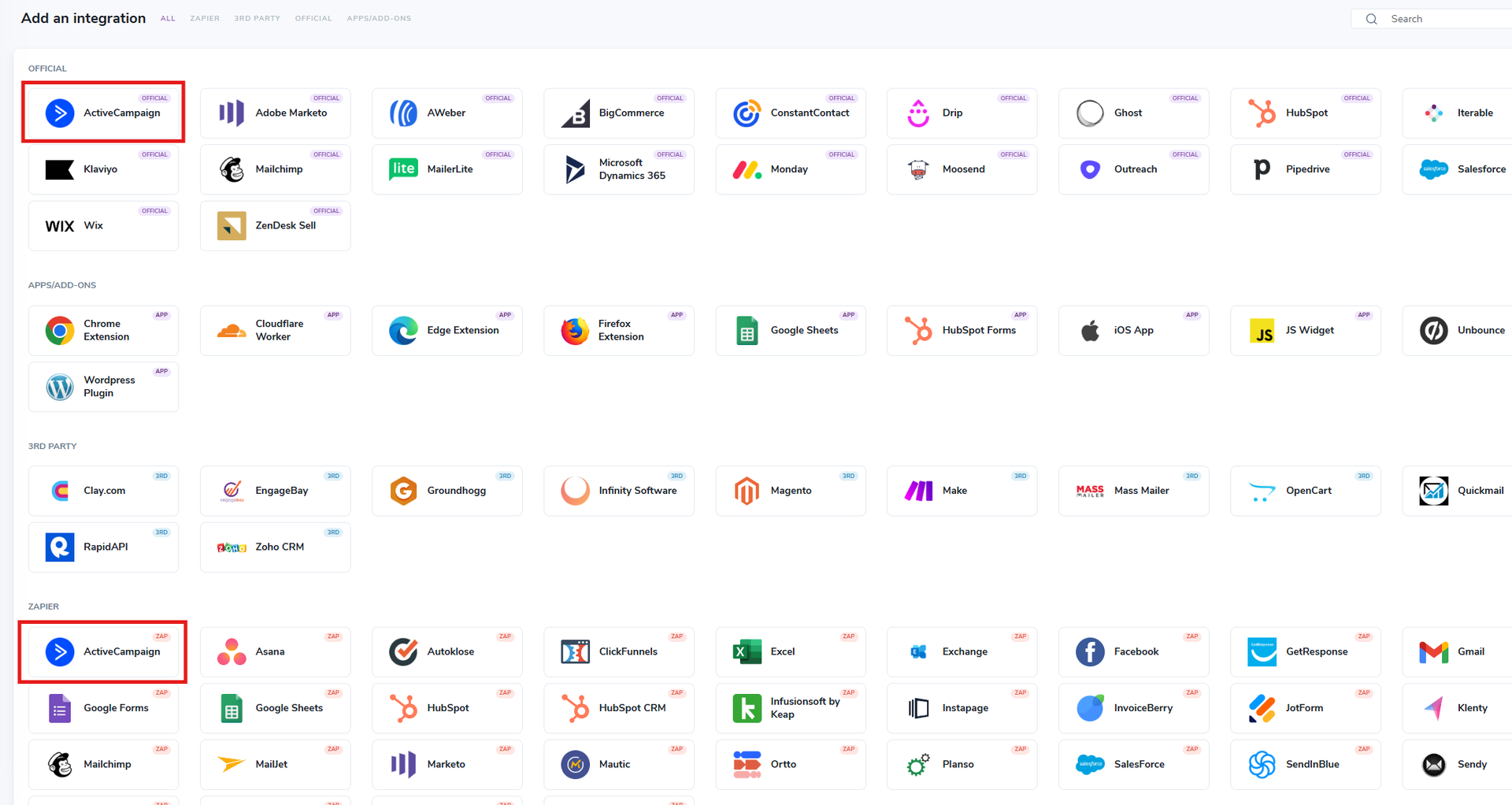
5. Select ActiveCampaign from the list of integrations. The official integration is the most direct method, but you can also integrate via Zapier if that’s your preference.
6. Paste your ActiveCampaign API key and URL into the fields. Click Connect.
With setup complete, your ActiveCampaign data will sync with ZeroBounce, displaying all available email lists for cleaning.
While you can manually check in and clean your ActiveCampaign lists as necessary, you can save time and manual effort by automating the entire process.
Here’s how to automate your email list cleaning with the integration:
1. To automatically clean and keep your lists up to date, click the Auto Validation toggle in the top menu.
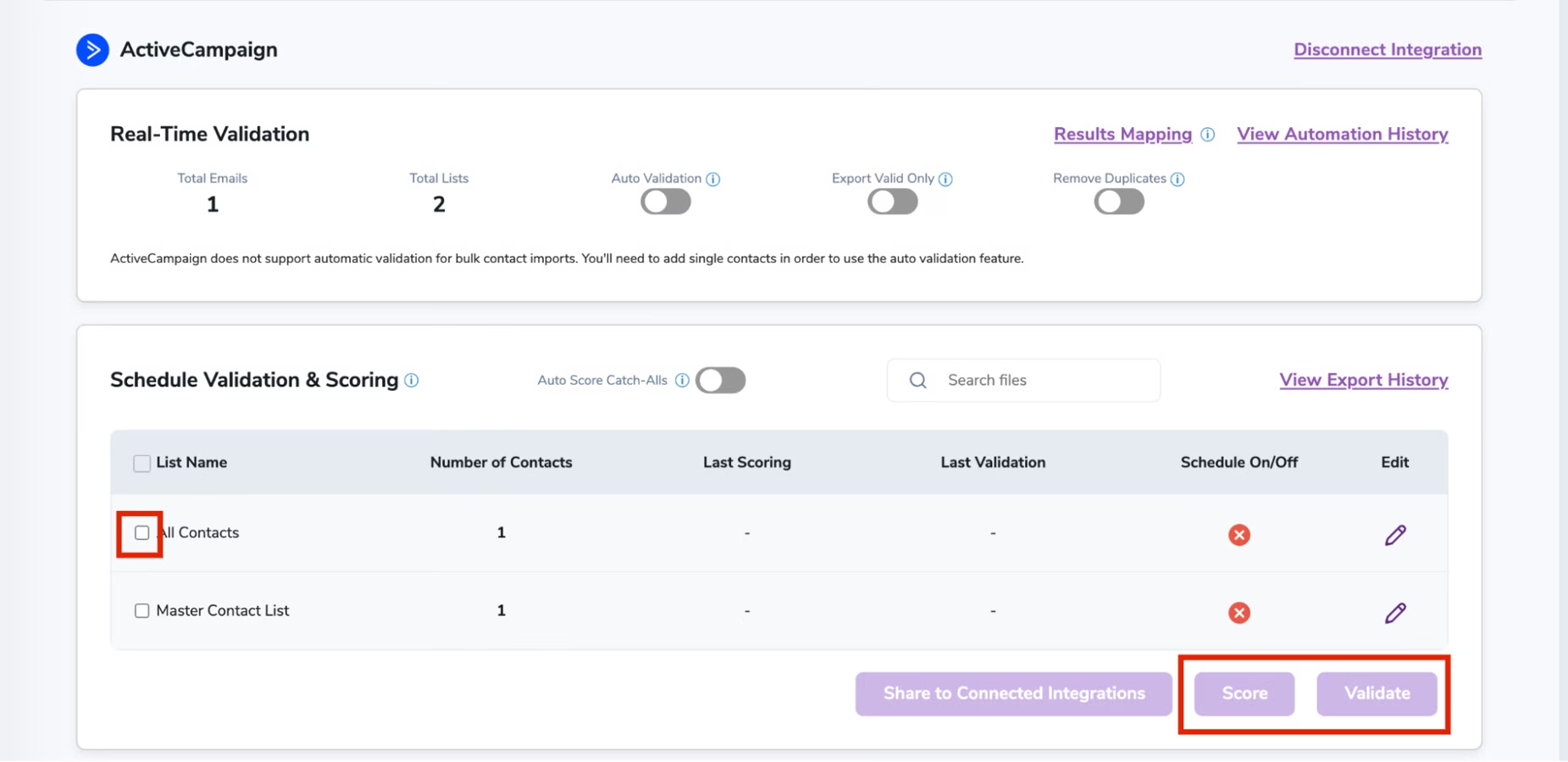
When you select this option, ZeroBounce automatically cleans any new single email address added to any of your ActiveCampaign lists.
2. To automate the cleaning process for specific lists and schedule future cleanings to occur at set intervals, click the Edit button on the right.
3. You’ll reach a sub-menu for that specific list. Here, you can use the date/time selector to request cleaning at specific times (e.g., once a month).
With everything finalized, ZeroBounce will automatically clean your lists and any new email addresses that you acquire. You’ll be able to identify validated email addresses by finding the new columns and tags added to your database.
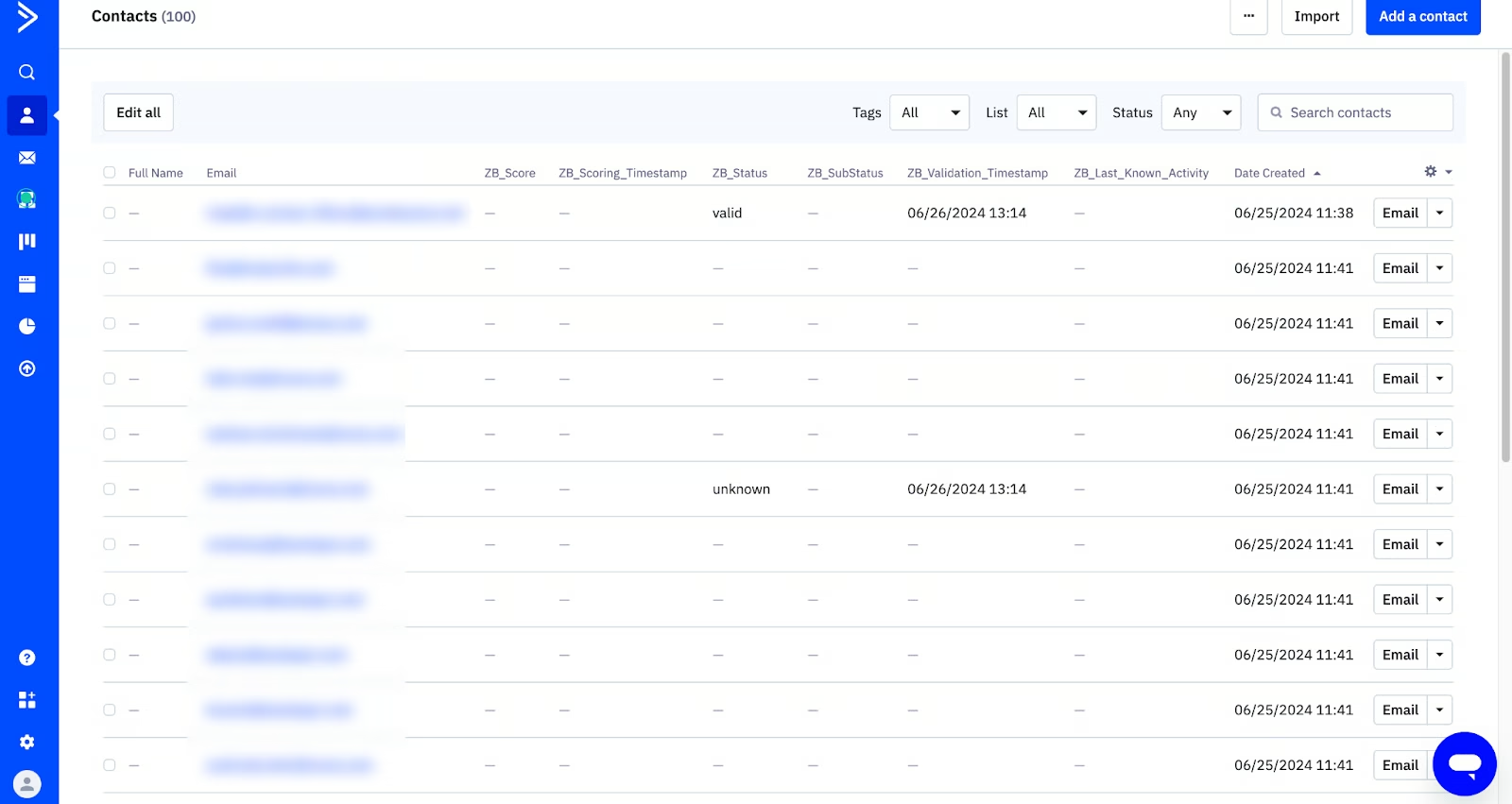
- ZB_Status: This tags your email address with its corresponding status (valid, invalid, catch-all, spam trap, abuse, do_not_mail, or unknown).
- ZB_SubStatus: Some contacts will have a sub-status to help you further understand why you see a result. (e.g., Invalid - No DNS entries, or Do_not_mail - Disposable domain).
- ZB_Validation_Timestamp: Finally, you can learn why a contact was last validated by checking the latest timestamp.
Note: The ZeroBounce ActiveCampaign integration also includes additional email list enhancement features, such as catch-all email scoring and the free Activity Data service. As a result, your list will also have tags for ‘ZB_Score’ and ‘ZB_Last_Known_Activity.’ Use these to gain more information about hard-to-verify catch-all emails and insights into a contact’s last known activity.
Creating re-engagement sequences for inactive but valid contacts
Inactive contacts are inevitable for every marketer. Interests and priorities change, which can cause a once-engaged subscriber to drop off. You might even consider that the mailbox is now abandoned or no longer valid.
With your new email list cleaning automation, you don’t need to hypothesize. Instead, your latest cleaning results will keep you up to date on who’s still valid and which contacts you need to delete.
But what do you do about those valid contacts that are no longer engaged?
Removing inactive contacts is always an option, but there might be a better way – re-engagement. But first, you need to know which contacts have gone silent.
The primary way to do this is to check for recent email opens. ActiveCampaign allows you to do this by using Activity windows. To do this:
- Select a list or email segment. You can do this with Advanced Search, Automation, Campaigns, Lists, and Scoring.
- Select a condition (e.g., ‘Has not opened) followed by a time window (e.g., in the last days, weeks, months, or years).
- Complete your search.
ActiveCampaign will generate a list of contacts that meet your criteria. It’s safe to consider a contact inactive if they haven’t engaged in at least three months. However, your team should have its own definition of what constitutes “inactive” based on your business model, offerings, and customer lifecycle journey.
Another way to measure contact activity is to take advantage of ZeroBounce’s free Activity Data tool, which is included in the email list cleaning integration with ActiveCampaign.
Activity Data uses scoring partners to identify and track subscriber engagement data on the email and the web, such as:
- Last known activity date
- The type(s) of activity
- Number of activities
- Activity data channels
Using Activity Data can further refine your contact insights by identifying whether a contact is truly inactive or just uninterested in your current email content.
Once you have your list of re-engagement candidates, segment them into a list that you’ll use for upcoming re-engagement campaigns. Because of your existing history, you’ll want to approach these contacts differently than you would a fresh, new lead.
Here are some recommendations on where to begin with your re-engagement efforts:
- The “We miss you” email: We love to know our business is appreciated. Sending a thoughtful gesture to remind the contact of your relationship can be effective for reclaiming some mindshare. Check out examples of win-back email campaigns.
- An exclusive offer: A lapsed contact might be waiting for an excuse or the ideal time to return. Sharing an exclusive discount or deal not available elsewhere can be a great catalyst for continued activity.
ActiveCampaign customer Bad Ass Coffee shares their strategy of how they market their exclusive offer to make the most out of a well-loved item:
“Giving something back to the guests that's not always available is one of the things that make it a hit. And that's where success lives: when you identify what your customers want and give it to them. To market it, we post about it everywhere we can in a very targeted fashion. We reach out digitally via Instagram, Google Business, loyalty emails, and in-store merchandising via digital menu boards, window clings, and A-frame stands.”
— Ivy Hanks, Director of Marketing, Bad Ass Coffee of Hawaii
To emulate this, there are a few steps to keep in mind:
- Use the contact’s history: Use any other data you have on the subscriber, such as purchase history or website activity. Understanding what drew a contact to you in the first place will enable you to create more personalized emails that yield superior results compared to generic email blasts. As an example, HubSpot reported that personalized CTA’s performed 202% better over generic ones.
- Critical updates: If the contact is inactive, they’re likely not up to speed on your latest offerings or enhancements to your customer experience. Give your re-engagement list the rundown on your biggest highlights and tell them what they’re missing out on.
- The value reminder: A customer chose you in the past for a reason. Using available proof, whether it be pricing superiority, security benefits, cutting-edge features, or customer support, is a great way to remind contacts of why they need your help.
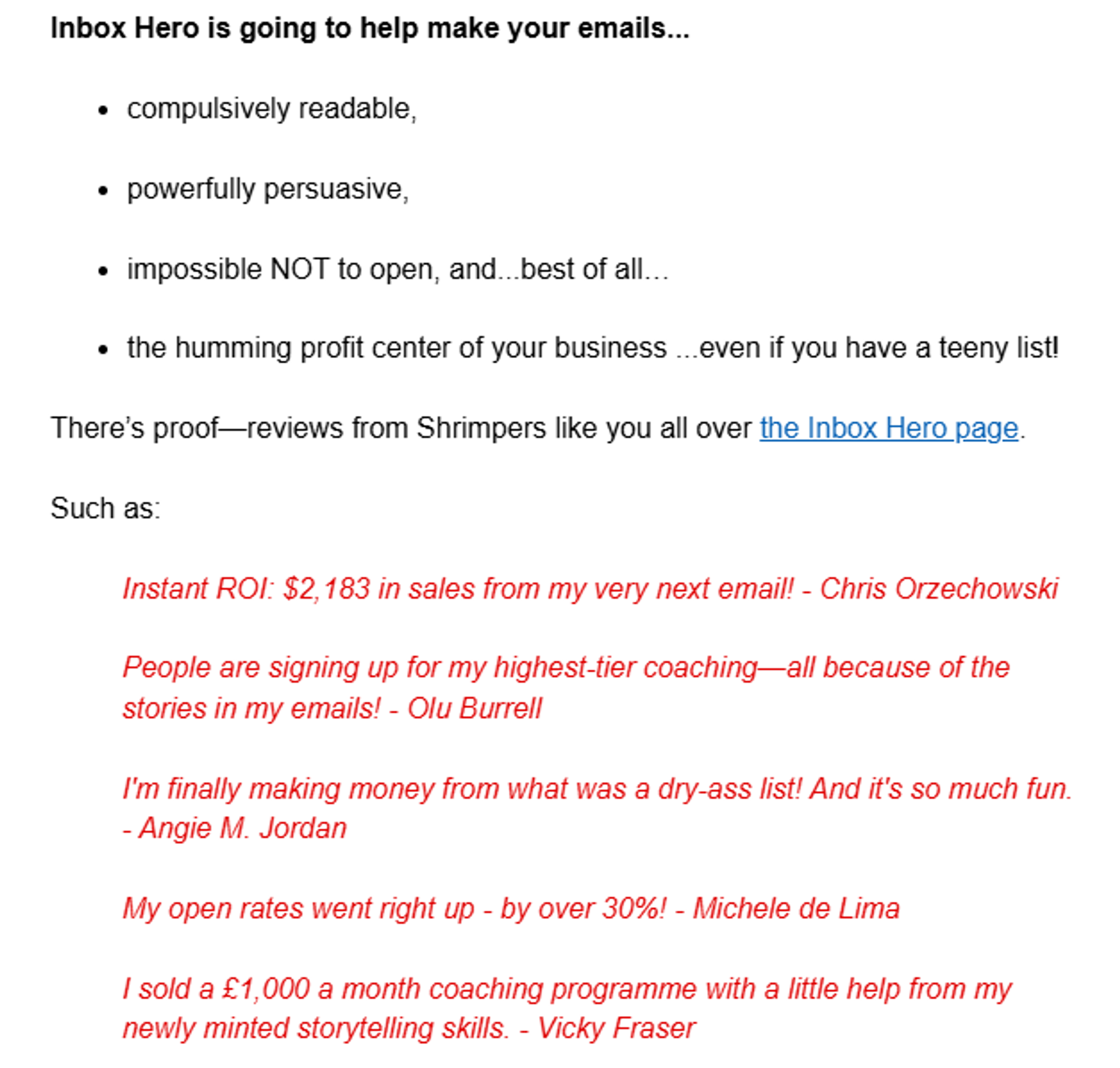
Here’s an example from copywriter Laura Belgray, founder of Talking Shrimp:
And another from Joanna Wiebe over at Copyhackers:
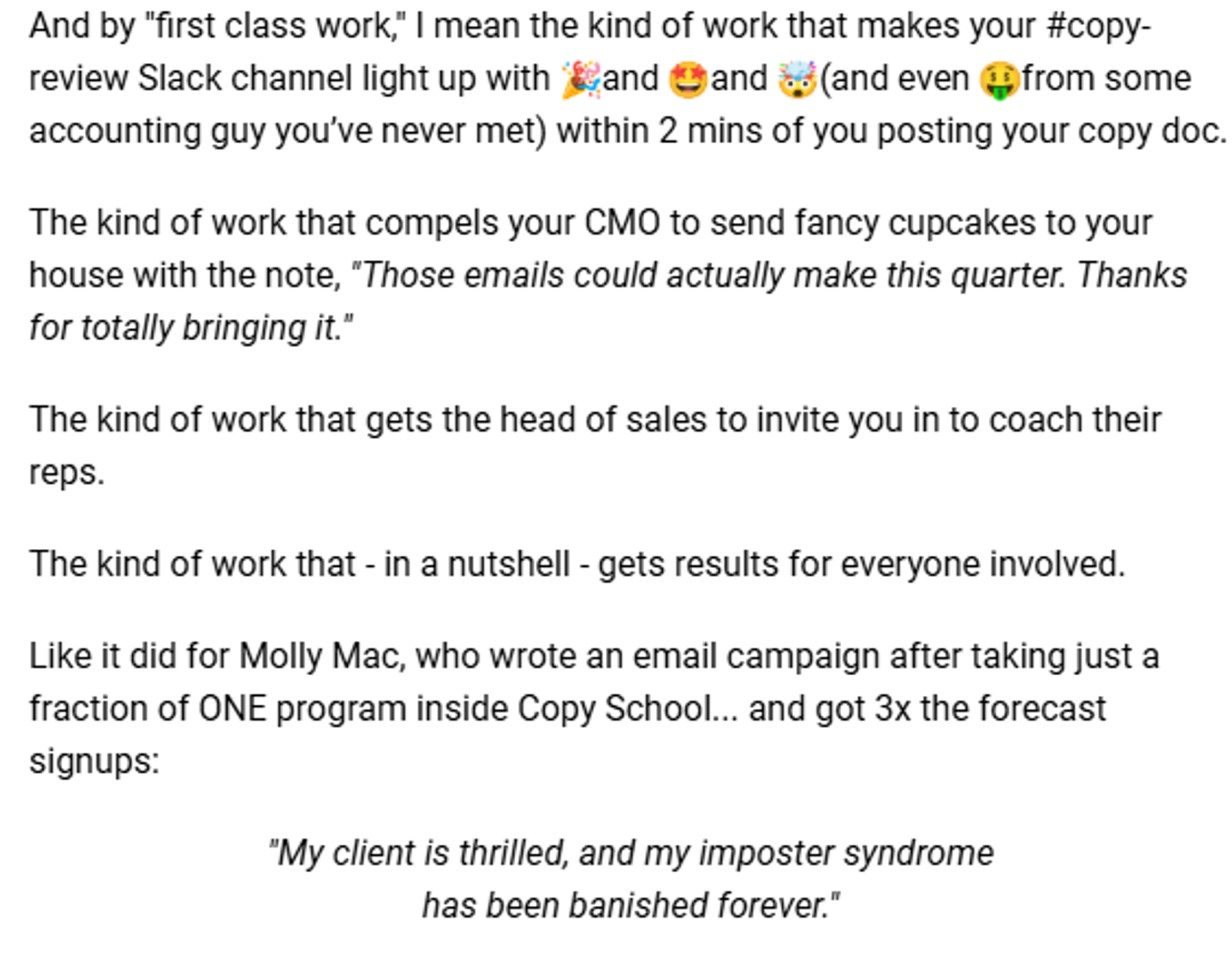
Consider including recent social proof, such as testimonials or social media posts, to reinforce the point.
When to suppress versus remove contacts
If your re-engagement efforts aren’t winning over certain contacts, it may be time to cut your losses and cease email campaigns for now. However, that doesn’t mean you should delete the data.
| Suppress | Remove | |
|---|---|---|
| The user unsubscribed from your emails. | ✔️ | |
| The user is subscribed to multiple mailing list segments and requests to opt out. | ✔️ | |
| You need to retain the subscriber/customer historical data. | ✔️ | |
| The email address is invalid and has no historical data attached to it. | ✔️ | |
| You replaced an invalid address on a contact record with a new one. | ✔️ | |
| The contact has requested that you delete their data in compliance with GDPR, CCPA, and other relevant regulations. | ✔️ | |
| The contact is active, has no historical data, and you have no plans for re-engagement. | ✔️ |
If the customer doesn’t request data deletion, suppress the contact and retain that valuable historical data. You can potentially use that information to set up re-engagement and winback campaigns down the line.
How to build an automated hygiene and engagement funnel
Ready to automate your email list hygiene? The ZeroBounce and ActiveCampaign integration make it simple, just three steps are needed to get started:
Step 1: Connect your accounts
From what you learned above, link your ActiveCampaign and ZeroBounce accounts through the integration.
Step 2: Enable auto validation
Turn on ZeroBounce's Auto Validation feature to automatically verify every new email address as it's added to your lists.
Step 3: Let the automation work:
Your integration now handles the heavy lifting - every new contact gets validated automatically with 99.6% accuracy.
Behind the scenes, this is what’s happening:
- A visitor signs up for your newsletter or creates an account
- Their email address is added to your ActiveCampaign list
- ZeroBounce’s Auto Validation instantly verifies the email through multiple checks:
- Syntax check: Verifies proper email format and catches typos
- DNS record check: Confirms the domain can send/receive emails
- Spam trap check: Identifies known spam trap signatures
- SMTP check: Tests the domain's ability to receive emails in real-time
- Additional checks: If the email address passes all previous checks, the validator scans for disposable domains, toxicity, and suppression lists
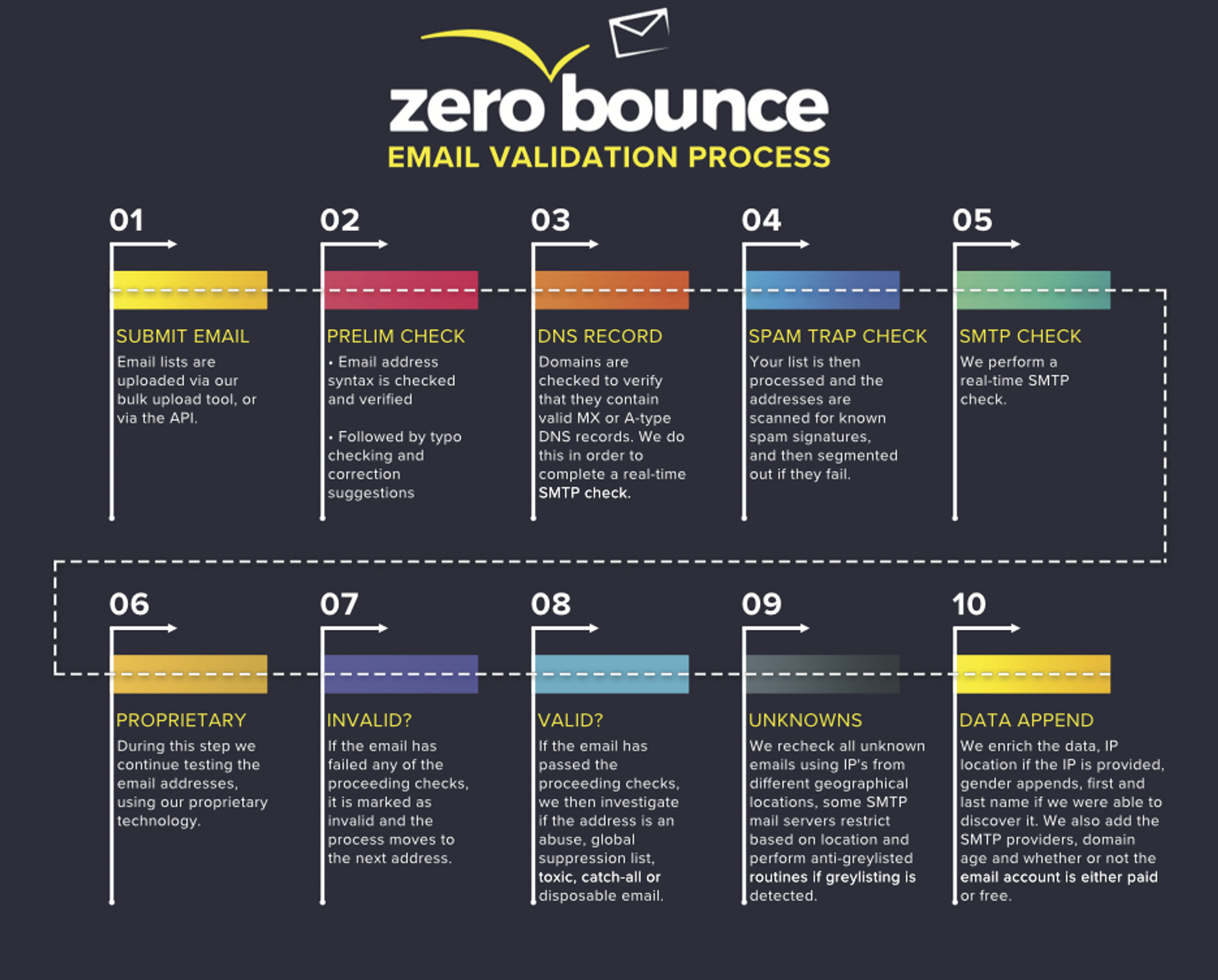
Contact records are automatically tagged with validation status (valid, invalid, spam_trap, etc.).
Managing your results is just as easy:
ActiveCampaign makes this process easy by allowing you to filter contacts by the ZB_Status tags that were automatically added during validation. Simply use the contact filtering feature to view all contacts tagged as “invalid,” “spam_trap,” or “do_not_email,” then bulk select and remove these problematic addresses in just a few clicks rather than reviewing each contact individually.
That's it. Your list hygiene now runs on autopilot, protecting your sender reputation and ensuring your campaigns reach real, engaged subscribers.
Automating catch-all scoring
The integration also includes ZeroBounce’s Email Scoring automation, which primarily targets catch-all email addresses. By design, catch-all emails are impossible to verify as they’re designed to “catch all” emails sent to any address on that email domain. In short, email validation fails as catch-all servers skip the usual mailbox checks by accepting all messages.
The problem with catch-alls
Catch-alls pose a risk for you, as these mailboxes are typically unmonitored and filled with spam. When you send your email, it either hits a full mailbox and bounces, or sits unopened and unread. In some cases, the domain may be configured to initially accept all emails but reject them later, resulting in higher bounce rates.
This leaves you with two options: delete catch-alls for safety, or attempt to differentiate between abandoned and active catch-all mailboxes.
With the Email Scoring automation, ZeroBounce utilizes its proprietary intelligence sources to monitor and assess activity levels for any catch-all emails on your list. The tool then assigns a score of 0-10 to each email, which serves as a Quality Score (QS) based on the feedback. For example:
QS 0 – Low probability of activity. 40% likelihood of bouncing or higher. It may be invalid, a spam trap, a disabled email address, etc.
QS 5 – Approximately 7% likelihood of bouncing
QS 10 – Approximately a 1% likelihood of bouncing or less
While validating catch-alls isn’t possible, the Email Scoring automation provides you with insights, so that you can make educated decisions regarding the risks associated with each potential contact. Your email may bounce, but it may also reach an active, monitored inbox if it has a high quality score.
Further list protection with automation
You can also further safeguard your ActiveCampaign lists by using ZeroBounce’s real-time email verification API directly on those email capture forms. While API implementation is manual, verification occurs automatically in the background, blocking any invalid email addresses from being added to your list. It’s recommended for any business or sender to protect their website forms with real-time email verification at all times to combat list decay.
By adding it directly to the backend of your website where the form is located, the validator will be able to detect any invalid or high-risk email addresses as they’re entered.
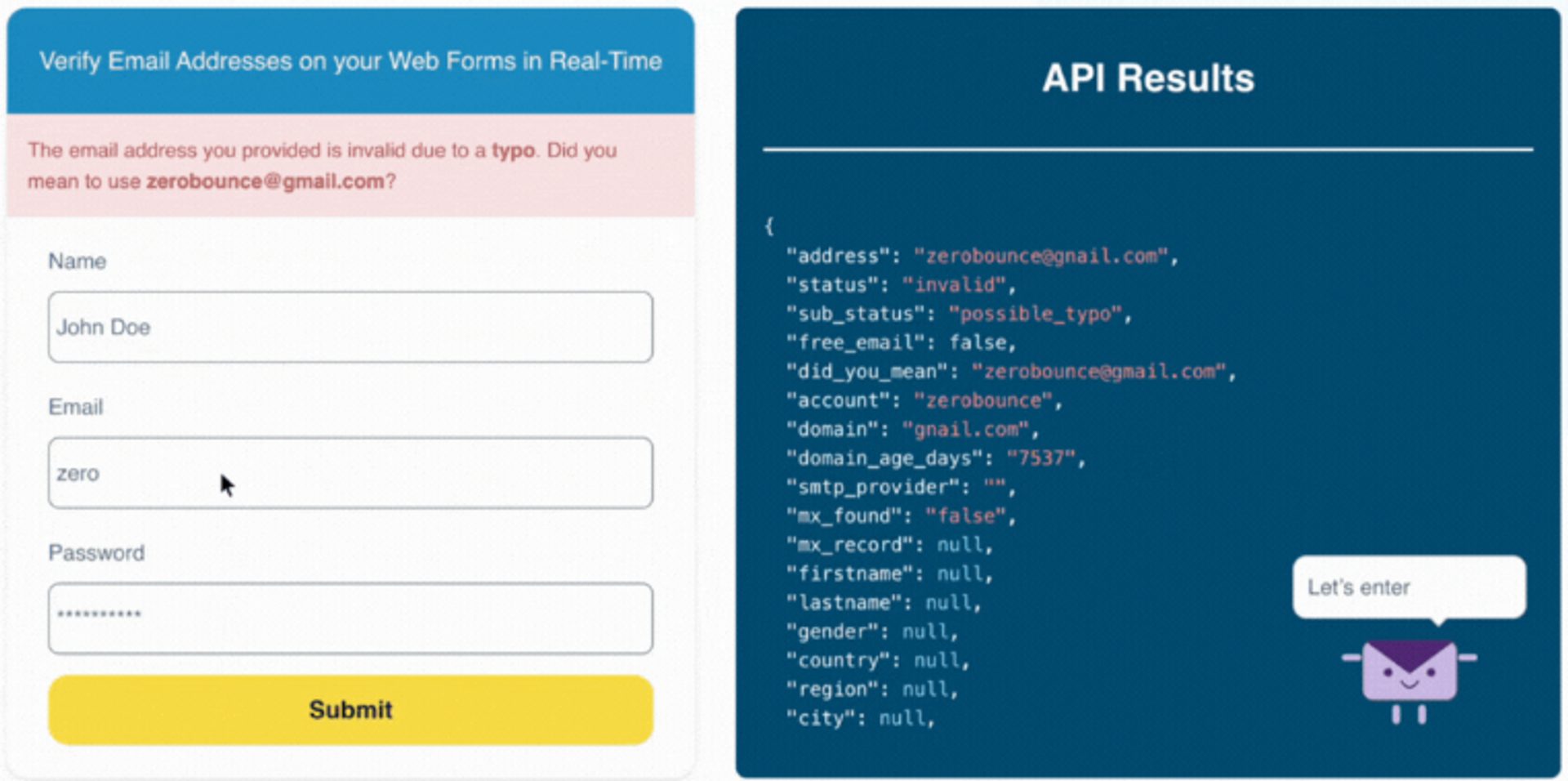
The real-time email verification API is also effective at identifying typos related to syntax. In 2024, ZeroBounce’s API stopped over 10 million typos via API usage on website forms. Not only does it keep your ActiveCampaign list free of bad data, but it also helps you connect with real people who might otherwise miss you due to a simple mistake.
Enriching your contacts
Maintaining a list of valid email addresses is a great start. But with more data on your side, you’re able to craft a funnel experience that’s better suited to your audience’s desires, needs, and interests.
While ZeroBounce can get you started with some key email, social (name, location, gender), and Activity Data details, ActiveCampaign’s personalization tools provide deeper data-driven insights that help you create truly personalized experiences.
Lead-nurturing sequences
You’ve cleaned your list and are now a bit more intimate with your audience. Now, it’s time to put that hard-earned data to work.
The lead-nurturing sequence is an ideal way to continue courting your audience by addressing their needs and interests. And, now that you’ve enhanced your contact cards with key data insights, you’re able to create emails that cater to more precise segments – based on previous engagement, the type of content they like, or even product interest.
Your audience is educated, aware of who you are, and now along for the ride. The next step is to guide readers in considering how they will solve the problem, ultimately leading to the inevitable conclusion that they can’t afford to miss out on a dynamic team-up.
Consider using email campaigns that:
- Further educate your audience with better data, insights, and ways to solve their problem
- Demonstrate your product or service, its features, and why others choose you
- Key value promoters, such as user experience, customer support, security benefits, and other essential resources
- Encourage contacts to sign up for a free account, free trial, or get on a live demo to talk through their unique needs
We effectively guide our audience through the logical steps before introducing them to a team member who can provide the one-on-one attention they deserve.
A simple yet vital tip: Respect your audience. While we’re avoiding discussing a purchase or making a hard sell, both sides recognize that this is a business interaction. Rather than focusing on yourself, talking about how great you are, and pushing prices in their face, ensure that anything you send focuses on the reader, shows personal attentiveness, and a genuine desire to help.
AI is the supercharge you need
Email marketing requires excellent data, experimentation, and hard work. However, you can make yours successful by automating the necessary and tedious list management process. Here’s what you stand to gain with automation on your side:
- Save time by eliminating manual database management tasks.
- Avoid manual, human errors.
- Automatic, 99.6% accurate verification for every new contact you add.
- Combat list decay by scheduling periodic list cleaning that happens automatically.
And with AI at your fingertips, you can become even more successful:
- Leverage AI to optimize send times, subject lines, and content automatically, going beyond basic automation to predictive insights that continuously improve campaign performance without manual testing.
- Use AI-powered segmentation and personalization that adapts in real-time based on subscriber behavior, creating more relevant experiences than static automation rules alone.
- Deploy intelligent automation that learns and evolves—AI analyzes campaign data to automatically adjust workflows, timing, and messaging for maximum engagement.
When you add AI-powered features on top of your automated foundation, you unlock predictive insights and adaptive personalization that transform good email marketing into exceptional results.
The checklist on what to clean:
- Automatically combat list decay by scheduling periodic list cleaning via an email verification integration.
- Suppress anyone who no longer wants to receive emails, but still has important historical data that you need to preserve.
- Delete email addresses that are fake, invalid, or belong to subscribers who specifically request that you delete their data, as per GDPR and other global privacy regulations.
- You can identify unengaged subscribers by checking their last known open date in your campaign history. Consider adding these lapsed subscribers to a re-engagement sequence.
List hygiene is in reach. Sign up for a free trial of ActiveCampaign and try it for fourteen days, free.