SMS Meaning and Definition
Definition
SMS messaging, short for Short Message Service, is a text-based communication method that allows users to send and receive messages between mobile devices over cellular networks. SMS messages can include letters, numbers, and symbols and are typically limited to 160 characters.
Did you know that 85% of American men and women own a smartphone, and approximately 98% of women and 97% of men own a cell phone?
That’s the vast majority of adults in the nation. And based on a study from the Pew Research Center, those who communicate through text messaging send and receive 41.5 messages on average every single day.
Clearly, text messaging is still the main way to communicate with loved ones and colleagues. Smartphones can send four types of messages, including in-app messaging and push notifications (which we’ll talk about later).
What is SMS messaging used for?
With SMS messaging being the number one way we communicate, businesses across the globe are using it in their marketing campaigns. SMS has a handful of benefits and use cases when used this way.
- Instant communication: SMS messaging is quick and direct communication with individuals or groups. It provides a fast way to deliver information to a recipient and receive a response.
- Customer engagement: SMS messaging is an effective way to engage with customers. It can provide timely notifications and updates, such as order confirmations, appointment reminders, and delivery notifications.
- Marketing: SMS messaging can be used for marketing purposes. It allows businesses to send promotional messages, discounts, and special offers directly to customers’ mobile devices.
- Internal communication: SMS messaging can be used for internal communication within a business to update employees on projects or other company-related information.
How does SMS messaging work?
When you send an SMS, it’s not as simple as your message zipping straight to the recipient. Behind the scenes, a series of steps ensures smooth delivery:
- Sending: Your message starts on your device and travels to a Short Message Service Center (SMSC).
- Processing: The SMSC processes the message, determines the recipient’s network, and figures out the best route to deliver it.
- Routing: Once routed, the message reaches the recipient’s mobile network, which forwards it to their device.
- Confirmation of send: The SMSC notifies you that the message has been sent.
This entire process takes seconds, making SMS one of the fastest communication methods available.
Why is SMS messaging important for businesses?
In a business context, SMS messaging has become a powerful tool for sending updates, reminders, and promotional content. For example, you might receive an SMS about your flight’s boarding time or a special sale at your favorite store.
There are many reasons why SMS is important in marketing, sales, and beyond.
- Instant reach: SMS messages are delivered in seconds, ensuring time-sensitive updates reach customers immediately.
- High open rates: Studies show that over 90% of SMS messages are opened within minutes, making it an unparalleled tool for engagement.
- Versatile applications: Businesses use SMS for a variety of purposes, including appointment reminders, shipping notifications, surveys, and marketing campaigns.
- Wide accessibility: SMS works on any mobile device, making it accessible to virtually everyone with a phone.
- Improves customer engagement: SMS messaging is a convenient and personalized way to engage customers. It allows businesses to deliver relevant and timely information to customers and build stronger relationships.
- Cost-effective: SMS messaging is a cost-effective way to communicate with customers. It is less expensive than traditional forms of communication, such as phone calls or direct mail.
- Increases sales: SMS messaging can be used for marketing purposes, allowing businesses to send promotional messages, discounts, and special offers directly to customers. This can lead to increased sales and revenue.
- Improves customer service: SMS messaging can update customers on their orders, appointment reminders, and other important information. This can improve customer satisfaction and loyalty.
The reach and simplicity of SMS make it a staple in personal and professional communication alike. SMS messages are transmitted through the cellular network infrastructure, allowing users to send messages even when they are not connected to the internet.
How to use SMS messaging in your business
You can start using SMS messaging with your customers in a few ways.
- Incorporate it into customer communication: Use SMS messaging to communicate directly with customers, providing them with timely updates and information and a better overall customer experience.
- Integrate SMS messaging into your marketing process. Send customers promotional messages, discounts, and other special offers through SMS messaging.
- Tie it into internal communication: Use SMS messaging to update employees on projects or other company-related information.
SMS messaging is a valuable tool for businesses to communicate with customers and employees. It provides a fast and cost-effective way to deliver information and engage with individuals or groups.
A study found that 54% of consumers prefer to receive marketing promotions via text messages.
That’s a pretty substantial number. Want to take a guess at how many businesses are currently using SMS messaging in their marketing process? Only 11%. So, if you haven’t at least started thinking about how to fold text messaging into your strategy, it might be a good time to reconsider.
Interested in improving the entire customer experience outside of just SMS messaging? Check out our complete guide on customer experience management for actionable tips.
Cost and usage considerations for SMS messaging
SMS comes with its own set of costs and practical considerations. Compared to other communication channels, SMS can be more expensive but offers unique advantages in reach and immediacy. Let’s break it all down so you can decide when and how to use SMS effectively.
The cost of SMS messaging
One of the first things to consider with SMS is its pricing structure. While it’s highly effective, the costs can add up quickly if you’re not strategic. Here’s what you need to know:
- Pay-per-message pricing: Unlike email, which often allows unlimited sends, SMS is typically charged on a per-message basis. Each text can cost a few cents, and if you’re sending to an international audience, rates will vary based on the country.
- Character limits and splits: SMS messages are capped at 160 characters. If your text exceeds that, it’s split into multiple messages, and you’re charged for each one. That’s why crafting concise and impactful messages is so important.
- Additional fees: Beyond the basic per-message cost, some SMS providers charge extra for premium features like custom sender IDs, shortcodes, or MMS (multimedia messages that include images or videos).
- Compliance costs: Regulations like GDPR or TCPA require that you provide opt-out options and maintain a compliant messaging list. Managing these unsubscribes and keeping your process up to code can involve time and resources.
While SMS costs can feel steep compared to other options, its effectiveness often justifies the investment, especially for time-sensitive or high-impact messages.
How SMS stacks up against other messaging channels
When you’re deciding whether to use SMS, it helps to compare it with other communication methods like email or messaging apps. Each channel has its own strengths and weaknesses, so the right choice depends on your goals.
- Compared to email:
SMS is more expensive than email, but it offers instant delivery and impressively high open rates—over 90% of texts are read within minutes. On the other hand, email is much cheaper and allows longer, more detailed communication.- When to use SMS: Flash sales, appointment reminders, or urgent alerts where timing is critical.
- When to use email: Newsletters, promotional campaigns, or anything that requires more detail or visuals.
- Compared to messaging apps (WhatsApp, Facebook Messenger, etc.):
Messaging apps can be a cheaper alternative, especially for international audiences, and they support rich media like images, buttons, and interactive features. However, they require users to have internet access and an account on the app, which limits their reach.- Why SMS stands out: SMS doesn’t rely on internet access or app downloads—any phone can receive a text. This makes it a universal option for communication.
- When apps shine: For deeper customer engagement or multimedia interactions where cost isn’t a concern.
SMS is best for broad, fast communication when you need to ensure your message reaches people immediately, regardless of their device or connectivity.
Practical use cases for SMS
The strengths of SMS make it ideal for certain types of communication. Here are some common scenarios where SMS truly shines:
- Time-sensitive alerts: Need to notify customers about a delivery, confirm an appointment, or share urgent updates? SMS ensures your message is seen quickly.
- Limited-time offers: Text messages are perfect for flash sales or exclusive deals because they grab attention fast, driving immediate action.
- Customer support: Two-way SMS is great for handling quick queries, confirmations, or updates. Customers appreciate the ease of texting for simple issues.
- Event notifications: Whether it’s sending reminders about an upcoming event or follow-ups afterward, SMS helps keep attendees informed without needing them to check their email.
When you pair SMS with other channels like email or messaging apps, you’ll have a well-rounded strategy that balances immediacy, cost, and audience preferences. Use SMS wisely, and it can become one of your most valuable communication tools.
What is MMS?
MMS, or Multimedia Messaging Service, takes SMS a step further. It allows you to send rich media—like images, videos, emojis, website links, contact cards, and audio—alongside text. MMS messages provide a more dynamic and interactive messaging experience. Users can attach images or videos from their device’s gallery, record audio messages, or capture pictures and videos directly within the messaging app and send them to others.
For instance, instead of just texting a promotional code, a business could send a vibrant flyer or video showcasing their latest products. MMS messages also allow for you to chain messages together, so you're not limited to the 160 characters as in SMS.
MMS messages are sent over cellular networks and require a mobile data connection or a Wi-Fi connection, depending on the user’s mobile plan and settings. However, the capabilities and limitations of MMS messaging might vary between carriers and devices.
What is the difference between SMS and MMS messaging?
SMS and MMS messaging are two different types of text messaging services. The key differences boil down to content and cost:
- Content: SMS is strictly text-based and limited to 160 characters. MMS, on the other hand, supports multimedia content and can also have a much larger file size, allowing for sharing higher-quality multimedia content.
- Cost: SMS messages are usually included in a standard text messaging plan, while MMS messages sometimes incur additional charges. This is because MMS messages are more data-intensive and require more bandwidth.
- Device support: While SMS works universally, some older devices or networks may not support MMS messaging.
What about the cost?
While SMS messaging is typically better suited for sending simple text messages, MMS messaging can have a higher return for your business. Yes, they’ll cost you more because the carrier is sending more data than it would for an SMS message, but here are a few things to consider:
MMS marketing campaigns, on average, boast 15% to 20% higher engagement levels than traditional SMS messages.
Not only that, but MMS campaigns are nearly 10 times more likely to be shared on other social channels. Depending on the goal of your campaign, MMS may very well be worth the additional cost.
Pros and cons of SMS and MMS
Let’s take a look at the pros and cons of each type of messaging.
SMS pros:
- High open and response rates
- Cost-effective for businesses
- Compatible with virtually all devices and networks
SMS cons:
- Limited to 160 characters
- Cannot include images, videos, or other multimedia
MMS pros:
- Allows for visually engaging and dynamic content
- Ideal for storytelling and branding
MMS cons:
- Higher costs compared to SMS
- Not universally supported across all devices and networks
How SMS marketing works
SMS marketing is a direct way to reach customers through their phones. Here’s how it typically works:
- Opt-in: Customers voluntarily subscribe to receive SMS updates from your business.
- Campaign creation: Businesses craft concise and impactful messages, often including a call-to-action (CTA) like “Click here” or “Shop now.”
- Automation: With tools like ActiveCampaign, businesses can schedule and personalize SMS campaigns based on customer behavior.
- Delivery and engagement: Messages are sent, opened, and often acted upon immediately, driving traffic and sales.
What is an SMS API and how does it work?
An SMS API (Application Programming Interface) integrates SMS functionality directly into your software or application. For example, an e-commerce platform could use an SMS API to automatically send order confirmations and shipping updates.
Here’s how it works:
- Integration: Developers connect the API to the business’s software.
- Message customization: Businesses define the content, recipients, and timing of messages.
- Automation: The API handles the sending and tracking of messages, providing real-time delivery statuses.
SMS APIs streamline communication, making it easy to manage large-scale messaging without manual effort.
Other types of messaging
As mentioned earlier, there are four types of messaging. The last two types are a bit different from SMS and MMS and serve different purposes.
In-app messaging
In-app messaging is messages or notifications sent from within a mobile application or software platform. Unlike traditional messaging methods like SMS or email, in-app messaging allows developers to create interactive and personalized messaging experiences directly within their applications.
This allows in-app messaging to be contextual and displayed within the context of the application, making it relevant to the user’s current activity. This messaging can also be personalized based on user behavior, preferences, or demographics and communicates directly with the customer in real time. A support chat feature within an app enables users to ask questions and receive instant responses.
Push notifications
Push notifications are short messages or alerts sent by mobile apps, websites, or other online services to notify users about new updates, events, or other activities within the app or service. These notifications are sent to users’ devices and appear on the screen even if the app is not currently in use. Push notifications are a direct way for apps and services to communicate with users, grabbing their attention and encouraging them to engage with the app.
It’s important for developers and businesses to use push notifications responsibly, ensuring they provide value to users and do not overwhelm them with excessive or irrelevant messages. Properly timed and relevant push notifications can significantly enhance user engagement and overall user experience with mobile apps.
Frequently asked questions
Q: Can I send multimedia with SMS?
A: No, SMS is limited to text. To send multimedia, you’ll need to use MMS.
Q: What’s the average cost of SMS and MMS?
A: SMS is generally more affordable, while MMS costs more due to larger data usage.
Q: Are SMS messages secure?
A: SMS is relatively secure but not encrypted. For sensitive information, consider other secure communication methods.
Using SMS messaging with ActiveCampaign
ActiveCampaign takes SMS messaging to the next level by seamlessly integrating it into your marketing and sales automation. Here’s what you can do:
- Personalized campaigns: Send tailored messages based on customer behavior, preferences, or past interactions.
- Automation: Schedule SMS messages as part of a larger campaign, ensuring consistent communication.
- Multi-channel integration: Combine SMS with email, site tracking, and other tools for a cohesive customer experience.
- Analytics: Track open rates, clicks, and responses to fine-tune your strategy.
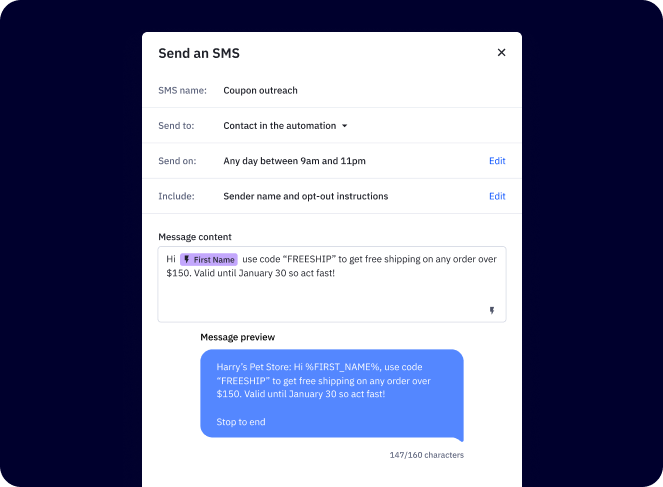
By using ActiveCampaign’s SMS tools, you’re not just sending texts. You’re creating meaningful, measurable customer interactions. Find more information here.
Here's how ActiveCampaign handles SMS messaging
ActiveCampaign treats SMS as a full marketing channel—not a bolt-on feature. The platform combines broadcast messaging, behavioral automation, two-way conversations, and AI-generated content in one unified workspace that shares contact data with your email, CRM, and 1,000+ integrations.
Here's what that looks like in practice.
SMS broadcast campaigns
Send one-time or scheduled messages to your entire list or a targeted segment. The SMS campaign builder includes:
- AI content generation. Describe your campaign goal, and Active Intelligence drafts your message instantly, pulling from your Brand Kit for consistent tone and positioning
- Personalization tags. Insert contact-specific fields (first name, purchase date, custom fields) directly into message content
- MMS support. Attach images, GIFs, or visuals (PNG, JPEG, GIF, up to 600KB recommended) to boost engagement; available for US and AU numbers
- Link shortening. Create custom short links with click tracking built in; public shorteners are blocked per carrier compliance requirements
- Scheduling with quiet hours. Set send windows and configure quiet hours so messages arrive when contacts are actually available
SMS in automations
The "Send SMS" action plugs into ActiveCampaign's automation builder, letting you trigger text messages based on contact behavior, lifecycle stage, or CRM events. Common automated sequences include:
- Abandoned cart recovery texts triggered minutes after a browse or add-to-cart event
- Appointment reminders sent 24 hours and 1 hour before a scheduled time
- Welcome sequences for new SMS subscribers
- Post-purchase follow-ups with upsell offers or review requests
- Lead nurture messages triggered by form submissions or email engagement signals
Automated SMS messages support up to 1,280 characters and respect the same quiet hours as broadcast sends.
Want to go deeper? Not all SMS automation is created equal. See what separates a true SMS marketing automation platform from basic texting tools →
SMS Inbox: two-way messaging
When contacts reply to your campaigns or automations, those conversations land in the SMS Inbox—a centralized interface for managing real-time dialogue at scale. Key capabilities include:
- Conversation threading. View the full message history with each contact in one place
- Contact profile pane. See each contact's tags, list memberships, and active automations without leaving the inbox
- AI reply suggestions. Active Intelligence drafts on-brand responses using your Brand Kit, FAQs, website content, and conversation history; customize tone by role (Greeter, Salesperson, Customer Support, or Front Desk)
- AI conversation summaries. Every 10 messages, the platform generates a summary of objectives, pain points, and recommended next steps
SMS Inbox is available on Plus, Professional, and Enterprise plans with the SMS Marketing add-on and a registered dedicated number (US, UK, or AU).
SMS reporting
ActiveCampaign's Aggregate Campaign Performance dashboard gives teams a centralized view of broadcast SMS performance with drill-down reporting per campaign. Tracked metrics include:
- Delivery rate and fail rate
- Reply rate
- Click rate (per link and overall)
- Opt-out rate
- Individual recipient delivery status and error reasons
Compliance and list management
ActiveCampaign provides the compliance infrastructure SMS requires—without requiring you to build it yourself:
- Consent-ready opt-in forms. Capture SMS permission with proper disclosures and timestamps via forms, checkout flows, or keyword sign-ups
- A2P 10DLC registration. Built-in in-app registration for US senders; dedicated 10-digit long codes protect your number from carrier filtering
- Automatic STOP processing. When a contact replies STOP, END, CANCEL, QUIT, or UNSUBSCRIBE, the platform processes the opt-out immediately and removes them from future sends
- Number validation. Phone numbers are validated at collection to reduce bounce rates and maintain list hygiene
- International reach. SMS automation deliverable to 180+ countries; broadcast campaigns require a registered US, UK, or AU number
SMS and cross-channel marketing
Because SMS and email share the same contact record in ActiveCampaign, you can coordinate messaging across channels within a single automation. A contact who ignores a Thursday email about a weekend sale can receive a Saturday morning text reminder—automatically, based on email engagement signals—without any manual intervention.
Sign up for a free trial to begin using powerful SMS messaging today.


