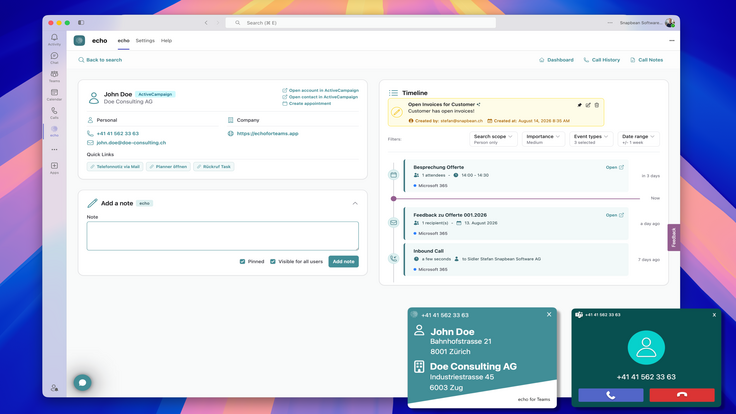

Integration Overview: Identify incoming Microsoft Teams callers using contacts from your ActiveCampaign account in real time.
Is This Integration Right for You?
- Sales Teams: Identify incoming callers using ActiveCampaign contact and CRM data. Review relevant customer information before answering and continue conversations with greater context.
- Customer Service Teams: Know who is calling before answering and view ActiveCampaign contact details directly in Microsoft Teams to provide faster, more personalized support.
- Small and Medium-Sized Businesses: Connect Microsoft Teams Phone with ActiveCampaign without changing your existing telephone setup. Bring caller identification, contact search, and customer context directly into Teams.
Why Use the echo for Microsoft Teams Integration?
Identify Incoming Callers in Real Time
- Match incoming Microsoft Teams calls with ActiveCampaign contacts and display the caller’s information as the call arrives.
Access ActiveCampaign Data in Microsoft Teams
- View contact details and related ActiveCampaign information directly within Microsoft Teams while handling customer and prospect calls.
Search Contacts from One Place
- Search for ActiveCampaign contacts directly from Microsoft Teams using names, phone numbers, and other available contact information.
Key Features of the echo for Microsoft Teams Platform:
- Real-Time Caller Identification: Automatically match incoming Microsoft Teams calls with contacts from ActiveCampaign and other connected data sources.
- Contact Search: Search for contacts directly within Microsoft Teams across ActiveCampaign and other connected sources.
- Contact and CRM Context: View contact details and relevant CRM information without leaving Microsoft Teams.
- Resolved Call History: Review your Microsoft Teams call history with telephone numbers matched to the corresponding contacts.