Der beste Posteingang für WhatsApp
Organisiere deine Gespräche, weise Kontakten Labels zu und filtere die Chats, die du benötigst, und spare dabei dir und deinem Team Zeit & Aufwand mit Posteingang für WhatsApp Nachrichten.
Organisiere deine Gespräche, weise Kontakten Labels zu und filtere die Chats, die du benötigst, und spare dabei dir und deinem Team Zeit & Aufwand mit Posteingang für WhatsApp Nachrichten.
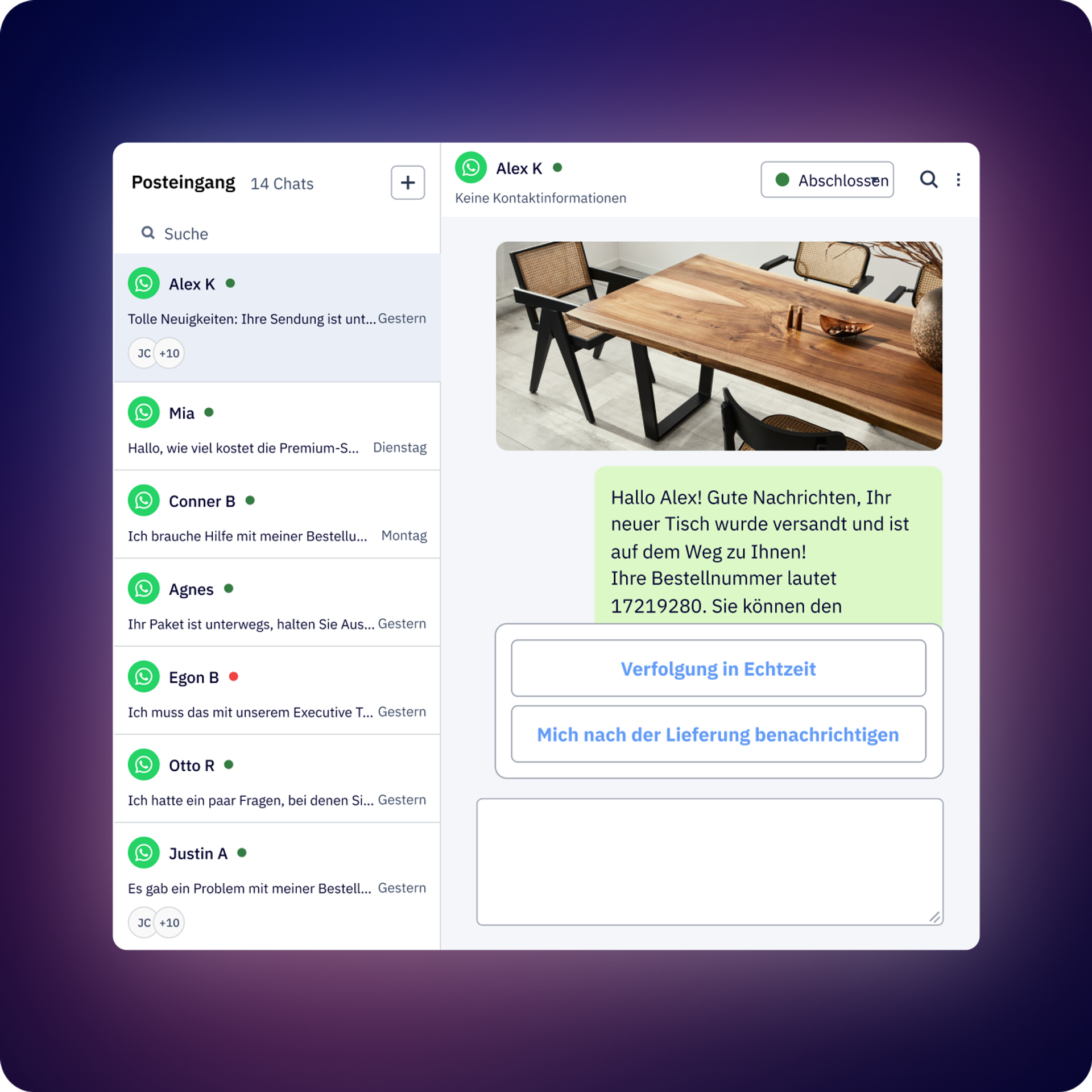
Weise einem Gespräch einen oder mehrere Agenten zu, sodass jeder den Status des Gesprächs kennt und über Antworten informiert wird.
Finde mit unseren Filtern (z. B. Status, ob die letzte Nachricht beantwortet wurde, wem sie zugewiesen ist, Tags und mehr) ganz einfach das Gespräch, das dich interessiert. Speichere gefilterte Ansichten, um deine Gespräche zu organisieren und schneller zu finden.
Starte und verwalte Automationen und Chatbots direkt über den Posteingang.
Füge Gesprächs- und Kontakt-Tags hinzu, um deine Aufgaben leicht zu identifizieren. Hinterlasse innerhalb des Gesprächs Notizen für den Rest deines Teams.
Hänge Dateien an und sende Sprachnotizen wie in WhatsApp, direkt aus dem Posteingang.
Speichere allgemeine Antworten, damit dein Team sie nicht jedes Mal neu eingeben muss. Finde sie schnell und organisiere sie mit Tags.
Zu spät für eine Antwort? Ist das Follow-up in ein paar Tagen? Plane die Nachricht im Posteingang, damit du sie nicht verpasst.
Weise einen oder mehrere Agenten einzeln zu oder erstelle ein Team mit benutzerdefinierten Zuweisungsregeln.
Plane eine automatische Zufriedenheitsumfrage am Ende eines Flows oder beim Abschluss eines Gesprächs.
Erhalte Berichte mit erweiterten Analysen nach Gesprächen und Agenten. Exportiere sie in eine herunterladbare CSV-Datei, um mehr Details zu erhalten, einschließlich aller bisherigen Gespräche.
Durchschnittliche Erstantwortzeit, durchschnittliche Gesprächsdauer, Anzahl der Gespräche usw.
Erstelle individuelle Rollen und Berechtigungen für dein Team. Wähle aus, wer fast jeden Bereich sehen oder verwalten kann: Kontakte, Vorlagen, Abrechnungen, wer Flows erstellen kann und sogar wer Gespräche von einer bestimmten WhatsApp-Nummer sehen kann.
Posteingang ist eine Multi-Agenten-WhatsApp-Schnittstelle, die es mehreren Teammitgliedern ermöglicht, WhatsApp Business-API-Gespräche über einen einzigen gemeinsamen Posteingang zu verwalten. Er ist wie WhatsApp konzipiert, aber für Teams entwickelt. So können Vertrieb, Support und andere Abteilungen mit Organisationsfunktionen wie Tags, Zuweisungen, Notizen und Gesprächstracking gemeinsam an Kundengesprächen arbeiten.
Mehrere Agenten können gleichzeitig arbeiten. Die genaue Anzahl der Benutzer hängt von deinem Tarif ab (siehe Details auf der Preisseite). Alle Agenten haben Zugriff auf denselben vereinheitlichten Posteingang und sehen, wer die einzelnen Gespräche bearbeitet.
Ja. Du kannst jedem Gespräch manuell einen oder mehrere Agenten zuweisen. WhatsApp Nachrichten unterstützt auch Regeln für die automatische Zuweisung von Agenten, sodass Gespräche anhand der von dir festgelegten Kriterien an die richtige Person weitergeleitet werden können. Das System verfügt über eine „Feste Zuweisung“, d. h., wenn du einem Kontakt einen Agenten zugewiesen hast, wird diese Person auch in Zukunft Gespräche mit diesem Kontakt führen.
Schnelle Antworten sind vorgespeicherte Nachrichtenvorlagen, mit denen dein Team auf häufige Fragen sofort antworten kann, ohne dieselben Informationen erneut eingeben zu müssen. Du kannst schnelle Antworten für häufig gestellte Fragen, Standardantworten oder gängige Workflows erstellen, und Agenten können sie mit einem einzigen Klick in Gespräche einfügen.
Ja. Der Posteingang zeigt den vollständigen Gesprächsverlauf mit vollständigem Kontext an, einschließlich des Absenders jeder Nachricht (ob Agent, Automation oder Kunde), des Sendezeitpunkts, Statusänderungen, hinzugefügter Tags, Notizen und Änderungen des Bearbeiters. Wenn ein Kontakt einen Flow betritt oder eine Nachricht erhält, zeigt der Posteingang auch an, welcher Flow oder welcher Broadcast die jeweilige Nachricht gesendet hat.
Du kannst Gespräche filtern nach:
Du kannst deine häufig verwendeten Filterkombinationen als benutzerdefinierte Ansichten (öffentlich oder privat) für einen schnellen Zugriff speichern. Der Posteingang enthält auch eine erweiterte Suche, die es dir erleichtert, bestimmte Nachrichten oder Gespräche zu finden.
ActiveCampaign unterstützt alle WhatsApp-Nachrichtentypen, einschließlich Text, Bilder, Videos, Sprachnotizen, Sticker, Dokumente und WhatsApp-Vorlagen. Du kannst jeden Medientyp senden, den die WhatsApp Business-API unterstützt.
ActiveCampaign kann automatisch Umfragen zur Kundenzufriedenheit (CSAT) senden, nachdem die Gespräche abgeschlossen sind. Du kannst konfigurieren, wann Umfragen gesendet werden und die Zufriedenheitswerte nach Agent, Team oder insgesamt analysieren. So kannst du die Kundenzufriedenheit verfolgen und feststellen, welche Agenten oder Prozesse gut funktionieren.
Ja. Wenn Kunden häufig bestimmte Aktionen oder Dienstleistungen anfordern, kannst du direkt aus dem Posteingang heraus einen ausgehenden Flow starten. So kannst du mehrstufige Prozesse automatisieren und dein Team kann sich auf andere Kunden konzentrieren. Während sich ein Kontakt in einem Flow befindet, sendet ActiveCampaign keine Benachrichtigungen für jede Antwort, bis er ihn abgeschlossen hat.
Ja. Du kannst in jedem Gespräch interne Notizen hinterlassen, die nur für deine Teammitglieder und nicht für Kunden sichtbar sind. Auf diese Weise können Agenten den Kontext weitergeben, wichtige Informationen dokumentieren oder Anweisungen für Kollegen hinterlassen, die das Gespräch später weiterführen könnten.
Du kannst Nachrichten so planen, dass sie zu einem späteren Zeitpunkt gesendet werden, anstatt sie sofort zu versenden. Dies ist nützlich, um mit Kunden zu optimalen Zeiten in Kontakt zu treten oder um außerhalb der Geschäftszeiten Antworten vorzubereiten, die zum richtigen Zeitpunkt zugestellt werden.
WhatsApp Nachrichten bietet einen signifikanten ROI durch deutlich höhere Engagementraten im Vergleich zu traditionellen Kanälen. Im Vergleich zu E‑Mails verzeichnen Unternehmen, die WhatsApp nutzen, in der Regel 98%ige Öffnungsraten gegenüber 20–30 % bei E‑Mails, was zu schnelleren Konversionen und höheren Einnahmen pro Kontakt führt.
Die finanziellen Auswirkungen variieren je nach Branche, Geschäftsmodell und Anwendungsfall. Zu den wichtigsten ROI-Treibern gehören:
Um die spezifischen finanziellen Auswirkungen für dein Unternehmen zu verstehen, lies unseren WhatsApp Nachrichten-ROI-Bericht (in englischer Sprache), der die Konversionsraten, Umsatzsteigerungen und Effizienzgewinne unserer Kunden aufschlüsselt. Du kannst deine potenzielle Rendite auch mit unserem WhatsApp ROI-Rechner (in englischer Sprache)berechnen, der die Auswirkungen auf den Umsatz auf der Grundlage deines aktuellen Kontaktvolumens, des durchschnittlichen Auftragswerts und der Konversionsziele schätzt.
Für Unternehmen, die WhatsApp Nachrichten von ActiveCampaign nutzen, ergibt sich ein zusätzlicher ROI aus der Verbesserung der Teameffizienz durch die Zusammenarbeit mehrerer Agenten, automatisierte Umfragen zur Kundenzufriedenheit, Regeln für die Gesprächszuweisung und erweiterte Berichte, die die Leistung der Agenten und die Gesprächsmetriken verfolgen.
Testen Sie es 14 Tage lang kostenlos.


