La mejor bandeja para WhatsApp
Organiza tus conversaciones, asigna categorías a los contactos y filtra los chats que necesites, lo que permitirá que tú y tu equipo ahorren tiempo y esfuerzo con la bandeja para la Mensajería por WhatsApp.
Organiza tus conversaciones, asigna categorías a los contactos y filtra los chats que necesites, lo que permitirá que tú y tu equipo ahorren tiempo y esfuerzo con la bandeja para la Mensajería por WhatsApp.
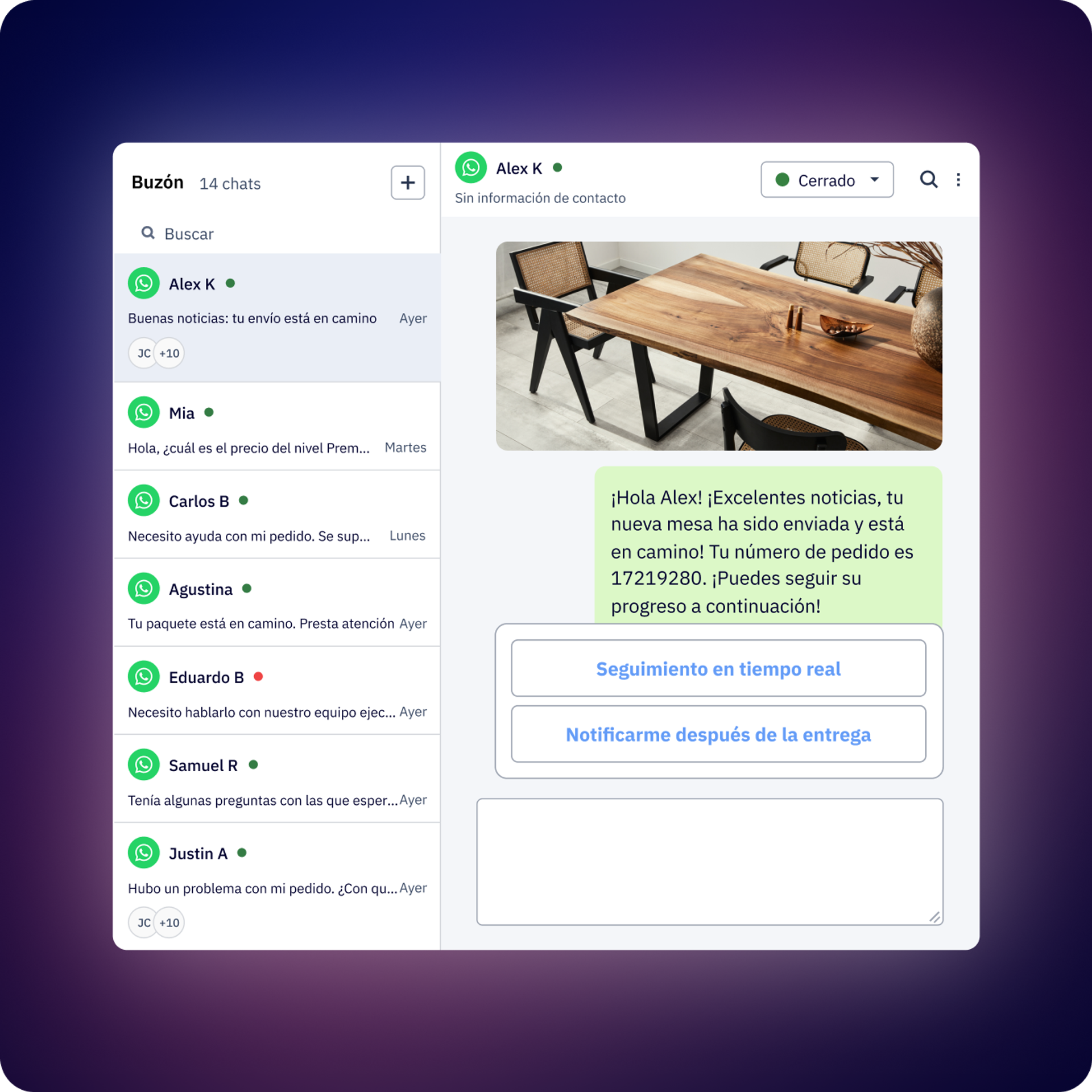
Asigna uno o más agentes a una conversación para que todas las personas conozcan su estado y reciban notificaciones de las respuestas.
Encuentra de manera sencilla las conversaciones que te interesan con nuestros filtros (p. ej., estado, si se respondió el último mensaje, a quién está asignado, etiquetas y más). Guarda las vistas filtradas para organizar y encontrar tus conversaciones más rápido.
Inicia y gestiona las automatizaciones y los chatbots directamente desde la bandeja.
Añade etiquetas de contacto y conversación para identificar tus tareas con facilidad. Deja notas dentro de la conversación para el resto del equipo.
Adjunta archivos y envía notas de voz del mismo modo en que lo harías en WhatsApp directamente desde la bandeja.
Guarda respuestas comunes para que tu equipo no tenga que escribirlas cada vez. Búscalas y organízalas de forma rápida con etiquetas.
¿Es demasiado tarde para responder? ¿Tienes que hacer un seguimiento en un par de días? Programa el mensaje desde la bandeja para no olvidarte de hacerlo.
Asigna uno o más agentes de forma individual o crea un equipo con reglas de asignación personalizadas.
Programa una encuesta de satisfacción automática al final del flujo o cuando se cierra una conversación.
Obtén informes con análisis avanzados por conversación y por agente. Expórtalos en un archivo CSV descargable para ver más detalles, como el historial de conversaciones,
el tiempo promedio de la primera respuesta, la duración promedio de la conversación, la cantidad de conversaciones, etc.
Crea permisos y roles personalizados para tu equipo. Elige quién puede ver o gestionar prácticamente todo: contactos, plantillas, facturación, quién puede crear flujos e incluso quién puede ver las conversaciones de un número de WhatsApp específico.
La bandeja es una interfaz multiagente de WhatsApp que permite que varios miembros del equipo gestionen conversaciones de la API de WhatsApp Business desde una única bandeja compartida. Está diseñada como WhatsApp, pero pensada para equipos, lo que permite que el departamento de Ventas, el de Asistencia y más colaboren en conversaciones con clientes con funciones de organización, como etiquetas, asignaciones, notas y seguimiento de conversaciones.
Pueden trabajar varios agentes en simultáneo. La cantidad exacta de usuarios depende del plan (consulta los detalles en la página Precios). Todos los agentes acceden a la misma bandeja unificada y pueden ver quién gestiona cada conversación.
Sí, puedes asignar uno o más agentes a cualquier conversación de forma manual. La Mensajería por WhatsApp también admite reglas de asignación automática de agentes, lo que permite transferir las conversaciones a la persona adecuada en función de los criterios que definas. El sistema incluye una “asignación fija”, lo que significa que una vez que asignes un agente a un contacto, dicha persona seguirá gestionando las futuras conversaciones con ese contacto.
Las respuestas rápidas son plantillas de mensajes predefinidas que permiten que tu equipo responda preguntas frecuentes al instante sin tener que volver a escribir la misma información. Puedes crear respuestas rápidas para preguntas frecuentes, respuestas estándar o flujos de trabajo comunes, y los agentes pueden incluirlas con un solo clic en las conversaciones.
Sí, en la bandeja se muestra el historial completo de la conversación, con todo el contexto, incluido quién envió cada mensaje (si fue un agente, una automatización o el cliente), cuándo se enviaron los mensajes, los cambios de estado, las adiciones de etiquetas, las notas y los cambios en la asignación. Cuando un contacto ingresa a un flujo o recibe un broadcast, en la bandeja también se muestra qué flujo o broadcast envió cada mensaje.
Puedes filtrar las conversaciones por:
Puedes guardar las combinaciones de filtros de uso frecuente como vistas personalizadas (públicas o privadas) para acceder a ellas con rapidez. En la bandeja también se incluye una búsqueda avanzada que te permite encontrar conversaciones o mensajes específicos fácilmente.
ActiveCampaign admite todos los tipos de mensajes de WhatsApp, incluidos texto, imágenes, videos, notas de voz, stickers, documentos y plantillas de WhatsApp. Puedes enviar todos los tipos de archivos multimedia que admita la API de WhatsApp Business.
ActiveCampaign puede enviar encuestas de satisfacción del cliente de forma automática una vez que se resuelvan las conversaciones. Puedes configurar cuándo enviar las encuestas y analizar las puntuaciones de satisfacción por agente, por equipo o en general. Esto te ayuda a hacer un seguimiento de los niveles de satisfacción del cliente e identificar qué agentes o procesos funcionan bien.
Sí, cuando los clientes solicitan con frecuencia acciones o servicios específicos, puedes iniciar un flujo saliente directamente en la bandeja desde la conversación. Esto te permite automatizar procesos de múltiples pasos y liberar a tu equipo para que se centre en los demás clientes. Cuando un contacto ingresa en un flujo, ActiveCampaign no envía notificaciones de cada respuesta hasta que lo complete.
Sí, puedes dejar notas internas dentro de cualquier conversación que solo podrán ver los miembros de tu equipo, no los clientes. Esto ayuda a los agentes a compartir contexto, registrar información importante o dejar instrucciones para los colegas que podrían encargarse de la conversación en un futuro.
Puedes programar mensajes para que se envíen más tarde en lugar de enviarlos de inmediato. Esta función es útil para hacer un seguimiento de los clientes en momentos oportunos o para preparar respuestas fuera del horario de atención que se enviarán cuando corresponda.
La Mensajería por WhatsApp ofrece un retorno de la inversión significativo gracias a las tasas de interacción considerablemente más altas en comparación con los canales tradicionales. Por ejemplo, si con el correo electrónico, las empresas que usan WhatsApp por lo general obtienen tasas de apertura del 98 % (en comparación con la del correo electrónico, que es de entre un 20 % y un 30 %), lo que genera conversiones más rápidas y mayores ingresos por contacto.
El impacto financiero varía en función de la industria, del modelo empresarial y del caso de uso. Factores clave del retorno de la inversión:
Si quieres comprender el impacto financiero específico para tu empresa, consulta nuestro informe “El retorno de la inversión de la Mensajería por WhatsApp”, en el que se detallan las mejoras en la eficacia, el aumento de los ingresos y las tasas de conversión de nuestros clientes. También puedes calcular tu rentabilidad potencial con nuestra Calculadora del retorno de la inversión de WhatsApp, que estima el impacto en los ingresos en función de tu volumen de contactos actual, el valor promedio de los pedidos y los objetivos de conversión.
Para las empresas que usan la Mensajería por WhatsApp de ActiveCampaign, el retorno de la inversión adicional proviene de las mejoras en la eficacia del equipo gracias a la colaboración de múltiples agentes, las encuestas de satisfacción del cliente automatizadas, las reglas de asignación de conversaciones y los informes avanzados que realizan un seguimiento del rendimiento de los agentes y de las métricas de la conversación.
Pruébalo gratis durante 14 días.


