Email deliverability is the ability of an email message to arrive in the recipient’s main email inbox. It’s often measured as the percentage of emails accepted by the Internet Service Provider (ISP).
If you’ve ever sent an email that seemed to vanish somewhere between “send” and your contact’s inbox, you’ve already experienced the challenge of deliverability. But there’s much more to it than just making sure your message doesn’t disappear.
Deliverability is also related to inbox placement: whether your email lands in the primary inbox, the promotions tab, or social tab, or worse, the spam folder.
Strong deliverability depends on a combination of strategy, data, and the right tools. In this article, we’ll take a deep dive into how deliverability works, and the strategic solutions that are available to help you give your emails a much better chance of being seen, opened, and acted on.
Why does email deliverability matter?
Email deliverability directly affects how well your campaigns perform and, by extension, your bottom line. When messages don’t reach the inbox, customers never see your offers, updates, or calls to action. That missed visibility can ripple through every part of your marketing performance, resulting in:
- Reduced engagement: Poor inbox placement means fewer opens and clicks, which can signal to inbox providers that your emails are low quality, further decreasing deliverability.
- Damaged reputation: Consistent sending to invalid or unengaged contacts can harm your sender reputation, making it harder for future messages to reach the inbox.
- Skewed performance data: When large portions of your audience don’t receive your messages, your analytics no longer reflect true customer behavior, making optimization harder.
- Customer experience impact: Missed transactional or onboarding emails can create confusion, delay conversions, or erode trust in your brand.
- Lost revenue: If promotional emails land in spam, subscribers never see your offers or abandoned cart reminders, leading to fewer purchases and lower campaign ROI.
Your deliverability rate is a critical indicator of both marketing health and operational reliability. While you can’t always see exactly where every message ends up, monitoring signals like bounce rates, spam complaints, and engagement patterns helps diagnose and prevent issues early.
Modern email marketing tools like ActiveCampaign make this easier with features for list hygiene, authentication, and automated engagement tracking. In the next sections, we’ll explore practical strategies to strengthen deliverability from the first send to every automated follow-up.
What is a good email deliverability rate?
A good email deliverability rate is generally higher than 89%. Over 95% is considered excellent, where nearly all your messages successfully reach subscribers’ inboxes. While 100% is ideal, it’s rarely realistic due to factors outside your control, like temporary server issues or full inboxes. The key is to maintain consistently high performance and address any dips quickly.
ActiveCampaign has been consistently ranked as a top deliverability provider in independent tests, with customer send rates that significantly exceed industry benchmarks.
ActiveCampaign helps businesses achieve strong deliverability rates across industries:
- Mentorshow maintains an exceptional deliverability rate of 99.88% while scaling personalized campaigns.
- UN|HUSHED delivers educational content reliably to a global audience at a deliverability rate of 99%.
- UBITS quickly began to grow their low deliverability rates across segmented B2B audiences after switching to ActiveCampaign.
- Power Bespoke: Saw deliverability rates jump first by 10%, then by 15% after implementing ActiveCampaign’s automation and optimized sending times.
Many factors influence email deliverability. Some you can control, and others (like technical outages or full inboxes) you can’t. Let’s explore the biggest factors that affect deliverability and how to improve your results over time.
What affects email deliverability?
Factors such as sender reputation, authentication, and being blacklisted are all common reasons for low email deliverability. Being very clear about the content you send, who you send it to, and how you send it is very important to maintain a high rate.
Let’s examine factors that impact email deliverability more closely.
Email sender reputation
At the heart of email deliverability is sender reputation. Sender reputation is the overall measure of how trustworthy mailbox providers consider you as a sender.
Sender reputation isn’t a single score, but rather the combined result of two key components: domain reputation and IP reputation.
Your domain reputation reflects the long-term sending behavior associated with your domain, including engagement levels, spam complaint rates, list hygiene, and authentication setup. As mailbox providers have grown more sophisticated, domain reputation has become the dominant factor that influences whether your emails are accepted, filtered, or blocked.
Your IP reputation measures the trustworthiness of the specific IP addresses used to send email. While it remains relevant for high-volume or dedicated senders, shared IP environments now rely more heavily on aggregated domain-level signals and recipient engagement data.
Simply put, domain reputation examines the credibility of who an email is coming from, while IP reputation looks at where an email is coming from.
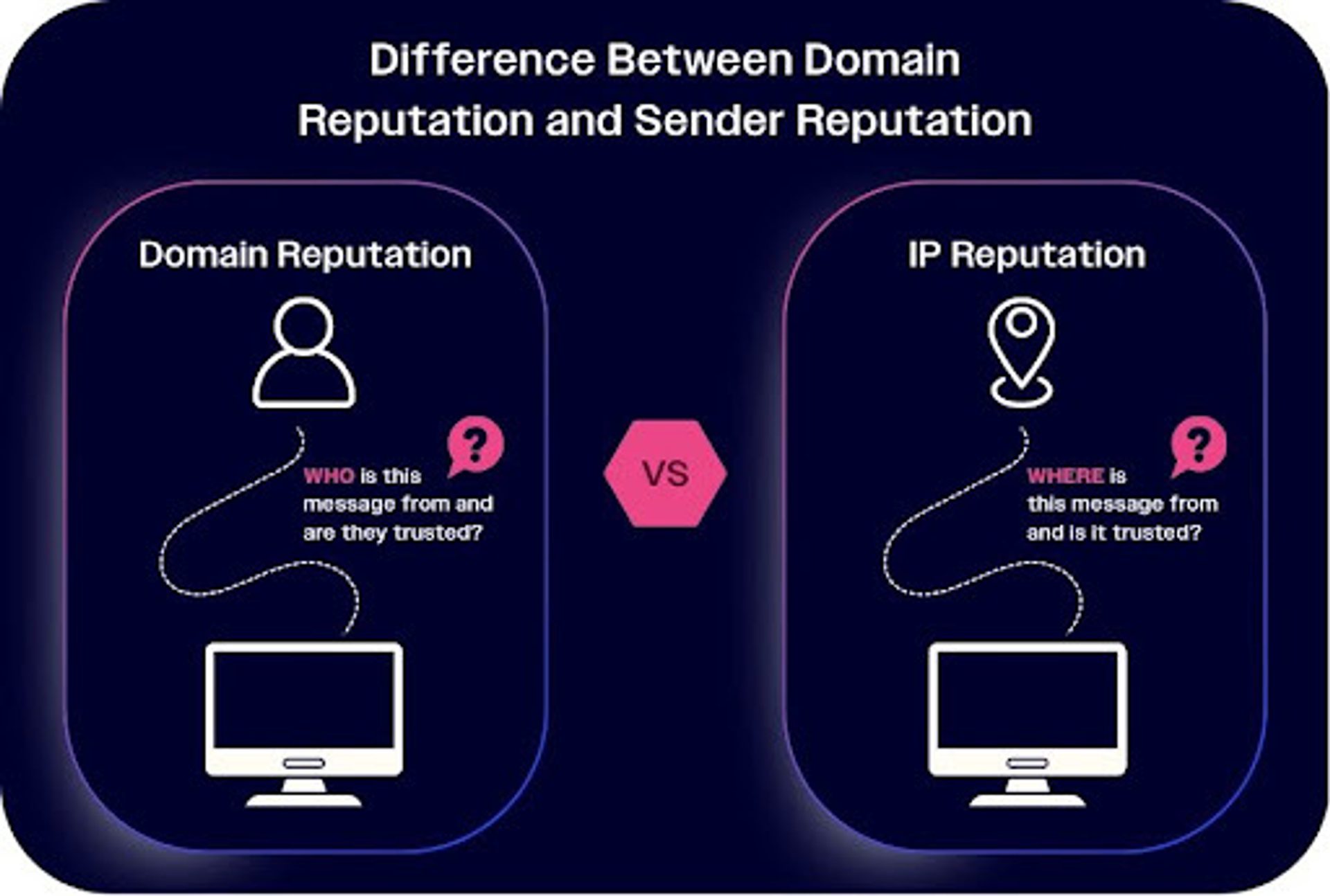
Domain reputation considers who is sending a message, while IP reputation considers where it is being sent from.
Together, these signals form your sender reputation, which directly determines how consistently your messages reach active inboxes. A poor reputation can lead to throttling, spam filtering, or outright rejection, while a strong one ensures stable, predictable deliverability.
Reputation is becoming increasingly dynamic, shaped not only by technical setup but also by recipient engagement.
Email bounce rate
A bounced email is one that failed to reach the subscriber. There are two types of bounces: soft bounce and hard bounce.
A soft bounce is a temporary issue in delivering your email due to a problem that can usually be resolved, such as a full inbox. While soft bounces were much more of a problem in the early days of email due to the limited storage availability for incoming emails, most of these occur today if there is a sudden increase in the volume of emails being sent. ISPs and mail servers watch for major spikes in send volume as it may be an indication that an account has been compromised or is being used for spam messages.
A hard bounce is a permanent type of bounce that means there is something wrong with the email address you’re trying to reach. Often this is due to the email address no longer existing for whatever reason. A single hard bounce is a sign that you should remove that email address and won’t affect you too much, but if you continuously get these hard bounces, it will signal to your ISP that you’re not keeping up with proper list hygiene, and will begin to hurt your reputation and email deliverability.
SPF, DKIM, and DMARC authentication
Email authentication helps ISPs to decide whether or not a sent email is genuinely from the sender it claims to be. When authentication is missing or misconfigured, messages can be flagged as suspicious, sent to spam, or rejected entirely, leading to poor deliverability.
There are three primary email authentication standards every sender should use:
- SPF (Sender Policy Framework) confirms that an email is sent from an authorized mail server for your domain. When the email is sent, it is checked against a list of authorized IP addresses that are allowed to send from that domain. SPF prevents unauthorized IPs from sending messages on your behalf and is often used to detect forgery and prevent spam.
- DKIM (DomainKeys Identified Mail) uses a digital signature within the email header to verify that the message wasn’t altered in transit and truly comes from your domain. DKIM’s main function is detecting and preventing spoofing and phishing. Unlike SPF, DKIM authentication appears within the email itself, helping to prevent a receiver from replying to illegitimate emails.
- DMARC (Domain-based Message Authentication, Reporting, and Conformance) builds on SPF and DKIM by telling receiving servers how to handle messages that fail authentication—whether to deliver, quarantine, or reject them. It also provides reports so you can monitor potential abuse of your domain. Major inbox providers, including Gmail and Yahoo, have now made DMARC verification compulsory for bulk senders, so it’s essential to implement it and align with your SPF and DKIM configurations.
It’s important to use all three authentication methods. Together, they protect your domain from spoofing and phishing while signaling to inbox providers that your emails are trustworthy. This trust directly improves your deliverability over time.
ActiveCampaign has a free DKIM, SPF, and DMARC authentication checker to make sure your emails are always properly authenticated.
ISP and mail service infrastructure
Even though email sending happens “in the cloud,” every message still depends on real infrastructure: the networks, servers, and IP addresses that route and deliver your emails. This infrastructure has a direct impact on deliverability because mailbox providers evaluate it to determine whether your messages are legitimate and trustworthy.
Building and maintaining this infrastructure on your own can be complex and resource-intensive. That’s why many businesses rely on trusted platforms like ActiveCampaign, with proven sending networks and dedicated deliverability teams to manage IP health, authentication, and compliance.
Open rates
Your open rate measures how many recipients open the emails you’ve successfully delivered. While unopened emails are technically delivered, consistently low engagement signals to mailbox providers that your messages may not be wanted, and that can gradually harm your sender reputation and overall deliverability.
As a benchmark, most healthy lists see open rates above 20%, though this varies by industry and audience. If your open rate drops below 15%, it’s a sign to investigate.
Open rates below 10% are an urgent red flag. This tells ISPs that there’s something really wrong with what you’re sending. They may interpret your messages as spam-like, severely impacting your ability to reach inboxes in the future. This most often occurs when a sender is intentionally sending spam or using purchased lists.
Spam emails
Emails that land directly in the spam box are technically delivered, but will cause your sender reputation to drop and impact your deliverability score down the line.
There are two primary ways spam emails occur:
- Spam complaints: Most email programs, like Gmail and Yahoo Mail, allow users to mark messages as spam. While it takes more than a single complaint to affect deliverability, high complaint rates signal to ISPs that your emails aren’t wanted.
- Spam traps: These are email addresses created by ISPs specifically to catch senders who add unverified addresses to their lists. If you hit any of these spam traps, usually through procuring a list without consent, your reputation will plummet and you may even lose the ability to reach any inbox at all. Always prioritize confirmed, opt-in contacts.
Because mailbox providers track these signals closely, spam complaints and spam trap hits can quietly undermine your deliverability over time, even if many of your emails are well-received.
Email blacklists
Email blacklists are online databases that track senders flagged for spam complaints or sending to spam traps. Mail servers consult these lists to decide whether to accept incoming messages. Being listed can result in emails being blocked or rejected outright, severely impacting deliverability.
Check out our guide on how to avoid email blacklists for some tips on how to protect your domain credibility.
Ideally, you should choose a deliverability-first email marketing platform, like ActiveCampaign, to take a proactive approach and protect your sender reputation from the start.
7 steps to avoid and manage poor email deliverability
Strong email deliverability comes from proactive maintenance, not quick fixes. Now, we’ll look at key ways to prevent and manage deliverability issues, from list hygiene and opt-in practices to content quality and engagement monitoring.
1. Test your email deliverability and reputation
Regularly testing and monitoring your deliverability helps you catch issues before they affect inbox placement. Even if you’re not currently seeing delivery problems, it’s worth checking key metrics like bounce rates, spam complaints, and domain reputation to stay ahead of potential issues.
If you’re seeing bad email delivery rates, there are a few ways to test and see what the real problem is:
- For quick checks, use ActiveCampaign’s free verification tools to confirm that SPF, DKIM, and DMARC are set up correctly.
- If you’re troubleshooting specific issues, external tools like MXToolbox, mail-tester.com, or isnotspam.com can offer additional diagnostic insights.
ActiveCampaign’s built-in analytics and reporting tools make it easy to monitor performance, including bounces, spam complaints, and engagement trends, so you can spot and resolve problems early. You can also keep an eye on domain and IP reputation through the platform, and choose a dedicated IP address to help you maintain trust with mailbox providers.
2. Always send engaging content
Engagement is one of the strongest signals mailbox providers use to judge sender reputation. When contacts consistently open, click, and interact with your messages, deliverability improves naturally.
Start by confirming that the content you are sending is high quality and what subscribers opted in for. If the subject line doesn’t capture their attention or they don’t care about what you’re sending, they’re more likely to ignore the email or report it as spam.
Not sure where to get started? ActiveCampaign has a number of email content templates and guides, as well as a free subject line generator to help you out.
It’s best to tailor emails based on behavior, preferences, or past interactions, so every message feels relevant to the recipient. ActiveCampaign’s advanced segmentation, personalization, and dynamic content features let you do this at scale, without creating and sending on a contact-by-contact basis.
You can also use A/B testing to refine subject lines, content, and send times to see what drives the best engagement and open rates.
3. Make it easy to unsubscribe
There was a time when a less-than-ethical business could make it extremely hard to unsubscribe from an email list. Thankfully, times have changed and now it is required that every email contains a way to unsubscribe. While this might seem counterintuitive, remember that an unengaged subscriber who doesn’t open your emails, or worse, reports them as spam, actually hurts your sender reputation.
It’s become increasingly popular to include an unsubscribe link at the top of each email you send, especially for regular newsletters. However, at a minimum, place an easy-to-find unsubscribe link near the bottom of your email.
ActiveCampaign automatically includes unsubscribe links in every email and manages suppression lists behind the scenes, ensuring that contacts who opt out are immediately excluded from future sends. This removes the need for manual list maintenance and helps prevent accidental sends to unsubscribed contacts.
By making unsubscribing effortless, you’ll reduce spam complaints and can focus your email efforts on the people who genuinely want to hear from you.
4. Be mindful of sending limits and volume
A consistent schedule is key when it comes to keeping your deliverability high. Sudden spikes in sending volume, even for legitimate promotions, can trigger spam filters or raise flags with mailbox providers.
There are times when you may need to send mass emails within a short period of time, such as a major sale or promotion. The problem is, if you increase your send too much at once, a mail server may see this as a sign of spam.
While there is no set number of emails to hit your sending limit, gradually increasing your email volume is the best way to avoid hitting it during a big event. You could, for example, set up a campaign to send preview or teaser emails every few days leading up to the promotion. By the time the big week comes, mail servers will have adjusted to a higher sending volume.
Another way to tackle this problem is with gradual distribution. Try creating a staggered scheduled send that uses ActiveCampaign’s predictive sending automation, so large campaigns can be distributed smoothly and at optimal times.
5. Practice good email hygiene
Keeping your email list healthy is like keeping your teeth clean. Keeping up regular maintenance is the strongest defense against developing a cavity, or in the case of your email list, low deliverability.
Regularly removing invalid or inactive contacts helps prevent high bounce rates and low engagement, both of which can harm your sender reputation.
Hard bounced emails should be taken off right away. But in the case of low open or engagement rates, it’s always good practice to try and re-engage them before removing them.
It’s quick and easy to set up an automated re-engagement campaign with ActiveCampaign, so you can win back inactive subscribers while preserving valuable relationships.
Meanwhile, automated list cleaning tools keep your lists in order and ensure your emails only reach valid, engaged recipients.
6. Always get consent to send (double opt-in is best!)
We’ve already explained that you should never buy or rent an email list, or use someone’s email address without their consent. Sending to people who haven’t agreed to hear from you can quickly damage your sender reputation and even lead to blacklisting. Additionally, email addresses can come from many legitimate places, but may still not be considered legitimate email subscribers until they confirm their desire to hear from you.
There are two main approaches to collecting consent:
- Single opt-in requires a visitor to take a single action to become a subscriber, such as submitting a form or writing their email down on a list. While fast, it can sometimes add people who didn’t intend to join your list. There are cases when a person might not realize what they are providing their email address for, such as if they think they’re just receiving a receipt and not a newsletter.
- Double opt-in requires a visitor to take two actions to become a subscriber. This is most commonly done by enabling “double opt-in” through your mailing list provider. The subscriber first submits a form and then confirms their subscription through a link in an email sent to them, known as a confirmation email.
There are other ways this might happen, such as if you receive an email address from a trade show or convention. In this case, the second form of consent could be a one-off email sent to them to confirm being added to your list.
You can set your ActiveCampaign forms to automatically include double opt-in so your consent records are in line with GDPR, CAN-SPAM, and other regulations. Automated workflows can also track and store consent records, so you stay compliant without adding manual steps.
7. Never send to purchased or rented email lists
The fastest way to be blacklisted and lower your open rate is to purchase or rent an email list. While it might seem like a great way to jumpstart your list, adding email addresses you’ve purchased, rented, or otherwise procured without the owner’s consent is not only wrong but may be illegal in certain circumstances.
Remember, if the people you’re sending to didn’t ask to receive your email, they’re extremely less likely to open it and more likely to report it as spam.
Not to mention, these types of lists are notorious for including spam traps.
How to get the best deliverability
Strong deliverability is the result of good sending habits, continuous monitoring, and a platform built for reliability. Here’s a checklist you can start using today to build a strong reputation and high deliverability.
- Authenticate your domain: Set up SPF, DKIM, and DMARC to prove your emails are legitimate. Check your authentication setup with ActiveCampaign’s free tool.
- Choose a reliable platform: A strong infrastructure and deliverability support system make all the difference. ActiveCampaign is ranked #1 in deliverability by EmailToolTester.
- Keep your list clean: Regularly remove invalid or inactive contacts and use re-engagement automations to win back valuable subscribers. Learn how to manage list hygiene in ActiveCampaign.
- Segment and personalize: Send relevant messages to engaged contacts with segmentation, conditional content, and predictive sending. Discover how personalization improves deliverability.
- Monitor engagement metrics: Track opens, clicks, bounces, and complaints through deliverability reporting to identify potential issues early. Use comprehensive reports to understand your deliverability performance.
If your emails aren’t landing in recipients’ inboxes, your marketing efforts are going to waste. Deliverability success depends on consistency, but you don’t have to manage it alone; choose a platform that ensures your emails successfully land in recipients’ inboxes.
Start your free trial to experience industry-leading deliverability and build campaigns that reach and convert.
FAQs
Q: How much email revenue are you losing on HubSpot?
A: HubSpot ranks #12 out of 16 platforms in the most recent independent deliverability testing with 77.7% inbox placement. ActiveCampaign ranks #1 with 94.2%. That means roughly 1,650 more emails per 10,000 sends never reach the inbox on HubSpot.
The problem is structural: HubSpot depends on third-party email infrastructure, while ActiveCampaign owns its full sending stack. Even a 5% deliverability improvement typically lifts email revenue 15-20%, so a 16.5-point gap is real money left on the table every send. See the full comparison for more detail.
Q: Why are so many businesses leaving Mailchimp over deliverability?
A: Deliverability is the top reason businesses cite when switching from Mailchimp to ActiveCampaign. In the most recent independent testing by EmailTooltester, ActiveCampaign hits 94.2% inbox placement (ranked #1 of 16 platforms) while Mailchimp scores 3 out of 5 stars with noted gaps in deliverability tooling and SPF alignment.
The difference is infrastructure. ActiveCampaign owns its full sending stack, including a private network that cuts send time by 10x. Mailchimp runs on shared servers where other senders' behavior can affect your reputation, even if your content is perfectly optimized. One former Mailchimp customer, UN|HUSHED, saw a 238% increase in open rates after switching.
If your emails aren’t landing in recipients’ inboxes, your marketing efforts are going to waste. Choose a platform that ensures your emails successfully land in recipients’ inboxes. Experience better email deliverability yourself with ActiveCampaign.
Start a free trial to start building campaigns that have the best deliverability rate in the industry.