Average Email Open Rate
Definition
Average open rate is the percentage of delivered emails that are opened by recipients across one or more campaigns. It’s a key measure of how effectively your emails capture attention in the inbox and signals overall subscriber engagement.
Open rate is calculated by dividing the number of people who open the email by the number of people who received the email. The average open rate is the open rate averaged across all email campaigns.
Average open rate can usually be found in your email marketing platform. Average open rates can vary based on industry and the types of emails sent.
For a standard email marketing campaign, a good open rate benchmark is 20%. However, triggered emails and email autoresponders tend to have higher open rates because they are triggered by a user action.
What's the average open rate for an email blast?
Across industries, a healthy average open rate for an email blast typically falls between 20-25% for an engaged list. High-performing campaigns may exceed this range—especially when they’re highly targeted or behavior-triggered. By comparison, a click-through rate (CTR) between 3-5% is considered a strong performance benchmark.
Benchmarks vary somewhat across industries.
Average email open rate by industry: ActiveCampaign customer data
| Industry | Average open rate |
|---|---|
| Media / Publishing | 43.16% |
| Non-profit | 42.68% |
| Blogger / Author | 41.99% |
| Healthcare | 41.48% |
| Travel / Hospitality | 40.87% |
| Fitness / Nutrition | 40.60% |
| Real Estate | 39.87% |
| Consulting / Agency | 39.08% |
| Online Training / Education | 39.06% |
| Entertainment / Events | 38.17% |
| Accounting / Financial | 37.74% |
| Other | 36.50% |
| Software | 36.20% |
| E-Commerce / Retail | 35.66% |
| Unknown | 27.61% |
| Overall | 39.26% |
ActiveCampaign customers’ average open rates: Reflects all customer campaigns between 1/1/2025–12/10/2025.
ActiveCampaign users benefit from a 93.4% deliverability rate compared to the industry average of 83.1%, which directly impacts achievable open rates. Access your Campaign Performance reports to compare your rates against these benchmarks.
Benchmarks can also vary significantly based on other key factors:
- List size and quality: Smaller, well-maintained lists with engaged subscribers often see higher open rates than large, outdated lists. Regular list cleaning helps sustain accuracy and engagement.
- Send frequency: Sending too often can lead to fatigue and lower open rates, while infrequent sends can cause disengagement. Finding an optimal cadence for your audience is key.
- Email type: Transactional or triggered emails (like order confirmations or account updates) generally have higher open rates because they’re expected and directly relevant. Promotional or newsletter emails tend to perform slightly lower but can still drive strong results when well-segmented and personalized.
These factors make it important to compare your results against both industry benchmarks and your own historical performance trends, rather than relying on a single number.
How to calculate email open rate
Open rate can be measured in two ways:
- Unique opens count each subscriber once, no matter how many times they open the email.
- Total opens count every individual open, including multiple opens from the same person.
Most marketers—and email platforms like ActiveCampaign—use unique open rate as the standard metric, since it more accurately reflects how many individual subscribers are engaged with your message.
The average open rate of a campaign is calculated using this formula:
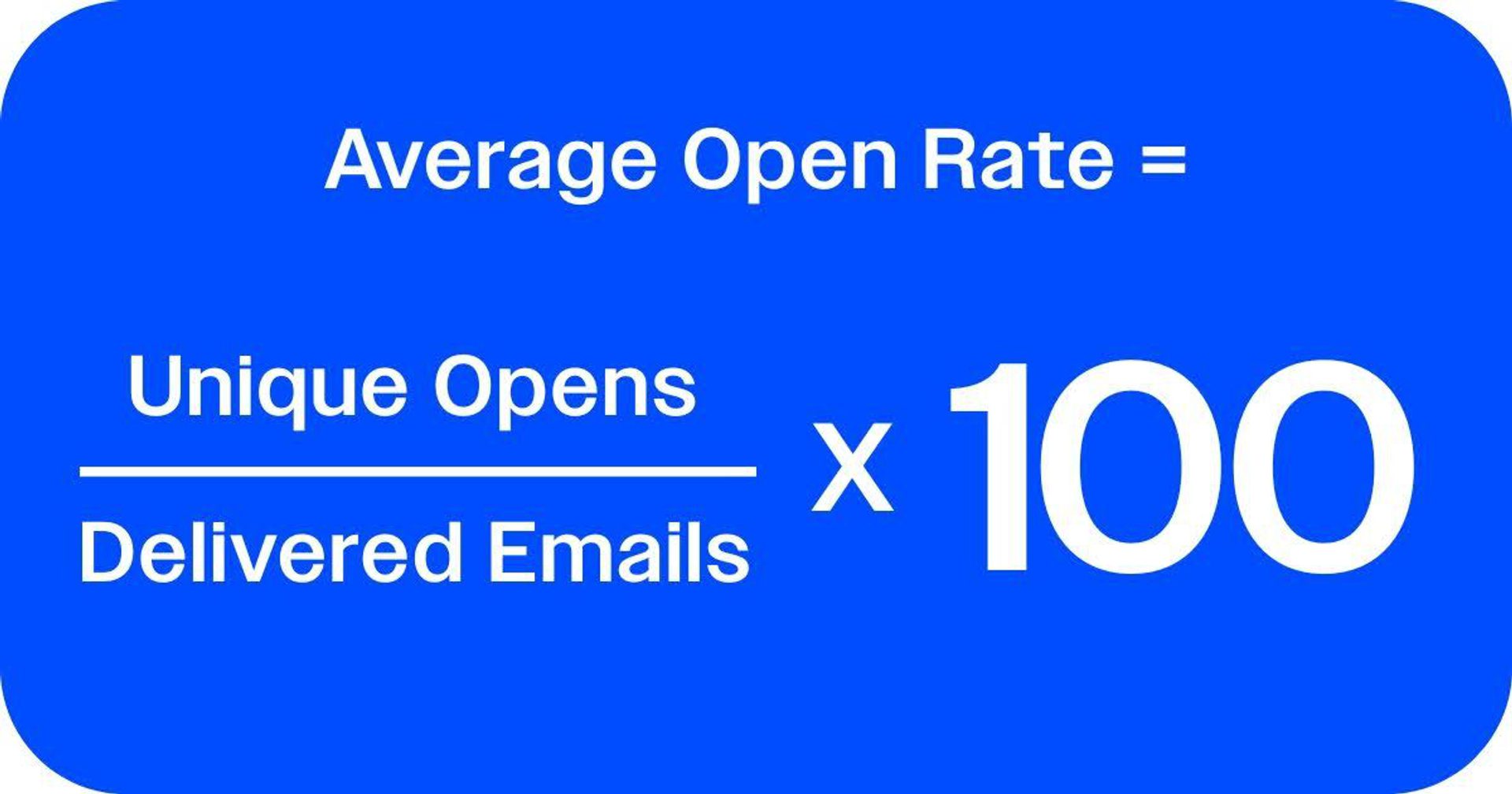
Average Open Rate = (Unique Opens ÷ Delivered Emails) × 100
Here, Delivered Emails equals the total number of emails sent minus bounces. Bounced messages never reach the inbox and shouldn’t count toward your open rate.
Most email service providers and email marketing platforms will do this math for you and display it in reporting dashboards. However, it’s useful to understand how the numbers are derived so you can confidently analyze your performance.
Calculating average open rate across multiple campaigns
When reviewing performance across several email campaigns, it’s best to use a weighted average rather than a simple average. This ensures that campaigns with larger send volumes have the correct influence on your overall open rate.
The formula for calculating average open rate across campaigns is very similar:
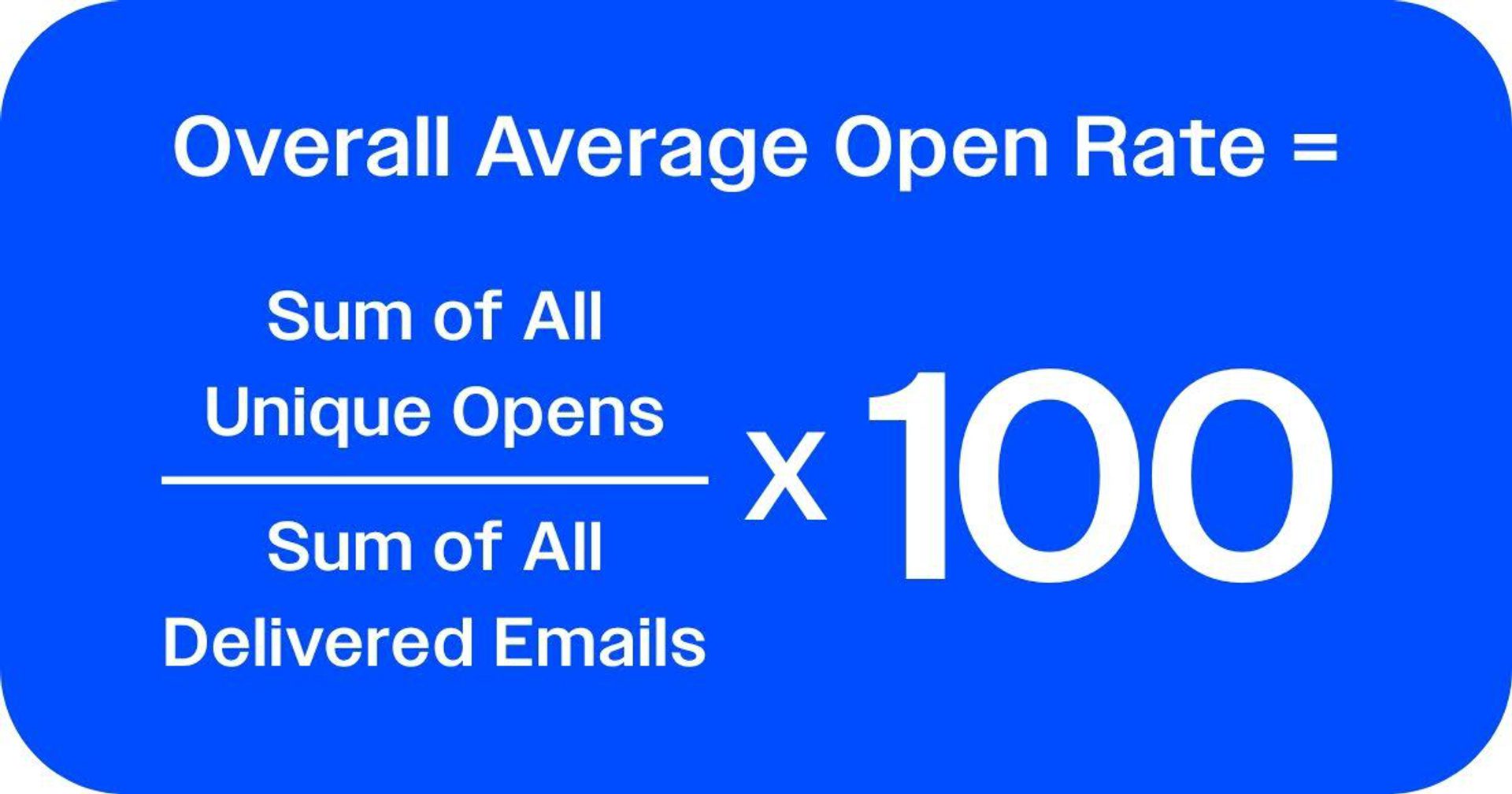
Overall Average Open Rate = (Sum of All Unique Opens ÷ Sum of All Delivered Emails) × 100
For example, let’s say you ran three campaigns over the past month.
- Campaign A with 2,500 unique opens and 10,000 delivered emails.
- Campaign B with 3,000 unique opens and 12,000 delivered emails.
- Campaign C with 1,200 unique opens and 5,000 delivered emails.
To calculate your average open rate for the month, you can:
- Add up your unique opens → 2,500 + 3,000 + 1,200 = 6,700
- Add up your delivered emails → 10,000 + 12,000 + 5,000 = 27,000
- Divide opens by delivered → 6,700 ÷ 27,000 = 0.248
- Multiply by 100 for a 24.8% average open rate.
Using the weighted average method gives you a more accurate picture of overall performance—especially when campaign sizes vary. In ActiveCampaign, these combined metrics are automatically calculated, allowing you to track open rate trends across your entire account.
Navigate to Reports > All Campaign Performance in your ActiveCampaign dashboard to see automatically calculated open rates across any date range or campaign type. Filter by tags or lists to get segment-specific averages.
What is the difference between email click-through rate and open rate?
Open rate measures how many people opened your email, while click-through rate (CTR) measures how many people clicked on a link inside it. Both are core engagement metrics, but they reflect different stages of your audience’s interaction.
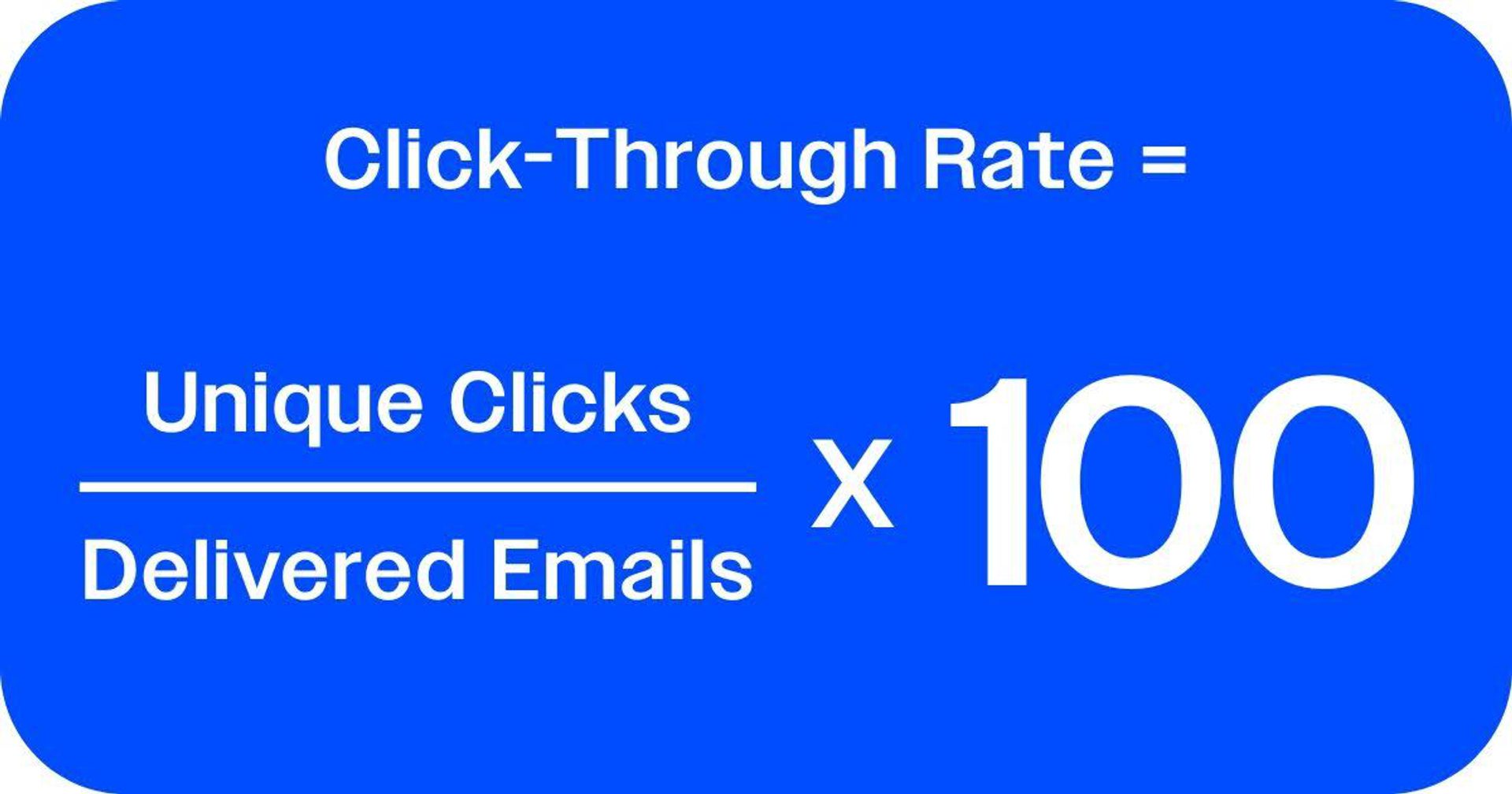
CTR (Click-Through Rate) = (Unique Clicks ÷ Delivered Emails) × 100
CTR gives you a top-level view of total engagement. It tells you how effective your email was from send to click. It’s ideal for comparing campaign performance over time.
In addition, some marketers track CTOR (Click-to-Open Rate), which isolates how many people clicked after opening your email:
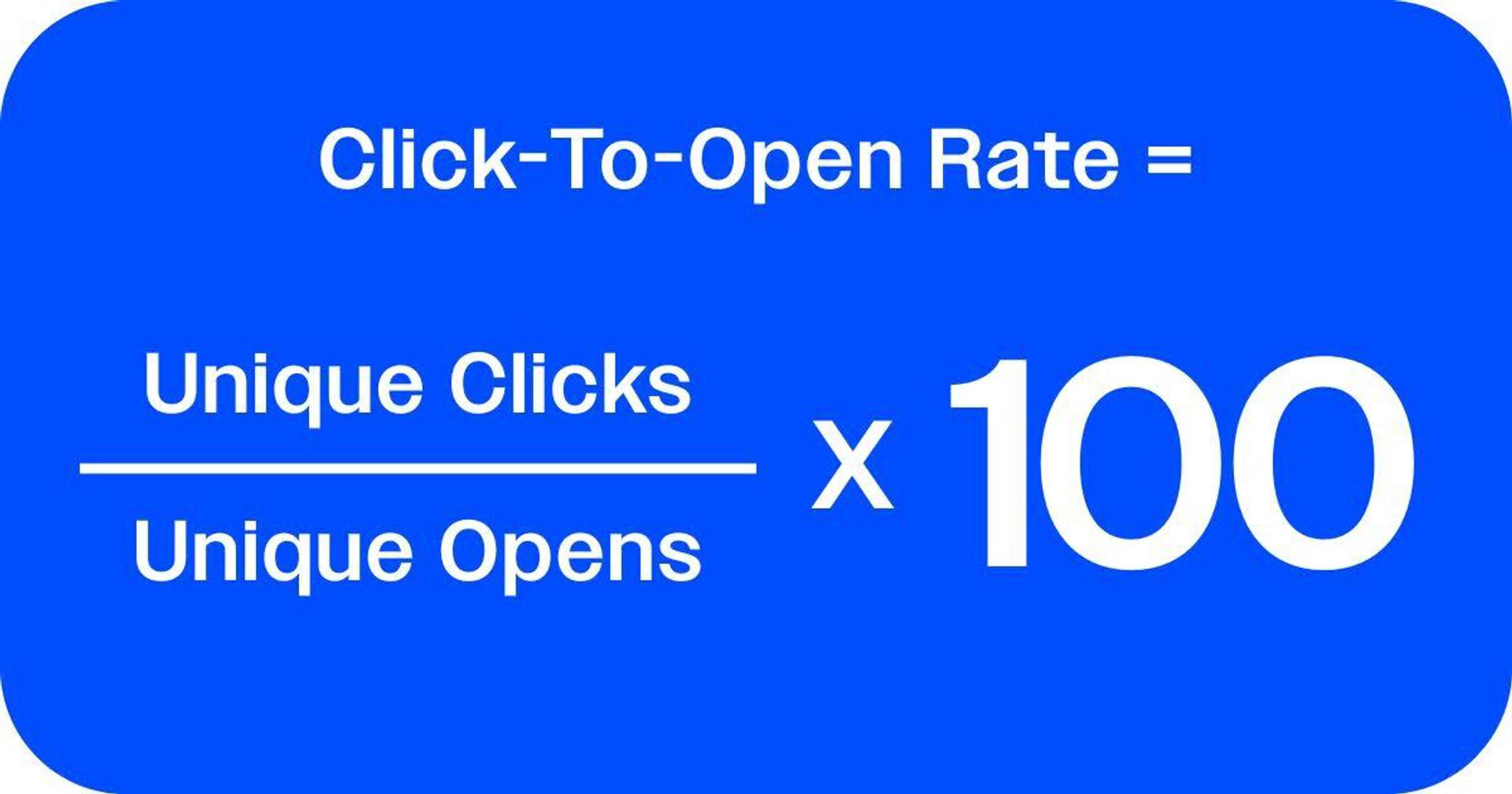
CTOR (Click-to-Open Rate) = (Unique Clicks ÷ Unique Opens) × 100
CTOR helps you assess content and design effectiveness among those who actually opened the email. A strong CTOR means your message and call-to-action resonated once recipients saw your content.
When reviewing performance, look at open rate, CTR, and CTOR together to understand the full engagement funnel. The way these metrics look in relation to one another can give you some insights into your strengths and weaknesses:
- High open rate + low CTR/CTOR: Your subject line and deliverability are strong, but your content or calls-to-action may not be compelling enough to drive clicks.
- Low open rate + high CTOR: Your content is performing well with those who see it, but you may need to improve deliverability, subject lines, or send timing to get more people to open.
- Balanced open and click metrics: Indicates your campaign is performing consistently across both attention and engagement.
Clicks often correlate more directly with conversion rates and revenue. By linking click data with sales outcomes you can quantify how improved engagement translates into tangible ROI and demonstrate the impact of your email marketing strategy.
Why do email open rates vary? Common factors and fixes
Even the best-crafted emails can see fluctuating open rates over time. Seasonal changes, list growth, or evolving subscriber behavior can all play a role but the root causes usually come down to a few key areas.
Here are some areas where issues may be occurring.
- List health and engagement history
Your contact list is the foundation of your open rate. If your audience has gone quiet, or if your list includes outdated or low-quality contacts, open rates will inevitably decline. Pay attention to:
- The age of the list: Older lists often contain inactive or disengaged subscribers.
- Engagement history: How recently have contacts opened or clicked your emails?
- Acquisition source: Lists built through genuine interest (like website signups or purchase opt-ins) tend to perform far better than those acquired through imports or promotions.
Healthy, engaged lists signal to mailbox providers that your emails are wanted, improving deliverability and inbox placement over time.
- Deliverability and sender reputation
Even the best message won’t get opened if it doesn’t reach the inbox. Deliverability is influenced by technical authentication, sender reputation, and the overall trustworthiness of your sending domain.
- Make sure DKIM (DomainKeys Identified Mail) and DMARC (Domain-based Message Authentication, Reporting & Conformance) are properly configured.
- Monitor spam complaints, bounce rates, and engagement trends—these are key signals used by mailbox providers to determine inbox placement.
With a solid authentication setup and a healthy reputation, you’ll ensure more of your messages actually reach subscribers.
- Content relevance and timing
Once your emails are delivered, attention shifts to engagement. Subject lines, timing, and audience targeting all affect whether your message stands out in a crowded inbox.
- Personalize your subject lines and preview text for relevance.
- Segment your audience by interests, behavior, or lifecycle stage.
- Test send times to match when your audience is most active.
Even small adjustments in timing or messaging can significantly lift open rates over time.
If your open rates are inconsistent or trending downward, work through this checklist to strengthen some core requirements:
- Authenticate your domain. Use ActiveCampaign’s free Verification Tools to check whether your domain is authenticated. Then, you can easily set up DKIM and DMARC in your Deliverability Settings to ensure your emails are properly verified and land in the inbox.
- Clean your list regularly. Use ActiveCampaign’s List Cleanup and Engagement Management tools to remove unengaged or invalid contacts and improve list quality.
- Monitor your sender reputation. Track bounces, complaints, and engagement trends to identify and fix issues before they impact performance.
- Optimize your content and timing. Test subject lines, adjust send frequency, and apply AI-powered Predictive Sending to reach subscribers when they’re most likely to engage.
Marketing agency AdClients used ActiveCampaign’s deliverability and automation tools to clean their lists and rebuild sender reputation. Within weeks, their average open rate increased from 8% to 39%.
How to improve your email open rates
Improving your open rate starts with optimizing the factors that make subscribers more likely to notice, trust, and act on your emails.
Email subject line best practices
Your subject line is the first (and sometimes only) chance to earn an open. Keep it clear, relevant, and aligned with your audience’s intent.
- Keep it concise: Aim for 30–50 characters to ensure your subject line displays fully on both desktop and mobile devices.
- Lead with value: Benefit-driven subject lines (“Get your next order 20% faster”) clearly state the advantage of opening. Curiosity-based lines (“You won’t believe what we improved this week”) can also work when used sparingly and authentically.
- Personalize and adapt: Use personalization tags (like the recipient’s name or location) and dynamic content in ActiveCampaign to tailor subject lines to individual subscribers. This level of personalization has been shown to consistently lift open rates across industries.
Timing and frequency optimization
When and how often you send emails can be just as important as what you send. Open rates often improve when emails align with your audience’s daily routines and preferences.
- Choose optimal send times: Research shows that midweek mornings (Tuesday–Thursday, 9–11 a.m.) often yield the best open rates, though this varies by industry.
- Establish a balanced cadence: Sending too frequently can cause fatigue, while infrequent emails can lead to disengagement. Use your performance data to find the rhythm that maintains interest without overwhelming subscribers.
- Target by time zone: ActiveCampaign’s Predictive Sending automatically delivers emails when each contact is most likely to engage, no matter where they’re located.
Consistent, well-timed communication helps reinforce trust and keeps your messages at the top of subscribers’ inboxes when they’re most receptive.
Segmentation strategies
Segmentation ensures every subscriber receives messages that are relevant to their behavior, preferences, and stage in the customer journey. ActiveCampaign’s segmentation engine allows you to create dynamic audiences that update automatically as contacts engage.
- Behavioral triggers: Send messages based on actions like email opens, website visits, or product purchases.
- Lifecycle stage targeting: Align your content with where each contact is in their journey: welcome series for new subscribers, re-engagement for inactive ones, and upsells for loyal customers.
- Dynamic content: Personalize body text, offers, and visuals based on contact attributes like past purchases or interests.
With these tools, you can send fewer but more relevant emails, boosting engagement and open rates simultaneously.
A/B testing
Testing different elements of your emails helps identify what actually drives opens and ensures decisions are based on data, not guesswork.
- What to test: Start with subject lines, sender names, and preview text, as these have the biggest influence on open rates.
- Sample size: Make sure each variation is sent to a large enough portion of your list (typically at least 10–20% of total recipients per variant) to ensure meaningful results.
- Statistical significance: Don’t draw conclusions too early—wait until each version has enough opens and clicks to produce reliable data.
ActiveCampaign allows you to run extensive A/B tests (and C, D, E, and F tests too!) with data-driven split testing software. It does all the hard work to figure out the best option and automatically sends the winning variation to the rest of your audience, while refining your approach over time.
Connecting open rates to revenue and ROI
While a strong open rate is an encouraging sign, it’s only the first step in the customer engagement journey. The true measure of success lies in how effectively your emails turn attention into action and ultimately into revenue.
Every successful email campaign follows a predictable performance path:
Open → Click → Conversion → Revenue
The recipient sees your subject line and chooses to engage. They interact with a link, button, or call-to-action in your email. The click leads to a measurable outcome (such as a purchase, signup, or booking) and that conversion produces tangible financial value.
Monitoring open rates helps you understand reach and attention, but on their own, they don’t tell the full story. Tracking end-to-end performance is essential for ROI analysis.
ActiveCampaign’s Marketing Revenue report connects your email campaigns directly to the sales they generate. By automatically attributing revenue to individual emails or automations, you can see exactly which campaigns drive the greatest financial return.
Key benefits include:
- Campaign-level attribution: Identify which emails are producing the most sales and revenue.
- Performance correlation: Compare open and click metrics alongside revenue outcomes to pinpoint the campaigns with the highest ROI.
- Optimization insights: Refine your messaging, audience, and timing based on real conversion data—not just opens.
By tying engagement directly to revenue, you can make informed decisions about where to focus.
When reporting to stakeholders, pair open rate data with complementary metrics like click-through rate (CTR), conversion rate, and total attributed revenue. Building dashboards that track these together, alongside deliverability and list health, creates a complete picture of marketing performance.
In your ActiveCampaign Reports, you can combine these metrics to show both engagement and financial outcomes at a glance. For leadership presentations, consider building a simple template that highlights:
- Month-over-month performance changes
- Campaigns with the highest ROI
- Correlations between engagement and sales outcomes
This approach provides executives with a clear, data-backed narrative.
Boost email open rates and email deliverability with ActiveCampaign
Improving your average open rate starts with the right foundation: reliable deliverability, precise targeting, and actionable insights. With ActiveCampaign, you get all three. Our industry-leading deliverability rate helps ensure your messages land in the inbox, while advanced segmentation, dynamic content, and AI-powered optimization keep them relevant and engaging.
From authentication tools that protect your sender reputation to real-time reporting that connects opens to actual revenue, ActiveCampaign gives you everything you need to turn attention into action.
Ready to open more opportunities with every send? Start your free trial now.
FAQs
How has Apple MPP changed open rate tracking?
Apple Mail Privacy Protection (MPP) hides whether users open emails in the Mail app, which can artificially inflate or obscure open rate data. While this affects visibility in Apple Mail specifically, metrics like click-through rate (CTR), conversions, and revenue attribution remain reliable indicators of engagement. Marketers should use these complementary metrics to get a more accurate view of campaign performance.
Should I remove subscribers who don't open emails?
Yes, periodically cleaning your list of inactive subscribers helps maintain deliverability and engagement. Start by identifying contacts who haven’t opened emails in the past 3–6 months, then use re-engagement campaigns or list-cleaning tools in ActiveCampaign. Removing persistently inactive contacts protects your sender reputation and ensures your open rate metrics reflect genuinely engaged audiences.
What's the difference between unique and total opens?
Unique opens count each subscriber once, no matter how many times they open an email. This is the standard metric used to measure engagement.
Total opens count every open, including multiple opens from the same subscriber. Total opens can show interest intensity but may overstate reach.
How do I calculate open rate for automated email sequences?
For automated sequences, apply the same open rate principles to each email in the workflow. Track both individual email performance and overall sequence engagement to see how subscribers progress through the automation. Consider timing, triggers, and personalization, as these factors can affect open behavior differently than one-off campaigns. ActiveCampaign’s reporting tools make it easy to monitor sequence-level engagement and identify drop-off points.


