A marketing automation strategy is the plan that decides what you automate, what stays human, and how you will judge the results. A tactic, such as a welcome series or an abandoned cart email, is what you build once that plan exists.
That order matters because automation makes building easy. A marketer can launch an email sequence, a retargeting audience, and a cart recovery email in a single afternoon. Without a plan behind them, those pieces rarely add up to a program, and nobody can tell which one moved revenue.
This guide gives you a seven-step process for building the strategy, then seven tactics the strategy should drive. It also covers common mistakes, how to measure results, and where ActiveCampaign marketing automation fits at each stage.
What is a marketing automation strategy?
A marketing automation strategy is a documented plan for which marketing activities you automate, which you keep manual, and how automation supports your business goals. It covers your goals, audience, customer journey, triggers, platform, and measurement. It sits inside your wider marketing strategy and tells you which tactics deserve a build.
Strategies and tactics answer different questions, so keep them separate in your planning.
Marketing automation strategy vs tactics
| Strategy | Tactic | |
|---|---|---|
| Question it answers | What should we automate, for whom, and why? | How do we run this specific campaign? |
| Example | Raise repeat purchases by nurturing new buyers after their first order | A post-purchase email sequence with a discount in the last message |
| Built from | Goals, customer research, journey map, platform limits | A trigger, a segment, messages, and wait steps |
| Reviewed | Every quarter or every six months | Monthly, against its own conversion goal |
Your strategy informs the tactics you choose. It covers customer research, market analysis, competitor comparisons, and goal-setting, and it tells you which tactics are worth building.
Suppose your research shows that customers in your sector rarely buy from targeted social ads. Automating a social ad sequence would waste budget, and the strategy is what tells you that before you build it.
How to build a marketing automation strategy in 7 steps
Work through these steps in order. Each one produces something you can write down and reuse, such as a goal, an audit list, a journey map, or a measurement plan.
1. Set goals you can measure
Your strategy starts with one to three business goals that automation can influence. Write each goal as a sentence with a baseline, a target, and a deadline.
Use this template for each goal:
- Raise [metric] from [baseline] to [target] by [date].
- Name the audience the goal applies to, such as new buyers or trial users.
- Name the person who reviews the result.
Goals that automation handles well include a higher repeat purchase rate, a shorter time from form fill to first sales conversation, and more trial users reaching their first success. Pick goals you already have a baseline for. If you lack a baseline, your first target is to measure one.
2. Gather your audience, market, and competitor intel
Pull together the research you already have so it can shape your automation decisions. This step collects documents. Creating them belongs to your wider marketing strategy.
Collect these inputs:
- Ideal customer profile (ICP) and customer personas
- Competitor analysis and SWOT analysis
- Total addressable market analysis
- Your own data: purchase history, email engagement, site behavior, and support questions
Then check your data quality. Automation acts on your contact data, so duplicate contacts, missing fields, and unclear consent status become wrong or unwanted messages. Fix the fields your triggers and segments will depend on before you build anything.
3. Audit your current activities and decide what to automate
List every marketing activity you run today and sort each one into automate now, automate later, or keep manual. Two questions drive the sort: which activities can be automated, and which are better left manual?
Automate an activity when it meets most of these conditions:
- It repeats on a schedule or after a clear event.
- The right message follows rules, such as a form field or a link click.
- Speed matters, and a delay costs you the sale or the attention.
- It reaches enough contacts that doing it by hand stops being practical.
Keep an activity manual when it needs judgment or a personal relationship. Say you run lead nurture campaigns for leads who are not yet sales-qualified, and you reroute people by hand based on which emails they open. That routing follows a clear rule, so it is a good candidate for automation.
The first email to a high-value account is different. An account-based marketing rep may need to write it for that company. Keep that email manual, and automate the follow-up steps around it.
4. Map the customer journey and find where automation helps
The customer journey is the path buyers take from first contact to purchase and the support that follows. Map it before you automate it, so each automation fills a specific gap.
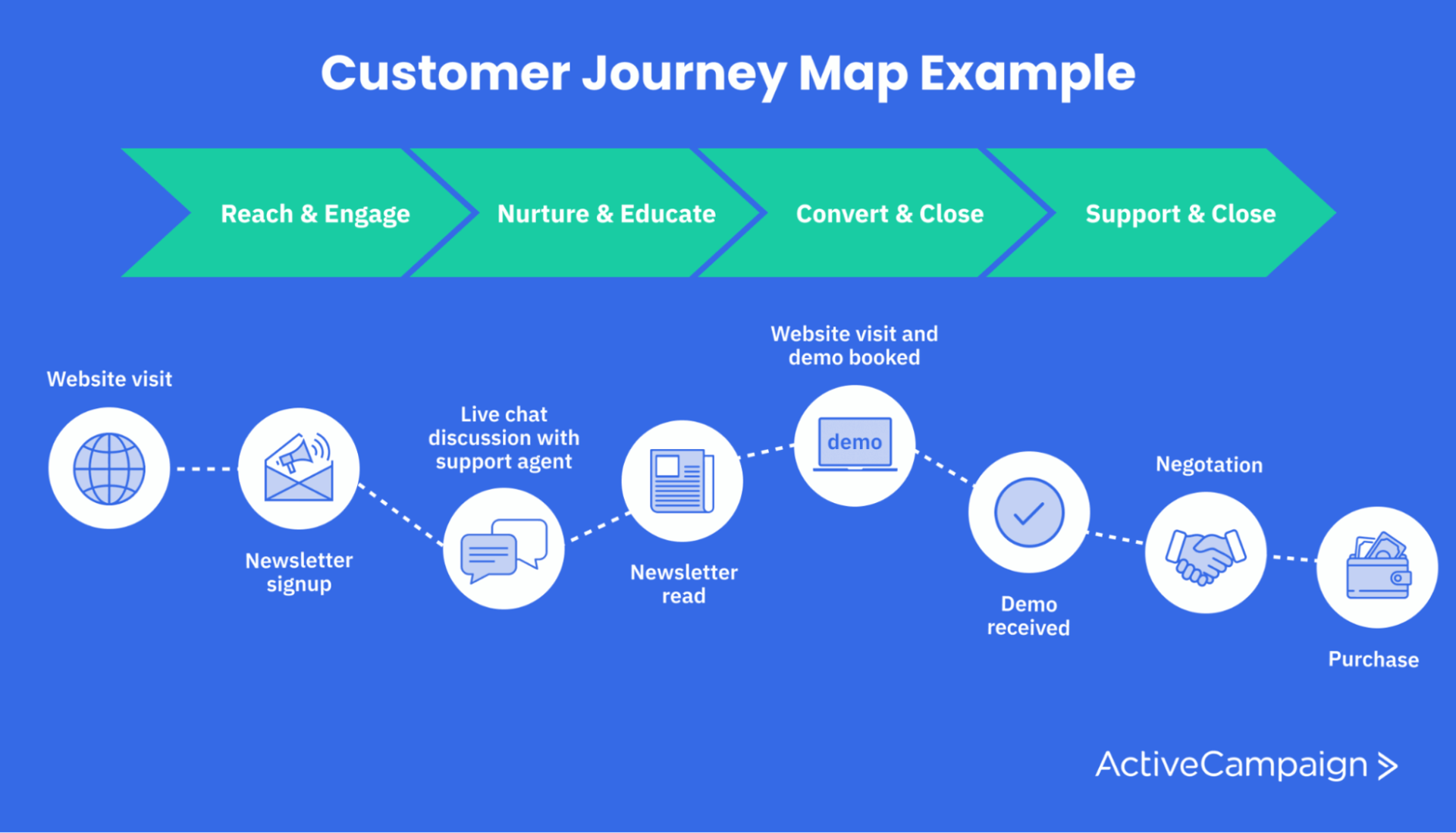
A journey map like this one runs from reach and engage, through nurture and educate, to convert and close, and on to support. Use yours to mark where prospects stall or leave. Then pick the one or two stages with the largest drop-off and plan automation there first.
Take the nurture and educate stage. Suppose your buyers spend a lot of time reading comparison posts. An email sequence can deliver those posts after a prospect shows interest, which saves them the search and restates your value at the moment they compare options.
5. Define triggers, entry rules, and exits
Every automation needs a trigger that starts it, a rule for who enters, and a condition that ends it. Triggers can be manual, such as a social media manager launching an ad sequence. They can also be automatic, such as a contact downloading an ebook and entering a nurture sequence.
Common automatic triggers include:
- Submitting a form or subscribing to a list
- Having a tag added
- Clicking a link in an email
- Making a purchase or abandoning a cart
- Visiting a specific page on your site
- Moving a deal to a new stage in your CRM
- Reaching a date, such as a renewal
Write a one-line spec for each automation: the trigger, who enters, what they receive, when they leave, and what success looks like. The exit matters most. Without one, a contact can keep receiving a nurture sequence after they buy. Use a goal or a condition that removes people once they take the action you wanted.
Audience segments keep the wrong people out at the start. When the spec is done, how to build a marketing automation workflow walks through the build.
6. Check what your platform can do
Compare your planned automations with what your platform supports before you commit. A plan that needs a capability your tool lacks forces a redesign later. Platforms overlap, but they differ on the details that decide how well your plan works.
Ask these questions about any platform:
- Can an automation branch based on what a contact clicks, buys, or does on your site?
- Can it start from website and ecommerce events as well as email activity?
- Can it update your CRM, create deals, and assign tasks?
- Can it send email and SMS from one automation?
- Can you report on each automation as well as each email?
- Does it connect to the tools you already use?
If the answers are no, adjust the plan or consider a different platform. The ActiveCampaign marketing automation platform covers each of these questions, as the section on ActiveCampaign below shows.
7. Plan measurement and a review rhythm
Decide how you will judge each automation before you launch it. Tie every metric to a goal from step 1, and record the baseline today.
Track these measures for each automation:
- Conversion rate: the share of entered contacts who complete the goal action
- Revenue or pipeline per contact: what an entered contact is worth compared with one who never entered
- Time to convert: how long entered contacts take to reach the goal
- Click and reply rates: which messages move people forward
- Unsubscribes and complaints: the warning signs of a poor fit or too much frequency
Treat open rates as a rough signal, since privacy features can inflate them. Clicks, replies, and conversions are more reliable.
Schedule the reviews. Check each automation monthly for broken steps and falling conversion. Review the whole strategy every quarter if your business changes fast, and every six months otherwise. For metric ideas, see these marketing campaign KPIs, and for report layouts, the marketing report guide.
One-page strategy checklist
Fill in each line before you build your first automation:
- Goals: metric, baseline, target, deadline
- Audience: who you serve and where they come from
- Journey gaps: the stages where prospects stall
- Automate: activities you will automate now and later
- Keep manual: activities that need a person
- Triggers and exits: one line for each automation
- Platform: the capabilities you need and confirmed
- Measures and review dates: the metrics and when you check them
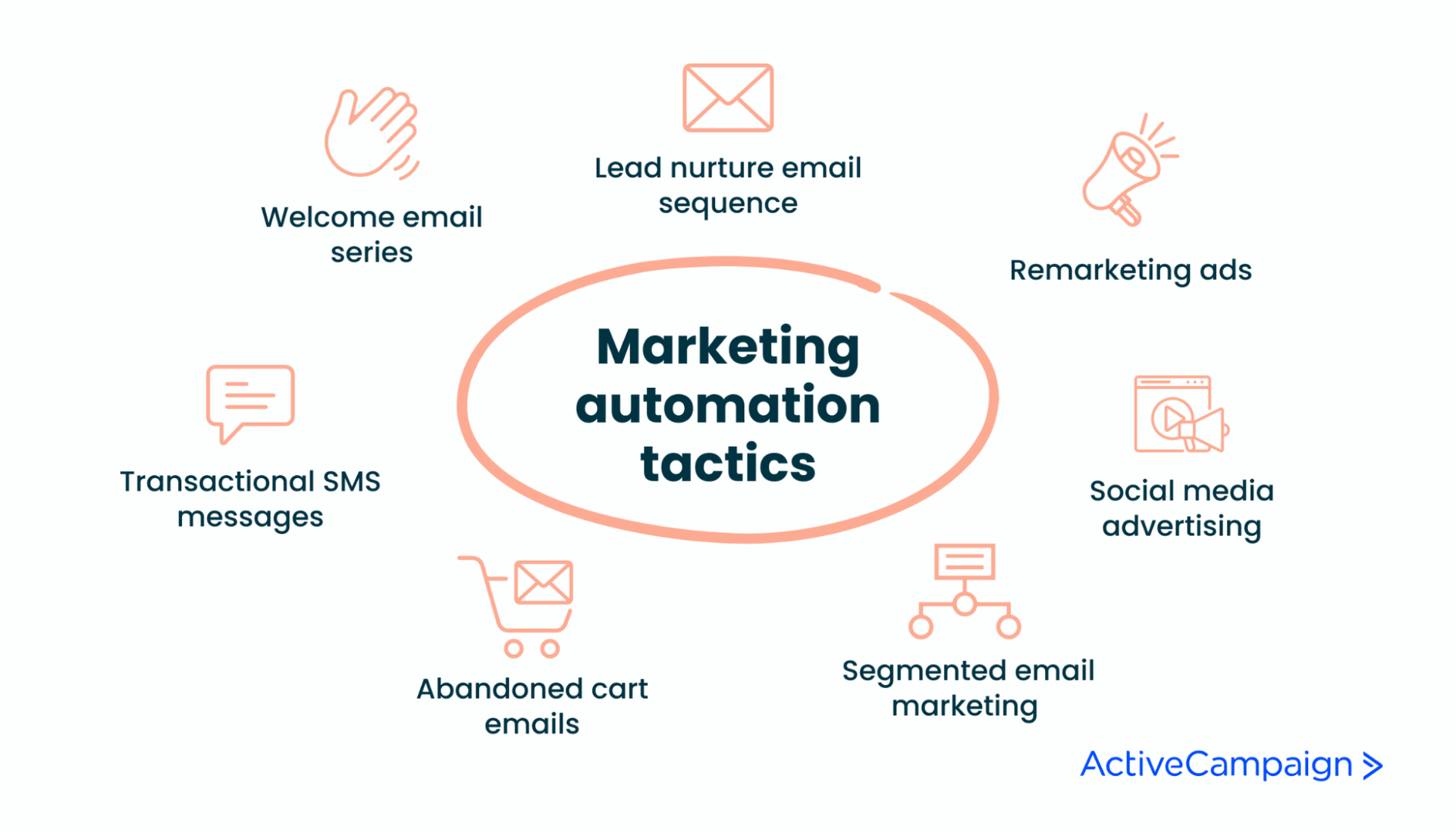
7 marketing automation tactics your strategy should drive
Choose tactics that serve the goals and journey gaps from your strategy. Each tactic below names its trigger and the measure to watch.
1. Lead nurture email sequence
A lead nurture sequence is a series of emails that starts when a contact takes a specific action and moves them toward a conversion goal. It is the classic marketing automation tactic, and you can map it to nearly any goal.
The trigger might be an ebook download, an email course signup, or a first purchase. Take a first purchase. The buyer enters a sequence spaced across several weeks, and the goal is a second purchase. The last email can carry a discount code as a final nudge.
Space the emails by how quickly your buyers decide. A low-priced product may need three emails in ten days, while a high-consideration service may need one a week for two months. The lead nurturing guide covers the build in more detail.
Measure it: conversion to the goal action, replies, and unsubscribes per email.
2. Remarketing ads
Remarketing ads, also called retargeting ads, show a product to someone who browsed it on your site and did not buy. Your tracking script records the visit, and your platform uses that behavior to place the contact in an audience for the matching ad.
In ActiveCampaign, site tracking records page visits that can trigger an automation, and an automation can add contacts to a Facebook Custom Audience. For the email version of this tactic, read about email retargeting.
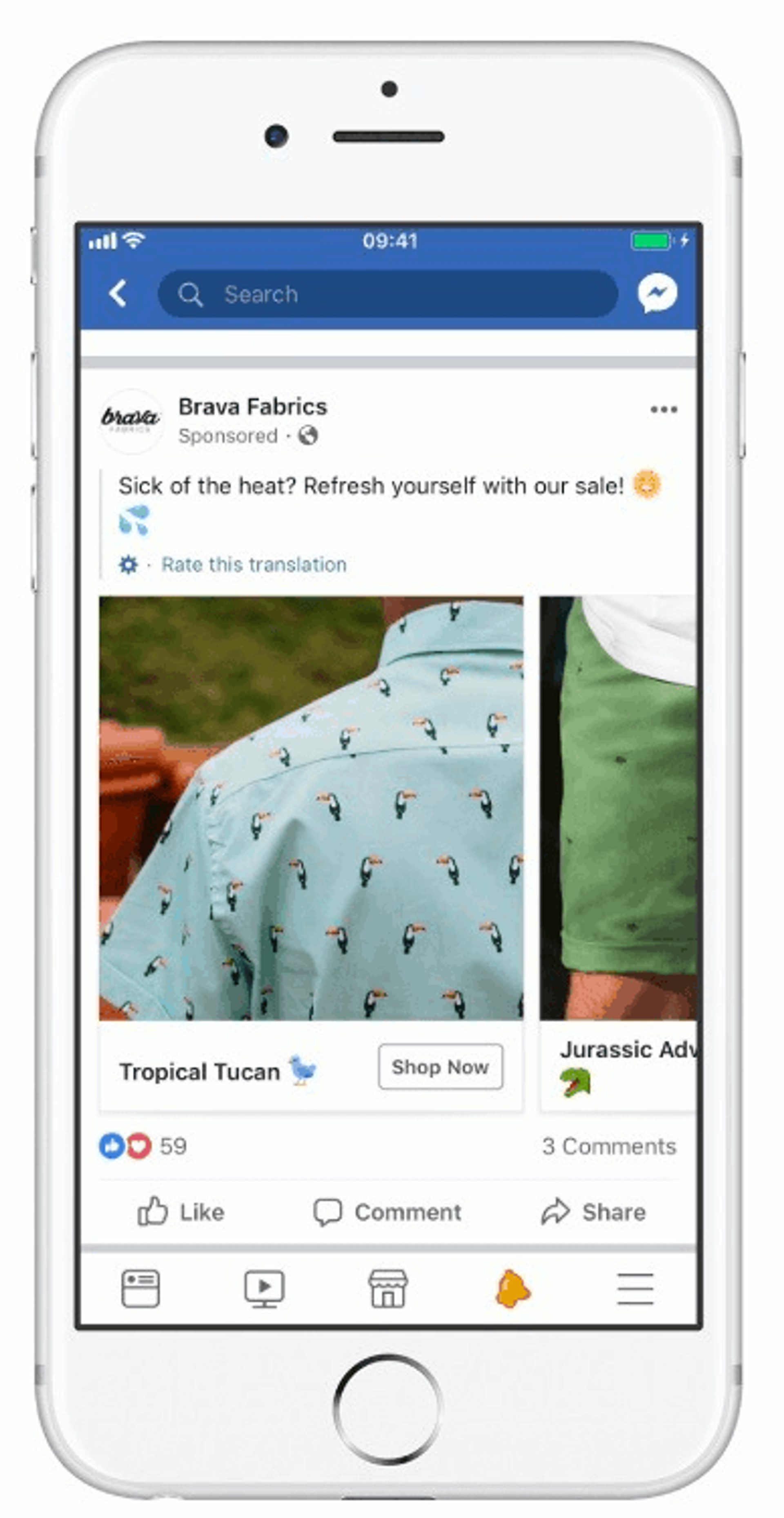
These ads appear most on Facebook and Instagram and also work as digital banner ads. Exclude people who already bought, and stop the ads after a set period. Ads that follow someone for months after a purchase waste budget and annoy them.
Measure it: return-visit rate and cost per recovered purchase.
3. Social media advertising
Social advertising works better as a sequence than as a single ad. Plan three ads with different creative and copy, such as an awareness ad, a proof ad, and an offer ad, and show each one to people in the matching stage.
Build the audiences from your contact data, using a tag, a segment, or a behavior, and move contacts to the next audience when they take the next step. This keeps prospects from seeing the same ad again and again.
Measure it: cost per lead and the share of viewers who move to the next stage.
4. Segmented email marketing
Segmented sequences send each audience the content that fits it, which improves engagement and conversion. Segments can use attributes such as industry, plan, location, past purchases, or behavior.
Say you run a sales CRM with users in real estate and in insurance. Some content suits both, but a guide to open houses means little to an insurance agent. Segmenting lets each group receive content that matches its work. The audience segmentation guide covers methods, and ActiveCampaign segmentation shows how to build segments.
Dynamic email content goes a step further. You send one email to your whole audience and change a block based on contact data. This Northern Trail email tailors its content block by recipient gender.
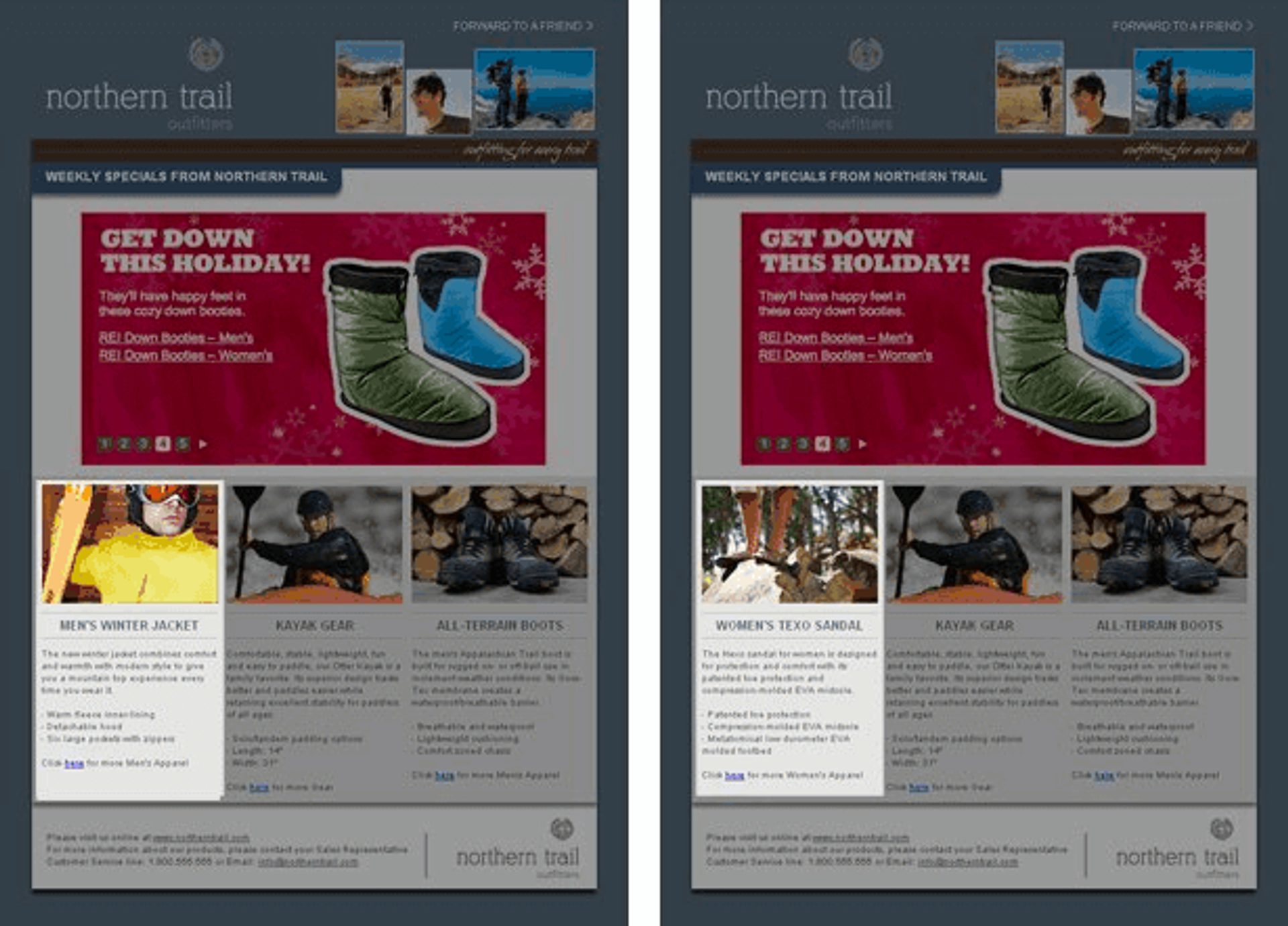
With dynamic content, one email replaces several near-duplicate versions.
Measure it: click rate and conversion by segment, compared with your unsegmented sends.
5. Abandoned cart emails
Abandoned cart emails recover sales from shoppers who added items to a cart and left. The trigger is the abandoned cart event from your store, and the sequence runs without a marketer sending each message.
A common pattern is three emails. The first is a reminder within hours. The second goes out the next day and answers objections such as shipping or returns. The last may include an incentive. Each email shows the items left behind and links straight back to the cart. For the full build, see how to build an abandoned cart series.
Morrow Audio shares the recovery rate it sees from this tactic.
We have a 26% abandoned cart recovery rate.
Pair cart emails with retargeting ads for a two-pronged recovery approach, and exclude anyone who completed the purchase.
Measure it: recovery rate, revenue per recovered cart, and unsubscribes.
6. SMS messages
SMS reaches customers on their phones, so it cuts through a crowded inbox. Use it for time-sensitive messages such as order updates, appointment reminders, and flash sales.
Get explicit opt-in before you text anyone, and keep the volume low. Texts feel more personal than email, so every extra message costs more goodwill. Homesick texts customers about ongoing sales, and its tiered discount message stays short and gives one link.
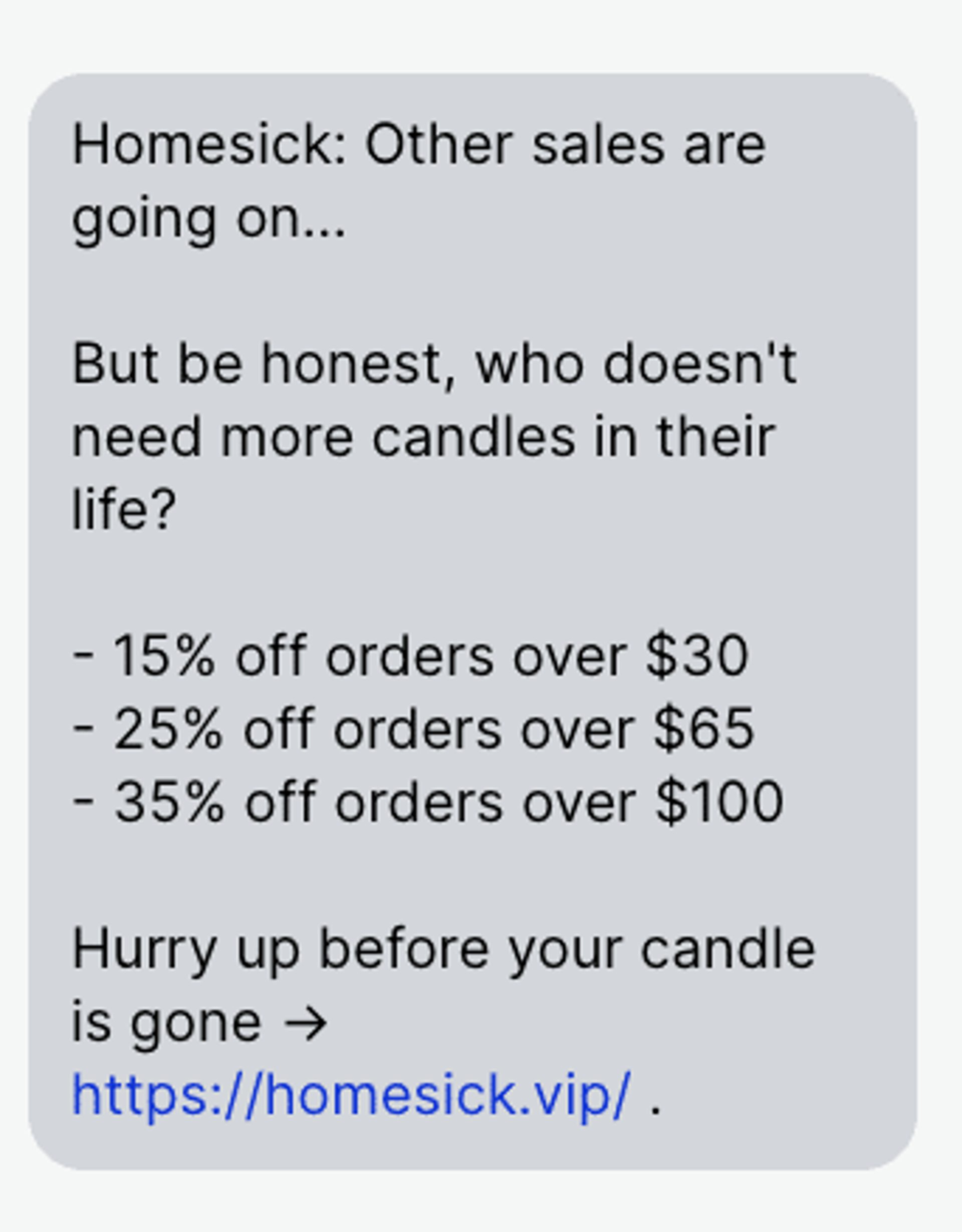
The SMS marketing automation guide covers triggers and timing, and ActiveCampaign SMS marketing shows how texts work with your automations.
Measure it: click-through rate, opt-out rate, and conversions.
7. Welcome email series
A welcome series introduces new subscribers or customers and gets them to take a first action. The trigger is a signup, such as joining your newsletter or rewards program after reading a post about a common industry challenge.
For SaaS companies, the series often starts when a customer signs up for the product. Send the first email right away, say what to expect, and give one action. Later emails can walk users through specific features to increase feature adoption. This Spotify email pairs a clear button with the benefits of the plan.
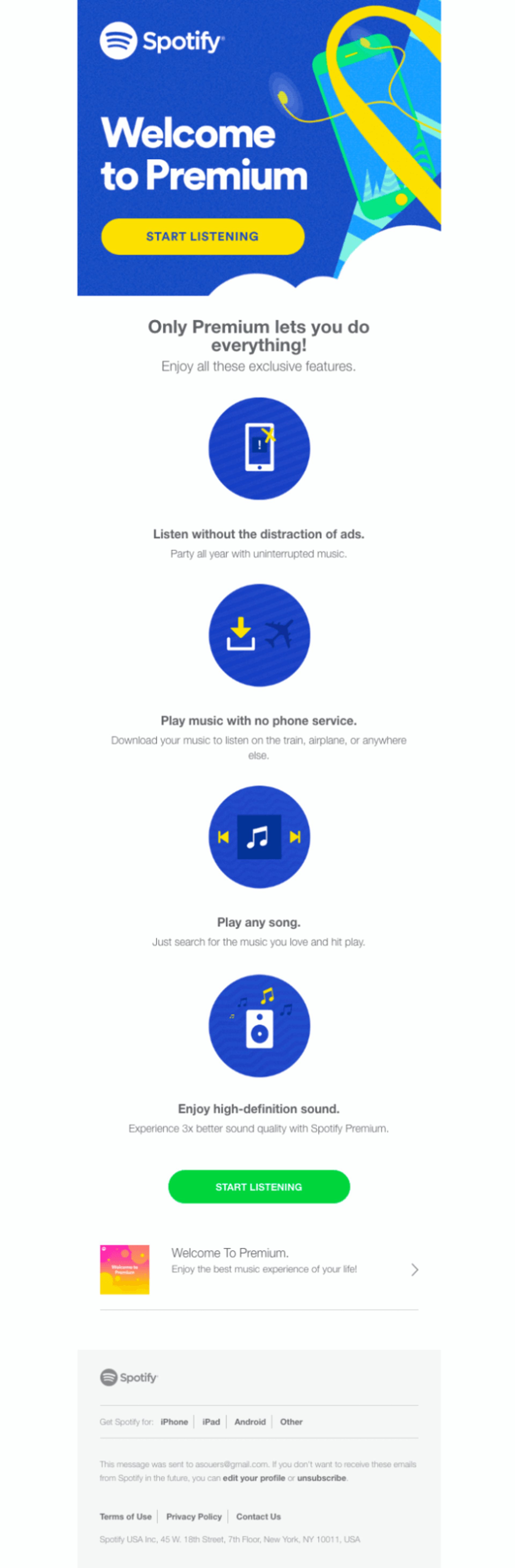
The welcome email series guide shows how to structure each message.
Measure it: first-action rate and feature adoption.
Marketing automation strategy mistakes to avoid
Avoid these six mistakes:
- Building tactics before goals. Without a goal, you cannot tell which automation works. Write the goal first.
- Automating a broken process. Automation repeats whatever you give it. Fix the manual process, then automate it.
- Sending one message to everyone. A single sequence for every contact lowers relevance. Segment by stage or behavior.
- Skipping exit conditions. Contacts keep getting emails after they convert. Add a goal or exit rule to every automation.
- Ignoring consent and preferences. Respect opt-ins and channel choices, especially for SMS.
- Setting and forgetting. Offers, products, and audiences change. Review on a schedule.
How ActiveCampaign supports your marketing automation strategy
ActiveCampaign is an AI platform for marketers, with Active Intelligence built into every plan. The strategy stays yours: you set the goals, the guardrails, and the approvals. Active Intelligence works from your own contact and campaign data, then drafts and recommends, and you approve what runs.
Active Intelligence users see 75% higher engagement than non-users, measured across 32,948 accounts.
Here is where each part of your strategy lives in ActiveCampaign:
- Triggers and entry rules (step 5): the automation builder starts from behavior such as form submissions, tags, email clicks, purchases, page visits, and deal stage changes, and segments control who enters.
- Branching and exits (steps 3 and 5): if/else and split actions route contacts by what they do, and goals let contacts who reach an outcome skip the steps they no longer need.
- Drafting the build (step 5): describe the sequence you planned, and Active Intelligence drafts the automation for you to review and edit before it goes live.
- Send timing (step 5): Predictive Sending chooses a send time for each contact.
- Channels (step 6): email, SMS, and WhatsApp can work from the same automation.
- Visibility (step 3): the automation map shows every automation and how they connect, which helps with your audit.
- Measurement (step 7): Business Goals tracking shows progress toward the goals you set and suggests a next move, and automation reports show how each path performs.
Customer result
Swim University, a pool care education business, reported a 66% increase in revenue after building its email marketing on ActiveCampaign automations. Read the Swim University story.
For a closer look at AI in automation, read AI marketing automation.
Put your marketing automation strategy to work
Frequently asked questions
What is the difference between a marketing automation strategy and a tactic?
A strategy is the plan for what you automate and why, based on your goals, audience, and customer journey. A tactic is one execution of that plan, such as a welcome series or an abandoned cart email. The strategy decides which tactics are worth building.
What is an example of marketing automation?
The lead nurture email sequence is the most common example. A prospect downloads an ebook, the automation starts, and they receive a prewritten series of emails, often one a week, until they reach the goal or leave the path.
How effective is marketing automation?
Results depend on the strategy behind it. Swim University reported a 66% increase in revenue with ActiveCampaign automations. Your own baseline and goals show what to expect.
How often should I review my marketing automation strategy?
Check each automation monthly and review the full strategy every quarter if your business is changing fast, or every six months otherwise. Review sooner after a new product, a new channel, or a sharp drop in conversion.
How do I start a marketing automation strategy with a small team?
Pick one goal and one automation, such as a welcome series for new subscribers. Write the one-page strategy, build the automation, measure it for a month, and then add the next tactic. A small program that you review beats a large one that nobody checks.