Email etiquette for marketers is a short set of habits that make every email honest, relevant, and easy to act on. Follow them and more of your emails get opened, read, and answered.
This guide covers the five core rules, the 13 mistakes that break them, and a before-and-after fix for each. The rules apply to marketing emails you send to a list and to one-to-one outreach such as cold emails and follow-ups.
It focuses on the manners of marketing email: how you address a reader, word a request, and sign off. For layout, content mix, and cadence problems in newsletters, see our guide to bad newsletter examples.
What is email etiquette for marketers?
Email etiquette for marketers is the set of conventions that govern how you identify yourself, address a reader, write the message, and ask for action. Good etiquette makes the sender look trustworthy and makes the email easy to read. Poor etiquette gets a message ignored, reported as spam, or filtered before anyone sees it.
Etiquette now affects delivery as well as manners. Since February 1, 2024, Gmail has required every sender to authenticate their sending domain and keep spam complaints below 0.3%. Senders of more than 5,000 messages a day to Gmail accounts must also set up DMARC and support one-click unsubscribe in marketing messages (see Gmail's email sender guidelines).
Emails with an unrecognizable sender, a misleading subject line, or content nobody asked for are the ones readers report, so the rules below protect your email deliverability.
The law sets a floor too. The U.S. CAN-SPAM Act applies to business-to-business email as well as consumer email. It requires accurate sender information, a subject line that reflects the content, a valid physical postal address, and an opt-out you honor within 10 business days (see the FTC's CAN-SPAM compliance guide).
What are the five rules of email etiquette for marketers?
Follow these five rules and you avoid most of the mistakes later in this guide. No single rulebook exists, so treat them as defaults and adjust for your audience.
Rule 1: Match your greeting to the relationship
Open with the name your reader would use for themselves. A first name ("Hi Priya,") suits most marketing and sales email because it matches how colleagues write to each other. Switch to a title and last name ("Dear Dr. Begum,") for fields such as law, medicine, and academia, or when the person signs their own emails formally.
If a stranger replies with their first name, use it back. Check every name against the person's LinkedIn profile or email signature, because a misspelled name tells the reader nobody looked.
Rule 2: Be courteous and respect the reader's time
Courtesy takes one sentence. Thank the reader for their time when you ask for a reply, and say please when you make a request. Acknowledge it when your email is unexpected. Keep the tone warm and professional, like a note to a colleague you respect. For wording ideas, browse these business email examples.
Rule 3: Format for skimming
Use these formatting habits in every email:
- Write paragraphs of one to three sentences.
- Use a standard font such as Arial at a size that stays readable on a phone.
- Bold the one point you want remembered.
- Turn any list of three or more items into bullets.
- Skip all caps, which read as shouting.
Rule 4: Write an honest, specific subject line
A good subject line promises what the email delivers. CAN-SPAM prohibits deceptive subject lines, and a misleading one trains readers to ignore you.
For cold emails, name the reader's problem or the specific reason you are writing. For people you have already met, reference the shared context: "Here's the resource I promised you" beats "Hi." Our free subject line generator gives you options to start from, and this guide to email subject lines shows what works.
Rule 5: Start a new thread when the topic changes
Start a fresh email when the topic changes or when it has been a while since your last message. Replying to an old thread tells the reader nothing about why you are writing now, and it can expose earlier messages you never meant to share. Write a new subject line that matches the new topic.
An email template or a cold email template gives you a clean structure to start from.
What makes a bad marketing email?
A bad marketing email breaks one or more of the five rules above, and the break shows in the first few seconds: an unfamiliar sender, a vague subject line, or an opening that talks about the sender instead of the reader.
These are the 13 mistakes to check for, in the order a reader meets them:
- No recognizable sender name
- Vague or misleading subject line
- No personalization
- Weak opening line
- Too much information
- No research on the reader
- No clear benefit
- Unclear or too many calls to action
- Spelling, grammar, and formatting errors
- Jargon
- Too informal a tone
- No email signature
- Inappropriate tone
13 email etiquette mistakes to avoid (with examples)
Each mistake below includes why it matters and how to fix it. Examples labeled "illustrative" were written for this guide. The inbox and email screenshots are real.
1. No recognizable sender name
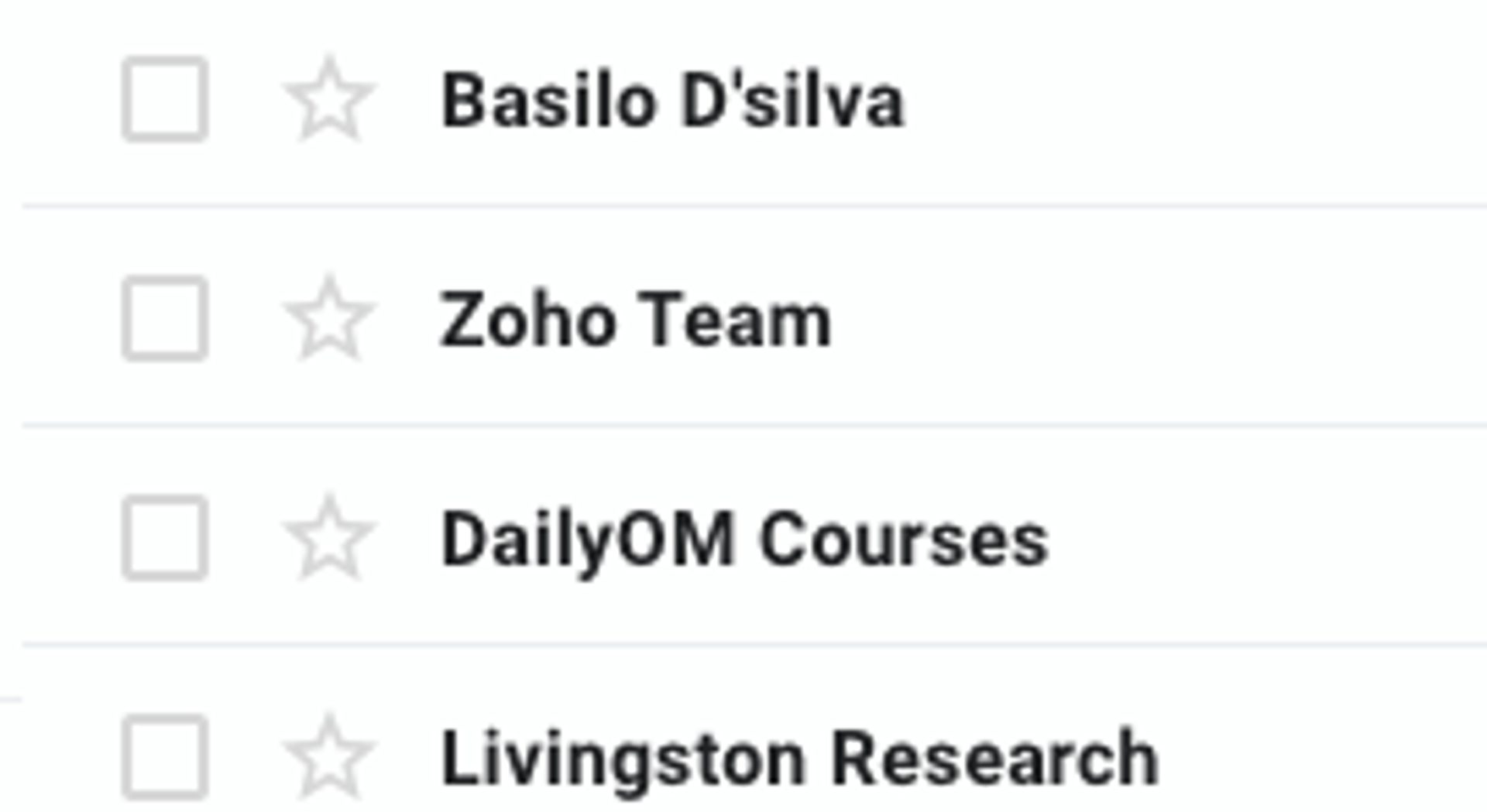
Readers decide whether to open an email by looking at who sent it, so the from name needs to be a person or brand they recognize. For one-to-one outreach, use a real name and company, such as "Dana Lee at Northwind." For newsletters and campaigns people subscribed to, use your brand name. Avoid "Info," "Admin," and "Marketing."
Send from an address that someone monitors, so readers can reply. In the inbox below, the named sender stands out from the generic team and department names around it.
2. Vague or misleading subject line
A subject line works when it names a benefit or a problem the reader recognizes and tells the truth about what is inside. Vague lines such as "Quick question" or "Update" give no reason to open, and deceptive lines break CAN-SPAM. Keep it short enough to read on a phone, and write it for one audience.
Here is the same email with a weak and a stronger subject line (illustrative example):
- Weak: "Exciting news from our team"
- Stronger: "3 ways to plan your Black Friday emails this week"
The Planoly subject line below is a real example. It names a deadline and a problem the reader has (planning Black Friday sales), so the reader sees why the email matters now. Pair a strong subject line with a preheader that adds one more reason to open, and A/B test your subject lines to learn what your audience prefers.

3. No personalization
Personalization means the email reflects who the reader is and what they have done, and a first name alone barely counts. Use their role, industry, the page they visited, or the last product they bought. In outreach, one specific observation about their business shows you did the homework. In campaigns, use merge tags with a fallback value so a missing field never prints "Hi ,".
Here is an invitation before and after personalization (illustrative example):
- Before: "Hi there, I would like to invite you to our event for professionals."
- After: "Hi Priya, since you manage email for a boutique fitness studio, Thursday's session on member win-back flows might help."
Our guide to sending personalized emails walks through the data to use.
4. Weak opening line
The opening line should tell the reader what is in it for them. Many inboxes show the first line next to the subject line, so it works as a second subject line. Lead with the reader's problem or goal, then connect it to your offer.
Here is the same email opener before and after (illustrative example):
- Before: "I'm writing to tell you about our new analytics dashboard."
- After: "If pulling Monday's numbers takes half your morning, here is a faster way to do it."
5. Too much information
One email should do one job, because readers decide in seconds whether to keep reading. Give the single point, one supporting detail, and one next step, then link to the rest. A first-touch email often fits in a few short paragraphs.
The same applies to updates and newsletters: put the most important item first and keep each item to a sentence or two. Our guide to writing a newsletter covers structure in more depth.
6. No research on the reader
Research decides whether your email is relevant. Check the reader's role, company, and recent activity before you write, and send the message only to people it helps. A pitch for enterprise procurement software sent to a yoga teacher wastes both people's time and invites a spam report.
Run these three checks before you send outreach:
- Confirm the person's current role and company.
- Read something they published or shared recently.
- Find one reason your message helps them now.
For campaigns, audience segmentation does this at scale: group contacts by role, interest, and behavior, then send each group the message that fits.
7. No clear benefit
Every email needs to answer "what's in it for me?" within the first two sentences. State the outcome the reader gets, such as time back, a target hit, or a problem solved, before you describe how you do it. A follow-up email needs a benefit too, because a message that only asks "did you see my last email?" gives the reader nothing new.
Here is a follow-up before and after (illustrative example):
- Before: "Following up in case my last email got buried."
- After: "Here is a one-page checklist for the three setup steps I mentioned. It should save you an afternoon."
8. Unclear or too many calls to action
One email should ask for one thing. Decide whether you want a reply, a booking, or a download, build the email around that action, and make it specific. Several links and buttons split attention, and the reader often picks none of them.
Phrase the call to action as a clear verb and place it after the benefit. Secondary links belong in the footer.
Here is a call to action before and after (illustrative example):
- Before: "Book a call, download the guide, follow us on LinkedIn, or reply with questions."
- After: "Would a 15-minute call on Thursday work?"
9. Spelling, grammar, and formatting errors
Typos signal carelessness, and in outreach they undercut your claim to do careful work. Read every email out loud, check names and numbers twice, and send a test to yourself to see how it renders on desktop and mobile. A tool such as Grammarly catches most errors, and a second pair of eyes catches the rest.
Click every link in the test email, and check that no merge tag printed as raw code.
10. Jargon
Plain language reads faster and sounds like a person. Replace jargon with the words your reader uses for their own work. If you would not say a phrase to the reader across a table, rewrite it.
Here is a sentence before and after (illustrative example):
- Before: "Our end-to-end platform orchestrates high-velocity outbound workflows for your reps."
- After: "Our software gives each rep a daily list of who to call and what to say."
11. Too informal a tone
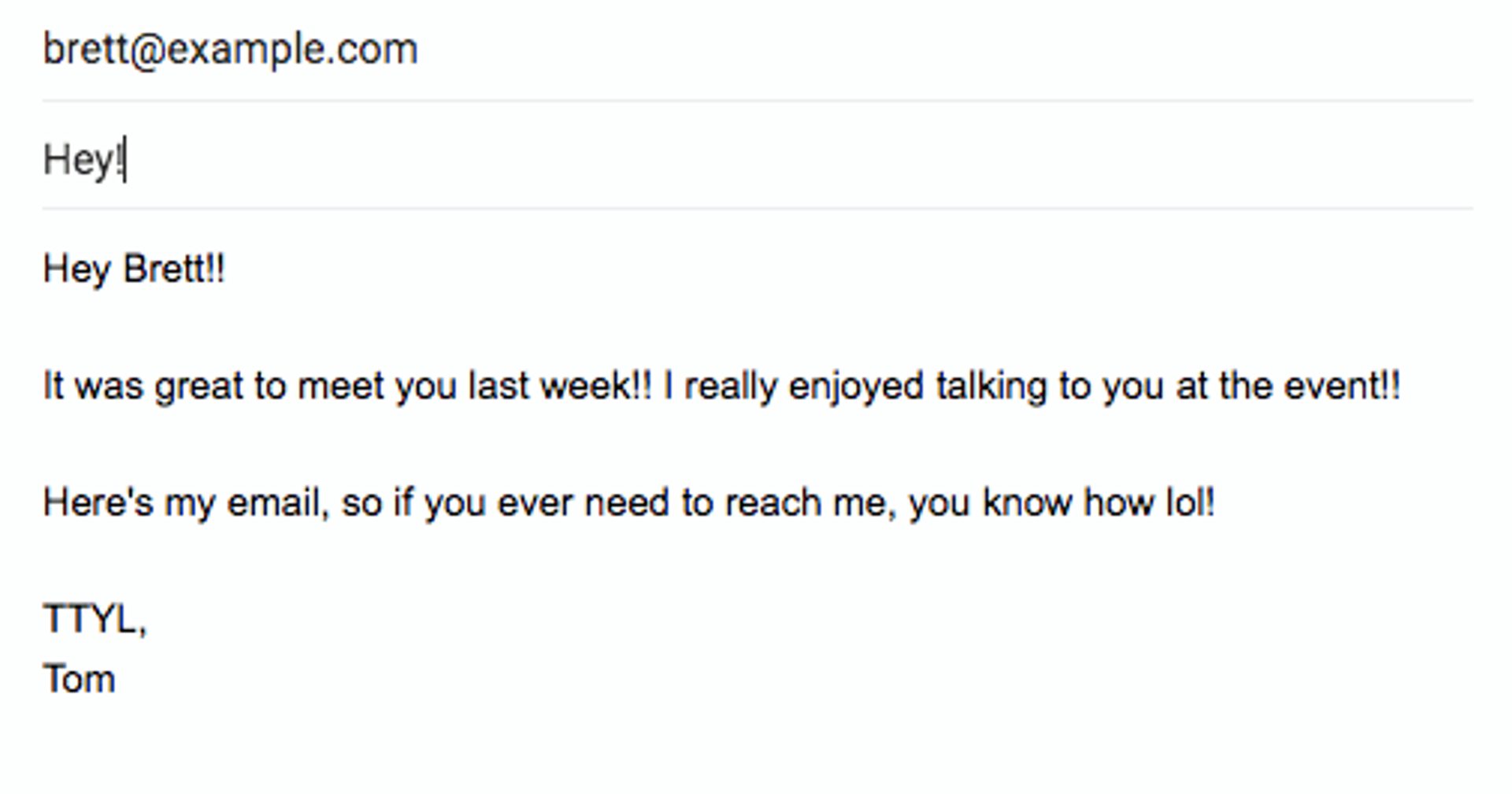
Match formality to the relationship. Warm, plain language suits most marketing email, while slang, text abbreviations, and strings of exclamation points undercut your credibility with someone you have met once.
The follow-up below shows the pattern: "Hey Brett!!", double exclamation points, "lol," and "TTYL" in a first message to a new contact. A stronger version reads: "Hi Brett, it was great to meet you at the event last week. My email is below if you want to continue the conversation."
12. No email signature
A signature tells the reader who you are and how to reach you without a search. Include your full name, title, company, and one way to contact you, such as a phone number or LinkedIn profile. Keep it to four or five lines. Marketing emails also need your company's physical postal address and a working unsubscribe link, which CAN-SPAM requires. See how to end an email well, and review your unsubscribe message while you are at it.
13. Inappropriate tone
Tone is harder in writing because readers cannot hear your voice or see your face. Skip sarcasm and jokes that depend on delivery, especially when cultural or language differences exist between you and the reader. Avoid pressure phrases such as "ASAP" and "don't be late," and rewrite any draft you wrote while annoyed.
The email below shows how a simple request lands when it arrives with sarcasm ("this isn't rocket science, people") and a warning:
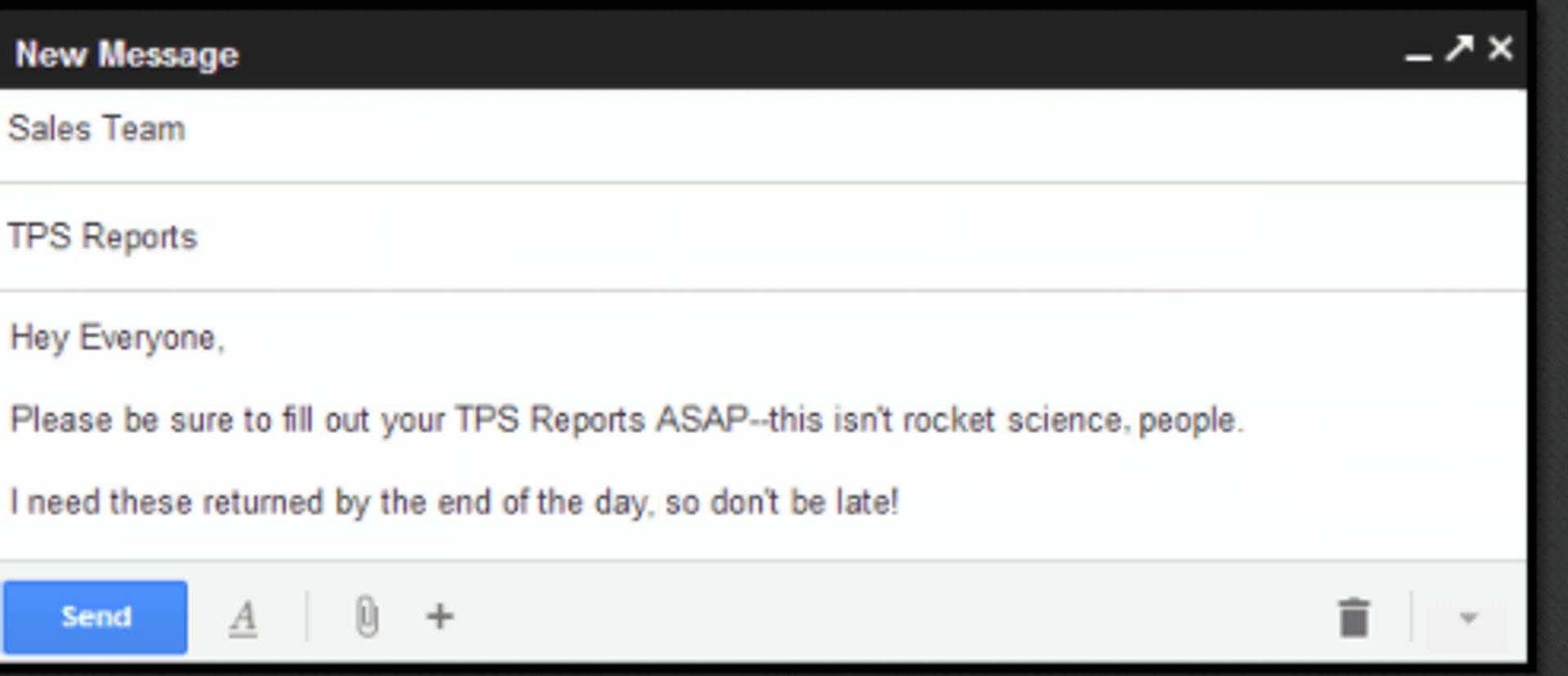
Image source: GCFGlobal.
A better version of the same request reads: "Hi team, please complete your TPS reports by end of day today. Reply if you need more time."
Email etiquette checklist before you send
Check these seven items before every send:
- Sender name is a person or brand the reader recognizes.
- Subject line is specific and matches the content.
- Opening line leads with the reader's benefit.
- Call to action is single and specific.
- Spelling, names, and links are checked in a test email.
- Signature includes your name, role, and company.
- Unsubscribe link and postal address appear in every marketing email.
How can ActiveCampaign help you send better emails?
Etiquette is easier to follow when your platform makes the right behavior the default. ActiveCampaign is an AI platform for marketers, with Active Intelligence built into every plan.
These ActiveCampaign features support the rules in this guide:
- Personalization tags and conditional content adapt names, details, and whole blocks to each contact.
- Segmentation groups contacts by behavior, role, and purchase history, and Active Intelligence suggests segments from your engagement data.
- Predictive Sending picks a send time for each contact, so email lands when that reader is likely to open it.
- Active Intelligence drafts campaigns from a prompt in your brand voice, and you review and approve every word before it sends.
- Email templates and the subject line generator give you a clean structure to start from.
Together they let you send the right email to the right reader at the right time, with every send still carrying your name. Explore ActiveCampaign email marketing to see them in action.
Customers who use Active Intelligence see 75% higher engagement than customers who don't, across 32,948 accounts.
Relevant, well-timed email is how that engagement shows up in your numbers.
Send emails people want to read
Frequently asked questions
What are the basic rules of email etiquette for marketers?
Five rules cover most situations: match your greeting to the relationship, be courteous, format for skimming, write an honest and specific subject line, and start a new thread when the topic changes. Add a recognizable sender name, a single call to action, and a signature, and your emails read as professional.
Should marketing emails use a formal or casual tone?
Match the tone to the relationship. Warm, plain language works for most marketing email. Use a title and last name for formal fields or recipients who sign formally, and avoid slang, text abbreviations, and strings of exclamation points with people you have met once.
How long should a marketing email be?
Make it as short as the job allows: one idea, one supporting detail, and one call to action. The right length varies by audience and goal, so test shorter and longer versions against your own list.
What does the law require in a marketing email?
In the U.S., CAN-SPAM requires accurate sender information, a subject line that reflects the content, your physical postal address, and an opt-out you honor within 10 business days (see the FTC’s guide). Gmail also expects authenticated sending domains and, for bulk senders, one-click unsubscribe.
How can I check an email before I send it?
Send a test to yourself and read it on desktop and mobile. Check the sender name, subject line, opening line, links, and signature against the checklist in this guide, then confirm every marketing email carries an unsubscribe link and your postal address.