How much does it cost to implement a CRM?
Implementing a CRM costs more than the subscription price. Your total includes transparent costs (subscription, service level, per-user fees, and implementation fees) and hidden costs (extra users, customization, data migration, overtime, contract terms, training, and premium add-ons). It also includes the staff time behind each one. Ask every vendor for a written quote that covers all of them.
When it comes to customer relationship management (CRM), nailing down an exact cost can seem like an impossible task.
A CRM rarely costs its face value. Beyond the initial cost, you pay per user, for customization, and more. So how can you know the true CRM cost and set a reasonable budget?
The challenge is that the true cost of a CRM implementation is rarely understood when the process begins.
This post will go through the various CRM implementation costs—and where you can expect to find them.
What are the two types of CRM implementation costs?
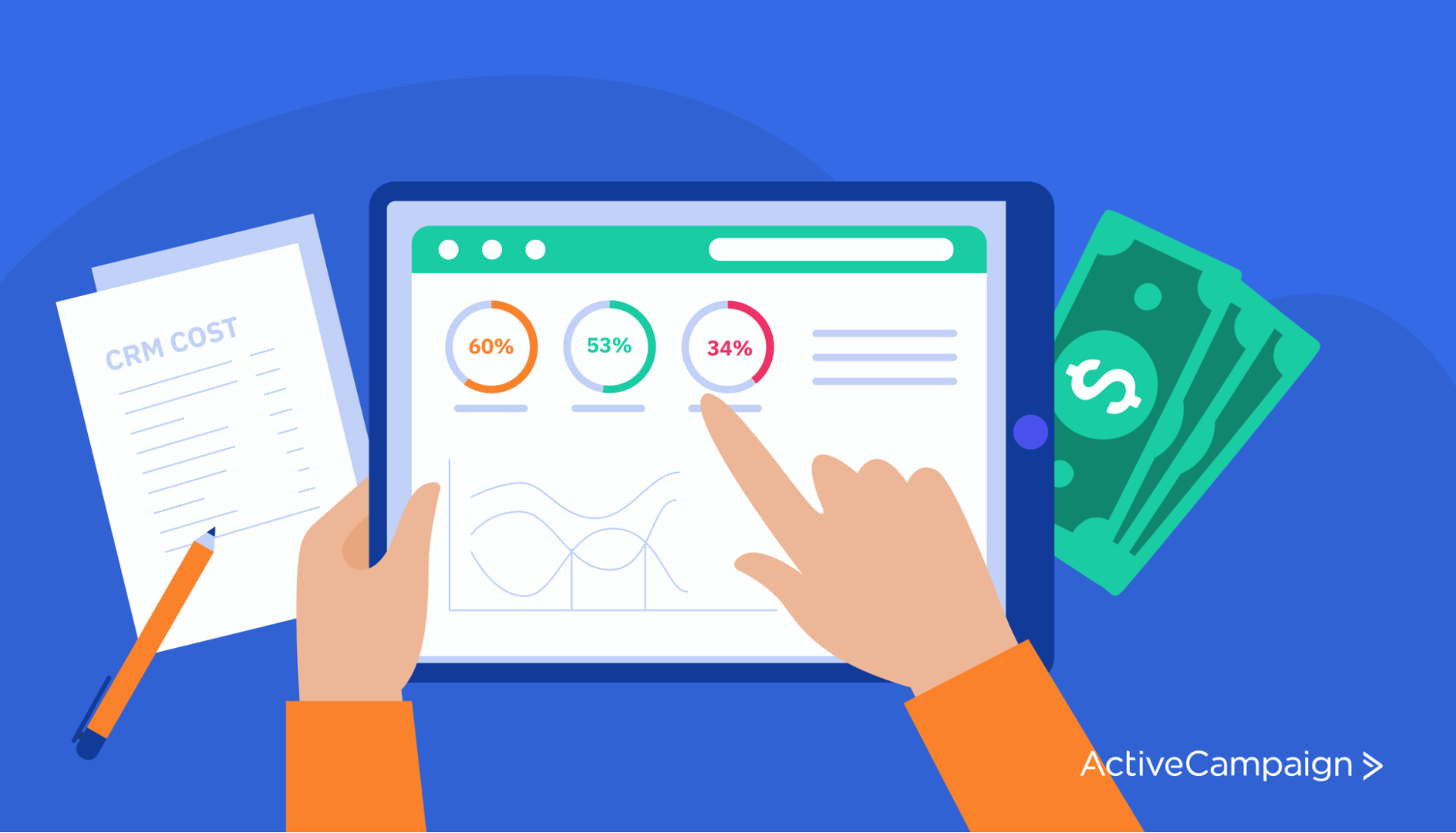
CRM implementation costs fall into 2 major categories: transparent costs and hidden costs. Each of these breaks down into money and time.
As a result, there are 4 types of CRM implementation costs:
- Transparent fees
- Transparent time investments
- Hidden fees
- Hidden time investments

Though some of these can vary in size between organizations, they’re always present in some form. Whether you’re a team of 2 or 2,000, implementing a CRM for your business is a big deal. It takes time, money, and effort.
But CRM implementations can go off the rails all too often—even in sales teams aware of the extra costs. How?
- It goes over budget
- Months past the deadline, implementation still isn’t finished
- Failure to meet expectations (even after setup)
- Minimal user adoption
When you understand the true costs, you can keep your project on track and your budget in check. You can also more effectively set expectations for the tool and deliver a CRM that solves the problems most important to your business.
How much should you budget for a CRM?
Budget varies widely between organizations, so there is no set amount. Start with your chosen CRM platform’s pricing scheme, then add the other costs in this guide.
For example, ActiveCampaign’s pricing page lists four plans (Starter, Plus, Pro, and Enterprise) priced by contact count, with 1, 1, 3, and 5 user seats included. CRM pipelines and sales engagement come from the Enhanced CRM add-on, which is available on Plus, Pro, and Enterprise. Check the pricing page for current prices.
Many CRM platforms also charge per user. For example, Microsoft lists Dynamics 365 Sales plans at $65, $105, and $150 per user per month, paid yearly. Even lower-priced CRMs may still carry hidden fees.
Then there are implementation fees, which vary by vendor and scope, so there is no reliable average. Ask for a written quote. ActiveCampaign’s pricing page lists contact migration and onboarding support as included services on every plan, with priority support on Pro and Enterprise. Each plan includes a set number of user seats and scales with your contact count.
What are transparent CRM costs?
CRM vendors are transparent about some costs for implementation. As a result, transparent costs are the easiest to spot and include in your budget. These comprise the “main” cost of implementation.
Transparent costs fall into 4 categories.
- Subscription costs
- Service-level costs
- Cost per user (usually user per month or per year)
- Implementation fees
Many parts of CRM implementation also require clear time investments. These transparent time investments correspond to the 8 steps of the CRM implementation process. But before we get into those, let’s dive a little deeper into what transparent fees and time investments look like.
What are transparent CRM fees?
In the CRM implementation process, the first transparent cost is your subscription or software cost—in other words, the price you pay to use the platform. As there are many types of CRM subscriptions, software costs can vary widely.
One of the biggest factors is whether your CRM is cloud-based or on-premise.
Is a cloud CRM or an on-premise CRM cheaper?
A cloud CRM is a system that lives entirely online, which your organization can access through a paid license. Cloud CRMs give you more flexibility in customization and payment options, are easier to scale up, and offer remote access on most devices.
An on-premise CRM is a system you purchase up front (for a whole lot of money). You own it. It exists on your servers. That may sound more reliable at first, but the maintenance, updates, and uptime are your responsibility.
Most businesses now use cloud-based CRM, according to SuperOffice’s 2022 CRM statistics roundup, which doesn’t name an original source.
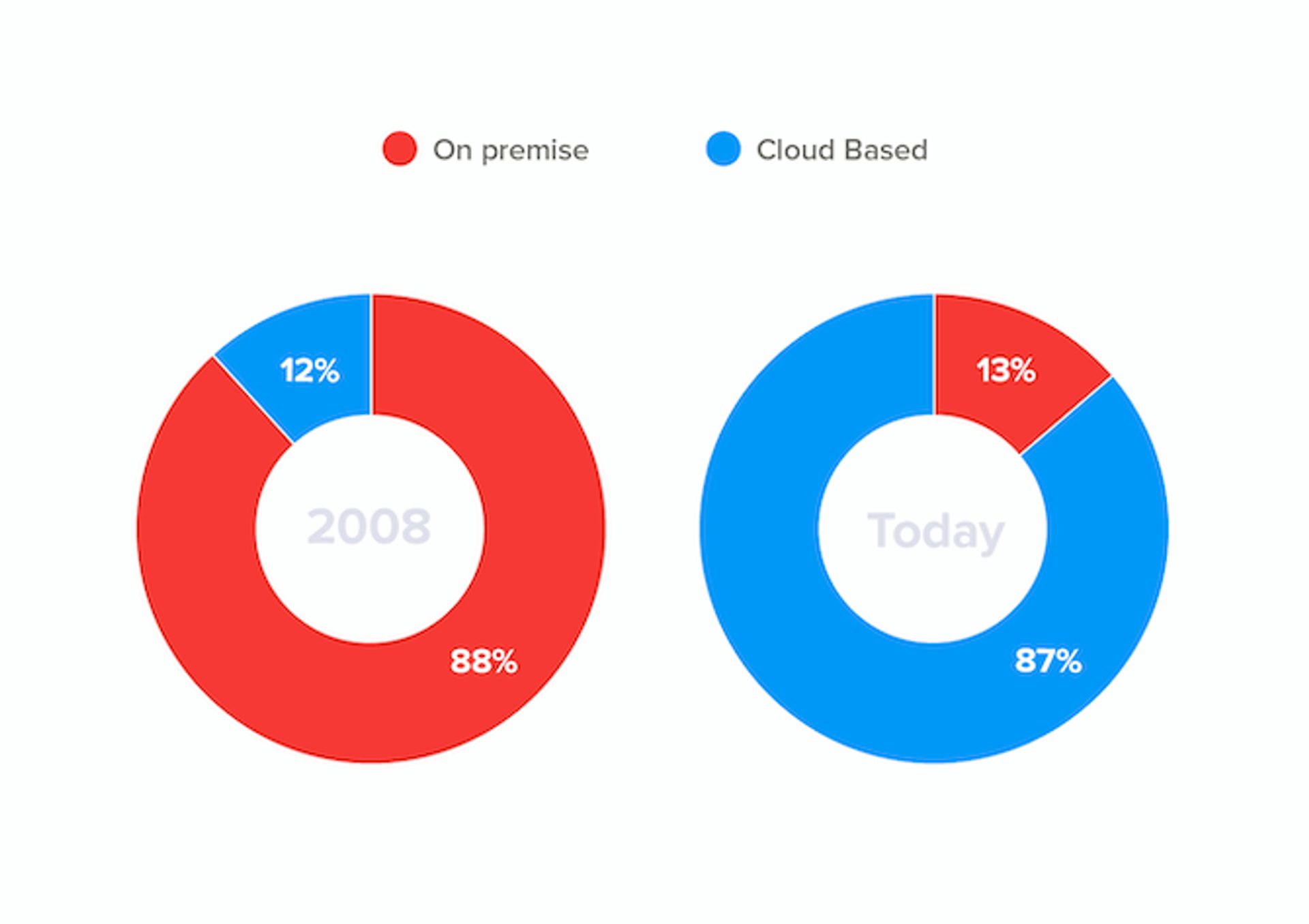
Cloud CRMs are rapidly replacing on-premise CRMs. This trend is primarily thanks to cloud CRMs taking less upfront investment and offering more options for subscriptions. Cloud-based CRMs usually offer a few subscription options:
- Monthly subscription (these are the most common)
- Yearly subscription (usually available and often comes with a discount)
- Quarterly subscription (rare, but sometimes possible)
However, that’s not to say cloud CRMs are always ideal. For example, you might choose an on-premise CRM if you manage sensitive data or need complete control over the system (often for reasons related to compliance with regulations).
What are service-level costs?
Three factors determine your service level cost:
- Pricing plan level: The service package you purchase from the vendor.
- Volume: The number of records, contacts, or data points you can store for a certain price.
- Add-ons: Any premium features, integrations, or capabilities you can add after the fact.
In the software-as-a-service (SaaS) model, CRM vendors offer various ‘levels’ or ‘tiers’ of a CRM platform. Each pricing plan level contains a particular bundle of features and capabilities.
For example, ActiveCampaign has 4 price levels: Starter, Plus, Pro, and Enterprise. Each pricing plan builds on the previous, offering more features. However, higher-level plans come at a higher price.
As your business grows, so will your CRM needs. A major benefit of using cloud-based CRMs here is that they can grow and scale with you to provide exactly what you need.
Another cost factor in the SaaS model is volume. As your CRM use grows, so will the number of contact records, organizations, and customer information you need to keep track of. As a result, some contact-based CRMs enforce limits on file storage.
Once you approach that limit, you might (or might not) be notified. Then you’ll have to decide whether to upgrade your contact/record limit or create more room in your contact list. However, many businesses simply find out they’ve already been billed for an upgraded plan without being notified (surprise!).
SaaS CRMs like ActiveCampaign make it simple to upgrade (or downgrade) your plan type or limit within the platform, further highlighting the benefit of scalability.
Here’s what upgrading/downgrading your account looks like in ActiveCampaign!
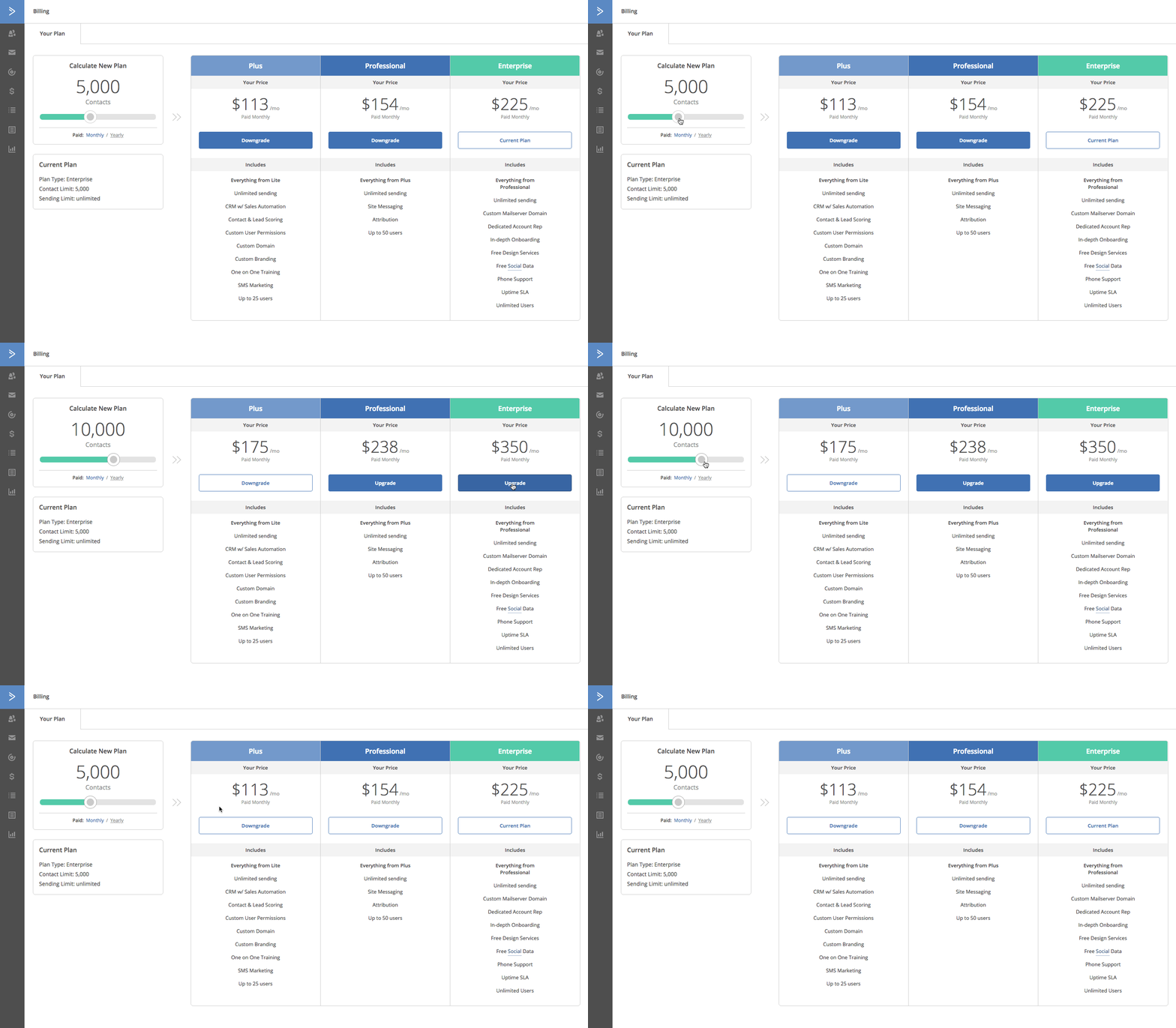
But what if there are just 1 or 2 features that you need but can’t justify the price jump from your current plan to the next? Thankfully, some CRMs offer add-ons to give you just that.
Add-ons can be free or come at an additional charge. Examples of free add-ons include:
- Native integrations with other tools
- Basic dashboard customization
- Basic reporting and analytics
While premium add-ons include:
- Advanced reporting features and custom reports
- Advanced analytics
- Advanced dashboard customization
- Artificial intelligence or machine learning capabilities
- 3rd party integrations
Add-ons are a great way to increase your CRM capabilities without breaking the bank. But you should always verify the true costs of an add-on, as they’re a common way for CRM vendors to sneak additional fees into your bill. For example, ActiveCampaign’s Enhanced CRM is an add-on for Plus, Pro, and Enterprise plans, offered as two parts: Pipelines and Sales engagement.
How does cost per user work?
Some CRM plans only allow for a set amount of users, while others allow for adding individual users for a set amount more per month.
The number of users for any given plan is usually listed in the plan’s description. In other cases, a fee may be needed to access particular features or add-ons. For example, ActiveCampaign plans include 1 user seat on Starter and Plus, 3 on Pro, and 5 on Enterprise.
What are CRM implementation fees?
Once you’ve decided on a vendor and plan level, it’s time to deploy your CRM. Unless you’re someone with extensive developer skills, you’re going to need some help with implementation.
Vendors offer setup and implementation services, which range in average cost according to the scope of the implementation.
Here are a few of the implementation services you could be offered:
- Building customized dashboards
- Automated workflow creation
- Template creation
- Consulting services
- Data migration
- Contact import
- Workflow export/import
But choose wisely! If you do all of these, it can end up costing you a lot of money.
Implementations are a bit of a gray area. Some vendors don’t tell you how much these services cost, and implementation fees can pile up quickly. Because fees vary widely, ask each vendor for a written, itemized implementation quote before you sign.
At ActiveCampaign, we recognize that your organization needs a CRM that can be set up and used quickly without breaking the bank. That’s why ActiveCampaign lists contact migration and onboarding support as included services on every plan. Its pricing page also lists training resources, including ActiveTraining, video tutorials, and customer enablement workshops.
How does time add to CRM costs?
Setting up your CRM takes time—but not everyone realizes that time is a cost. Time is money, after all.
So, if you underestimate how much time you need, you will spend way more than you wanted.
How long implementation takes depends on your data, your integrations, and your team size. Many companies still don’t plan enough time for it.
There may be a cost of time, but the cost of cutting corners will always come back to bite you—such as when you can’t find the crucial information you need to close a deal, or you discover that your sales forecasts were dangerously inaccurate.
The costs of these oversights can easily outweigh the extra costs for the right implementation. But sneaky as these costs might be, they have nothing on some of the hidden CRM costs we’ll cover in the next section.
What are hidden CRM costs?
Hidden costs are the fees and time investments that don’t show up in a vendor’s main pricing, so they’re easy to miss until you’re already committed. Like transparent CRM costs, they break down into fees and time investments. “No hidden fees!” Sound familiar? Maybe you heard it from a salesperson in that one used car dealership commercial. Or maybe you know that the price you see isn’t always the price you pay.
Hidden costs exist everywhere. CRM software is no exception. So what kind of hidden costs could you run into?
- A service fee no one told you about
- A premium add-on you thought was included
- An afternoon spent figuring out why your workflows don’t work (or flow)
What are hidden CRM fees?
With most costs and fees available upfront, hidden fees are often the most unexpected. Hidden CRM fees can occur for 2 reasons:
- Vendors don’t always list every fee up front
- Customers don’t ask enough questions
If you don’t ask outright, the vendor may not mention it. These surprise fees hide in the details. If you want to avoid them, ask clarifying questions.
Common hidden fee hiding places include:
- Adding users
- Customization
- Data migration
- Staff overtime during implementation
- Minimum contract terms
- Ongoing training and customer support
- Premium add-ons
But aren’t all of these fees expected? Not always. Let’s take a closer look.
Adding users is an easy place for a vendor to insert a hidden fee. Sometimes the ‘cost-per-user’ is stated directly. Sometimes the plan includes a set amount of users. If you can’t find either, ask the vendor.
Customization means different things from vendor to vendor. It’s important to know what's considered premium customization and what isn't. What you discussed as an included feature may suddenly become an added service.
Some things to clarify with your CRM vendor:
- Custom dashboards
- How many dashboards can you create before they charge you?
- Are there limits on what you can include?
- Do you get training or customer service modules?
Data migration and information import is a service people often offer. Before you sign up, ask if this service is included or premium. If it’s premium, it gets expensive fast!
Staff overtime during implementation comes into play when the CRM implementation process requires a customer service team from the vendor company. If the work takes longer than quoted, you could end up paying more than you planned.
Minimum contract terms rarely come out during pricing or negotiation talks unless you specifically ask. Some common CRM contract pitfalls (and things to ask for) include:
- Named user vs. concurrent user
- Is the fee based on the number of CRM users or total employees?
Ongoing training and customer service modules can be costly if you encounter problems. Ask about hourly rates for extra support during the sales process.
Premium add-ons include integrations, analytics, reporting, or intelligence-based features advertised in the buying process but hidden behind paywalls once you purchase. This is typically done by giving you a taste of a feature free—and then charging you for full access.
Common examples of this include:
- You might be able to link your email address and view the email history with a contact in their CRM profile, but sending them an email directly from the CRM comes at a price.
- You can see the total number of new leads as they come in, but it costs extra to see their source.
- Basic metrics like ‘number of emails opened’ and ‘win-rate’ are given for free, but seeing the individual email addresses or ‘average sales cycle length’ comes at a price.
One hidden fee that you won’t avoid with these questions is training. Training is certainly a time investment but also a hidden monetary cost.
Why? A team that doesn’t know how to use your CRM gets less done.
When you have someone run CRM training for new hires, it takes away from them doing their actual job. Unless you have a CRM administrator, in which case it'd be their job to train your employees.
Where do hidden time costs come from?
Hidden time costs come mainly from 2 phases: discovery, and data cleansing and migration. Steps you didn’t realize existed can quickly eat away at your time and create expensive setbacks.
- Discovery
- Data cleansing and migration
Mapping your business requirements is tedious. Sometimes it may even seem like overkill. But when you truly know what you need, you won’t waste time setting up features that you ultimately won’t use.
Poor discovery bleeds into everything that comes after it, making each phase longer than the last. In other words, if you set up your CRM poorly, you’ll probably have to set it up again. From scratch.
Thankfully, it’s easy to avoid with proper discovery. By taking time to understand your needs and requirements, your discovery process will benefit in the following ways.
- Choosing a CRM is straightforward because you know exactly what you’re looking for.
- You use free trials to study each feature on your wishlist.
- You know exactly which questions to ask during a demo.
- You know which problems you might run into—and you have plans to deal with them before they happen.
- You already have a blueprint for how you’ll customize your CRM.
- Your team’s use cases and pain points are addressed, and people use the CRM.
Data migration is the second area that’s vulnerable to hidden time investments. In fact, it almost always takes longer (read: costs more) than people think it will.
As a business, bad customer data is your enemy. To avoid hidden time investments, don’t underestimate:
- The amount of customer data you have
- The time it takes to locate incorrect data
- The difficulty of finding correct data
- The importance of good data to your business
Frequently asked questions about CRM costs
There’s a lot of uncertainty when it comes to estimating CRM costs. Here are some of the most commonly asked questions we’ve encountered as a CRM provider.
What is the true cost of a CRM?
The true cost of a CRM is your subscription plus add-ons, per-user fees, implementation fees, hidden fees, and the staff time to set it up and learn it. Ask each vendor for a written quote that covers all of them.
How much is a CRM for a small business?
It depends on the CRM platform and, of course, the business itself. However, you can usually get a reasonable estimate of CRM cost by calculating the total number of users and multiplying it by the per-user rate of your platform. However, always factor in the hidden costs and time investments, such as add-ons and limits.
How do you calculate CRM costs?
There’s no set formula, but multiplying your total number of expected users by the CRM’s base cost per user is a good estimate. However, be sure to account for extra fees, especially as they relate to your organization’s capacity and requirements.
Are CRM systems worth it?
Yes, for most teams. CRM systems make the most of your data to provide accurate sales forecasts and insights about your customers—among other things. When the alternative is often going on a “gut feeling,” CRM systems are well worth the investment.
Can QuickBooks be used as a CRM?
In some cases, yes. Since QuickBooks stores buying histories and other customer data, it’s often a convenient CRM tool for many small businesses. However, since it’s not necessarily a CRM, it lacks many features that make CRM software invaluable.
Does ActiveCampaign charge implementation fees?
ActiveCampaign’s pricing page shows no separate implementation fee. It lists contact migration and onboarding support as included services on every plan. See the pricing page for current plan details.
What should you remember about CRM implementation costs?
CRM costs go beyond the subscription price. Plan for transparent fees, hidden fees, and the time your team spends on setup, migration, and training. Ask every vendor for a written quote that covers all of them.
At ActiveCampaign, we try to present our costs as clearly and transparently as possible. Plus, we also do a bunch of things to help you avoid hidden costs:
- Our plans have a set amount of users indicated on our pricing page.
- We include contact migration.
- Support and onboarding support are included on every plan, with priority support on Pro and Enterprise.
- Our pricing page compares what each plan includes.
- We also offer a directory of certified consultants for additional services.
For more information and to start a 14-day free trial, contact a CRM expert from ActiveCampaign today.