Every marketing platform you're evaluating right now has "AI" somewhere on its homepage. Most of them mean an assistant that rewrites subject lines and compiles segment lists. A few of them mean something more operationally significant. The problem is that "AI-powered" and "intelligent automation" don't necessarily mean anything specific, and vendors know it.
Migrating data, rebuilding workflows, retraining your team: none of that is quickly recoverable if the platform you chose turns out to be a glorified writing assistant with little else to offer. So, when it comes to choosing AI marketing software, how do you determine which one is right for your team, and how can you be confident enough in the distinction to justify your choice to leadership?
This guide provides a framework for evaluating AI marketing platforms, so you can ask the right questions, make an informed decision, and present your case for investment.
How do you choose AI marketing software when the category is still being defined?
AI marketing software is a maturing category. The evaluation frameworks, analyst coverage, and peer benchmarks that exist for established categories like CRM or email platforms haven't caught up to how fast the technology is emerging, so buyers can't always rely on the same third-party validation they use for other purchases.
Most marketing leaders are comfortable with automation fundamentals like segmentation, nurture flows, and triggered emails. But newer concepts like agent-based systems, unified data layers, and predictive insights represent a different operating model. If you’re not yet fluent in what those terms mean for your work, you're at a disadvantage the moment a vendor demo starts.
Market saturation makes this even harder. Hundreds of platforms now include "AI" in their positioning, but the term covers everything from a basic subject line generator to a full autonomous campaign engine. That range makes apples-to-apples comparison nearly impossible without a clear set of criteria.
The evaluation process itself also creates risks. These are the most common ways buyers end up with a platform that doesn't deliver:
- Choosing based on a polished demo. Vendor demos are built to impress, not replicate your workflow. Always request a hands-on trial with your actual data before committing.
- Prioritizing feature count over integration depth. Ten AI features that operate in isolation may well deliver less value than three that work together.
- Underestimating total switching cost. The subscription price is the smallest number in this decision. Migration, workflow reconstruction, and team retraining can add months of disruption on top of it.
- Selecting for today's needs only. Evaluate whether the AI capabilities hold up as your contact list, channel mix, and team size grow, not just whether they work for the program you're running now.
- Treating generative tools as a proxy for AI capability. If content generation is the primary AI differentiator, the platform likely isn't addressing the harder operational challenges. Don't let one impressive feature stand in for a complete evaluation.
As AI capability becomes a primary decision factor, buyer reviews are increasingly reflecting frustration from teams who feel their current platform is falling behind.
AI features are useful but still feel like support tools rather than fully autonomous systems.
Pricing increases quickly as my contact list grows, and most of the more advanced automation and AI features are locked behind the premium plan.
The cost of getting it wrong can send you spiraling. Switching platforms means migrating contacts, rebuilding automations, and retraining the team. Every week of that transition is a week of reduced output.
We’ve put together a thorough buyer’s guide for AI marketing software to give teams new to the category a working vocabulary and a more structured way to think through the decision. Below you’ll find a set of assessment criteria grounded in how these platforms actually function, and a framework for evaluation.
What does good AI marketing software look like?
The best AI marketing platforms don't just help you work faster on individual tasks. They address the operational work that actually slows teams down: finding the right audiences, coordinating messaging across channels, understanding what's working, and adjusting campaigns before performance deteriorates. These bottlenecks eat time and risk missed opportunities, and they're the areas where AI can create the biggest returns.
AI marketing tools currently span a wide range.
At one end, task-level assistants handle discrete jobs like drafting copy, resizing creative, and suggesting a send time.
At the other end, integrated AI agent orchestration systems operate across the full campaign lifecycle. They identify segments, build and launch campaigns, monitor performance, and optimize in real time without waiting for a human to pull a report and act on it.
Most platforms sit somewhere in the middle, but the position can be difficult to assess.
Content generation tools represent the fastest-growing AI marketing software category right now, and they're useful. But content speed doesn't fix the most common problems limiting marketing teams.
The following AI marketing software capabilities connect directly to business results:
- Autonomous campaign creation turns a single prompt or goal description into a complete campaign with subject lines, copy, layout, images, and CTAs. Campaign build time drops from hours to minutes.
- Intelligent audience discovery uses behavioral patterns, purchase history, and engagement data to surface high-value segments that manual analysis would miss.
- Cross-channel orchestration coordinates email, SMS, WhatsApp, and ads from a single automation. Adding a channel doesn't mean building a separate workflow.
- Predictive optimization determines the best send time, content variant, and channel for each individual contact rather than applying batch-level averages to entire lists.
- Conversational reporting lets marketers ask plain-language questions about performance and get instant answers with recommendations, replacing manual data pulls and spreadsheet analysis.
The platforms that deliver the most value connect these capabilities into a system where each campaign's data feeds back into the next one's decisions.
Mapping your pain points to AI marketing features
The most useful way to evaluate how AI marketing software fits your business is to start with the operational friction your team already feels. Take a look at the work that's slow, manual, or breaking down as your program grows, then map them to the features that will help.
Here's how some of the most common marketing pain points map to the AI capabilities that address them.
| Pain point | How it impacts the business | AI marketing features to look for |
| "We spend more time building campaigns than running strategy." | Strategic planning gets squeezed out by manual campaign assembly. Teams spend hours on subject lines, copy, layout, and scheduling instead of optimizing performance. | Autonomous campaign creation that turns a single prompt into a complete campaign with subject lines, copy, layout, images, and CTAs. |
| "We can't personalize at scale with our current team size." | Broad, one-size-fits-all messaging leads to lower engagement and missed revenue from high-value micro-audiences the team doesn't have time to identify manually. | AI-driven segmentation that surfaces behavioral micro-audiences automatically, plus predictive sending that optimizes delivery timing per individual contact. |
| "Our data lives in separate tools and nothing talks to each other." | AI recommendations are shallow because they're based on partial data. Teams waste time reconciling information across platforms instead of acting on it. | A unified data layer with deep native integrations (CRM, ecommerce, support) so AI agents operate on the full customer picture, not siloed channel inputs. |
| "We don't know what's working until weeks after a campaign ends." | Optimization happens too late to affect results. Manual reporting through exports and spreadsheets delays decisions and hides actionable patterns. | Conversational reporting that answers plain-language questions in real time, plus proactive insights that surface trends and recommendations automatically. |
| "Every new channel we add doubles our workload." | Each channel becomes a separate workflow with its own targeting logic, which fragments the customer experience and multiplies the team's manual effort. | Cross-channel orchestration that coordinates email, SMS, WhatsApp, and ads from a single automation with shared targeting logic and behavioral branching. |
| "Our current platform worked when we were small, but we've outgrown it." | Growth creates proportionally more manual work. Adding contacts, campaigns, or channels strains a team that's already at capacity. | AI orchestration engines that get smarter with more data, absorbing complexity autonomously so adding channels and contacts improves performance instead of increasing workload. |
Not every platform will have the depth to address all of these. The sooner you map your team's friction to specific capabilities, the better positioned you'll be to ask the right questions in an evaluation and recognize when a platform's AI isn't built for your needs.
How to evaluate AI marketing software
Work through the criteria below before you shortlist AI marketing platforms. Each includes what to look for, a question to ask vendors, and a benchmark for comparison.
1. Map AI depth across the campaign lifecycle
Start by mapping each vendor's AI capabilities against the full campaign lifecycle: strategy, creation, audience selection, execution, optimization, and reporting. This is the single most revealing diagnostic in any platform evaluation.
Platforms with AI at every stage create compounding gains. Each campaign generates data that makes the next one smarter. Platforms with AI at only one or two stages deliver isolated speed improvements that don't change overall trajectory.
Ask vendors: "Walk me through how your AI is involved at each stage of a campaign. Where does it make autonomous decisions, and where does it still require manual input?"
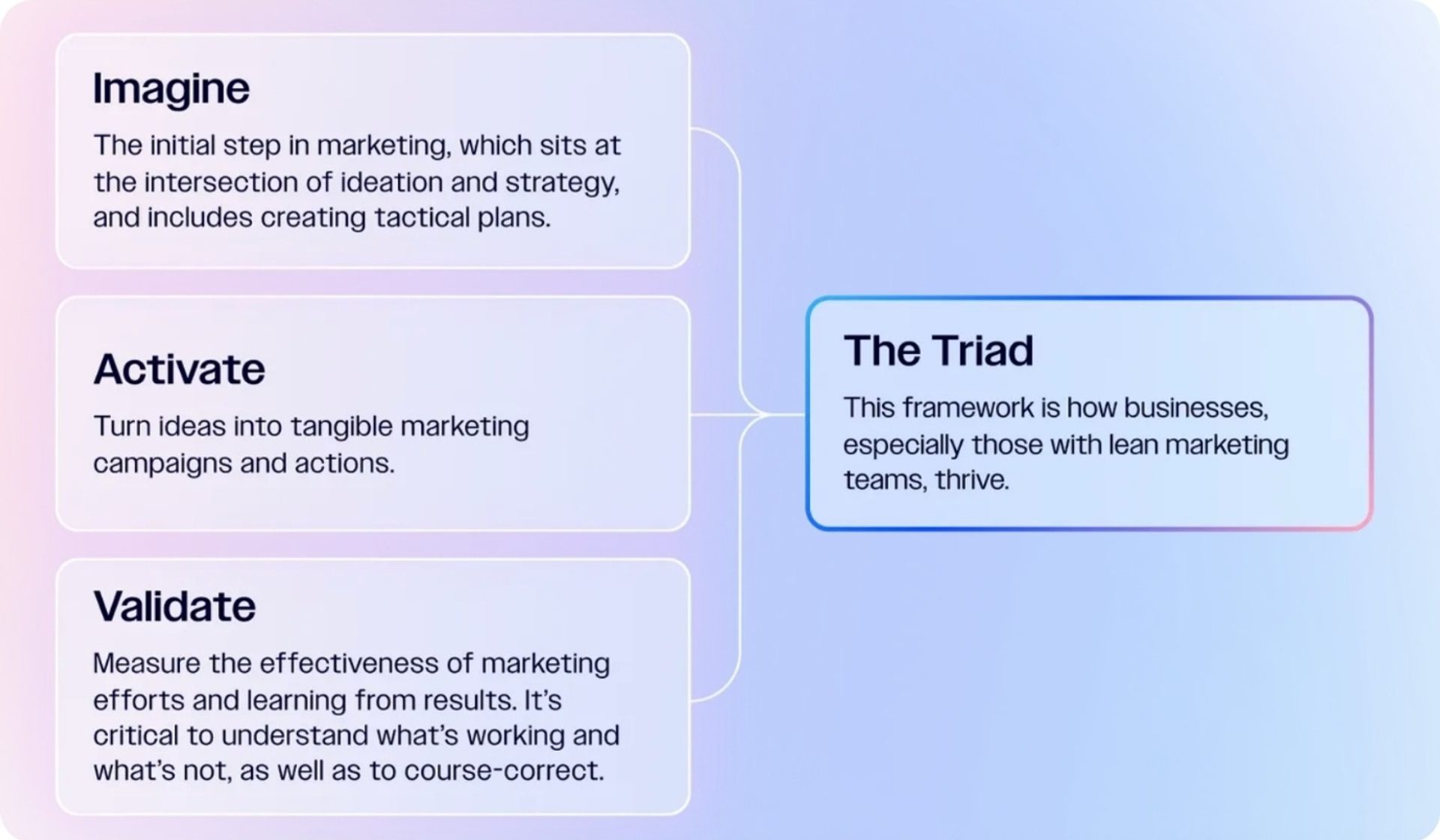
Some platforms apply strong AI to audience segmentation and predictive analytics but rely more heavily on manual configuration for campaign creation and cross-channel execution. They’re capable in their lane, but not full-lifecycle by design. As a benchmark for full-lifecycle coverage, look for AI marketing software that spans three phases of intelligent marketing:
- Imagine (strategy and creation)
- Activate (cross-channel execution)
- Validate (performance monitoring and optimization)
That structure means AI is doing substantive work at every stage rather than augmenting one part of the workflow while leaving the rest manual.
2. Audit the data and integration ecosystem
AI quality depends on data quality and breadth. An AI making decisions based on email engagement alone produces shallow recommendations. An AI drawing from CRM data, ecommerce transactions, site behavior, and support history makes fundamentally better decisions because it sees the full customer picture.
When evaluating platforms, audit how many data sources each one can unify natively, and whether AI agents actually operate on that unified data or only access siloed channel-level inputs.
Ask vendors: "Does the AI operate on unified customer data across connected tools, or does it only access channel-specific inputs?"
Here’s an example of what AI data and integrations looks like across some of the most popular marketing platforms:
| Platform | Native CRM | Ecommerce Integrations | Site Behavior | Unified Data Layer for AI |
| ActiveCampaign | ✓ | ✓ | ✓ | Yes, AI agents access all connected data including 900+ integrations |
| Klaviyo | Limited | ✓ | ✓ | Strong for ecommerce |
| HubSpot | ✓ | ✓ | ✓ | AI primarily accesses HubSpot-native data |
| Brevo | Limited | ✓ | Limited | Unified across email, SMS, WhatsApp, and CRM |
| Mailchimp | ✗ | ✓ | Limited | Limited to email and ecommerce data |
3. Test time to value
The most capable AI platform on the market won't move the needle if your team spends the first three months figuring out how to use it. You should evaluate whether your actual team (not just technical staff, developers or consultants) can use the platform from day one.
Assess onboarding support, interface complexity, and how quickly a non-technical marketer can move from account setup to a live campaign. This isn't just a usability question, but a risk question. A platform your team can't fully adopt is a platform you're paying for at a fraction of its value.
Some AI marketing platforms offer AI-powered enablement tools, like conversational workspaces, guided walkthroughs, in-product coaching, or agentic setup that guides users rather than requiring them to configure manually.
Ask vendors: "Can you walk me through how a non-technical marketer on my team would set up and launch their first campaign — from login to send?"
Take a look at the table below to compare projected time to value across major AI marketing platforms:
| Platform | Self-serve Onboarding | Agentic Setup | Non-Technical Usability | Dedicated Migration Support | Time to First Campaign |
| ActiveCampaign | ✓ | ✓ | High | ✓ | Hours |
| Klaviyo | ✓ | ✗ | Medium | Limited | Days |
| HubSpot | ✓ | ✗ | Medium | ✓ (paid) | Days–Weeks |
| Brevo | ✓ | ✗ | High | ✗ | Hours–Days |
| Mailchimp | ✓ | ✗ | High | ✗ | Hours–Days |
4. Assess scalability against complexity creep
There are two ways AI marketing software scales:
The first adds modules, dashboards, and configuration layers as your program grows and your team absorbs that complexity manually.
The second provides AI that gets smarter as data accumulates, handling the added complexity so your team doesn't have to.
The test is straightforward: does adding more contacts, channels, or campaigns require proportionally more manual work? Or does the platform absorb that complexity autonomously?
This is especially important when you're evaluating platforms at the low-complexity end of your needs. A platform that handles your current program well may still require proportionally more manual effort as your campaigns advance. That's not scaling, it’s just growing the workload alongside the program.
Ask vendors: "If we double our contact list and add two new channels in the next year, what does the increase in manual configuration and maintenance look like on your platform?"
When mapping popular AI marketing platforms against this axis, there’s a clear spectrum.
- Simple but limiting tools offer a fast setup and low learning curve, but adding channels or complexity means workarounds, manual processes, or even switching platforms. These platforms are best for early-stage programs and include Mailchimp, Brevo, and Constant Contact.
- Capable and approachable tools hit the middle ground. A dedicated intelligence engine means AI gets smarter with more data, adding channels extends existing automations, and enablement tools mean complexity stays manageable. ActiveCampaign sits at this point and is a good choice for growing to enterprise teams.
- Granular but complex tools offer extensive capabilities, but scaling typically requires more configuration, more training, and often dedicated technical staff. Platforms like HubSpot and Salesforce Agentforce are best for large organizations with dedicated ops and technical staff.
The middle ground usually offers the best opportunity for teams choosing new AI marketing software.
5. Evaluate vendor fit and long-term partnership
Features get platforms onto shortlists but support, resources, and product roadmap matter just as much. They determine whether those features are used at full capacity. The best AI marketing platform for your team is the one your team actually adopts, and that depends as much on the vendor relationship as the product itself.
Evaluate the following items:
- Support quality
- Migration assistance
- Community resources
- Product roadmap
The roadmap should reflect where AI marketing is heading. A vendor that's already behind on AI development is likely to fall further behind as the category accelerates.
Ask vendors: "What does the transition look like if we move from our current platform and what support do you provide after go-live to make sure the team is getting full value?"
Some platforms stand out in particular in this dimension.
ActiveCampaign offers free agentic migration and onboarding, 1:1 strategy sessions, and multi-language support.
HubSpot provides strong onboarding resources and a large customer community, though some of their onboarding resources are linked to high fees.
Mailchimp’s long-term popularity has resulted in extensive self-serve resources and a large knowledge base, but the platform's AI development has lagged behind the rest of the category.
Klaviyo's support is well-regarded within the ecommerce segment it's built for, but thins out for teams operating outside that use case.
Core AI marketing platform vs. point solutions: when to consolidate and when to layer
Marketing leaders evaluating AI software often face a version of the same structural question: do you replace your existing stack with a unified platform, or do you layer specialized AI tools on top of what you already have?
Consolidation is a stronger option if your current stack is fragmented across multiple tools that don't share data. If the team spends more time managing integrations than running campaigns, or if AI features across separate tools produce conflicting recommendations because they operate on incomplete data, consolidation eliminates those gaps.
Layering makes sense if your team already has a strong core platform that handles orchestration well but lacks a niche capability. Advanced ad optimization or social listening, for example, might justify a best-of-breed point solution that plugs into the core system.
Every additional point solution adds a data silo, an integration to maintain, and a context gap that weakens AI decision-making. Before adding a new tool, ask whether the core platform could handle the use case natively, or whether the new tool's data will feed back into the system the rest of the team relies on.
Take a look back at the earlier data and integration ecosystem audit step to help identify tools with strong data unification, either inside the platform or via native integrations.
How to evaluate the total cost of AI marketing software
Pricing models vary widely across AI marketing platforms, and the subscription fee is rarely the number that matters most. Before committing to a platform, consider the full cost: what you pay at signing, what you pay during onboarding and migration, and what you'll pay two years from now when your program has grown.
Some common pricing structures for AI marketing software include:
- Contact-based tiers scale the subscription with the number of contacts in the database. Some platforms charge per contact per list, which inflates costs when the same contact appears on multiple lists.
- Feature-gated tiers make core functionality available on lower plans but lock AI features, advanced automation, or analytics behind higher tiers or add-on fees. HubSpot, for example, gates many AI and reporting features behind its Professional and Enterprise tiers.
- Credit-based AI pricing charges credits for each AI action such as campaign generation, content creation, or data enrichment. This can make costs unpredictable and penalize teams that use AI heavily.
- Per-user pricing scales costs with the number of team members who access the platform, which can discourage cross-team collaboration.
- Usage-based pricing charges based on email sends, API calls, or automation runs. Costs can spike during high-volume campaigns or seasonal pushes.
Look for a platform that includes the AI capabilities mapped to core pain points across all pricing tiers, rather than reserving them for enterprise plans.
The subscription fee is only one line item. The following hidden and semi-hidden costs can significantly change total cost of ownership.
Onboarding and implementation fees
Some platforms charge mandatory onboarding fees that range from a few hundred dollars to tens of thousands, depending on complexity. HubSpot's mandatory onboarding starts at $3,000 for Professional plans and climbs to $7,000+ for Enterprise.
Before signing, find out whether onboarding is included, how long the process takes, and whether the vendor provides hands-on support or self-service documentation only. The difference between guided onboarding and a knowledge base link can mean weeks of lost productivity.
Data migration costs
Migrating contacts, automations, templates, and historical data from an existing platform can involve vendor fees, third-party migration services, or significant internal time. The scope of what gets migrated varies dramatically across platforms.
| Platform | Migration scope | Cost | Support level |
| ActiveCampaign | Contacts and email lists Forms Landing pages Templates Automations (up to 10 steps) | Free | Agentic migration and hands-on support |
| HubSpot | Contacts Company data | Varies (often requires third-party) | Self-service tools and paid consulting |
| Mailchimp | Contact import | Free (manual) | Self-service documentation |
| Klaviyo | Contacts Some flows from select platforms | Free (limited scope) | Guided for Shopify migrations |
| Constant Contact | Contacts | Free (manual) | Self-service documentation |
Risk mitigation during migration
A platform switch creates a productivity gap. Campaigns still need to run while the team learns a new system, which means a period where output quality and speed dip. That cost is recoverable if you chose well. It's much harder to absorb if you have to switch.
Plan for an overlap period where both platforms run simultaneously. This adds short-term cost but protects campaign continuity.
Ask the vendor for a specific migration timeline, what support is available during the transition, and whether the team can run campaigns on the new platform before fully cutting over from the old one.
Projected ongoing costs
Total cost of ownership extends beyond the first year. Project these ongoing costs before committing:
- Annual subscription increases or tier upgrades as the contact list grows
- Costs for additional channels like SMS or WhatsApp
- Training costs as the team evolves or new hires come onboard
- Potential costs if the platform's pricing model changes
Hidden contract fees to double check
Read the contract carefully before committing. Some costs don't always surface during the sales process, so make sure to look out for the following in your contract:
- Transaction fees on ecommerce or payment integrations, charged as a percentage of revenue processed through the platform.
- Overage charges when contact count, email send volume, or API usage exceeds plan limits—these can accumulate quickly during high-growth periods.
- Seat limits and per-user fees beyond the number of users included in the base plan.
- Premium support fees for access to dedicated account management, priority response times, or phone support.
- Historical data access fees for reporting beyond a set lookback window — some platforms limit analytics to 12 or 24 months on lower tiers, charging more for deeper historical access.
A thorough cost analysis prevents the scenario where a platform that looked affordable at signing becomes a budget problem within a year.
Discovery questions to ask before signing
Bring this checklist into every vendor conversation and demo. It isn't designed to catch vendors off guard, but it’s specific enough that vague positioning has nowhere to hide.
AI depth and autonomy
- "Where does your AI operate across the campaign lifecycle?"
- "How does the platform get smarter over time? Does each campaign's data feed into the next one's decisions?"
Data and integrations
- "How many native integrations does the platform support?"
- "Does the AI operate on unified customer data, or does it only access channel-specific inputs?"
Pricing and total cost
- "Which AI features are included in each pricing plan?"
- "Are there any usage limits on AI features?"
- "Will pricing change as I add new channels?"
Usability and onboarding
- "How long does it take a non-technical marketer to build and launch their first AI-powered campaign?"
- "What onboarding support is included, and is there a dedicated account manager?"
- "Can I try the platform with my own data before committing?"
Migration and support
- "What does the migration process include? Contacts only, or automations and templates as well?"
- "What is the expected timeline for full migration?"
- "What ongoing support is available after onboarding, and is it included in the subscription?"
Save this list as a shared document for the evaluation team. Consistent questions across vendors make comparison straightforward.
Key takeaways
- The difference between AI marketing software a team outgrows and a platform that scales with the business comes down to AI depth.
- Map current pain points to specific AI capabilities before evaluating vendors — this keeps the search focused on business outcomes rather than feature lists.
- Evaluate platforms on five criteria: autonomous agent coverage, unified data and integrations, usability and time to value, scalability without complexity creep, and long-term vendor partnership.
- Calculate total cost of ownership before signing, including AI feature access, onboarding, migration, hidden fees, and ongoing costs.
- Bring a structured list of discovery questions to every vendor conversation to compare platforms on equal terms.
If ActiveCampaign is on your shortlist, the best next step is seeing how it performs against the criteria in this guide with your own data and workflows.
Book a demo to learn more about ActiveCampaign’s AI marketing software.
Further Reading
Looking to compare specific platforms before making a final decision? Check out our resources that cover the best AI marketing software:
- The 7 Best AI Marketing Tools
- 6 Best Agentic Marketing Platforms, Ranked by Workflow Coverage
- 5 AI Email Marketing Platforms That Do More Than Write Emails
- The New Marketing Stack: 6 Autonomous Tools for Modern Teams
Product-specific comparisons:
- AI Marketing Comparison: ActiveCampaign Active Intelligence vs. HubSpot Breeze
- AI Marketing Comparison: ActiveCampaign Active Intelligence vs. Mailchimp Intuit Assist
- AI Marketing Comparison: ActiveCampaign Active Intelligence vs. Brevo Aura
- AI Marketing Comparison: ActiveCampaign Active Intelligence vs. Constant Contact AI Assistant
FAQs
What AI marketing software capabilities have the biggest impact on business results?
The AI marketing software capabilities with the most measurable impact include:
- Autonomous campaign creation
- AI-driven audience discovery
- Predictive optimization at the individual contact level
These address the highest-cost bottlenecks in marketing operations: time spent building campaigns manually, revenue left on the table by broad segmentation, and engagement lost to generic send times.
Can I migrate from my current marketing platform to an AI-native one without losing data?
Yes, you can usually migrate from your current marketing platform to an AI-native one without losing data, though the scope of what migrates varies by vendor. Some platforms only migrate contact lists, while others transfer automations, templates, forms, and email history.
ActiveCampaign offers free migration to its AI-native marketing platform, covering contacts, email lists, forms, landing pages, templates, and automations up to 10 steps. Plan for an overlap period where both platforms run simultaneously to protect campaign continuity during the transition.
What integrations should AI marketing software support?
At minimum, AI marketing software should integrate natively with the CRM, ecommerce platform, and analytics tools the team already uses. The depth of integrations matters most: for example, a platform that syncs real-time purchase data from Shopify gives AI agents far better inputs than one that only imports contact lists. Look for integrations with deep data connections to the tools that drive the most customer data.
How does ActiveCampaign’s AI compare to other marketing software?
ActiveCampaign’s AI marketing software operates across the full campaign lifecycle through three connected agent modes:
- Imagine (strategy and creation)
- Activate (cross-channel execution)
- Validate (performance monitoring and optimization).
This differs from platforms that focus AI on a single stage, like content generation or send-time optimization. ActiveCampaign also optimizes at the individual contact level rather than applying batch-level averages, includes AI features across pricing tiers without credit-based limits, and provides free migration and onboarding rather than charging mandatory setup fees.