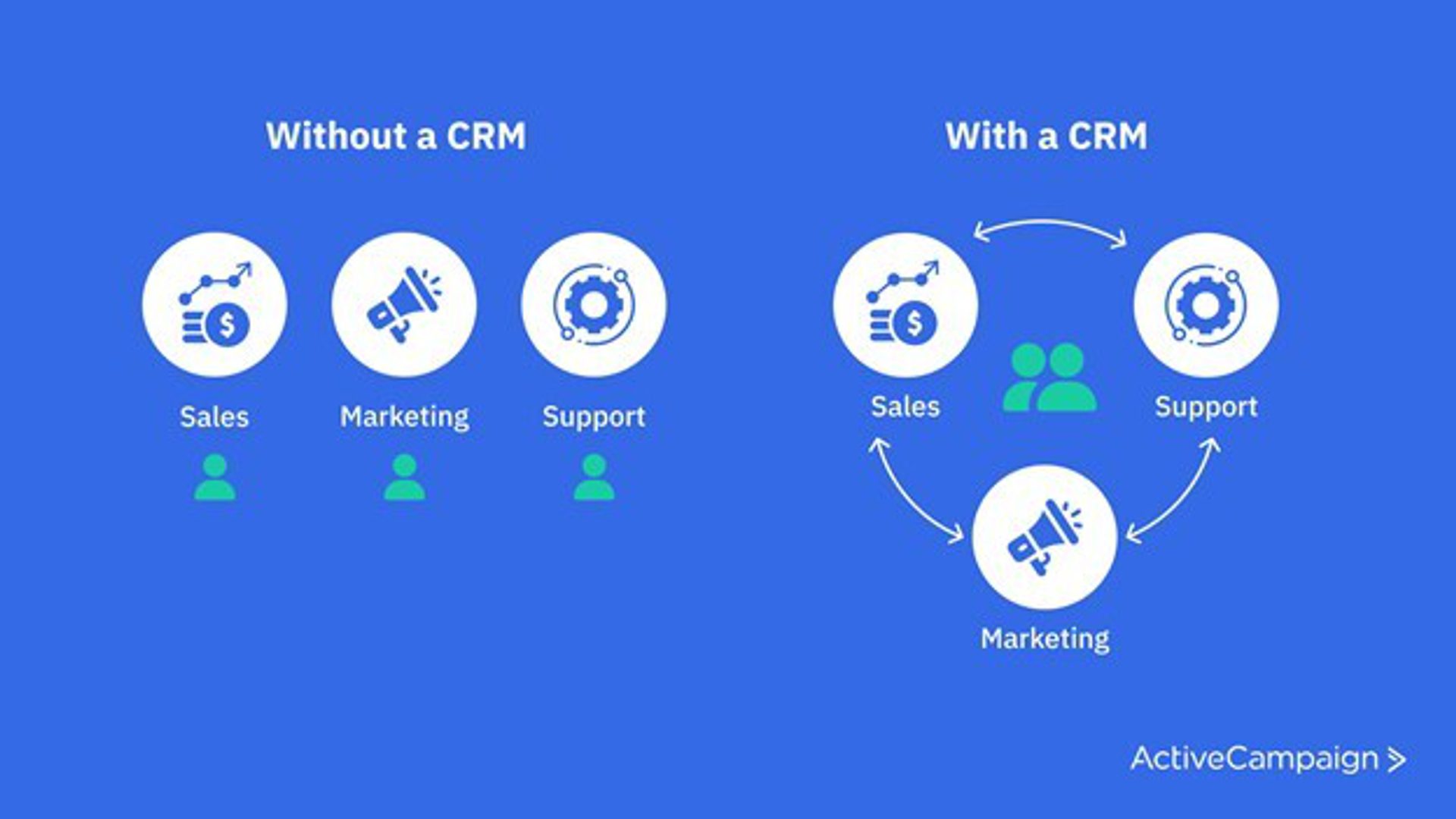
CRM best practices are the habits that keep customer data accurate, your team using the system, and every lead followed up on time. Set goals first, involve every team, automate repeat work, and audit your data on a schedule.
The 15 best practices below cover three stages: implementation and adoption, ongoing improvement, and data management. Each one names the problem it prevents and the first step to take.
A CRM pays off only when people use it and trust what's in it. Later in this guide, you'll see where each practice maps to ActiveCampaign's sales CRM.
CRM best practices for implementation and adoption
How you set up your CRM decides whether people use it. These five practices get the foundation right before the first contact is imported.
1. Set clear goals before you configure anything
Start with the outcome you want from the CRM, such as faster follow-up, a higher lead-to-customer rate, or more repeat purchases. Every setup decision, from required fields to pipeline stages, then has a reason behind it.
Write down three goals, each with a number:
- One revenue goal, such as lead-to-customer conversion rate
- One speed goal, such as hours to first follow-up
- One retention goal, such as repeat purchases per customer
Review the goals each quarter. If a field, report, or automation doesn't support one of them, you probably don't need it yet. This guide to setting CRM goals walks through examples.
2. Earn buy-in from sales, marketing, and support
A CRM works best when sales, marketing, and support share one view of each customer. Without it, each team sees only its own slice: sales sees deals, marketing sees email clicks, and support sees tickets.
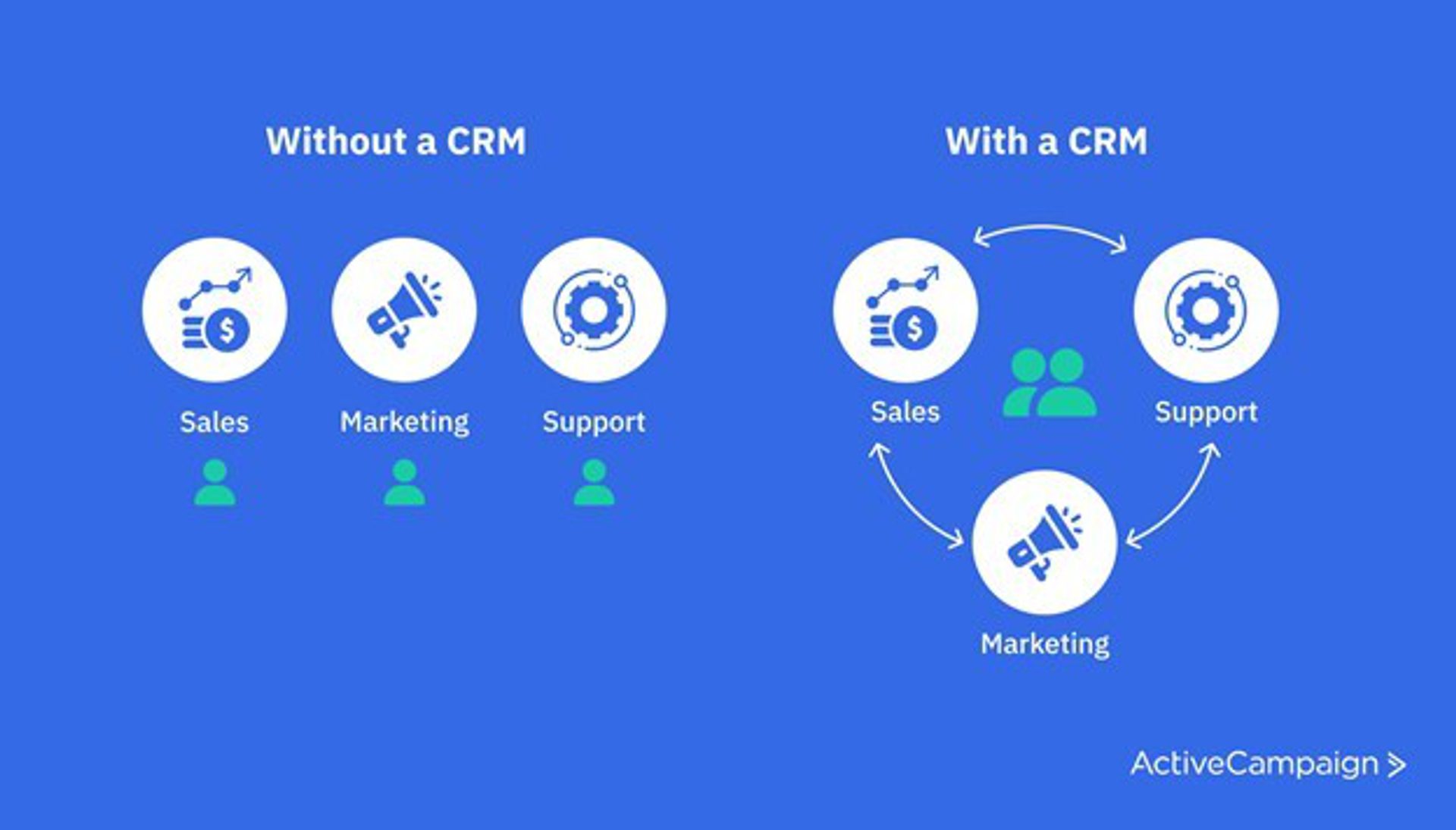
With a shared CRM, a rep can see which emails a lead opened, and a support agent can see which deal a customer closed. That context closes the gaps between handoffs.
Put one person from each team on the group that plans the rollout. Each of them knows what would stop their teammates from using the system, and they can fix it before launch.
3. Choose a CRM that fits how your team sells
Pick the CRM whose features match your sales process, and check the daily tools your reps will use first. Room to grow matters, but fit comes before scale.
Check for these features before you commit:
- Visual sales pipelines with custom stages
- Contact and deal records in one place
- Lead scoring
- Automation for follow-up, tasks, and assignment
- Native integrations with your email, ad, ecommerce, and support tools
- Reports your team can read without an analyst
Check what each lead source tells you, too. A lead who downloads a white paper might share company size and industry. Use that data to estimate deal size, segment your list, and tailor your follow-up. This guide to setting up a CRM covers the details.
4. Connect your data sources
Connect every tool that touches a customer, so your CRM reports show the full picture. Start with the sources that carry the most revenue data.
Connect these first:
- Ad platforms, to see which campaign produced each lead
- Ecommerce platforms, to see purchases and order value
- Help desk tools, to see open issues before sales reaches out
- Calendars, to log booked calls automatically
- Website tracking, to see which pages a lead visits
Native integrations take less upkeep than custom connections. ActiveCampaign's app directory lists integrations for ad platforms, ecommerce stores, calendars, payments, and more.
5. Train your team before rollout
Most CRM failures come from poor adoption, so plan training before anyone logs in. People learn new software faster when the training matches their role.
A solid adoption plan includes:
- Role-based training for sales, marketing, and support
- A one-page standard for what to log and when
- A named owner for questions
- A fixed date to retire old spreadsheets, so data doesn't split across two places
Use your CRM vendor's onboarding and support team too. They know the common setup mistakes and can steer you around them. For a full rollout checklist, see this guide to the CRM implementation process.
CRM best practices for ongoing improvement
A good setup decays without upkeep. These five practices keep your CRM matched to how customers actually buy.
6. Automate follow-up from the start
Automate the repeat tasks that slow your response, such as post-call emails, task creation, and lead assignment. Speed shapes how customers judge you, so let automation send the first reply and save your team for the conversation.
Use automations to:
- Follow up when a lead takes an action, such as watching a case study video
- Score and segment leads as they engage
- Create a task for a rep when a deal changes stage
- Send personalized nurture messages based on behavior
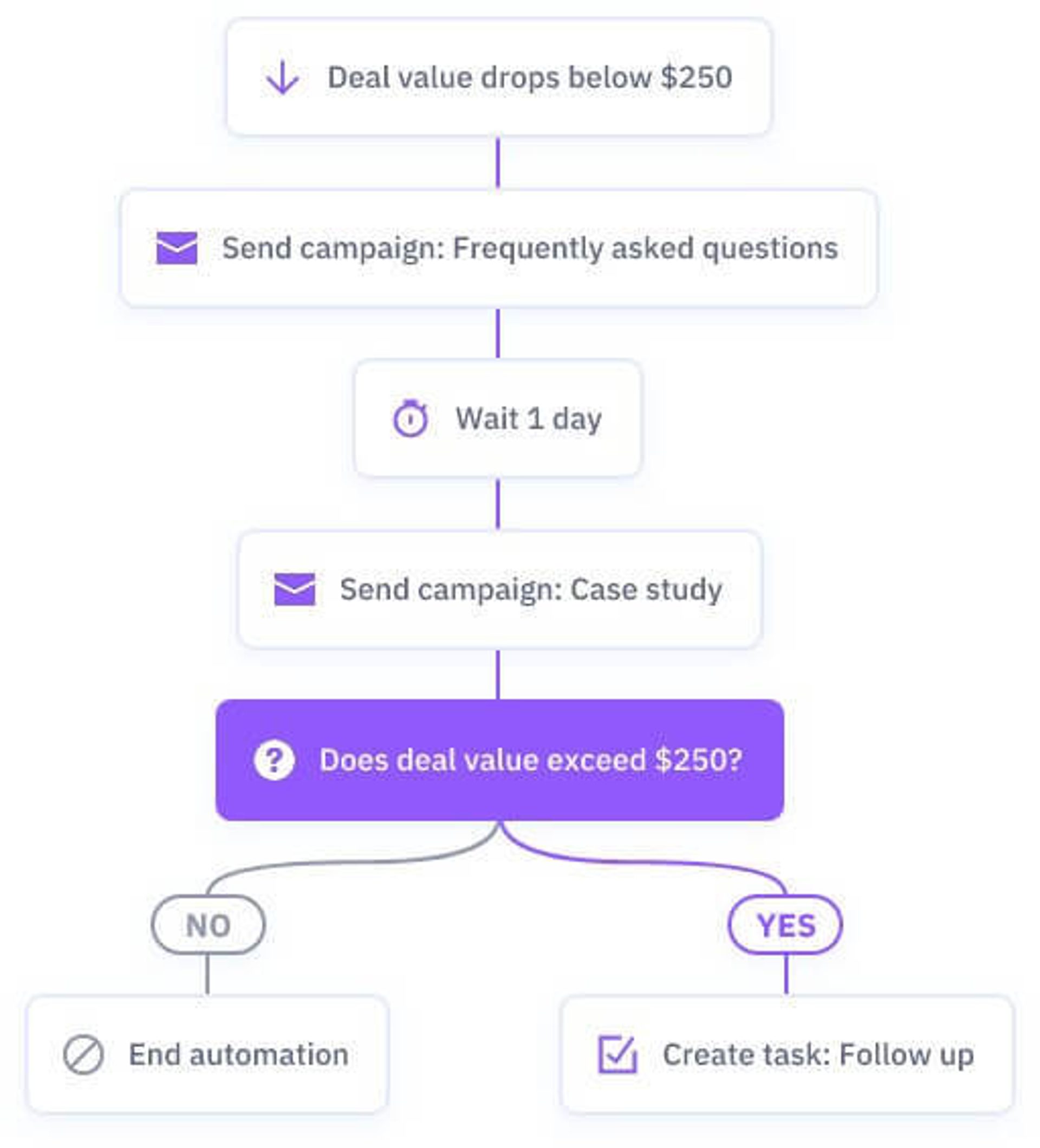
The automation below shows the pattern. When a deal value drops below $250, it sends a FAQ email, waits a day, and sends a case study. If the deal value then exceeds $250, it creates a follow-up task for the rep.
See more examples in this guide to CRM automation.
7. Build your sales cycle with stages, rules, and owners
Map your sales cycle in the CRM with one stage for each real step, a rule for who owns each deal, and a clear exit condition for every stage. A spreadsheet can't enforce any of that.
A simple pipeline might use these stages:
- New lead
- Qualified
- Demo or proposal
- Negotiation
- Closed won or closed lost
Write one sentence per stage that says what must be true before a deal moves forward. Then add assignment rules by category, deal size, or region, so each rep works the deals they know best.
Name an owner for each pipeline and data source too. ActiveCampaign supports unlimited pipelines with their own stages and offers round robin assignment. This guide to sales pipeline management goes deeper.
8. Build customer personas from real data
Replace guess-based personas with ones built from your CRM data. Many personas come from a marketing team's intuition, but your CRM shows who actually buys.
Look for these patterns in your best customers:
- Their demographics and company details
- Where they first met your brand
- Which content they engaged with before buying
- Which channels they use to contact you after purchase
Compare your highest-value customers with the rest. The traits they share point to your next audience segments, and often to groups you hadn't noticed.
9. Audit your workflows every quarter
Review your pipelines, automations, and reports every quarter to confirm they still match the real customer journey. A CRM that beats your old process can still hide bottlenecks.
Ask these questions in each review:
- Which stage do deals stall in?
- Which automation hasn't fired in 90 days?
- Which manual step could a trigger replace?
- Which report does nobody open?
For example, instead of reps judging lead quality by hand, set lead scoring rules based on email and website engagement.
10. Keep building the relationship after the sale
CRM stands for customer relationship management, and the relationship starts at the sale. Many teams build detailed lead workflows and then go quiet after closing the deal.
Automate these post-sale touches:
- A follow-up email with user guides and clear support contacts
- An introduction from the account manager or customer success contact
- An onboarding workflow based on how the customer uses your product
- A check-in before renewal
CRM best practices for data management
Data quality decides whether you can trust your reports, segments, and automations. These five practices keep it high.
11. Track clear KPIs for each channel
Key performance indicators (KPIs) are the specific numbers you use to judge marketing and sales, such as lead volume, conversion rate, and customer lifetime value. Track them per channel so you know which sources earn their budget.
Record the original source of every lead through your ad and web integrations. Then follow each source through conversion and lifetime value, and move budget toward channels that produce customers, not only leads. This guide to measuring CRM success and these campaign KPIs help you choose the numbers, and a regular CRM report keeps them in view.
12. Use your data to personalize the customer experience
Collected data only helps when it changes what the customer sees. Use it to make each message and recommendation match the person receiving it.
Start with these personalization moves:
- Recommend products or gift ideas based on purchase history
- Send tutorials and guides based on how customers use your product
- Change website content by segment, as covered in this website personalization guide
13. Standardize tags, names, and required fields
Set one naming convention and a short list of required fields before anyone adds data. Manual entry creates duplicate tags like "Sales Lead" and "Lead - Sales," which split your reports and break automations.
Agree on these three things before launch:
- A single pattern for tags and custom field names
- Three to five required fields on every contact, such as source, owner, and lifecycle stage
- One shared page that documents both
Example: one tag pattern for every team
Use a "category: value" pattern, such as lead: webinar, lead: referral, and customer: annual plan. Everyone works from one list, and a search for "lead:" tags finds every lead source at once.
14. Validate data when it enters the CRM
Add validation at every point where data enters your CRM, so errors never get stored. Typos in phone numbers and email addresses cause bounces, failed automations, and wrong reports.
Apply these checks:
- Required fields and format checks on every form
- Dropdowns instead of free text for fields like country and industry
- Standard formats for phone numbers and dates
- A duplicate check on email address at import
15. Audit your data regularly
Run a full data audit every six months and a quick duplicate check every month. Data quality is the foundation of every CRM strategy, and small problems grow as the database does.
Cover these tasks in each audit:
- Merge duplicate records
- Fix or remove invalid emails and phone numbers
- Archive contacts who have been inactive for a long time
- Mark unresponsive leads
- Fill in empty required fields
Audit after a large import, migration, or new integration too, because those add the most bad records at once. A clear view of your CRM database helps you plan the clean-up.
CRM review schedule
| How often | What to review |
|---|---|
| Monthly | Duplicate records, bounced emails, and stalled deals |
| Quarterly | Pipeline stages, automations, KPI results, and naming convention |
| Every six months | Full data audit, user access, and customer personas |
| After any import or new integration | Required fields, duplicates, and tag names |
How ActiveCampaign helps you put these CRM best practices to work
ActiveCampaign is an AI platform for marketers, with Active Intelligence built into every plan. Its sales CRM keeps contacts, deals, tasks, and 1:1 email in the same system that runs your marketing, so each practice above works from one contact record.
Here is where the practices map to ActiveCampaign:
- Pipelines and routing (practice 7): unlimited pipelines with custom stages, plus round robin assignment
- Automation (practices 6, 9, and 10): triggers for deal creation, stage, status, owner, value, and score changes, plus task completion, as shown in these CRM workflows
- Lead scoring and win probability (practices 6 and 9): lead scoring ranks your best leads, and Active Intelligence shows win probability on deals once a pipeline has enough closed deals to learn from
- Segmentation (practices 8 and 12): segments built from deal, contact, and engagement data
- Integrations (practice 4): the app directory connects your ad, ecommerce, and calendar tools
You decide which pipelines, rules, and scores matter. Active Intelligence recommends, drafts, and flags what deserves your attention, and you approve it. Start with one pipeline and one automation, then expand as your data quality improves.
Active Intelligence results
Active Intelligence users see 75% higher engagement than non-users, across 32,948 ActiveCampaign accounts. Learn how Active Intelligence works.
What are the most common CRM mistakes?
The most common CRM mistakes are skipping goals, importing messy data, and leaving adoption to chance. Each one is avoidable with the practices above.
Watch for these mistakes:
- Starting without goals: you end up with fields and reports nobody uses
- Importing messy data: bad records follow you into every segment and automation
- Skipping training: reps fall back to spreadsheets and your CRM goes stale
- Over-automating on day one: automate a repeat task you understand first, then add more once the basics work
- Never auditing: stale stages and duplicate contacts pile up quietly
Which CRM best practice should you start with?
Start with goals, a naming convention, and a duplicate clean-up. All three cost nothing, and every other practice gets easier once they're in place.
Put these CRM best practices to work
CRM best practices FAQs
What are CRM best practices?
CRM best practices are repeatable habits that keep customer data accurate, make the system easy to use, and turn contact records into timely follow-up. They cover goals, team adoption, automation, and data management. Following them gives your team reports it can trust and a clear next step for every lead.
How often should you audit your CRM data?
Run a quick duplicate and bounce check every month and a full audit every six months. Audit sooner after a large import, a migration, or a new integration, since those add the most bad records at once.
What is the first step in a CRM implementation?
The first step is setting goals. Write down the revenue, speed, and retention outcomes you want, then choose the pipeline stages, required fields, and reports that support them.
How do you get a team to use the CRM?
Involve each team in setup, train by role, and retire old spreadsheets on a fixed date. Make the CRM the only place a deal gets updated, so your data stays in one place.